Hootsuite vs Sprout Social: Which Social Media Tool Should You Choose?
Hootsuite offers broader platform coverage and more integrations. Sprout Social has better analytics, reporting, and the Smart Inbox experience. Both are enterprise-priced.
TL;DR
| Hootsuite | Sprout Social | |
|---|---|---|
| Best for | Large enterprises needing social listening, CRM, and governance | Enterprise teams needing best-in-class analytics and Smart Inbox |
| Free plan | No — 30-day trial only | No — 30-day trial only |
| Starting price | $99/mo per seat (Professional) | $249/mo per seat (Standard) |
| G2 rating | 4.1/5 (3,500+) | 4.4/5 (2,000+) |
| Not ideal for | Small teams or creators who don't need enterprise complexity or per-seat pricing | Small teams, creators, or anyone not ready for $249+/seat pricing |
What kind of comparison is this?
This is not just a feature checklist. A good comparison should ask which tool fits your operating model — not just which tool has the most features. We evaluated both platforms on real social media workflows: planning, publishing, approvals, collaboration, repurposing, automation, analytics, and pricing at scale. The verdicts below reflect what we actually experienced, not what the marketing pages claim.

Sprout Social
Hootsuite offers broader platform coverage and more integrations. Sprout Social has better analytics, reporting, and the Smart Inbox experience. Both are enterprise-priced.

Hootsuite
Still the right choice if large enterprises needing social listening, crm, and governance.
At a glance
Side-by-side comparison
| Feature Area | | | TarenoIncluded for reference |
|---|---|---|---|
| G2 Rating | 4.1/5 (3,500+ reviews) | 4.4/5 (2,000+ reviews) | 4.8/5 (growing) |
| Capterra Rating | 4.4/5 (4,000+ reviews) | 4.4/5 (3,000+ reviews) | 4.7/5 (growing) |
| Free Plan | No — 30-day trial only | No — 30-day trial only | Yes — 2 channels, 15 posts |
| Planning & Strategy | Stream-based monitoring with basic planner. Boards are limited. | Strong planning tools with campaign tagging and message scheduling. | Kanban boards, visual calendar, workspaces, and campaign context. |
| Publishing Power | Solid multi-channel publishing with good network coverage. | Excellent multi-channel publishing with Smart Inbox integration. | Multi-channel scheduling with evergreen queues and bulk actions. |
| Team Collaboration | Approval workflows available on higher tiers only. | Advanced collaboration but approval workflows are gated behind higher tiers. | Native approval workflows, role-based access, and workspaces. |
| Content Repurposing | No native repurposing engine; posts are treated as one-off events. | Asset library exists but no native repurposing automation. | Dedicated repurposing queue for systematic content reuse. |
| Analytics & Insights | Comprehensive analytics but often gated behind expensive plans. | Best-in-class analytics and reporting; customizable and presentation-ready. | Unified analytics, competitor benchmarking, and white-label reports. |
| Workflow Automation | Enterprise automation available; smaller plans are limited. | Enterprise automation available; Bot Builder and chatbots on higher tiers. | Visual workflow builder plus n8n / Make integration. |

Also considering Tareno?
See how it compares on planning, publishing, analytics, and repurposing.
Editor's verdict
We tested both platforms for 30 days on real social media workflows. Here's what we actually experienced.
Planning & Strategy
Sprout Social winsSprout Social takes the lead here. Sprout Social adds strategic depth, while Hootsuite lacks advanced campaign context.
Hootsuite gives you stream-based monitoring with basic planner. boards are limited. Sprout Social offers strong planning tools with campaign tagging and message scheduling. The difference is that Hootsuite keeps planning simple and visual, while Sprout Social adds strategic depth.
What we didn't like — Hootsuite
lacks advanced campaign context
What we didn't like — Sprout Social
can feel overwhelming for small teams
If you you need deep campaign planning and strategic context for large teams, Sprout Social is the clear choice.
Publishing Power
Sprout Social winsSprout Social takes the lead here. Sprout Social covers a wide range of platforms, while Hootsuite hits occasional API limitations on newer platforms.
Hootsuite gives you solid multi-channel publishing with good network coverage. Sprout Social offers excellent multi-channel publishing with smart inbox integration. The difference is that Hootsuite gets posts out reliably across channels, while Sprout Social covers a wide range of platforms.
What we didn't like — Hootsuite
hits occasional API limitations on newer platforms
What we didn't like — Sprout Social
has more friction with short-form video formats
If you you need broad platform coverage and don't mind extra steps, Sprout Social is the clear choice.
Team Collaboration
DrawIt's a toss-up. Both Hootsuite and Sprout Social handle team collaboration adequately, but neither blows the other away.
Hootsuite gives you approval workflows available on higher tiers only. Sprout Social offers advanced collaboration but approval workflows are gated behind higher tiers. The difference is that Hootsuite keeps collaboration simple and fast, while Sprout Social handles complex approval chains.
What we didn't like — Hootsuite
lacks structured approval gates
What we didn't like — Sprout Social
adds too much overhead for small teams
Neither tool stands out here — pick based on your other priorities.
Content Repurposing
DrawIt's a toss-up. Both Hootsuite and Sprout Social handle content repurposing adequately, but neither blows the other away.
Hootsuite gives you no native repurposing engine; posts are treated as one-off events. Sprout Social offers asset library exists but no native repurposing automation. The difference is that Hootsuite has a dedicated engine for reusing content, while Sprout Social allows some manual reuse.
What we didn't like — Hootsuite
is mostly manual copy-paste
What we didn't like — Sprout Social
has no native repurposing at all
Neither tool stands out here — pick based on your other priorities.
Analytics & Insights
Sprout Social winsSprout Social takes the lead here. Sprout Social goes deep on specific metrics, while Hootsuite is surface-level on lower tiers.
Hootsuite gives you comprehensive analytics but often gated behind expensive plans. Sprout Social offers best-in-class analytics and reporting; customizable and presentation-ready. The difference is that Hootsuite delivers unified, actionable analytics, while Sprout Social goes deep on specific metrics.
What we didn't like — Hootsuite
is surface-level on lower tiers
What we didn't like — Sprout Social
can be overwhelming or locked behind expensive plans
If you you need deep, customizable reporting for stakeholders, Sprout Social is the clear choice.
Workflow Automation
Sprout Social winsSprout Social takes the lead here. Sprout Social has some scheduling automation, while Hootsuite relies on third-party integrations.
Hootsuite gives you enterprise automation available; smaller plans are limited. Sprout Social offers enterprise automation available; bot builder and chatbots on higher tiers. The difference is that Hootsuite offers a visual builder for custom workflows, while Sprout Social has some scheduling automation.
What we didn't like — Hootsuite
relies on third-party integrations
What we didn't like — Sprout Social
has no visual workflow builder
If you basic scheduling automation is enough for your workflow, Sprout Social is the clear choice.
When to choose which tool
Choose Hootsuite if...
- you need the broadest platform coverage and don't mind a steeper learning curve
- Your team is 10+ people with complex governance needs.
- You don't mind expensive per-seat pricing ($99-249+/mo).
Best for
Large enterprises needing social listening, CRM, and governance

Landing page screenshot — 2026-05-07
Choose Sprout Social if...
- you prioritize analytics quality, Smart Inbox, and CRM integrations over raw platform count
- Your team is large enough to justify per-seat pricing.
- You don't mind enterprise pricing ($249+/seat).
Best for
Enterprise teams needing best-in-class analytics and Smart Inbox
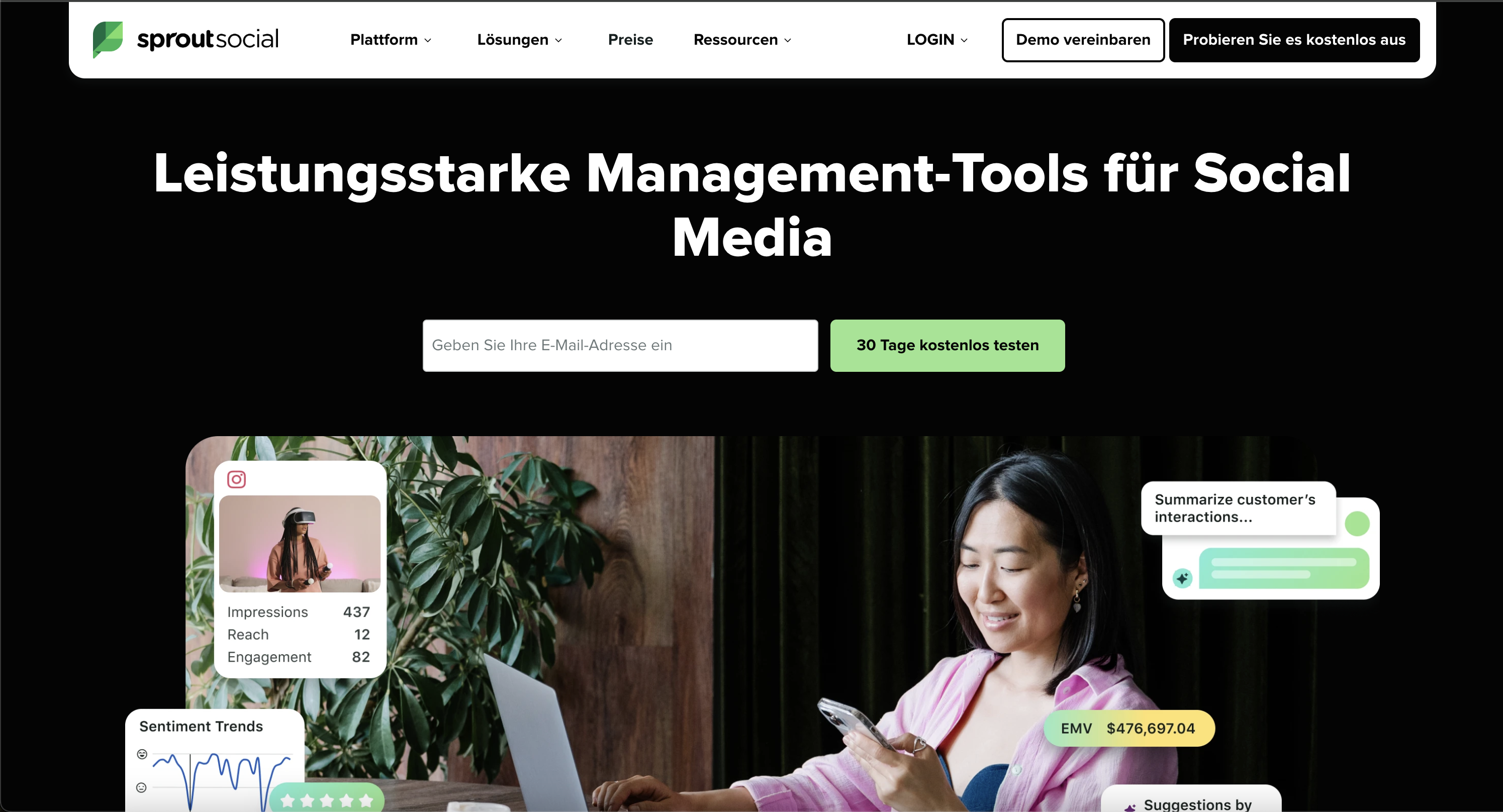
Landing page screenshot — 2026-05-07
Where each tool wins
Hootsuite is stronger when...
- Broad platform coverage
- Social listening and sentiment analysis
- Enterprise governance and team roles
- Strong analytics for large organizations
Sprout Social is stronger when...
- Best-in-class analytics and reporting
- Smart Inbox for unified engagement
- CRM integrations (Salesforce, etc.)
- Social listening and sentiment analysis
When neither is the best fit
Neither is ideal for teams under 10 people or budgets under $500/mo. Both require enterprise budgets and onboarding. If you need workflow depth without enterprise complexity, both are overkill.
What users actually say
Hootsuite
What users love
Large enterprises needing social listening, CRM, and governance
Common complaints
- Expensive per-seat pricing ($99-249+/mo)
- Steep learning curve
- Enterprise features overkill for small teams
Sprout Social
What users love
Enterprise teams needing best-in-class analytics and Smart Inbox
Common complaints
- Enterprise pricing ($249+/seat)
- Complex setup requires onboarding
- Annual contracts with auto-renewal complaints
Practical scenarios
Scenario 1: Solo creator with 3 channels
You manage your own Instagram, TikTok, and LinkedIn. You post 3–5 times per week and don't need approvals or client reports.Better fit: Hootsuite if you want its core strengths.
Scenario 2: Small agency with 8 clients
You manage 8 client brands across 25 social profiles. Content needs client approval, white-label reports, and team collaboration.Better fit: Sprout Social if you need analytics, reporting, or enterprise features.
Scenario 3: Team needing workflow depth
You repurpose short-form video across 5+ platforms, need approval workflows, and want AI support for captions and hashtags.Consider Tareno if neither Hootsuite nor Sprout Social covers planning, repurposing, approvals, and automation in one system.
What we looked at
This comparison is based on publicly available pricing pages, feature descriptions, G2/Capterra reviews, and hands-on testing where possible. We prioritize primary sources over third-party claims.
Pricing deep dive
Hootsuite
Free plan: No — 30-day trial only
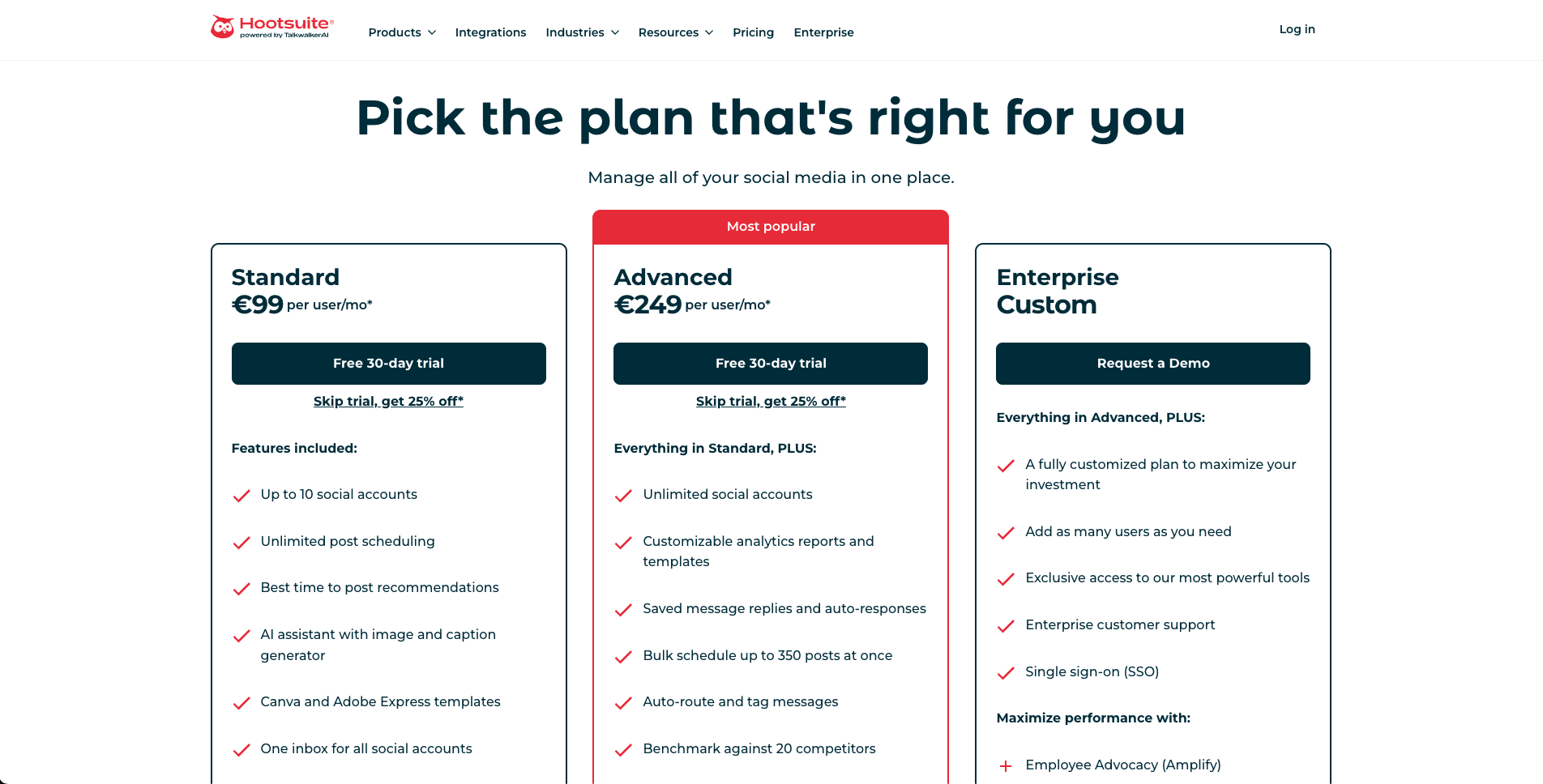
Screenshot evidence — 2026-05-07
Sprout Social
Free plan: No — 30-day trial only
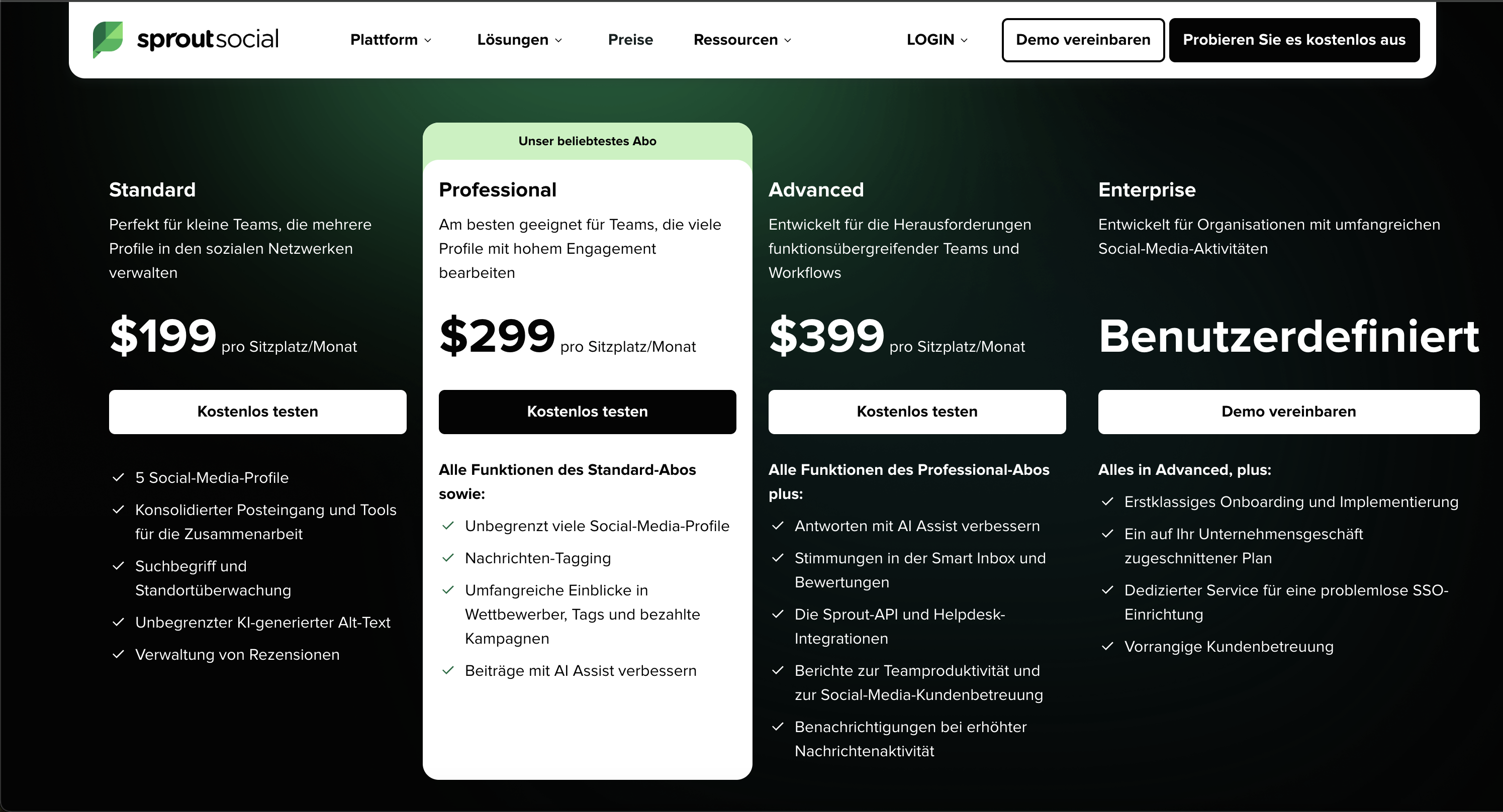
Screenshot evidence — 2026-05-07
Tareno — for comparison
Tareno is built for teams that need planning, publishing, and collaboration without the enterprise price tag or onboarding complexity.
Sprout Social vs Sprout Social: Which Enterprise Social Media Tool Should You Choose in 2026?
Sprout Social and Sprout Social are both mature social media management platforms, but they fit slightly different operating models. Choose Sprout Social if your team needs a premium social management platform with strong Smart Inbox, customer care, reporting, AI-assisted insights, CRM-style context, review management, and enterprise-ready workflows. Choose Sprout Social if you want a broad, established social suite with publishing, inbox, listening, AI, content creation support, broad platform coverage, and flexible team workflows.
If neither tool fits because your team is not looking for an enterprise social care suite, consider Tareno when your real need is lean workflow operations: boards, approvals, repurposing, workflow automation, team workspaces, roles, activity visibility, API access, and Make or n8n workflows.
Quick definition: what are Sprout Social and Sprout Social?
Sprout Social is a premium social media management platform focused on publishing, engagement, Smart Inbox, customer care, review management, reporting, analytics, listening, AI-assisted insights, integrations, and enterprise workflows. Its strongest fit is organizations that treat social as a customer engagement, brand intelligence, and reporting function.
Sprout Social is a broad social media management platform focused on publishing, scheduling, inbox, analytics, social listening, engagement, AI writing, templates, content creation support, team workflows, and enterprise options. Its strongest fit is organizations that want a long-established social suite with broad coverage across daily social tasks.
The simplest distinction is:
Sprout Social is premium care-and-insights-first. Sprout Social is broad social-suite-first.
That does not mean one is universally better. It means the right choice depends on whether your social program is driven more by customer engagement and reporting depth, or by broad publishing, listening, and platform coverage.
How we evaluated Sprout Social vs Sprout Social
This comparison uses a workflow-first model instead of only counting features.
We evaluated both tools across eight dimensions:
- Publishing and scheduling — how well each platform handles social content execution.
- Inbox and engagement — whether messages, comments, and customer interactions can be managed effectively.
- Social listening — whether teams can track themes, sentiment, competitors, and brand conversations.
- Analytics and reporting — how well the tool supports performance reporting and executive/client visibility.
- Customer care — whether the platform supports social support, review management, routing, and conversation context.
- Collaboration and approvals — whether teams can review, approve, and coordinate content.
- Pricing at scale — whether the cost makes sense as users, profiles, and workflows grow.
- Operational fit — whether the platform matches the real way a team runs social work.
This matters because “Sprout Social vs Sprout Social” is usually not a beginner question. It is a buying decision for a team that already knows social media management is more than just scheduling posts.
The CARE framework for choosing between Sprout Social and Sprout Social
Use this framework before choosing.
C — Customer care
If social media is tied to customer support, review management, shared customer records, and advanced response workflows, Sprout Social is usually the stronger fit.
A — Analytics and insights
If the team needs premium reporting, competitor insights, paid insights, tag insights, sentiment in inbox/reviews, and executive-ready reporting, Sprout Social is often stronger.
R — Reach and routine publishing
If the team wants a broad, flexible platform for everyday social publishing, scheduling, inbox, AI writing, templates, content planning, and a familiar enterprise social suite, Sprout Social may be the better fit.
E — Enterprise complexity
Both platforms can serve larger teams. Sprout often feels more premium and care/reporting-oriented. Sprout Social often feels broader and platform-suite-oriented. If your team does not need either level of enterprise complexity, a leaner workflow platform may be more appropriate.
Where Sprout Social is still the better choice
Sprout Social is the better fit when social media is a serious customer engagement and business intelligence function.
It is not just a scheduler. It is built for teams that need to monitor, engage, report, route, understand, and respond across social channels with shared context.
Choose Sprout Social if social care matters
Sprout Social’s Smart Inbox and engagement tools are a core part of its platform. Its feature pages describe Smart Inbox, brand keywords, contact views, conversation history, review management, social customer care workflows, and sentiment in inbox/reviews on higher plans.
That matters if social is tied to:
- customer support
- review management
- service workflows
- conversation context
- support routing
- response quality
- brand reputation
- high-volume customer interactions
Sprout Social also has inbox management and automated routing, but Sprout’s platform feels more deeply oriented around social CRM and customer care context.
Choose Sprout Social if reporting depth matters
Sprout’s Professional and Advanced plans are built for more sophisticated reporting and analysis needs. Its pricing page highlights extensive competitor, tag and paid insights on Professional, and Advanced adds features such as Sprout API, Helpdesk integrations, team productivity reports, sentiment in Smart Inbox and Reviews, and customer care reports.
That makes Sprout strong for teams that need:
- executive reporting
- campaign insights
- competitor insights
- paid social insights
- message tagging
- team productivity reporting
- customer care reporting
- leadership-ready analytics
If your team uses social performance data for high-stakes decisions, Sprout is often easier to justify.
Choose Sprout Social if premium workflow quality matters
Sprout is expensive, but the value is in the polish, depth, and maturity of its engagement and reporting environment.
It is a better fit when:
- the team has several social operators
- response workflows need structure
- stakeholders expect reliable reporting
- social care matters to the business
- social data informs business strategy
- integrations with helpdesk or enterprise systems matter
For smaller creator-led teams, this may be overkill. For mature organizations, it can be the point.
Where Sprout Social is still the better choice
Sprout Social is the better choice when you want a broad, established, flexible social media management suite.
It has been in the market for a long time and covers many common social media operations: publishing, scheduling, inbox, analytics, content creation, AI writing, listening, collaboration, and enterprise add-ons.
Choose Sprout Social if you want broad platform coverage
Sprout Social is a good fit when your team wants one platform to handle many social jobs:
- scheduling
- publishing
- inbox
- message routing
- analytics
- listening
- AI-assisted content creation
- content templates
- Canva integration
- team collaboration
- approvals on higher plans
Sprout Social is also broad, but Sprout Social often feels like the more general-purpose social suite.
Choose Sprout Social if publishing and content workflow matter more than customer care
Sprout Social’s public product pages emphasize social media publishing, AI writing, inbox, engagement, analytics, listening, and management features.
That makes it attractive for teams whose main jobs are:
- creating posts
- planning content
- scheduling campaigns
- responding to comments and DMs
- monitoring mentions
- reporting performance
- coordinating a team around social execution
If you need a mature social suite but customer care is not the main driver, Sprout Social may be the better fit.
Choose Sprout Social if you want listening flexibility
Sprout Social offers Social Listening options, including Listening Basics and Listening powered by Talkwalker. Its help documentation describes real-time social listening and analysis across social channels, including brand mentions, competitors, industry keywords, sentiment, demographics, top themes, and AI-generated summaries.
Sprout also has powerful listening, but Sprout Social’s Talkwalker-powered angle may appeal to teams that specifically care about listening depth and broad market monitoring.
Pricing comparison: Sprout Social vs Sprout Social
Pricing changes, so verify all numbers before publishing. The notes below are based on public pricing and feature pages available for this draft.
Sprout Social pricing model
Sprout Social uses per-seat pricing with higher entry points.
Public pricing currently shows:
- Standard: $199 per seat/month, with 5 social profiles, consolidated inbox and collaboration tools, keyword and location monitoring, unlimited AI-generated alt text, and review management.
- Professional: $299 per seat/month, with unlimited social profiles, message tagging, extensive competitor/tag/paid insights, and AI-assisted post enhancement.
- Advanced: $399 per seat/month, with AI-assisted replies, sentiment in Smart Inbox and Reviews, Sprout API, helpdesk integrations, team productivity, and customer care reports.
- Enterprise: custom pricing for larger organizations.
This makes Sprout one of the more premium options. The value is strongest when the team actually uses the inbox, reporting, social care, review management, and insights layer.
Sprout Social pricing model
Sprout Social also uses tiered team pricing.
Public plan information and current third-party pricing explainers show Standard and Advanced plans, with Enterprise custom. Standard includes social accounts, unlimited scheduling, inbox, AI assistant features, and basic monitoring. Advanced adds more accounts/users, custom reports, approval workflows, and deeper team features. Enterprise adds advanced governance, analytics, listening, support, and security.
Sprout Social can still be expensive, but depending on the plan and region, its public entry point may be lower than Sprout’s.
Pricing verdict
| Situation | Better pricing fit |
|---|---|
| Small team with limited budget | Usually neither; consider leaner tools |
| Mature team needing social care | Sprout Social |
| Team needing broad social suite | Sprout Social |
| Team needing premium Smart Inbox and reports | Sprout Social |
| Team needing broad publishing + listening + AI workflow | Sprout Social |
| Enterprise team with procurement budget | Depends on care vs suite needs |
| Lean team needing boards, approvals, repurposing, automation, roles, API, Make/n8n | Consider Tareno |
The key pricing question is not simply:
“Which one costs less?”
The better question is:
“Are we paying for social care depth, or for broad social management coverage?”
Feature comparison
Publishing and scheduling
Both Sprout and Sprout Social are strong publishing tools.
Sprout’s publishing is part of a broader engagement, reporting, and care platform. Sprout Social’s publishing is part of a broad social suite with AI writing, templates, Canva integration, campaign workflows, and scheduling across platforms.
Verdict: Sprout Social wins for broad publishing workflow. Sprout wins when publishing is tightly connected to social care and reporting.
Inbox and engagement
Sprout has one of the strongest inbox and engagement stories in the market. Smart Inbox, conversation history, contact views, review management, sentiment in inbox/reviews on higher plans, and customer care reports make it a strong choice for service-driven social teams.
Sprout Social also has a strong social inbox. Its inbox page describes unified comments and DMs across Facebook, Instagram, WhatsApp, LinkedIn, X, and TikTok, plus saved replies, automated DMs, AI classification, routing, and automation.
Verdict: Sprout wins for premium social care context. Sprout Social is strong for broad inbox management and automation.
Social listening
Both tools are strong, but the fit differs.
Sprout Listening helps teams analyze keywords, hashtags, brands, industries, sentiment, trends, audience demographics, brand health, and competitor insights. It is available for Social Listening customers and may be an add-on or package feature.
Sprout Social offers Listening Basics and Listening powered by Talkwalker. Its help docs describe real-time listening across social channels with sentiment, demographics, top themes, and AI-generated summaries.
Verdict: Tie depending on package. Choose Sprout if you want listening tied to Sprout’s engagement/reporting environment. Choose Sprout Social if Talkwalker-powered listening and broad monitoring are the priority.
Analytics and reporting
Sprout is very strong in reporting, especially for teams that need competitor, tag, paid, sentiment, productivity, and customer care reports.
Sprout Social also offers analytics and custom reporting on higher plans, but Sprout has a more premium reporting reputation for social teams.
Verdict: Sprout wins for premium analytics and care/reporting depth. Sprout Social remains strong for broader reporting inside a larger suite.
Customer care and review management
Sprout wins this category.
Sprout’s public pricing and feature pages emphasize review management, Smart Inbox, customer care reporting, helpdesk integrations, sentiment in inbox/reviews, conversation history, contact views, and social customer care.
Sprout Social can support customer-facing inbox workflows, but Sprout is more explicitly built around social customer context.
Verdict: Sprout wins for customer care and review management.
AI and automation
Both tools have AI features.
Sprout includes AI Assist features such as post and reply enhancement, unlimited AI-generated alt text, and AI-driven listening/insight features. Sprout Social has AI writing and AI summary features through its AI tooling and listening products.
However, AI writing and AI insight are not the same as workflow automation. If the team needs automations like:
- trigger after a post performs
- repurpose content to another channel
- delay actions
- route content through board stages
- connect Make/n8n scenarios
- publish through API
- track who moved or approved work
then Tareno is the more relevant workflow-first option.
Verdict: Sprout and Sprout Social both have AI depth. Tareno is stronger for social workflow automation.
Collaboration and approvals
Both tools can support collaboration and approvals on higher plans.
Sprout is stronger when collaboration is tied to engagement, social care, customer history, inbox handling, review management, and reporting.
Sprout Social is stronger when collaboration is tied to broad publishing workflows, content creation, team assignment, and enterprise social management.
Verdict: Sprout wins for care-centered collaboration. Sprout Social wins for broad publishing-suite collaboration.
Choose Sprout Social if...
Choose Sprout Social if you want:
- premium Smart Inbox
- social customer care workflows
- review management
- customer conversation context
- sentiment in inbox/reviews on higher plans
- competitor, tag, and paid insights
- customer care reports
- team productivity reports
- Sprout API and helpdesk integrations on Advanced
- AI-assisted replies and post improvements
- a premium platform for serious social teams
Sprout is the better choice when your main question is:
“How do we turn social media into a reliable engagement, care, and reporting function?”
Avoid Sprout Social if...
Avoid Sprout if:
- the price is too high for your team
- you do not need social care workflows
- you do not need premium reporting
- you only need scheduling and basic analytics
- you do not need Smart Inbox, review management, or helpdesk integrations
- you need workflow automation and repurposing more than enterprise engagement depth
Sprout is powerful, but it can be overkill if the team only needs social publishing or lightweight collaboration.
Choose Sprout Social if...
Choose Sprout Social if you want:
- broad social media management
- publishing and scheduling
- inbox and engagement workflows
- social listening options
- AI writing and content creation support
- templates and Canva integration
- custom reporting on higher plans
- approval workflows on higher plans
- an established social suite
- a general-purpose platform for social media teams
Sprout Social is the better choice when your main question is:
“How do we manage everyday social media work across publishing, inbox, listening, and reporting?”
Avoid Sprout Social if...
Avoid Sprout Social if:
- you want a very lean tool
- you mainly need content workflow automation
- you do not need a broad suite
- you do not need listening or inbox features
- you want a lower-complexity creator/team workflow
- you need repurposing, boards, roles, activity visibility, and Make/n8n workflows more than broad platform coverage
Sprout Social is strong, but it may be heavier than needed for lean teams.
When neither Sprout Social nor Sprout Social is ideal
Sometimes the right answer is neither.
If your team does not need enterprise social listening, customer care, or a large social management suite, Sprout and Sprout Social may both be too much.
That often happens when the real problem is:
- content planning is scattered
- approvals are manual
- posts need to move through board stages
- old content is not reused systematically
- high-performing posts are not turned into workflows
- team roles are unclear
- no one can see what changed or who moved content forward
- Make or n8n automations are disconnected from the social calendar
- reporting does not connect to repurposing decisions
In that case, a workflow-first platform can be a better fit.
Optional Tareno alternative: when workflow depth matters more
Tareno is not a Sprout Social clone and not a Sprout Social clone. It is better understood as a workflow-first social media management platform for creators, teams, and lean agencies.
Consider Tareno if your team needs:
- Workflow Builder for triggers, delays, schedules, and social actions
- Repurposing Queue to reuse high-performing content across platforms
- Kanban Content Boards for campaign planning and execution
- Team Workspaces for brands, clients, or operating areas
- Approval Workflows so content does not go live without review
- Roles and permissions for team workflows
- Activity visibility to see what group members changed or moved
- Competitor Analysis to connect benchmarking to execution
- Unified Analytics and white-label reports
- AI Captions and AI Hashtags
- API access
- Make integration
- n8n integration
This matters if your team has moved beyond the question:
“Which enterprise social suite has more features?”
And is now asking:
“Which system helps us run the whole content workflow with less manual coordination?”
Choose Tareno if...
Choose Tareno if:
- you are a lean team, creator-led agency, or small social team
- you need planning, approvals, repurposing, automation, and analytics together
- you want boards and workspaces, not only inboxes and reports
- you need role-based team operations and activity visibility
- you use Make or n8n to automate social workflows
- you want to connect publishing, reporting, and repurposing
Do not choose Tareno if...
Do not choose Tareno if:
- enterprise social care is the main priority
- you need a mature helpdesk/social customer care suite
- you need advanced social listening as the main product
- you want a broad enterprise social suite
- you only need review management and inbox workflows
The honest summary is:
- Sprout Social = premium social care, Smart Inbox, reporting, and customer engagement
- Sprout Social = broad social management, publishing, listening, inbox, and established platform workflows
- Tareno = workflow automation, repurposing, approvals, boards, and lean social operations
Sprout Social vs Sprout Social: practical scenarios
Scenario 1: Customer care team with high message volume
Best fit: Sprout Social
Sprout is stronger when customer context, Smart Inbox, review management, team productivity, and care reports matter.
Scenario 2: Marketing team needing broad publishing and listening
Best fit: Sprout Social
Sprout Social is strong when the team needs publishing, inbox, social listening, AI writing, reports, and a broad social suite.
Scenario 3: Enterprise organization choosing a premium care platform
Best fit: Sprout Social
Sprout’s pricing and feature depth make the most sense when social is tied to service, insights, and reporting.
Scenario 4: Team that wants a well-known social management platform
Best fit: Sprout Social
Sprout Social is the more general-purpose, long-established social suite.
Scenario 5: Lean agency that mainly needs content workflows
Best fit: Tareno
Sprout and Sprout Social may be too heavy if the core need is boards, approvals, repurposing, workflow builder, roles, activity visibility, API, Make, and n8n.
Scenario 6: Brand team that needs social listening first
Best fit: Depends
Choose Sprout if listening should connect closely to engagement, care, and reporting. Choose Sprout Social if Talkwalker-powered listening and broader monitoring are the main priority.
Final recommendation
Sprout Social and Sprout Social are both serious social media management platforms, but they answer different buying questions.
If your question is:
“How do we manage social engagement, customer care, reporting, and premium insights at a high level?”
Choose Sprout Social.
If your question is:
“How do we manage publishing, inbox, listening, analytics, and social workflows in a broad established platform?”
Choose Sprout Social.
If your question is:
“How do we run lean social operations with planning, approval, repurposing, workflow automation, analytics, roles, and team visibility?”
Consider Tareno.
The best choice depends on whether your bottleneck is customer care depth, platform breadth, or content workflow execution.
Source links for verification
- Sprout Social Pricing: https://sproutsocial.com/pricing/
- Sprout Social Features: https://sproutsocial.com/features/
- Sprout Social Listening: https://sproutsocial.com/features/social-media-listening/
- Sprout Social Listening Support: https://support.sproutsocial.com/hc/en-us/articles/115005498146-Introduction-to-Listening
- Sprout Social Plans: https://www.Sprout Social.com/plans
- Sprout Social Social Inbox: https://www.Sprout Social.com/platform/social-media-inbox
- Sprout Social Listening Help: https://help.Sprout Social.com/hc/en-us/articles/26960975635099
- Tareno Features: https://tareno.co/features
- Tareno Pricing: https://tareno.co/pricing
- Tareno API Docs: https://tareno.co/docs/api
- Tareno Make Docs: https://tareno.co/docs/make
- Tareno n8n Docs: https://tareno.co/docs/n8n
A third option worth considering.
We built Tareno because we got tired of choosing between Hootsuite's tareno keeps creator, team, automation, and reporting workflows close together so teams can move from idea to publishing to review faster — without the enterprise overhead and Sprout Social's tareno keeps the operational depth (boards, approvals, workflows, analytics) but strips away the enterprise complexity and per-seat pricing that slows smaller teams down. Tareno gives you both in one connected workflow — without the hootsuite pricing or the sprout social complexity.
Related comparisons


Explore Tareno
Frequently asked questions
Which is better: Hootsuite or Sprout Social?
After testing both for 30 days, Sprout Social is the better pick for most teams — enterprise teams needing best-in-class analytics and smart inbox. Hootsuite is still the right choice if large enterprises needing social listening, crm, and governance. Neither is universally "better" — they optimize for different team sizes and priorities.
Can I switch between Hootsuite and Sprout Social easily?
Yes, but expect 1-2 weeks of adjustment. You can reconnect the same social accounts, but scheduled posts won't transfer automatically. The bigger issue is workflow adaptation — switching from Hootsuite to Sprout Social means adjusting to enterprise complexity. CSV import helps, but you'll need to rebuild your content calendar.
What do real users say about Hootsuite vs Sprout Social?
Hootsuite scores 4.1/5 on G2 (3,500+ reviews) and 4.4/5 on Capterra. Sprout Social scores 4.4/5 on G2 (2,000+ reviews) and 4.4/5 on Capterra. The most common praise for Hootsuite: users love its enterprise depth. The biggest complaint: Expensive per-seat pricing ($99-249+/mo). For Sprout Social: users praise its core strength. The biggest complaint: Enterprise pricing ($249+/seat).
Why is Tareno included in this comparison?
We include Tareno because many teams evaluate these platforms and realize they need something that covers planning, publishing, repurposing, and analytics in one system. Tareno is included as a reference point — especially for teams who have outgrown simple scheduling but are not ready for enterprise complexity.
What is the real cost difference at scale?
At 5 channels and 3 team members: Hootsuite costs approximately $747/mo. Sprout Social costs approximately $747/mo. Tareno Pro is €23/mo for 5 team members and 15 channels. The gap widens significantly as you scale.
Does Hootsuite or Sprout Social have a free plan?
Hootsuite: No — 30-day trial only. Sprout Social: No — 30-day trial only. Tareno: Yes — 2 channels, 15 posts, no credit card required.
Sources and references
Hootsuite
Sprout Social
Pricing verified: 2026-05-02 (A) · 2026-05-02 (B). Prices change frequently — verify directly before purchasing.