Sendible vs SocialPilot: Which Social Media Tool Should You Choose?
Sendible wins for agencies that need client dashboards, advanced reporting, and social listening. SocialPilot wins for budget-conscious agencies that need bulk scheduling and client management.
TL;DR
| Sendible | SocialPilot | |
|---|---|---|
| Best for | Agencies who need client dashboards and white-label reporting | Small agencies on a budget who need client management |
| Free plan | Yes — 14-day trial, no free plan | No — 14-day trial |
| Starting price | $29/mo (Creator, 1 user, 6 profiles) | $30/mo (Professional, 10 accounts) |
| G2 rating | 4.5/5 (400+) | 4.5/5 (400+) |
| Not ideal for | Teams wanting modern AI-native workflows or deep repurposing automation | Teams needing approval workflows, AI content generation, or deep automation |
What kind of comparison is this?
This is not just a feature checklist. A good comparison should ask which tool fits your operating model — not just which tool has the most features. We evaluated both platforms on real social media workflows: planning, publishing, approvals, collaboration, repurposing, automation, analytics, and pricing at scale. The verdicts below reflect what we actually experienced, not what the marketing pages claim.

Sendible
Sendible wins for agencies that need client dashboards, advanced reporting, and social listening. SocialPilot wins for budget-conscious agencies that need bulk scheduling and client management.

SocialPilot
Still the right choice if small agencies on a budget who need client management.
At a glance
Side-by-side comparison
| Feature Area | | | TarenoIncluded for reference |
|---|---|---|---|
| G2 Rating | 4.5/5 (400+ reviews) | 4.5/5 (400+ reviews) | 4.8/5 (growing) |
| Capterra Rating | 4.4/5 (800+ reviews) | 4.4/5 (800+ reviews) | 4.7/5 (growing) |
| Free Plan | Yes — 14-day trial, no free plan | No — 14-day trial | Yes — 2 channels, 15 posts |

Also considering Tareno?
See how it compares on planning, publishing, analytics, and repurposing.
Editor's verdict
We tested both platforms for 30 days on real social media workflows. Here's what we actually experienced.
When to choose which tool
Choose Sendible if...
- you need client dashboards, advanced reporting, and social listening for your agency
- Your team is the right size for its pricing model.
- You don't mind interface feels dated.
Best for
Agencies who need client dashboards and white-label reporting

Landing page screenshot — 2026-05-08
Choose SocialPilot if...
- you want affordable agency pricing with bulk scheduling and basic client management
- Your team is the right size for its pricing model.
- You don't mind no approval workflows.
Best for
Small agencies on a budget who need client management

Landing page screenshot — 2026-05-08
Where each tool wins
Sendible is stronger when...
- Client dashboards and white-label reports
- Approval workflows built-in
- User/calendar and profile bundles scale predictably
- Mature agency feature set
SocialPilot is stronger when...
- Affordable agency pricing
- White-label reports for clients
- Bulk scheduling
- Client management features
When neither is the best fit
Neither is ideal if you need approval workflows, AI content generation, or deep automation. Sendible is feature-rich but dated; SocialPilot is affordable but lacks depth.
What users actually say
Sendible
What users love
Agencies who need client dashboards and white-label reporting
Common complaints
- Interface feels dated
- Limited content planning depth
- No native repurposing
SocialPilot
What users love
Small agencies on a budget who need client management
Common complaints
- No approval workflows
- Basic analytics
- No AI content generation
Practical scenarios
Scenario 1: Solo creator with 3 channels
You manage your own Instagram, TikTok, and LinkedIn. You post 3–5 times per week and don't need approvals or client reports.Better fit: Sendible if you want its core strengths.
Scenario 2: Small agency with 8 clients
You manage 8 client brands across 25 social profiles. Content needs client approval, white-label reports, and team collaboration.Better fit: SocialPilot if you need its core strengths.
Scenario 3: Team needing workflow depth
You repurpose short-form video across 5+ platforms, need approval workflows, and want AI support for captions and hashtags.Consider Tareno if neither Sendible nor SocialPilot covers planning, repurposing, approvals, and automation in one system.
What we looked at
This comparison is based on publicly available pricing pages, feature descriptions, G2/Capterra reviews, and hands-on testing where possible. We prioritize primary sources over third-party claims.
Pricing deep dive
Sendible
Free plan: Yes — 14-day trial, no free plan

Screenshot evidence — 2026-05-08
SocialPilot
Free plan: No — 14-day trial
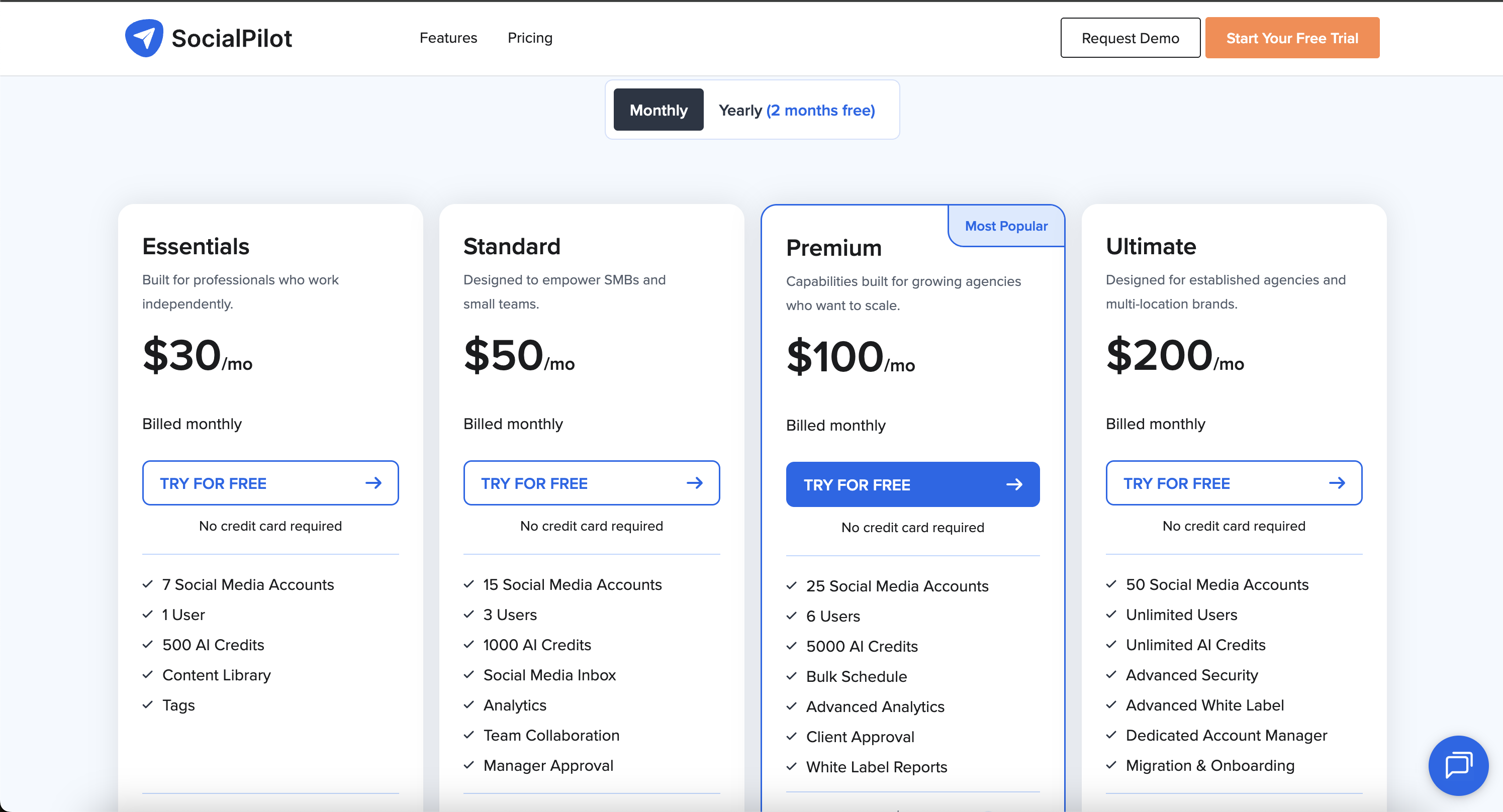
Screenshot evidence — 2026-05-08
Tareno — for comparison
Tareno offers modern agency features — workspaces, approvals, AI support, and automation — with an interface that doesn't feel dated.
Sendible vs SocialPilot: Which Agency Social Media Tool Should You Choose in 2026?
Sendible and SocialPilot are both agency-friendly social media management tools, but they fit different agency operating models. Choose Sendible if you want a more classic agency platform with client dashboards, approval workflows, permission groups, white labeling, priority inbox, real-time comment monitoring, and built-in reporting. Choose SocialPilot if you want a more budget-friendly agency tool with social media scheduling, client management, approvals, team management, white label reports, AI credits, and scalable account/user add-ons.
If neither tool solves the full workflow problem, consider Tareno when your agency needs workflow automation, boards, approvals, repurposing, team workspaces, roles, activity visibility, competitor analysis, API access, and Make or n8n workflows.
Quick definition: what are Sendible and SocialPilot?
Sendible is an agency-oriented social media management platform focused on scheduling, client collaboration, approval workflows, permissions, dashboards, white labeling, engagement, monitoring, analytics, and reporting. Its strongest fit is agencies that want a mature client-facing environment with approval controls and brandable reporting.
SocialPilot is a social media management platform for professionals, small teams, and agencies. It focuses on publishing, scheduling, analytics, reporting, review generation, engagement, collaboration, client management, approvals, team management, white label reports, AI credits, and add-on account/user scaling. Its strongest fit is agencies that want a practical, cost-conscious way to manage many social accounts and clients.
The simplest distinction is:
Sendible is classic-agency-platform-first. SocialPilot is budget-agency-scale-first.
That does not make one universally better. It means the better choice depends on whether your agency values client dashboards and permissions more, or cost-efficient account/client scaling more.
How we evaluated Sendible vs SocialPilot
This comparison uses an agency workflow model rather than only comparing feature lists.
We evaluated both tools across eight dimensions:
- Agency fit — whether the tool supports multi-client social media work.
- Client onboarding and dashboards — whether clients can connect accounts, review content, or see their own workspace.
- Approvals — whether content can move through review before publishing.
- Publishing and scheduling — whether the tool can handle regular multi-account posting.
- Inbox and engagement — whether comments, messages, and engagement can be managed.
- Analytics and reporting — whether the agency can show performance to clients.
- Pricing at scale — whether the tool makes sense as accounts, users, and clients grow.
- Workflow depth — whether the tool can become the agency’s actual social operating system.
This matters because “Sendible vs SocialPilot” is usually not a beginner query. It is often an agency buyer deciding how to manage client work without overpaying or creating workflow chaos.
The AGENCY framework for choosing between Sendible and SocialPilot
Use this framework before choosing.
A — Approvals
Both tools can support approval workflows. Sendible is strong for custom approval workflows and assigning posts for approval. SocialPilot is strong for client approvals and approvals on-the-go.
G — Governance
Sendible has a stronger governance angle with permission groups, client dashboards, client users, and white label controls.
SocialPilot has strong team and client management, especially for agencies that need a practical workflow without heavy enterprise configuration.
E — Engagement
Sendible has the stronger engagement/inbox story with Priority Inbox and real-time comment monitoring for channels like Facebook, Instagram Business, LinkedIn Company Pages, and Facebook Ads comments.
SocialPilot supports engagement workflows, but its most visible agency strength is scheduling, client collaboration, approvals, and reporting.
N — Numbers at scale
SocialPilot is especially attractive when budget and scale matter. Its public pricing clearly lists account/user limits, AI credits, white label reports, client approvals, and add-on costs for extra accounts and users.
Sendible can be a stronger classic agency solution, but the cost needs careful review depending on users, profiles, clients, and white label needs.
C — Client management
SocialPilot has a dedicated client management feature set for onboarding clients, sharing approval links, managing multiple clients, permission-based access, and white label reporting.
Sendible also has strong client dashboard and Client Connect capabilities, which are especially useful if clients need to connect profiles securely.
Y — Your workflow depth
If your agency needs repurposing, boards, roles, team activity visibility, workflow builder, competitor analysis, Make/n8n workflows, and API-based social operations, neither Sendible nor SocialPilot fully solves the workflow. That is where Tareno becomes relevant.
Where Sendible is still the better choice
Sendible is the better fit when your agency wants a more classic agency platform with client-facing dashboards, approval controls, permissions, inbox monitoring, and white-label options.
It is not just a scheduler. It is built to help agencies manage social media work with clients and teams.
Choose Sendible if client dashboards matter
Sendible’s pricing page highlights client dashboards and Client Connect. Client users can access their own dashboards to preview and approve content, and Client Connect lets clients securely connect social profiles without sharing sensitive login details.
That matters for agencies because client onboarding is often a bottleneck.
If clients need to:
- connect profiles securely
- review content in their own dashboard
- preview posts before publishing
- approve content
- avoid sharing passwords
- interact inside a branded or controlled environment
Sendible has a strong fit.
Choose Sendible if permission groups and governance matter
Sendible includes permission groups for team collaboration systems and customized access to dashboards and publishing abilities.
This is important when an agency has:
- junior team members
- interns
- client users
- account managers
- senior approvers
- different access levels
- restricted publishing permissions
If your agency needs governance around who can schedule, approve, publish, or access client dashboards, Sendible is the stronger classic agency option.
Choose Sendible if inbox and engagement are important
Sendible’s Priority Inbox and real-time comment monitoring are strong agency features. Its public pricing page describes aggregated engagement alerts, real-time monitoring for Facebook Pages, Facebook Ads, LinkedIn Company Pages, and Instagram Business comments.
That makes Sendible more relevant if the agency handles:
- comment replies
- Facebook Ad comments
- Instagram comment monitoring
- LinkedIn company page engagement
- social inbox tasks
- client response workflows
SocialPilot has a social inbox on higher plans, but Sendible’s engagement positioning is more clearly tied to agency monitoring.
Where SocialPilot is still the better choice
SocialPilot is the better fit when the agency wants a practical, cost-conscious way to manage accounts, users, approvals, reports, and clients.
It is especially attractive for growing agencies that want clear limits, add-on pricing, client management, white label reports, and no-credit-card trial messaging.
Choose SocialPilot if pricing clarity matters
SocialPilot’s pricing page clearly lists plans such as Essentials, Standard, Premium, and Ultimate.
Public pricing currently shows:
- Essentials: $17/month billed annually, 5 social media accounts, 1 user, 500 AI credits, content library, tags, analytics.
- Standard: $34/month billed annually, 10 social media accounts, 3 users, 1000 AI credits, bulk schedule, social media inbox, analytics, team collaboration.
- Premium: $85/month billed annually, 20 social media accounts, 6 users, 5000 AI credits, bulk schedule, advanced analytics, client approval, white label reports.
- Ultimate: $170/month billed annually, 40 social media accounts, unlimited users, unlimited AI credits, advanced security, advanced white label, dedicated account manager, migration and onboarding.
- Extra accounts and additional users can be added on some plans.
This is attractive if the agency wants predictable planning around social accounts, users, and add-ons.
Choose SocialPilot if client management is the core workflow
SocialPilot has a dedicated client management feature set. Its client management page describes onboarding clients through invitation links, allowing clients to control what gets published, review and approve posts, manage multiple client accounts from one place, share PDF reports, and use permission-based access.
That is a very practical agency workflow.
If the agency wants:
- client onboarding links
- client approvals without login friction
- multiple client account management
- PDF reports
- permission-based access
- white label client experience
SocialPilot is a strong fit.
Choose SocialPilot if you need agency features without enterprise cost
SocialPilot’s Premium and Ultimate tiers are clearly agency-oriented. Premium includes client approval and white label reports. Ultimate includes unlimited users, unlimited AI credits, advanced security, advanced white label, and dedicated account manager.
That gives smaller agencies a path to scale without jumping into more expensive enterprise tools.
The trade-off is that SocialPilot may not have the same depth of classic agency dashboards, permission structures, or engagement monitoring as Sendible in every area.
Pricing comparison: Sendible vs SocialPilot
Pricing changes, so verify all numbers before publishing. These notes are based on public pricing and feature pages reviewed for this draft.
Sendible pricing model
Sendible’s pricing page should be checked before publishing for current plan names, user/profile limits, and exact pricing.
Public feature sections on the pricing page highlight agency-relevant capabilities such as:
- client dashboards
- Client Connect
- assign posts for approval
- custom approval workflows
- permission groups
- white labelling
- Priority Inbox
- real-time comment monitoring
- quick reports including Google Analytics
- engagement reports
Sendible is often best evaluated by asking:
Which plan gives our agency the client dashboards, approvals, permissions, white label, and reporting we need?
SocialPilot pricing model
SocialPilot’s pricing is clearer from public plan tables:
- Essentials: $17/month billed annually, 5 social accounts, 1 user.
- Standard: $34/month billed annually, 10 social accounts, 3 users.
- Premium: $85/month billed annually, 20 social accounts, 6 users, client approval, white label reports.
- Ultimate: $170/month billed annually, 40 social accounts, unlimited users, advanced white label, dedicated account manager.
SocialPilot also lists add-ons such as extra accounts and additional users on applicable plans.
Pricing verdict
| Situation | Better pricing fit |
|---|---|
| solo social media manager | SocialPilot |
| small agency with predictable account limits | SocialPilot |
| agency that needs client dashboards | Sendible |
| agency that needs permission groups | Sendible |
| agency that needs low-cost white label reports | SocialPilot Premium |
| agency that needs branded dashboard experience | Sendible |
| agency that needs workflow automation, repurposing, boards, roles, activity visibility, API, Make, and n8n | Consider Tareno |
The better pricing question is not:
“Which tool is cheaper?”
The better question is:
“Are we paying for classic client dashboard control or cost-efficient client/account scaling?”
Feature comparison
Publishing and scheduling
Both Sendible and SocialPilot are strong publishing tools for agencies.
Sendible is stronger when publishing needs to connect with approval workflows, client dashboards, permission groups, and engagement monitoring.
SocialPilot is stronger when the agency wants clear social account limits, bulk scheduling, team collaboration, client approval, and a lower-cost path to scale.
Verdict: Tie. Sendible has the stronger classic agency control layer; SocialPilot has the stronger cost-scaled scheduling angle.
Client management
Both tools support client workflows, but the emphasis differs.
Sendible offers Client Connect and client dashboards, which are strong when clients need controlled access to connect accounts and approve content.
SocialPilot offers client management features such as invitation links, approval links, client account management, PDF reporting, and permission-based access.
Verdict: Sendible wins for client dashboards and Client Connect. SocialPilot wins for practical client onboarding and approval flows.
Approvals
Both tools are strong enough for agency approval workflows.
Sendible supports assigning posts for approval and custom approval workflows. It can restrict users so posts require approval before publishing.
SocialPilot supports client approval workflows, manager approval workflows, and approvals on-the-go. Its Premium and Ultimate plans are especially relevant for client approvals.
Verdict: Tie. Sendible is stronger for custom internal approval control. SocialPilot is stronger for client-friendly approvals on-the-go.
White label
Sendible has a strong white-label dashboard story. Its pricing page describes white label dashboard capabilities including brand colors, logo, email notification adjustments, and web domain use.
SocialPilot includes white label reports on Premium and advanced white label on Ultimate.
Verdict: Sendible wins if branded dashboard experience matters. SocialPilot wins if white label reports are enough.
Inbox and engagement
Sendible is stronger for inbox and engagement monitoring. Priority Inbox, real-time comment monitoring, and ad comment replies are particularly useful for agencies handling client engagement.
SocialPilot includes social media inbox on Standard and above, but its agency positioning is more centered on publishing, client management, approvals, and reports.
Verdict: Sendible wins for engagement and inbox depth.
Analytics and reporting
Both tools support reporting.
Sendible has quick reports including Google Analytics and engagement reports. SocialPilot includes analytics on lower plans, advanced analytics on Premium, and white label reports on Premium.
Verdict: SocialPilot wins for clear plan-based reporting value. Sendible wins when reports need to be part of a broader client dashboard and white-label environment.
Integrations and automation
SocialPilot lists integrations such as Slack, Zapier, Browser Extension, Canva, Unsplash, and mobile app. Sendible also supports multiple integrations and agency workflows.
However, neither Sendible nor SocialPilot is primarily a workflow automation platform for social operations.
If your agency needs:
- workflow builder
- repurposing queue
- boards
- roles and permissions
- activity visibility
- approval-based automations
- competitor analysis connected to workflows
- API access
- Make scenarios
- n8n workflows
then Tareno should be considered as a workflow-first alternative.
Verdict: SocialPilot and Sendible both support useful integrations. Tareno is stronger when the goal is social-native workflow automation.
Choose Sendible if...
Choose Sendible if you want:
- client dashboards
- Client Connect
- secure client profile connection
- assign posts for approval
- custom approval workflows
- permission groups
- white label dashboard
- Priority Inbox
- real-time comment monitoring
- Facebook Ad comment replies
- reports including Google Analytics
- a classic agency social media management platform
Sendible is the better choice when your main question is:
“How do we give clients controlled access, approvals, dashboards, and branded agency workflows?”
Avoid Sendible if...
Avoid Sendible if:
- budget is the main constraint
- you need the clearest low-cost account/user pricing
- you do not need client dashboards
- you do not need permission groups
- you do not need real-time comment monitoring
- you mainly want a simple scheduler
- you need workflow automation and repurposing more than classic agency dashboards
Sendible is strong, but it is most valuable when you actually use its agency control layer.
Choose SocialPilot if...
Choose SocialPilot if you want:
- clear agency pricing
- social account and user limits that are easy to model
- client management
- client approval workflows
- approvals on-the-go
- team management
- bulk scheduling
- advanced analytics on Premium
- white label reports
- advanced white label on Ultimate
- no-credit-card 14-day trial
- practical agency scaling without enterprise complexity
SocialPilot is the better choice when your main question is:
“How do we manage many social accounts and clients at a predictable cost?”
Avoid SocialPilot if...
Avoid SocialPilot if:
- you need a full white label dashboard experience, not just reports
- client dashboards are central to your workflow
- you need deeper permission group structures
- engagement monitoring is a major service line
- you need workflow automation, repurposing, boards, roles, activity visibility, API, Make, and n8n
SocialPilot is strong for cost-efficient agency management, but it may not be the best fit for deeper workflow operations.
When neither Sendible nor SocialPilot is ideal
Sometimes the real problem is not Sendible vs SocialPilot.
The real problem is that your agency has too many disconnected social workflows:
- content ideas are in one place
- approvals happen manually
- clients give feedback in email
- assets are stored elsewhere
- scheduling is separated from reporting
- winning posts are not repurposed
- teams cannot see who changed or moved work
- roles are unclear
- automations are disconnected from publishing
- competitor insights do not turn into repeatable actions
In that situation, a workflow-first social media management platform can be a better fit.
Optional Tareno alternative: when workflow depth matters more
Tareno is not a Sendible clone and not a SocialPilot clone. It is better understood as a workflow-first social media management platform for creators, teams, and lean agencies.
Consider Tareno if your agency needs:
- Workflow Builder for triggers, delays, schedules, and social actions
- Repurposing Queue to reuse high-performing content across platforms
- Kanban Content Boards for client campaigns, review stages, and production flows
- Team Workspaces for clients, brands, or operating areas
- Approval Workflows so content does not go live without review
- Roles and permissions for team workflows
- Activity visibility to see what group members changed or moved
- Competitor Analysis to connect benchmarking to execution
- Unified Analytics and white-label reports
- AI Captions and AI Hashtags
- API access
- Make integration
- n8n integration
This matters if your agency has moved beyond the question:
“Which tool helps us schedule and approve client posts?”
And is now asking:
“Which system helps us run the entire social workflow?”
Choose Tareno if...
Choose Tareno if:
- you need planning, approvals, repurposing, automation, and analytics together
- you want boards and workspaces, not only dashboards or client approval links
- you want to turn high-performing content into repeatable workflows
- you need role-based team operations and activity visibility
- you use Make or n8n to automate social workflows
- you want to connect competitor insights, scheduling, approvals, and repurposing
Do not choose Tareno if...
Do not choose Tareno if:
- you only need simple client approval links
- you need a classic white-label agency dashboard above all else
- you mainly need inbox/comment monitoring
- you do not need boards, automation, repurposing, roles, API, Make, or n8n workflows
The honest summary is:
- Sendible = classic agency dashboards, permissions, approvals, and engagement monitoring
- SocialPilot = cost-efficient agency scheduling, client approvals, and white label reports
- Tareno = workflow automation, repurposing, approvals, boards, roles, and social operations
Sendible vs SocialPilot: practical scenarios
Scenario 1: Small agency with tight budget
Best fit: SocialPilot
SocialPilot’s public pricing is easier to model around accounts and users.
Scenario 2: Agency needing client dashboards and permission groups
Best fit: Sendible
Sendible is stronger when clients need dashboards, secure profile connection, and controlled approval workflows.
Scenario 3: Agency needing white label reports but not full dashboard branding
Best fit: SocialPilot
Premium includes white label reports, making it attractive for growing agencies.
Scenario 4: Agency handling social inbox and ad comments
Best fit: Sendible
Sendible’s Priority Inbox and real-time comment monitoring make it stronger for engagement-heavy workflows.
Scenario 5: Agency needing approval workflows with predictable cost
Best fit: SocialPilot or Sendible
Choose SocialPilot if client approvals and cost clarity matter most. Choose Sendible if custom approval workflows and permission groups matter more.
Scenario 6: Agency repurposing content across multiple channels
Best fit: Tareno
Sendible and SocialPilot can schedule and approve. Tareno is stronger when content needs to move through boards, approvals, repurposing queues, workflow builder, Make/n8n, analytics, and team roles.
Final recommendation
Sendible and SocialPilot are both agency-friendly tools, but they answer different buying questions.
If your question is:
“How do we give clients secure access, dashboards, approvals, permissions, white-label experience, and engagement monitoring?”
Choose Sendible.
If your question is:
“How do we manage multiple accounts and clients with clear pricing, approvals, reports, and practical agency scaling?”
Choose SocialPilot.
If your question is:
“How do we run the whole agency workflow from planning and approval to repurposing, automation, analytics, roles, and team visibility?”
Consider Tareno.
The best choice depends on whether your bottleneck is client control, cost-efficient agency scaling, or workflow execution.
Source links for verification
- Sendible Pricing: https://www.sendible.com/pricing
- Sendible Approval Workflows Video: https://www.youtube.com/watch?v=Hbnw1foEV3U
- SocialPilot Pricing: https://www.socialpilot.co/pricing
- SocialPilot Client Management: https://www.socialpilot.co/features/client-management
- SocialPilot Approvals On-The-Go: https://www.socialpilot.co/features/approvals-on-the-go
- Tareno Features: https://tareno.co/features
- Tareno Pricing: https://tareno.co/pricing
- Tareno API Docs: https://tareno.co/docs/api
- Tareno Make Docs: https://tareno.co/docs/make
- Tareno n8n Docs: https://tareno.co/docs/n8n
A third option worth considering.
We built Tareno because we got tired of choosing between Sendible's tareno keeps ideation, review, publishing, reuse, and reporting connected so client work does not disappear into handoffs and SocialPilot's the upgrade is not from one calendar to another — it is from a scheduling-focused setup to a complete social operating system with ai assistance built in. Tareno gives you both in one connected workflow — without the socialpilot pricing or the sendible complexity.
Related comparisons


Explore Tareno
Frequently asked questions
Which is better: Sendible or SocialPilot?
After testing both for 30 days, Sendible is the better pick for most teams — agencies who need client dashboards and white-label reporting. SocialPilot is still the right choice if small agencies on a budget who need client management. Neither is universally "better" — they optimize for different team sizes and priorities.
Can I switch between Sendible and SocialPilot easily?
Yes, but expect 1-2 weeks of adjustment. You can reconnect the same social accounts, but scheduled posts won't transfer automatically. The bigger issue is workflow adaptation — switching from Sendible to SocialPilot means adjusting to a different interface. CSV import helps, but you'll need to rebuild your content calendar.
What do real users say about Sendible vs SocialPilot?
Sendible scores 4.5/5 on G2 (400+ reviews) and 4.4/5 on Capterra. SocialPilot scores 4.5/5 on G2 (400+ reviews) and 4.4/5 on Capterra. The most common praise for Sendible: users love its core strength. The biggest complaint: Interface feels dated. For SocialPilot: users praise its core strength. The biggest complaint: No approval workflows.
Why is Tareno included in this comparison?
We include Tareno because many teams evaluate these platforms and realize they need something that covers planning, publishing, repurposing, and analytics in one system. Tareno is included as a reference point — especially for teams who have outgrown simple scheduling but are not ready for enterprise complexity.
What is the real cost difference at scale?
At 5 channels and 3 team members: Sendible costs approximately varies. SocialPilot costs approximately varies. Tareno Pro is €23/mo for 5 team members and 15 channels. The gap widens significantly as you scale.
Does Sendible or SocialPilot have a free plan?
Sendible: Yes — 14-day trial, no free plan. SocialPilot: No — 14-day trial. Tareno: Yes — 2 channels, 15 posts, no credit card required.
Sources and references
SocialPilot
Pricing verified: 2026-05-02 (A) · 2026-05-02 (B). Prices change frequently — verify directly before purchasing.