TL;DR
Strong LinkedIn posts are too valuable to use only once.
Threads is a natural second channel for text-led ideas when you adapt the post instead of copying it.
The biggest mistake is not repurposing; it is 1:1 crossposting without changing the pacing or framing.
This works best when the original post has one clear thesis, one useful example, and room for conversation.
Quick Definition
LinkedIn-to-Threads repurposing means rewriting the core idea of a LinkedIn post into a shorter, more conversational Threads-native version without changing the underlying insight.
If you already publish thoughtful LinkedIn posts, you are already doing the hard part: shaping useful ideas. That is exactly why Threads deserves attention. You do not need a brand-new content universe for every platform. You need a better way to extend the life of ideas that already have substance.
Why LinkedIn Posts Are Strong Raw Material for Threads
A good LinkedIn post usually contains the building blocks that also make a good Threads post: one thesis, one practical angle, and one recognizable point of view. That makes LinkedIn one of the easiest source channels for Threads.
The advantage is not that both platforms are identical. They are not. The advantage is that both channels can carry text-led ideas well. When a post already has shape on LinkedIn, you are not starting from zero on Threads. You are translating the same idea into a more compressed, more conversational form.
For creators and B2B teams, that matters because good ideas are expensive to produce. A solid LinkedIn post often reflects judgment, experience, and a useful example. If you publish it once and never revisit it, you treat a high-value idea like disposable content.
A simple example shows the difference. Imagine you publish a LinkedIn post about three reasons content repurposing fails in teams. On Threads, you do not need to carry over the entire structure. You can turn the same insight into a sharper statement, a short example, and one question. The value stays. The packaging changes.
That is also why this topic connects to a wider content system. When you build ideas in modular, reusable ways, they become easier to carry into formats that support broader discoverability, including content designed for Social SEO and GEO.
Why 1:1 Crossposting Is Usually the Wrong Move
The fact that LinkedIn is good source material does not mean the original post should be copied as-is. That is where smart repurposing turns into weak duplication.
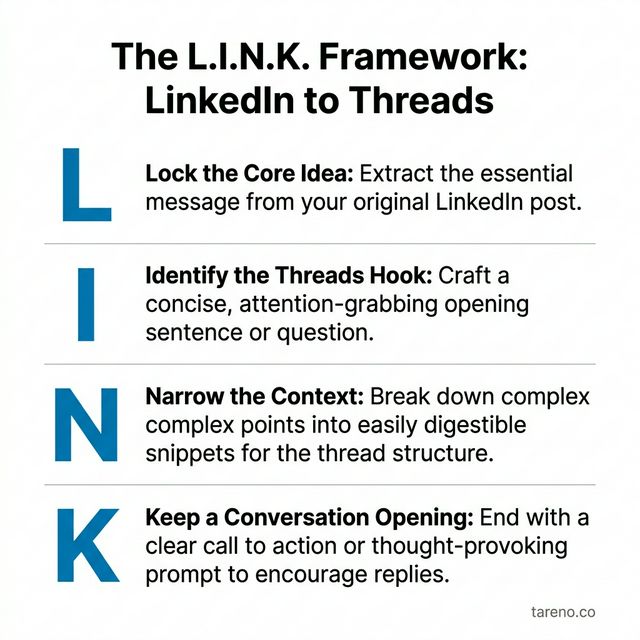
The L.I.N.K. Framework keeps your core idea stable while changing the packaging for Threads.
LinkedIn usually tolerates more setup, more formal pacing, and more context before the point lands. Threads usually benefits from a faster opening, more direct wording, and an ending that leaves room for replies.
That difference matters. If your LinkedIn post spends several lines building context before the thesis appears, that can work on LinkedIn. On Threads, the same structure often feels slow. The better move is to move the observation to the front and compress the explanation behind it.
For example, a LinkedIn post might begin by setting up the problem in a measured way. A Threads version often works better if it starts with the actual claim: “Most B2B teams do not have a content volume problem. They have a reuse problem.” Same insight. Different pacing.
The ending changes too. A LinkedIn post can close like a short article. A Threads post usually performs its job better when it invites response: a question, a contrast, or a point people can push back on.
The rule is simple: keep the idea, rewrite the pacing. Keep the lesson, rewrite the tone. Keep the example, rewrite the opening and ending.
The L.I.N.K. Framework for LinkedIn-to-Threads Repurposing
To make this repeatable, use the L.I.N.K. Framework:
L — Locate the core idea
I — Inspect the original intent
N — Nativize for Threads
K — Keep the feedback loop
Repurposing works when the idea stays the same, the packaging becomes native to the destination channel, and the feedback comes back into the system.
L — Locate the core idea
Before rewriting anything, identify the one thing the original post is really saying. Is the value in the thesis, the example, the warning, or the mini-framework? If you cannot isolate that, you will carry too much into the Threads version.
Mini-example: a long LinkedIn post may feel rich, but its real value might be one line: “More channels do not fix a weak source asset.” That is the transferable core.
I — Inspect the original intent
Different posts do different jobs. Some explain. Some challenge. Some document a lesson from practice. The Threads version should preserve that purpose even if the words become sharper.
Mini-example: if the LinkedIn post teaches a lesson, the Threads version should still feel useful, not just provocative.
N — Nativize for Threads
This is the real rewrite. Move the point higher, remove formal filler, shorten the ramp, and decide whether the idea belongs in one post or a short sequence.
Mini-example: “In our recent observations across several teams, we noticed…” becomes “One repurposing mistake keeps showing up: nobody defines the source post clearly enough.”
K — Keep the feedback loop
Repurposing should not stop at publishing. Threads becomes more useful when reactions, objections, and recurring questions feed the next content cycle.
Mini-example: if multiple people ask which post formats travel best, that is a strong signal for a follow-up post, FAQ entry, or blog section.
Step by Step: Turn One LinkedIn Post Into a Better Threads Post
You do not need a heavy process. A clear workflow is enough.
1. Mark the core thesis
Read the LinkedIn post as source material, not as a finished object. Which sentence carries the real value?
2. Remove ballast
Cut opening phrases, duplicate explanation, and anything that exists only because LinkedIn allows more setup.
3. Rewrite the tone for conversation
Threads usually benefits from more direct language. That does not mean sloppy writing. It means fewer formal transitions and faster clarity.
4. Add a conversation hook
Give readers a place to respond. That can be a question, a contrast, or a short unresolved tension point.
5. Decide whether this should be one post or a series
Some LinkedIn posts compress well into one Threads post. Others work better as a short sequence that separates thesis, example, and implication.
6. Feed reactions back into your system
Do not only check whether the post was seen. Look at which wording people repeat, which objections appear, and which subtopic deserves expansion.
If you do this regularly, you do not need to start every rewrite from a blank page. A drafting aid such as Tareno's Threads Post Generator can help turn the core idea of a LinkedIn post into a shorter Threads-first draft. That does not replace the editorial decision. It simply makes the first pass faster and cleaner. This fits especially well inside broader social media workflow systems.
When You Should Do This — And When You Should Not
Repurposing LinkedIn posts for Threads is useful under specific conditions. It is not a blanket rule.
Do it when the post has transferable substance
The best candidates usually have one clear idea, one practical example or lesson, and enough tension to trigger a response. Opinion-led posts, project learnings, compact frameworks, and small case observations often travel well.
Do it when Threads plays a real role in your system
If you want another place to test ideas, extend the life of strong text content, or create a second conversation surface, Threads makes sense.
Do not do it when the original post depends on heavy context
Some posts lose too much when compressed. That includes formal company statements, compliance-heavy messaging, and posts that only make sense with slides, screenshots, or long background explanation.
Do not do it if you cannot support the conversation layer
Threads is not only a publishing surface. It is also a reply surface. If your team has no time to engage, clarify, or continue the discussion, the channel may create more drag than value. That matters even more when you are already thinking about the risks of community handling at scale.
A simple test helps: if the idea still makes sense in one sharp sentence and one short example, it is probably a strong candidate. If it collapses without the full setup, leave it on LinkedIn.
Where a Threads Post Generator Actually Helps
A tool is most useful after the strategic decision has already been made. Once you know the LinkedIn post deserves a Threads-native version, a generator can help with compression, alternate hooks, and first-pass drafts.
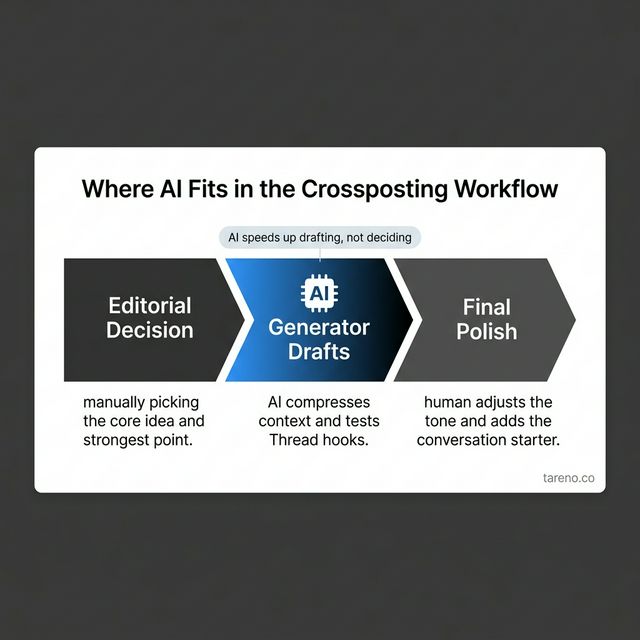
A generator speeds up the drafting step — editorial selection still comes first.
That is the correct role for Tareno's Threads Post Generator (Free Tool). It helps with the operational part of adaptation, not with deciding whether the source post is good enough to repurpose in the first place.
This distinction matters. A tool can make a rewrite faster. It cannot decide whether the idea belongs on Threads, whether the tone fits your brand, or whether the post should become one update or a short series.
Used well, a generator reduces friction in the drafting step. Used badly, it becomes a shortcut that hides the lack of editorial judgment.
The Most Common Mistakes in LinkedIn-to-Threads Repurposing
The first mistake is copying without adapting. The post keeps its LinkedIn pacing, too much setup survives, and the ending still sounds like the close of a mini article.
The second mistake is adapting without enough substance. Teams cut so aggressively that only a provocative line remains. That may look sharp, but it gives the audience very little to engage with.
The third mistake is publishing without learning. The Threads version goes live, but nobody captures the replies, objections, or repeated questions. That wastes the biggest strategic upside of the channel.
Comparison: LinkedIn vs. Threads for the Same Idea
AspectLinkedInThreadsMain roleexplanation and positioningcompression and conversationTypical pacingmore context before the pointfaster path to the pointStrong use caseframeworks, lessons, structured argumentssharp observations, questions, follow-up anglesCommon risktoo much setuptoo little context
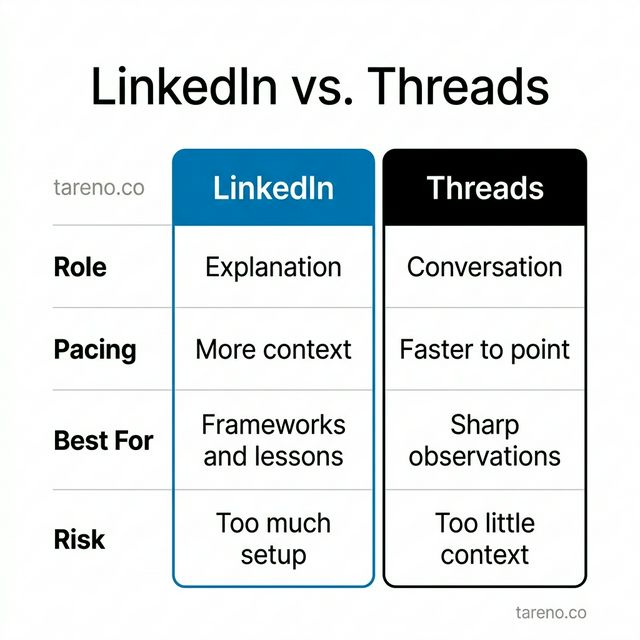
LinkedIn and Threads serve different editorial jobs — adapting the pacing is the key difference.
A practical example makes the contrast clear. If your core idea is “Most teams create too much from scratch and reuse too little,” LinkedIn is a good place to explain the operational problem behind that habit. Threads is a good place to turn the same insight into a shorter challenge, one example, and one question.
FAQ
Can I copy a LinkedIn post directly to Threads?
You can technically do it, but it is usually the weaker editorial choice. In most cases, it is better to keep the core idea and rewrite the pacing, tone, and ending for Threads.
Which LinkedIn posts work best on Threads?
Posts with one clear observation, one practical lesson, a compact framework, or a strong point of view usually adapt best. Formal updates and context-heavy statements usually adapt poorly.
Do I need a separate Threads strategy?
Not always. Many teams do not need a completely separate idea universe. They need a clean adaptation logic that turns strong LinkedIn posts into Threads-native versions.
Is Threads relevant for B2B creators and teams?
It can be. Threads is most useful when you already create text-led ideas and want another place to test phrasing, collect reactions, and extend the life of strong content.
How often should I repurpose instead of creating from scratch?
There is no universal ratio. A practical rule is to fully use strong source ideas before constantly chasing brand-new ones. But not every LinkedIn post deserves a Threads version.
Where does a generator help, and where does it not?
It helps with drafting, shortening, and generating alternate openings. It does not replace strategic selection, brand judgment, or the decision about whether the idea belongs on Threads at all.
Conclusion
If you already invest in good LinkedIn posts, you should usually ask whether the idea deserves a Threads-native second life. That is not because every channel matters equally. It is because strong ideas should not be trapped in one format when they can travel well into another.
The real advantage is not just more distribution. It is a better content loop. A thought gets built out on LinkedIn, compressed for Threads, sharpened by reactions, and carried into larger assets from there. That same logic matters when social content should later support owned-channel growth, including turning followers into newsletter subscribers.
At the same time, wider distribution is not a strategy by itself. More touchpoints do not automatically create more trust, which is exactly why social growth still needs stronger positioning, clearer proof, and a better system behind it, as seen in the broader trust gap between followers and buyers.
Key Takeaways
Strong LinkedIn posts are often the best raw material for Threads.
Useful repurposing means adaptation, not duplication.
The L.I.N.K. Framework helps keep the idea stable while changing the format.
Threads is most valuable when it becomes a testing and conversation layer, not just another posting destination.
A generator tool can speed up drafting, but it cannot replace editorial judgment.