Watch what happens right after you connect Tareno: your assistant can see your social accounts, and you can start writing.
1Ask about your accounts
2Tareno looks them up
3Your accounts appear
4Write what you want
Claude
Which of my social accounts are connected?
Write anything, for example: Post about our new product
Which of my social accounts are connected?
Found 4 accounts
You have 4 accounts connected: Instagram, LinkedIn, TikTok, X
Write anything, for example: Post about our new product
Illustrated demo · no live account
How do I connect Tareno to Claude?
Search for Tareno in Claude's plugin directory, install the plugin and sign in with your Tareno account. Then open a new conversation and ask Claude to run your connected accounts. The same plugin works in the Claude apps, in Claude Cowork and in Claude Code, so you connect only once.
Connect Claude in five steps
1
Find the plugin
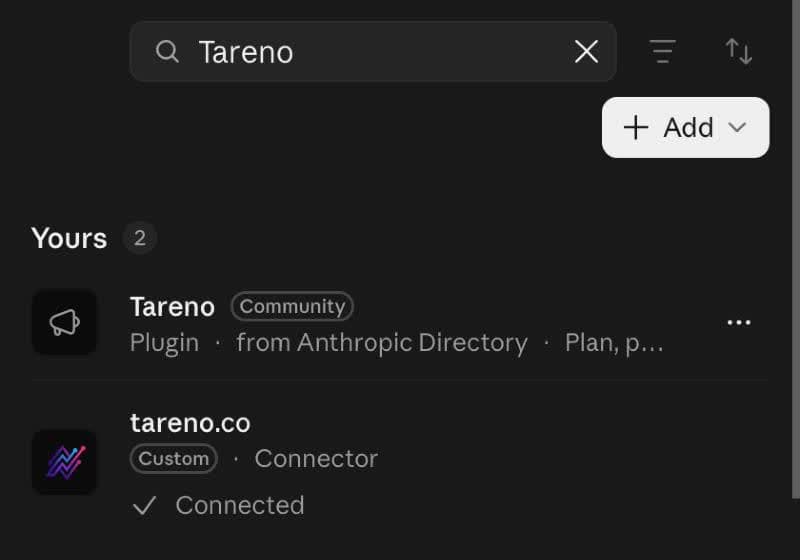
In Claude open Customize, then Plugins, and search for Tareno. As of 26 October 2026 it is listed with a Community label. The plugin bundles the Tareno social-operations skill with the MCP connection, so Claude already knows the sensible order: accounts first, platform rules next, drafts after that.
Customize, then Plugins: search for Tareno. A plugin you have not added yet appears under "More you can add" with an Add button; this account already had it.
2
Install and sign in
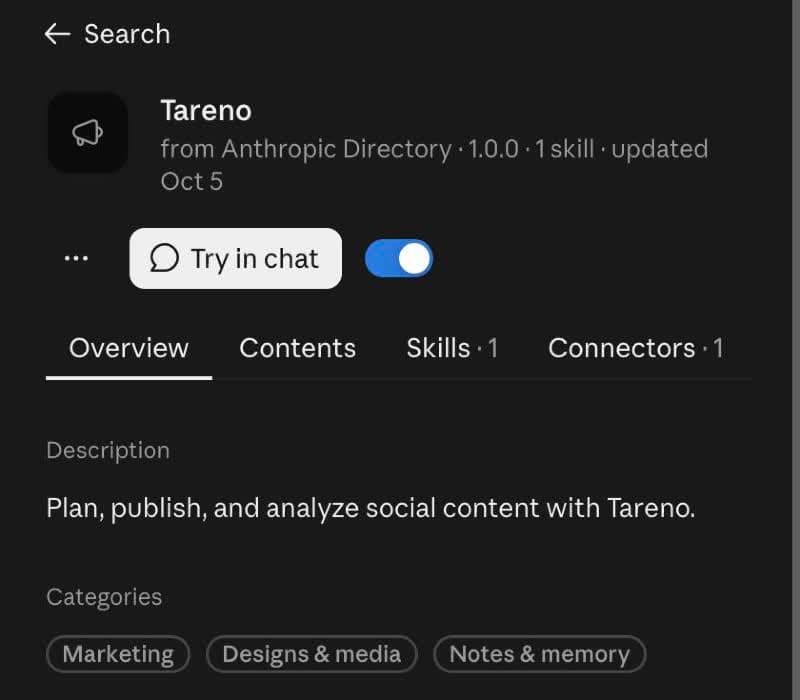
Choose Add. If Tareno is not yet connected to your Claude account, Claude takes you to Tareno, where you sign in, read the requested permissions and approve; the connection uses OAuth, so you never paste an API key into a conversation. In our test the account already had a Tareno connection, and Claude simply confirmed that Tareno is installed and ready to use.
The plugin is on and ready. Choose Try in chat to start.
3
Connect your social profiles in Tareno
Claude can use only the profiles that are connected to your Tareno workspace. Add the Instagram, TikTok, LinkedIn, X or YouTube accounts in the dashboard before you start, so that the first draft has a destination.
4
Run a first read-only check
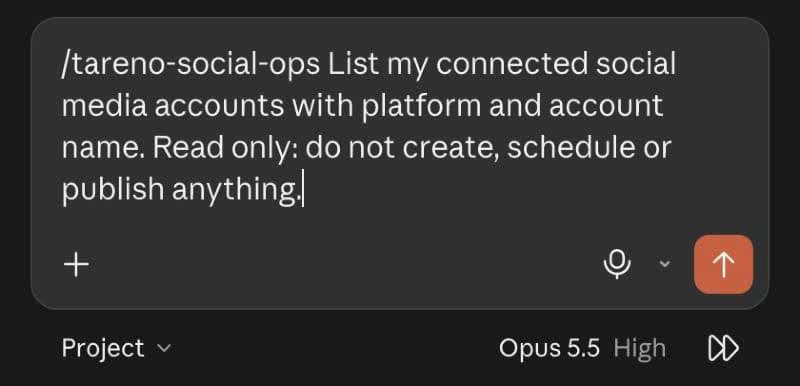
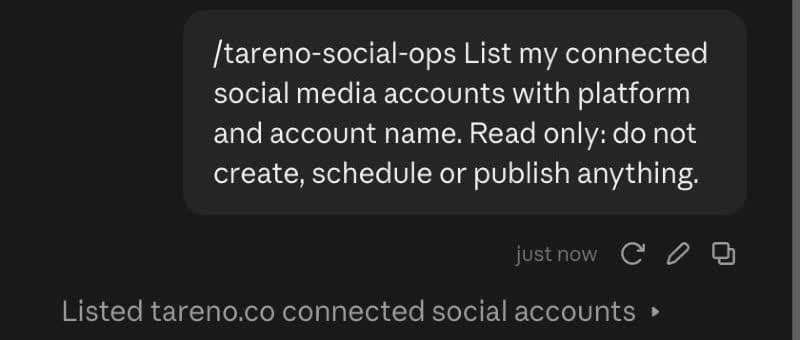
Choose Try in chat, or open a new conversation, and ask Claude to list your connected accounts without creating anything. Claude shows that it looked them up through Tareno, and when your accounts appear you are ready for drafts and posting requests.
Start with a read-only request.Claude reports that it listed your connected accounts through Tareno.
5
Optional: add a custom connector
You can also add Tareno by hand in Claude's connector settings, with the endpoint on the right and OAuth. Custom connectors depend on your Claude plan and your organization's settings.
Review text, media, account, and time in Tareno and approve.
What Claude is good at with Tareno
Claude reads long material closely and keeps instructions steady across a conversation, which suits work that starts from documents and brand rules. These six jobs make use of that.
01
Documents become posts
Attach a report, an article or an interview transcript and name the audience. Claude proposes angles, drafts a post for LinkedIn or X that stays within what the document says, and saves it through saving drafts so you can read it in Tareno before any posting time is requested.
02
A Project as your brand memory
Keep your brand voice, banned claims and product facts in a Claude Project. Every conversation in it starts from the same rules, so a caption written on Monday sounds like the one from last month. Claude then calls your connected accounts and each network's rules to fit the draft to the account it will use, which keeps the voice consistent and the format valid.
03
A long report becomes a short series
Give Claude a long document and ask for a five-part series. It splits the argument into parts with one point each, marks which paragraph every part relies on and saves the whole series as drafts, which keeps a complex topic from being squeezed into a single post.
04
Viral research with the reasoning shown
Ask Claude for the strongest videos on a topic through viral video search. It lays out why each one worked, what the first seconds do and what you could borrow without copying, and it asks before it starts any analysis that costs credits.
05
Comment triage
On networks where Tareno can read comments, Claude uses post comments for a post, groups the replies by theme, flags the questions that need an answer and drafts short responses in your voice. It cannot post the replies, so you paste the approved wording yourself.
06
Performance told as a story
Ask for the numbers behind a month with network analytics and a short narrative: what moved, what probably caused it and what to try next. Claude keeps observed metrics apart from guesses and labels anything a network did not return as unavailable.
Prompts to copy for Claude
01
Check the connection
Use Tareno to list my connected social accounts with platform and account name, read only. Create, schedule and publish nothing. Then tell me which account you would use for a post about topic and whether any network I need is not connected.
02
Post from an attachment
I am attaching report or article. Write one LinkedIn post for audience that uses only claims found in the document, and name the page or paragraph behind each claim. Once I confirm the wording, save the draft for LinkedIn account through Tareno.
03
Turn a long document into a series
Split the attached document into a five-part series for X with one point per part, and note which section each part is based on. Save all five parts as separate drafts in Tareno and give me a table with the draft IDs.
04
Rules from a Project
Following the brand voice and the banned claims in this Project, draft two Instagram captions for campaign. Use Tareno to check the rules of my Instagram account first, and save the better caption as a draft for review.
05
Read the comments
Use Tareno to read the latest comments on my most recent Instagram post. Group them by theme, mark the questions that need an answer and draft a short reply for each in my voice. Do not publish anything.
06
Monthly performance story
Use Tareno to get my platform analytics for LinkedIn for the last month. Tell me what moved, separate what the data shows from what you assume, and propose three experiments for next month. Treat metrics that were not returned as unavailable.
Which social networks can Claude post to?
Claude can prepare drafts, scheduling requests and publishing requests for every account you connect in Tareno on these ten networks:
Connect each account in Tareno first. The post formats and required settings depend on the network and the account type, and Claude reads them from Tareno before it prepares a post.
Limits and things to know
Scheduling, publishing, edits to scheduled posts and deletions create approval actions. You approve them in the Tareno dashboard, and nothing reaches a network on the strength of the chat alone.
The plugin is published for the Claude apps, Claude Cowork and Claude Code.
Plugins and custom connectors depend on your Claude plan and your organization's settings. If the option is missing, ask your administrator instead of looking for a workaround.
Claude cannot confirm permission to quote a source. Name the passages that are cleared for attribution, and read each draft in Tareno before you approve it.
Transcripts and comments exist only on supported networks, and Tareno exposes no comment reading for LinkedIn or X. Metrics that a network does not return stay unavailable.
Claude, Claude Code or Claude Cowork?
Use Claude in the app for conversations, research and writing, especially with a Project that holds your brand rules. Use Claude Cowork when one input should produce several finished outputs, such as a campaign folder that becomes a set of posts. Use Claude Code when the source is a repository. The plugin and your Tareno account are the same in all three.
Claude, Claude Code or Claude Cowork at a glance
Claude, Claude Code or Claude Cowork at a glance
Claude, Claude Code or Claude Cowork at a glance
Claude
Claude Cowork
Claude Code
Use it for
Conversations, research and writing
One input that should become several finished outputs
Work that starts in a repository
Typical input
A question, a document or a Project with your brand rules
A campaign folder that becomes a set of posts
Commits, a changelog or a release
Shared
The same Tareno plugin and account, and the same approval step
The same Tareno plugin and account, and the same approval step
The same Tareno plugin and account, and the same approval step
Plugin or custom connector in Claude
Plugin or custom connector in Claude
Plugin or custom connector in Claude
Plugin
Custom connector
Where
Customize, then Plugins, search for Tareno (labelled Community as of 26 October 2026)
Claude's connector settings, added by hand with Tareno's endpoint and OAuth
What you get
Tareno's social-operations skill together with the connection
Open the published Tareno listing, choose install or connect, and complete the Tareno login. Enable Tareno in a new conversation. For Claude, search for Tareno in the supported plugin directory.
Choose OAuth, connect and sign in with your own Tareno account. Check the requested permissions. Refresh the client's tool list after authorization.
Run list_accounts first. Confirm the returned workspace and account IDs before creating a draft. If no accounts appear, connect a social account in Tareno first.
https://tareno.co/api/mcp
Use the same Tareno account across supported clients. Open the relevant setup guide for authentication, first use, reconnect, and revocation.
Yes, through Tareno. Claude prepares drafts, scheduling requests and publishing requests for the accounts you connected in your Tareno workspace on ten networks. A post goes live only after you approve the request in the Tareno dashboard.
Which Claude surfaces can use the Tareno plugin?
The published plugin works in the Claude apps, in Claude Cowork and in Claude Code, and you install it once. After connecting your own Tareno account, run list_accounts and check the returned profiles before creating a draft or requesting a publishing time.
Does Tareno work with Claude Projects and uploaded files?
Yes. Claude can use the files and instructions in a Project, such as brand guidelines or a product brief, and then call Tareno to check your accounts and save drafts. Tareno receives only the post text and the media you ask Claude to send.
What does Claude actually receive from my social accounts?
Only what Tareno's tools return, such as account names, post data and analytics. Claude signs in to Tareno through OAuth, and Tareno uses each network's official login, so passwords and network tokens never reach the conversation.
Why does Claude not show the Tareno tools?
Check that the plugin or connector is switched on for the conversation in Claude's tools menu, and open a new conversation. If the tools are still missing, disconnect and reconnect Tareno once, and make sure that you approved the right Tareno account.
Do I need a paid Claude plan?
The availability of plugins and connectors depends on your Claude plan and your organization's settings, which Anthropic controls. On the Tareno side you need an account with MCP access. Check the Tareno pricing page for current plans.
Can I research viral videos with Tareno?
Yes. Ask your agent to search by topic and supported network, then review the returned video links and results yourself. A deeper analysis can use credits: request a quote and check the cost before starting it. Use the findings for original ideas rather than copying someone else's work.
Can Claude answer comments on my posts?
It can read comments where Tareno supports it and draft replies in your voice, but it cannot post them. You paste the approved wording into the network yourself. LinkedIn and X expose no comment reading through Tareno.
Let Claude prepare your next posts
Start with your Tareno account, connect your agent and prepare drafts. You approve what goes live.