Agencies do not only need to schedule posts.
They need to get content approved.
That sounds simple until the workflow involves account managers, copywriters, designers, clients, internal reviewers, brand guidelines, campaign deadlines, reports, and repurposing.
Client approval is one of the biggest operational bottlenecks for social media agencies.
If the process is weak, feedback gets lost, approvals become vague, posts are delayed, and the wrong version may get scheduled.
If the process is strong, the agency can move faster with less back-and-forth.
The best social media tools for agencies with client approvals help teams manage drafts, internal review, client feedback, approval states, scheduling, reporting, repurposing, and workflow automation.
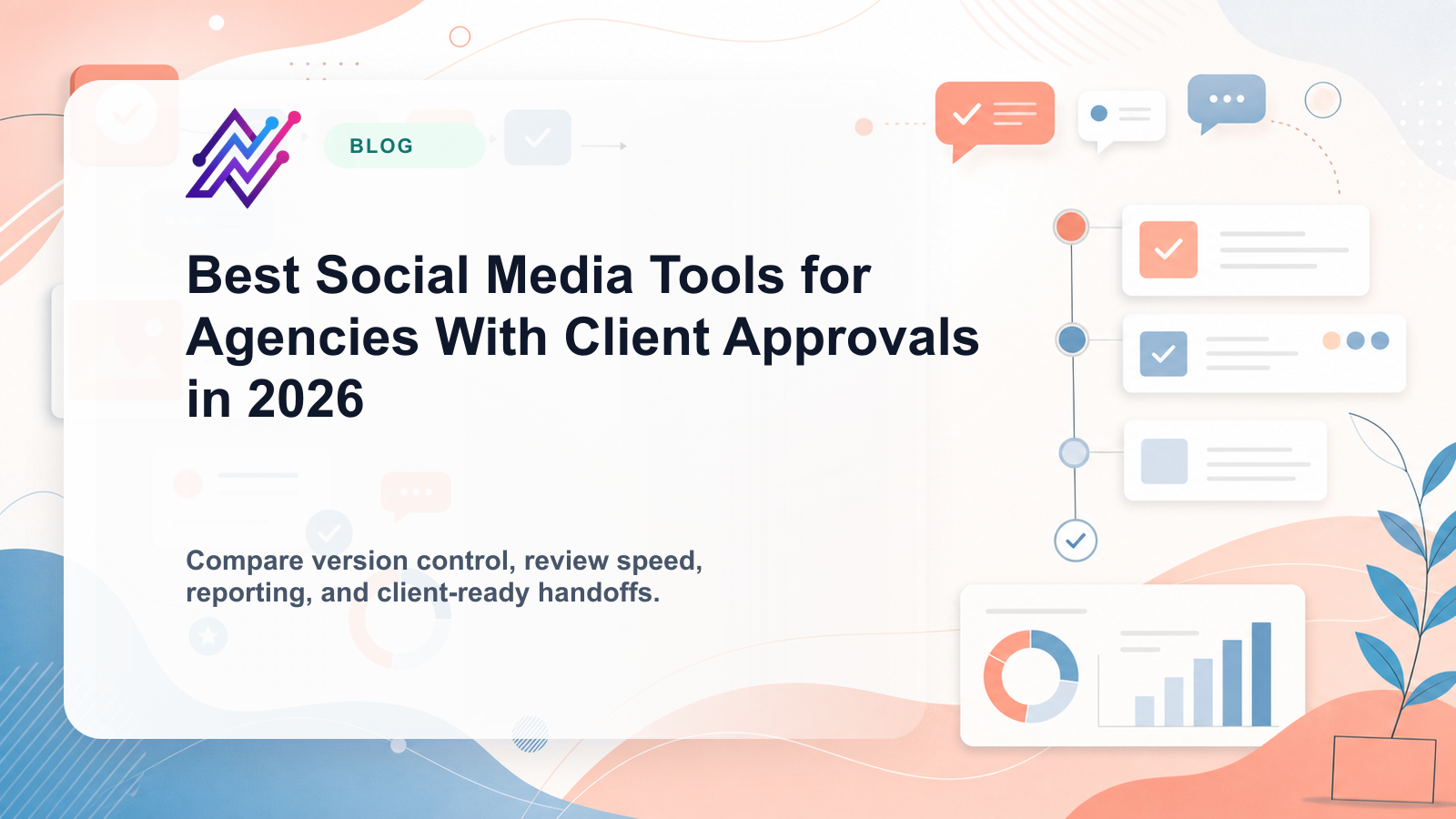
This guide compares the strongest tools in 2026 by real agency approval workflow, not just by whether they have an “approve” button.
TL;DR: best agency tools with client approvals
Agency needBest fitWhyClient approvals plus workflow automationTarenoClient workspaces, boards, approvals, reporting, repurposing, Make, n8n, APIDedicated client reviewPlanableComments, internal notes, external review, approval collaborationAgency dashboards and reportsSendibleClient dashboards, approval workflows, reports, white-label workflowsAgency scheduling approvalsSocialPilotClient approvals, manager approvals, bulk scheduling, white-label reportsInbox and moderation workflowsAgorapulseAssignments, inbox, moderation rules, reports, response workflowsBroad agency suiteHootsuitePublishing, inbox, analytics, listening, approvals on relevant plansSimple agency schedulingBufferClean queue, simple publishing, lightweight collaborationVisual approval workflowsLaterVisual calendar and creator-style planning
Short version: Planable is strong for review. Sendible and SocialPilot are strong for agency workflows. Tareno is strongest when client approvals need to connect with boards, scheduling, reporting, repurposing, roles, activity visibility, Make, n8n, and API workflows.
Why agencies need client approval workflows
Agency social media work has more moving parts than solo creator workflows.
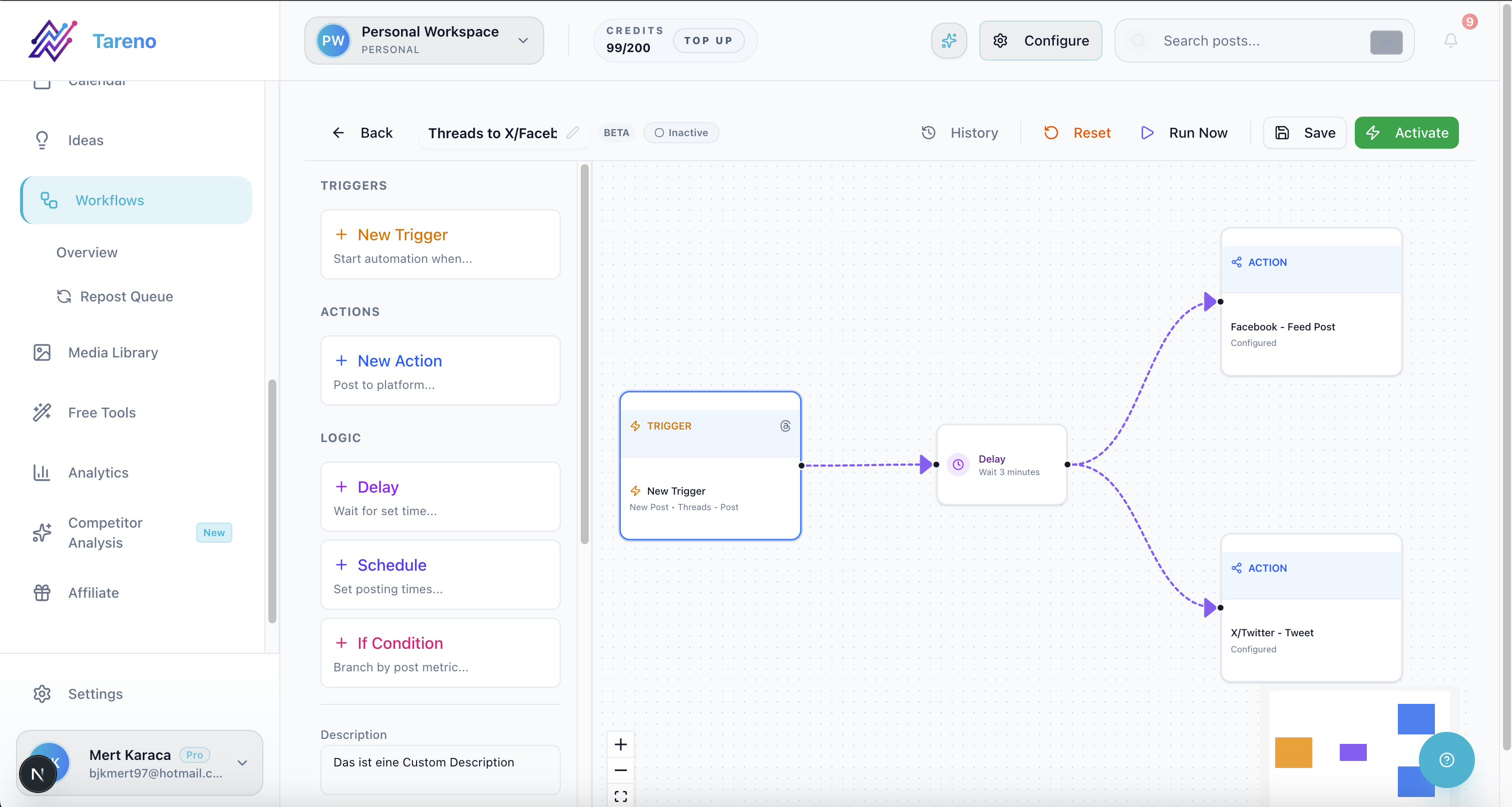
Workflow automation prevents approval bottlenecks from delaying campaigns.
An agency may need to manage:
multiple clients
multiple brands
multiple social profiles
multiple internal team members
client stakeholders
approval rounds
campaign deadlines
white-label reports
content revisions
repurposed content
product or legal review
social inbox assignments
monthly reporting
A basic scheduler can publish content.
But it does not always solve approval chaos.
Agencies need a workflow that answers:
who drafted this?
has it been internally reviewed?
did the client approve the exact version?
what changes were requested?
can this be scheduled?
who scheduled it?
what performed well?
what should be repurposed?
That is why approval workflows matter.
What “client approval” should actually include
A client approval workflow should include more than a status label.
It should support:
internal review before client review
client comments
change requests
approval status
version visibility
platform-specific approval
owner assignment
notifications
publish gates
activity history
reporting connection
repurposing decisions
The key point:
Client approval should apply to a specific version of a post.
If a client approves an Instagram caption but the team later changes it for LinkedIn, that new version may need separate approval.
A strong tool makes this visible.
The AGENCY framework
Use the AGENCY framework to evaluate tools.
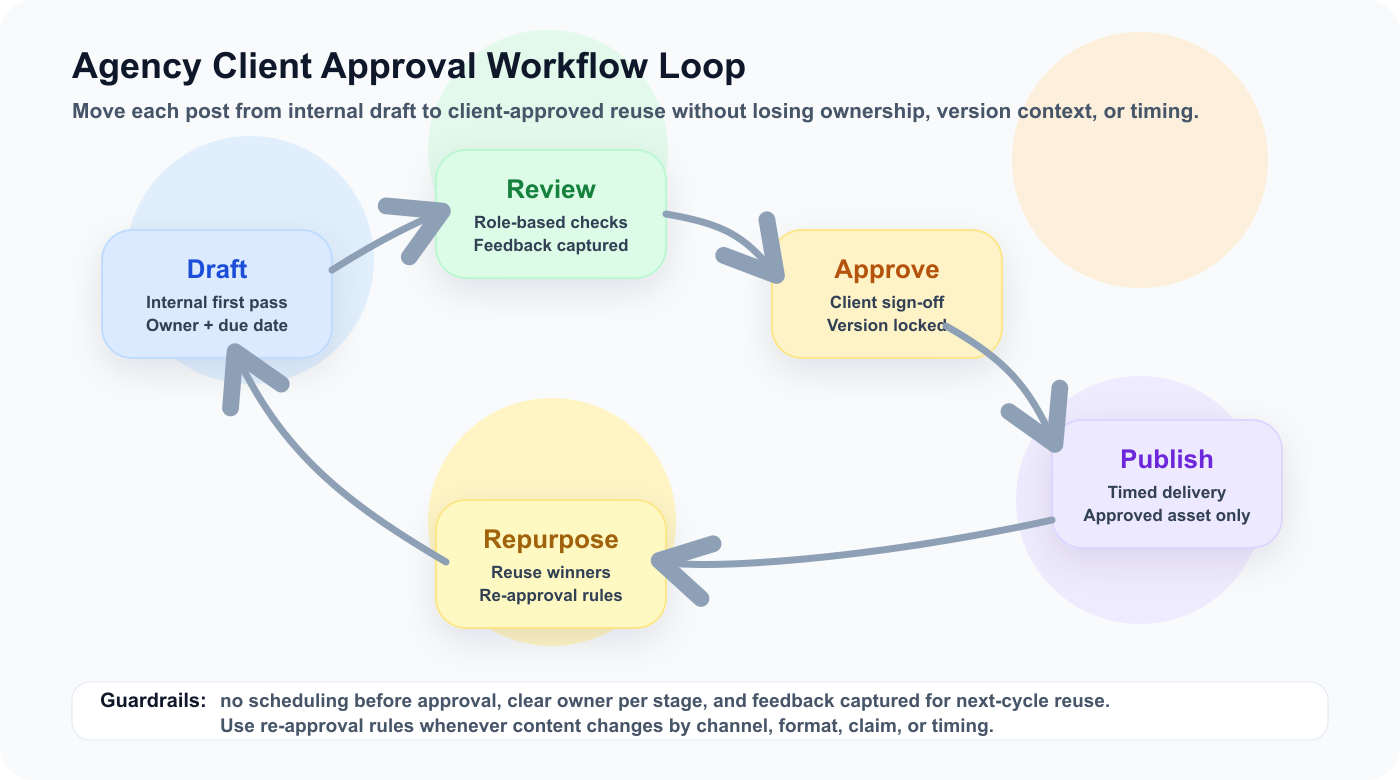
A — Approval depth
G — Guest/client access
E — Execution workflow
N — Next actions after approval
C — Client reporting
Y — Yield from repurposing
This framework helps agencies choose based on operations, not marketing claims.
A — Approval depth
Approval depth means how well the tool supports real review.
Ask:
Can clients comment?
Can internal notes be separated from client comments?
Can changes be requested?
Can a post be approved by platform?
Can approval block publishing?
Is there approval history?
Can multiple reviewers be assigned?
Can client access be limited?
A weak approval workflow only says approved or not approved.
A strong workflow shows the full review context.
G — Guest/client access
Client access should be easy.
Clients should not need to learn a complex social media platform just to approve posts.
Good client access should be:
simple
secure
scoped to their content
clear about deadlines
clear about what needs review
easy for comments
easy for final approval
Some agencies need full client dashboards.
Others need simple external review links.
The best tool depends on client maturity.
E — Execution workflow
Approval should connect to execution.
The workflow should show:
Brief
Draft
Internal Review
Client Review
Changes Requested
Approved
Scheduled
Published
Report
Repurpose
This matters because client approval is not the end.
It is the gate before scheduling.
If approved posts still need manual chasing, the workflow is incomplete.
N — Next actions after approval
A strong approval workflow creates next actions automatically.
Examples:
approved → notify publisher
approved → move to scheduled
approved → update client tracker
approved → trigger Make workflow
approved → trigger n8n workflow
published → create reporting task
high-performing → add to repurposing queue
This is where workflow automation becomes valuable.
Approvals should move work forward.
C — Client reporting
Agencies need reports that connect to approvals.
A good report should show:
what was published
what performed best
what underperformed
what should be changed
what should be repurposed
what is planned next
A better agency report says:
This approved carousel performed 2x above baseline, so we will repurpose it into a LinkedIn post and Pinterest pin next month.
That is reporting as client value.
Y — Yield from repurposing
Approved client content should not always be used once.
If a post performs well, it can become:
TikTok
Instagram Reel
carousel
LinkedIn post
Threads post
Pinterest pin
blog section
newsletter note
sales asset
But repurposing may require re-approval.
A strong agency tool should help manage that.
1. Tareno — best for client approvals plus workflow automation
Tareno is a strong fit for agencies that need approval connected to content operations.
It is useful when the workflow includes client workspaces, boards, approvals, scheduling, reporting, repurposing, and automation.
Tareno is best for
Choose Tareno if your agency needs:
client/team workspaces
content boards
approval workflows
content calendar
workflow builder
repurposing queue
white-label reports
roles and permissions
activity visibility
unified analytics
competitor analysis
AI captions and hashtags
Make integration
n8n integration
API access
Where Tareno wins
Tareno wins when an agency needs to manage the full loop:
Brief → Draft → Internal Review → Client Approval → Schedule → Publish → Report → Repurpose
This is more than approval.
It is an agency workflow system.
Not ideal for
Tareno may be more than needed if the agency only needs a simple client review link and already manages scheduling, reporting, and repurposing elsewhere.
2. Planable — best for dedicated client review
Planable is one of the strongest tools for review and approval collaboration.

Real Planable positioning helps agencies compare dedicated review collaboration depth.
Planable is best for
Planable is best for:
client comments
internal notes
external review
content approvals
multi-step approvals on relevant plans
stakeholder collaboration
review-focused workflows
Where Planable wins
Planable is strong when client feedback is the main bottleneck.
It gives agencies a cleaner place to collect comments and approval.
Where Planable may not be enough
Planable may be less ideal if the agency needs approvals to connect deeply with reporting, repurposing queues, Make/n8n workflows, analytics-to-action, and operational activity visibility.
Planable helps get content approved.
A workflow-first system helps the approved content move through the rest of the agency process.
3. Sendible — best for agency dashboards and reports
Sendible is included as a product/website reference for this ranked tool comparison.
Sendible is useful for agencies that want client dashboards and reports.
Sendible is best for
Sendible is best for:
agency dashboards
client approvals
client profile connection
reports
social inbox
permissions
white-label workflows
engagement monitoring
Where Sendible wins
Sendible is strong for traditional agency workflows.
It can help organize clients, approvals, reports, and engagement.
Where Sendible may not be enough
Sendible may be less ideal if the agency needs workflow-first repurposing, Make/n8n automation, board-based content production, and analytics-to-action task movement.
4. SocialPilot — best for agency scheduling approvals

SocialPilot is included as a product/website reference for this ranked tool comparison.
SocialPilot is practical for agencies that need scheduling and approval workflows.
SocialPilot is best for
SocialPilot is best for:
bulk scheduling
client approvals
manager approvals
account/user scaling
white-label reports
advanced analytics
agency social publishing
Where SocialPilot wins
SocialPilot is useful for agencies that manage many accounts and need practical approval workflows without a heavy enterprise suite.
Where SocialPilot may not be enough
SocialPilot may be less ideal if the agency needs deeper repurposing queues, workflow builder logic, Make/n8n triggers, activity visibility, and analytics-to-repurpose workflows.
5. Agorapulse — best for inbox and moderation workflows
Agorapulse is included as a product/website reference for this ranked tool comparison.
Agorapulse is useful when agency workflows include social inbox, comments, moderation, and response assignments.
Agorapulse is best for
Agorapulse is best for:
social inbox
comment management
ad comments
assignments
moderation rules
saved replies
labels
ROI-style reports
team reports
Where Agorapulse wins
Agorapulse is strong when the agency manages engagement and moderation for clients.
Where Agorapulse may not be enough
Agorapulse may be less ideal if the agency’s main bottleneck is content approval, repurposing workflows, workflow builder automation, and content production visibility.
6. Hootsuite — best for broad agency suite needs
Hootsuite is included as a product/website reference for this ranked tool comparison.
Hootsuite is useful when agencies need a broad suite.
Hootsuite is best for
Hootsuite is best for:
publishing
inbox
AI tools
analytics
listening
reports
competitor benchmarking
enterprise workflows
Where Hootsuite wins
Hootsuite is strong when an agency needs wide feature coverage.
Where Hootsuite may not be enough
Hootsuite may be less ideal for lean agencies that want workflow-first approvals, repurposing queues, and Make/n8n automation without a heavier suite.
Tool comparison table
ToolBest forApproval strengthMain limitationTarenoApproval + workflow automationBoards, client workspaces, approvals, reporting, repurposingMore than needed for simple reviewPlanableDedicated reviewComments, internal notes, client approvalLess post-approval workflow automationSendibleAgency dashboardsClient workflows and reportsLess workflow-first repurposingSocialPilotAgency schedulingClient and manager approvalsLess deep workflow operationsAgorapulseInbox/moderationAssignments and moderation workflowsLess content lifecycle depthHootsuiteBroad suiteApprovals inside larger suiteCan be heavy for lean agenciesBufferSimple schedulingLightweight team approvalLimited agency approval depthLaterVisual planningVisual review contextLess automation depth
Agency approval workflow examples
Standard client approval workflow
Client brief is added.
Copywriter drafts content.
Designer adds creative.
Account manager reviews internally.
Client approves or requests changes.
Approved post is scheduled.
Published post is measured.
Winner enters repurposing queue.
Approval-to-report workflow
Client approves content.
Post is scheduled.
Post is published.
Reporting row is created.
Performance is reviewed.
Next-month recommendations are created.
Approval-to-repurpose workflow
Client-approved post performs above baseline.
Agency adds it to repurposing queue.
Platform version is rewritten.
Client reviews again if needed.
Repurposed content is scheduled.
Second-wave performance is reported.
What agencies should look for
Look for:
client workspaces
guest/client access
internal review
client comments
approval statuses
change requests
version history
publish gates
content calendar
reporting
repurposing queue
roles and permissions
activity visibility
Make/n8n/API support
white-label reporting
pricing at scale
The right tool depends on whether the agency needs review only or a full operating workflow.
Common mistakes
Mistake 1: No internal review before client review
Clients should not catch basic errors.
Mistake 2: Approval without version control
Approval should apply to a specific version.
Mistake 3: Scheduling before approval
Approved status should be a publishing gate.
Mistake 4: No owner
Every post should have an owner.
Mistake 5: No reporting loop
Reports should create next actions.
Mistake 6: No repurposing process
High-performing approved content should become future content.
Related Tareno resources
Keep building the workflow
Product Tareno Features See the planning, scheduling, approval, and workflow features behind this guide. Explore features -> Plans Tareno Pricing Match the workflow depth in this article to the right plan and trial option. View pricing -> Compare Comparison Hub Compare Tareno with common social media management tools by workflow fit. Compare tools -> Workflow Approval Workflows Build structured review stages before posts reach the calendar. Review approvals ->
FAQ
What is the best social media tool for agencies with client approvals?
It depends on the agency workflow. Planable is strong for client review. Sendible is strong for dashboards. SocialPilot is strong for scheduling approvals. Tareno is strong when approvals need to connect with boards, reporting, repurposing, Make, n8n, and API workflows.
What should an agency client approval workflow include?
It should include internal review, client review, comments, change requests, approval status, version history, publish gates, scheduling, reporting, and repurposing decisions.
Do agencies need client approval for every post?
Not always. High-risk content should usually be approved. Low-risk evergreen content can sometimes be pre-approved or reviewed in batches depending on the agreement.
Can client approvals be automated?
The approval decision should stay human, but reminders, status movement, scheduling handoffs, reporting rows, and Make/n8n workflows can be automated.
Which tool is best for client review?
Planable is one of the strongest dedicated review tools. Tareno is better when review needs to connect to workflow automation, reporting, and repurposing.
Can agencies repurpose client-approved posts?
Yes, but repurposed content may need re-approval, especially if it is old, sponsor-related, pricing-related, or adapted for a new platform.
Final thoughts
Client approvals are not a small feature for agencies.
They are part of the agency operating system.
A good approval workflow protects the client, the agency, and the publishing process.
The best tool depends on whether your agency needs simple review, client dashboards, scheduling approvals, inbox workflows, or full workflow automation.
If approvals need to connect to scheduling, reporting, repurposing, Make, n8n, API, roles, and activity visibility, choose a workflow-first system.
Primary CTA: Explore Tareno features to see how client workspaces, boards, approvals, reports, repurposing queues, Make, n8n, API, roles, and activity visibility work together.
Secondary CTA: Compare Tareno with Planable, Sendible, SocialPilot, Agorapulse, Hootsuite, and Buffer on the compare hub.