Content repurposing and scheduling are often discussed separately.
But for creators, agencies, startups, and teams, they belong together.
Repurposing answers:
What should we reuse?
Scheduling answers:
When should it go live?
A team that only repurposes without scheduling creates drafts that never publish.
A team that only schedules without repurposing keeps starting from zero.
The best workflow connects both.
It helps you find content worth reusing, rewrite it for each platform, approve the new version, schedule it, publish it, measure results, and decide whether to reuse it again.
This guide compares the best social media tools for content repurposing and scheduling in 2026 by actual workflow fit.
TL;DR: best repurposing and scheduling tools by use case
NeedBest fitWhyWorkflow-based repurposing and schedulingTarenoRepurposing queue, calendar, boards, approvals, analytics, Make, n8n, APIEvergreen category schedulingSocialBeeRecurring categories, evergreen libraries, re-queueingSimple scheduling with manual reuseBufferClean queue, easy publishing, simple calendarVisual repurposing and planningLaterVisual calendar, Social Sets, creator-friendly planningAnalytics-led repurposingMetricoolReports, competitor tracking, performance reviewAgency scheduling and approvalsSocialPilotBulk scheduling, client approvals, reportsBroad-suite schedulingHootsuitePublishing, inbox, analytics, AI, listeningReview-heavy repurposingPlanableComments, internal notes, stakeholder approvals
Short version: If you only need evergreen recycling, SocialBee may be enough. If you need a full repurposing-to-scheduling workflow with approvals, analytics, Make, n8n, API, and activity visibility, Tareno is stronger.
Why repurposing and scheduling should be connected
Repurposing creates leverage.
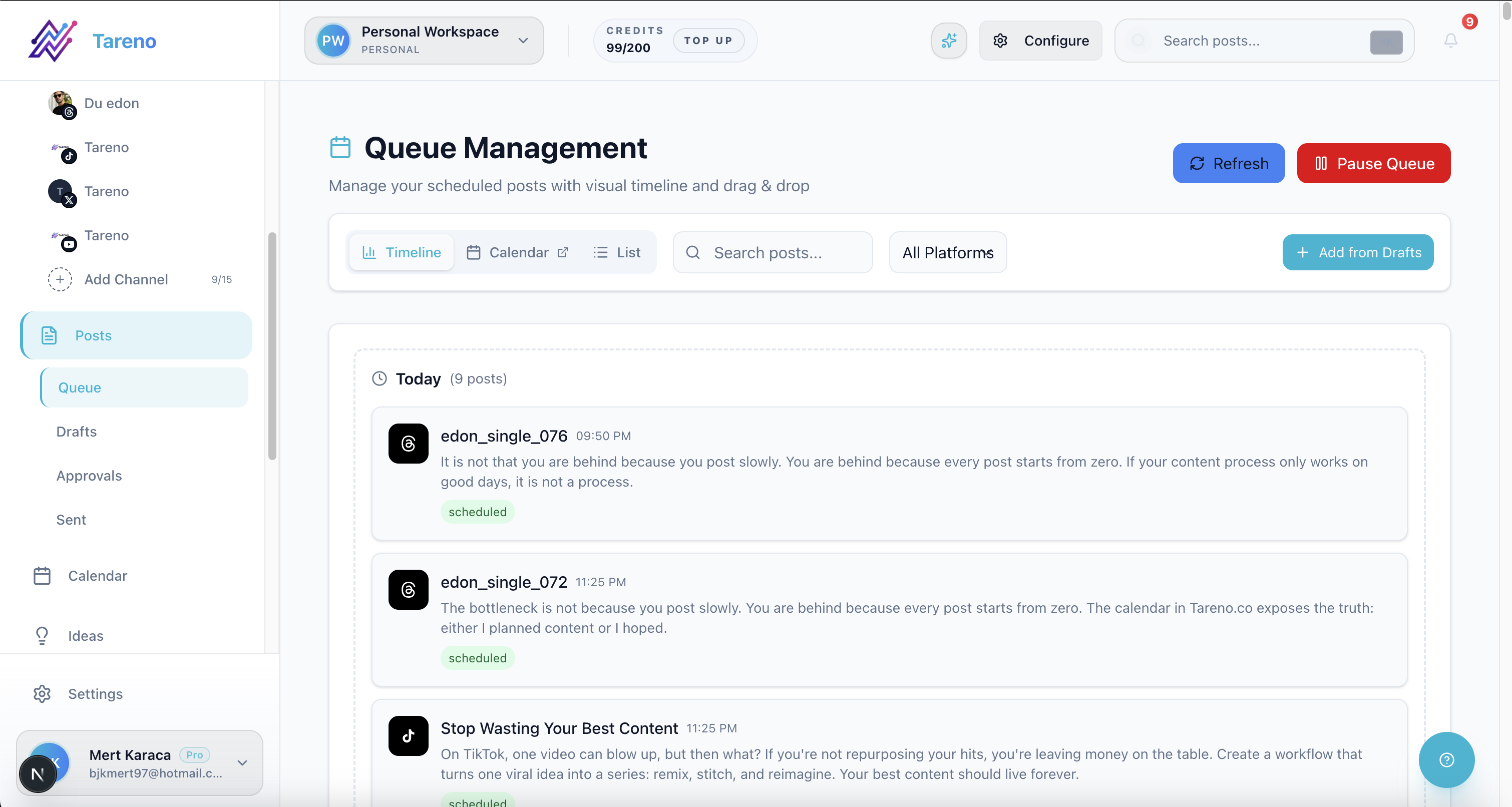
A queue-first workflow keeps repurposed content from stalling before publish.
Scheduling creates consistency.
Together, they create a repeatable content system.
A good connected workflow looks like this:
Identify a post that performed well.
Add it to a repurposing queue.
Choose target platforms.
Rewrite the idea for each platform.
Approve the new version.
Schedule it.
Publish it.
Measure performance.
Reuse again if it works.
When these steps are disconnected, teams lose momentum.
The repurposing idea sits in a spreadsheet.
The rewritten caption sits in a doc.
The scheduler has no context.
The report never creates a next action.
The result is manual work.
A connected repurposing and scheduling system reduces that friction.
Repurposing vs evergreen scheduling vs recycling
These terms are related, but not identical.
Repurposing
Repurposing means adapting one idea into a new format or platform.
Example:
LinkedIn post → Instagram carousel → TikTok script → Pinterest pin
Evergreen scheduling
Evergreen scheduling means keeping timeless content in a recurring queue.
Example:
Tips, tutorials, FAQs, and educational posts are scheduled repeatedly over time.
Recycling
Recycling often means reposting or re-queueing similar content.
Example:
A quote, blog link, or tip is reused after a set interval.
The best tool depends on which workflow you need.
If you need categories, SocialBee-style tools can fit.
If you need workflow-based repurposing with approvals and analytics, a workflow-first tool is stronger.
The RESCHEDULE framework
Use the RESCHEDULE framework to choose the right tool.
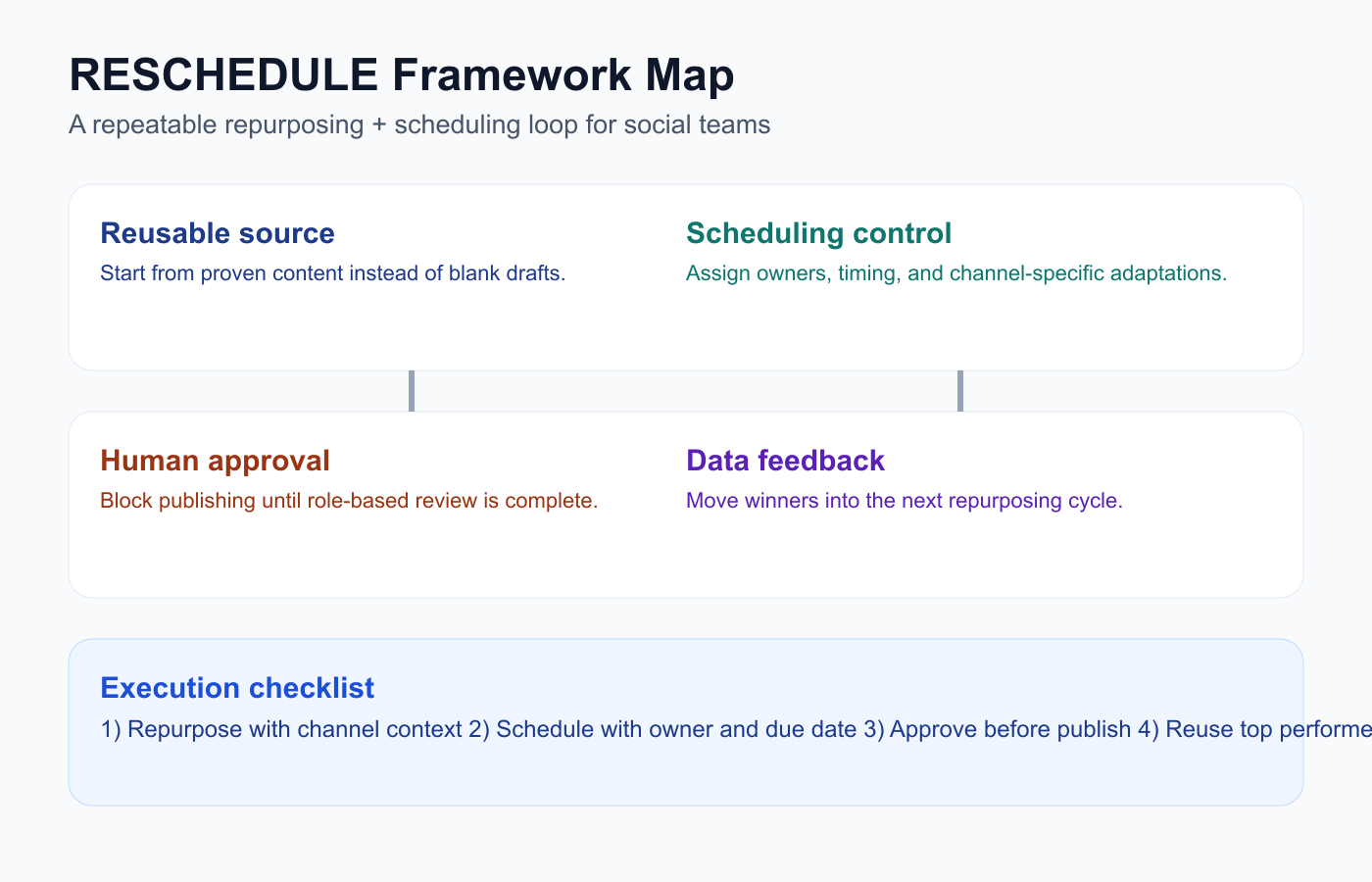
The RESCHEDULE framework turns one-off reuse into a measurable operating loop.
R — Reusable source
E — Evergreen potential
S — Scheduling control
C — Channel adaptation
H — Human approval
E — Execution visibility
D — Data feedback
U — Unified workflow
L — Logic and integrations
E — Evaluate again
This framework keeps the decision practical.
R — Reusable source
Start with the source content.
Sources can include:
Instagram posts
TikTok videos
LinkedIn posts
Threads posts
blog posts
YouTube videos
customer questions
webinars
reports
product updates
competitor insights
old high-performing posts
The tool should help you keep source context.
A repurposed post should show where it came from and why it is being reused.
E — Evergreen potential
Some content can be reused repeatedly.
Examples:
tutorials
beginner guides
workflows
checklists
common mistakes
FAQs
customer questions
evergreen tips
educational content
Some content needs review before reuse.
Examples:
pricing
product claims
competitor comparisons
feature announcements
seasonal campaigns
trending topics
expired offers
A good workflow should mark whether a post is evergreen or time-sensitive.
S — Scheduling control
Scheduling control matters because repurposed content should not overload a channel.
Look for:
calendar view
queue view
category schedules
platform-specific scheduling
bulk scheduling
recurring content controls
approval-based scheduling
pause/resume queues
platform spacing
campaign labels
A repurposing tool without scheduling creates extra work.
A scheduler without repurposing creates repetitive manual planning.
C — Channel adaptation
Repurposed content should be adapted by platform.
A TikTok script is not a LinkedIn post.
A Pinterest pin is not a Threads post.
A LinkedIn post is not an Instagram carousel.
Good tools should support:
platform-specific captions
different media
different hashtags
different CTAs
different formats
AI-assisted rewrites
preview by platform
This keeps repurposing from becoming spammy.
H — Human approval
Approval is important for repurposed content.
Repurposed posts may be old.
They may include outdated claims.
They may mention pricing, competitors, features, sponsors, or clients.
A safe workflow includes:
reviewer assignment
changes requested
approval status
publish gate
activity visibility
final version tracking
Automation should help move content to approval, not bypass it.
E — Execution visibility
Teams need to know where repurposed content stands.
A good workflow should show:
source post
target platform
owner
status
approval state
scheduled date
published date
performance result
reuse decision
Without visibility, repurposing becomes another messy list.
D — Data feedback
Repurposing should start and end with data.
Start with data:
high saves
high shares
strong watch time
strong clicks
meaningful comments
above-baseline reach
End with data:
did the repurposed version work?
should it be reused again?
should the idea become a series?
should it become a blog or landing page?
should it be archived?
A good tool connects reporting to repurposing.
U — Unified workflow
The best repurposing and scheduling tools reduce fragmentation.
A unified workflow connects:
source content
rewrite
approval
scheduling
publishing
reporting
repurposing again
This is especially useful for small teams and agencies.
If every step happens in a different tool, the workflow becomes fragile.
L — Logic and integrations
Make, n8n, API, and webhook workflows can make repurposing more powerful.
Example automations:
high performer → create repurposing task
approved repurposed post → schedule
published post → create reporting task
blog published → create social drafts
client approved → update tracker
post measured → mark reuse again or archive
Integrations matter when social media connects to the rest of the operating system.
E — Evaluate again
Repurposing is not complete after scheduling.
You need to measure the repurposed version.
A good evaluation process asks:
did this platform version work?
did the new hook improve performance?
did the new format fit the audience?
should this be reused again?
should the source content be updated?
should the idea become a larger asset?
Repurposing should compound learning.
1. Tareno — best for workflow-based repurposing and scheduling
Tareno is best when repurposing and scheduling need to work together inside a larger workflow.
Tareno is best for
Choose Tareno if you need:
repurposing queue
content calendar
content boards
platform-specific captions
approval workflows
workflow builder
unified analytics
competitor analysis
team workspaces
roles and permissions
activity visibility
AI captions and hashtags
Make integration
n8n integration
API access
Where Tareno wins
Tareno wins when teams need to move from performance signal to scheduled repurposed content.
Example:
Top Instagram post → Repurposing Queue → TikTok/Threads/Pinterest drafts → Approval → Schedule → Publish → Measure again.
This is stronger than simply re-queueing the same post.
Not ideal for
Tareno may be more than needed if you only want a basic evergreen category queue.
2. SocialBee — best for evergreen content categories
SocialBee is strong for evergreen scheduling and recurring categories.

Real SocialBee product positioning helps validate evergreen-focused tool fit.
SocialBee is best for
SocialBee is best for:
content categories
evergreen libraries
recurring queues
re-queueing
content variations
category-based schedules
blog promotion
Where SocialBee wins
SocialBee is useful when your content is organized into timeless categories.
Examples:
tips
quotes
blog posts
tutorials
testimonials
educational posts
Where SocialBee may not be enough
SocialBee may be less ideal if you need:
workflow-based repurposing
approval gates
analytics-to-action
Make/n8n workflows
activity visibility
platform-specific content lifecycle
3. Buffer — best for simple scheduling with manual reuse
Buffer is included as a product/website reference for this ranked tool comparison.
Buffer is useful when the scheduling workflow is simple.
Buffer is best for
Buffer is best for:
clean queues
simple scheduling
low-friction publishing
lightweight analytics
manual content reuse
small creators and teams
Where Buffer wins
Buffer makes scheduling easy.
If repurposing is handled manually, Buffer can publish the reused content cleanly.
Where Buffer may not be enough
Buffer may be less ideal if repurposing needs:
dedicated queue
approval workflow
AI platform rewrites
analytics-based triggers
Make/n8n automation
content board visibility
4. Later — best for visual repurposing and planning

Later is included as a product/website reference for this ranked tool comparison.
Later is useful for visual-first creators and brands.
Later is best for
Later is best for:
visual content calendar
Social Sets
Instagram planning
TikTok planning
Link in Bio
creator-style planning
visual campaign layout
Where Later wins
Later is strong when repurposed content needs visual planning.
Where Later may not be enough
Later may be less ideal if the team needs:
deeper repurposing queues
workflow builder
approval-triggered scheduling
Make/n8n workflows
analytics-to-repurpose actions
5. Metricool — best for analytics-led scheduling decisions
Metricool is included as a product/website reference for this ranked tool comparison.
Metricool is useful when data drives the repurposing decision.
Metricool is best for
Metricool is best for:
social analytics
competitor tracking
brand dashboards
reports
performance review
planning context
Where Metricool wins
Metricool helps teams identify what worked.
That is valuable because repurposing should start with evidence.
Where Metricool may not be enough
Metricool may be less ideal if you need to move winners into a repurposing workflow with approvals, scheduling stages, roles, and automation.
6. SocialPilot — best for agency scheduling and approvals

SocialPilot is included as a product/website reference for this ranked tool comparison.
SocialPilot is practical for agencies that need scheduling plus approval workflows.
SocialPilot is best for
SocialPilot is best for:
bulk scheduling
client approvals
manager approvals
account/user scaling
agency workflows
white-label reports
Where SocialPilot wins
SocialPilot helps agencies schedule content across many accounts and manage approvals.
Where SocialPilot may not be enough
SocialPilot may be less ideal if repurposing needs to connect to analytics, workflow builder, Make/n8n, activity visibility, and queue-based reuse.
Tool comparison table
ToolBest forStrengthMain limitationTarenoWorkflow-based repurposing + schedulingQueue, calendar, approvals, analytics, Make/n8n/APIMore than needed for simple evergreen recyclingSocialBeeEvergreen categoriesRecurring queues and re-queueingLess workflow depthBufferSimple schedulingClean queueManual repurposingLaterVisual planningVisual calendar and Social SetsLess automation depthMetricoolAnalytics-led decisionsReporting and competitorsLess execution workflowSocialPilotAgency schedulingBulk scheduling and approvalsLess repurposing workflowPlanableReview-heavy contentComments and approvalLess scheduling/repurposing automationHootsuiteBroad suitePublishing, inbox, analyticsCan be heavy for lean workflows
Repurposing and scheduling workflow examples
Creator workflow
Review top posts weekly.
Add winners to repurposing queue.
Use AI to create platform rewrites.
Edit for voice.
Schedule.
Measure second-wave performance.
Agency workflow
Client report identifies winning content.
Account manager adds winners to queue.
Copywriter creates platform versions.
Client approves.
Social manager schedules.
Report shows original and repurposed performance.
SaaS workflow
Blog post performs well.
Social manager creates LinkedIn, Threads, TikTok, and Pinterest versions.
Product owner reviews claims.
Posts are scheduled.
Analytics decide whether to create a follow-up asset.
What to look for
Look for:
repurposing queue
scheduling calendar
platform-specific captions
approval workflow
AI rewrites
analytics connection
ownership
activity visibility
evergreen handling
Make/n8n/API support
reporting after republishing
The best tool depends on whether your workflow is simple recycling or full repurposing operations.
Related Tareno resources
Keep building the workflow
Product Tareno Features See the planning, scheduling, approval, and workflow features behind this guide. Explore features -> Plans Tareno Pricing Match the workflow depth in this article to the right plan and trial option. View pricing -> Compare Comparison Hub Compare Tareno with common social media management tools by workflow fit. Compare tools -> Workflow Repurposing Queue Turn strong posts into new channel-ready content without losing ownership. See repurposing ->
FAQ
What is the best tool for content repurposing and scheduling?
It depends on your workflow. SocialBee is strong for evergreen categories. Buffer is strong for simple scheduling. Tareno is strong when repurposing needs queues, approvals, analytics, scheduling, Make, n8n, API, roles, and activity visibility.
What is the difference between repurposing and scheduling?
Repurposing decides what existing content should become next. Scheduling decides when that new version should publish.
Is evergreen scheduling the same as repurposing?
Not exactly. Evergreen scheduling often reuses timeless content in recurring queues. Repurposing adapts the idea, format, and platform context.
Should repurposed content be approved?
Yes, especially if it includes pricing, product claims, competitor references, sponsor content, client content, or outdated information.
Can analytics help with repurposing?
Yes. Analytics can identify high-performing posts that should be rewritten, scheduled again, turned into new formats, or added to a repurposing queue.
Can Make and n8n automate repurposing workflows?
Yes. Make and n8n can create repurposing tasks, notify reviewers, update trackers, move approved posts to scheduling, and create reporting workflows.
Final thoughts
Repurposing and scheduling work best together.
Repurposing gives you better inputs.
Scheduling gives those inputs consistency.
A basic scheduler can help publish reused content.
An evergreen tool can help recycle categories.
A workflow-first system can help teams select winners, rewrite them, approve them, schedule them, measure them, and reuse them again.
The best choice depends on the complexity of your workflow.
Primary CTA: Explore Tareno features to see how repurposing queues, scheduling, boards, approvals, analytics, Make, n8n, API, roles, and activity visibility can work together.
Secondary CTA: Compare Tareno with SocialBee, Buffer, Later, Metricool, and SocialPilot on the compare hub.