The best Instagram scheduling tool depends on four things you can check in ten minutes: how many channels you post to, how many people must log in, how many posts have to wait in the queue at once, and whether your Stories use links, text, stickers or music. For a solo creator who posts to Instagram only, Instagram's own scheduler is the free option to check first, provided its help page confirms the limits (we could not open it; the figures reported by search summaries are unverified here). For two people on Instagram plus a Facebook Page, a per-channel tool with a team seat (Buffer Team in our worked example) is the cheapest fit. Later is the pick when previewing and arranging the profile grid is your priority. This guide is documentation-based, not a hands-on test, and prices are US prices in USD as shown on 13 November 2026.
This documentation-based comparison is published by Tareno, one of the products discussed. No hands-on result is implied.
TL;DR
- Native Instagram scheduling is the free option to check first for one person, one Instagram account, no Facebook mirror. Confirm its limits on Instagram's help page before relying on it.
- Stories with link stickers, text, stickers or music are notification-only in Buffer's documentation. That is a content decision, not a reason to pick a tool.
- Count queue size before you compare prices. Buffer Free holds 10 scheduled posts per channel, Metricool Free 20 per month, Later Starter 30 per profile per month, Tareno Starter up to 100 posts scheduled at a time.
- In the worked example below, a two-person florist with Instagram and Facebook lands on Buffer Team at $20 per month billed monthly. Tareno is not her first pick.
- No reach or time-saving effect of scheduling is claimed anywhere in this article. Nobody measured one here.
Quick definition
An Instagram scheduling tool stores your caption, media and publish time, then publishes through Instagram's API or sends you a reminder to publish by hand. Meta's own documentation does not describe a scheduling setting in the API; scheduling happens inside each tool, which is why the limits differ so much.
What "scheduled" can mean: auto-publish or reminder
Instagram's publishing API works only for professional accounts, and the developer documentation lists the media it accepts: Meta's content publishing documentation names REELS and STORIES as media types, a carousel maximum of 20 items, JPEG as the image format, and a limit of "100 API-published posts within a 24-hour moving period" (the carousel section of the same page says 50, and the page does not reconcile the two). The page's intro note says "Reels and stories are not supported" while the body documents both, so check it before you rely on either. It also says the media has to sit on a public server. The page contains no scheduling parameter, so a tool keeps your post and releases it later.
When a tool cannot publish something through that route, it falls back to a notification: your phone buzzes and you finish the post in the Instagram app. Buffer's help article on scheduling Instagram posts and Reels is the clearest list we found. Automatic publishing needs a Business or Creator account. Buffer falls back to "Notify Me" for personal accounts, out-of-range aspect ratios, Reels under 3 seconds or over 15 minutes, music on a post or story, story links, text or stickers, and the Tag Products reminder. The same article says a Story takes up to 10 items and "Story text, links, stickers, and music require notification publishing". Buffer's first-comment feature is limited to a paid plan, a Professional account and automatic publishing.
Other tools draw the line elsewhere. Later's Stories page says "Say goodbye to notification posting" and mentions automatic publishing to Instagram business profiles or creator accounts, but we could not open Later's help center (it returned a bot check), so we do not know whether link stickers are included. Treat that as the first thing to test in a trial.
Format by format: auto-publish or reminder
Only documented routes are filled in; "not stated" means the sources we read say nothing either way.
| Format | Buffer | Later | Planoly | Metricool | Tareno | Native Instagram |
|---|---|---|---|---|---|---|
| Feed photo | Auto (Business or Creator account) | Not stated | Not stated | Not stated | Format listed, route not stated | Not stated |
| Carousel | Auto | Not stated | Not stated | Not stated | Format listed, route not stated | Not stated |
| Reel | Auto for 3 s to 15 min; reminder outside that, or with music | Not stated | Not stated | Not stated | Format listed, route not stated | Not stated |
| Story without link, text, sticker or music | Auto, up to 10 items | Auto promised on its Stories page | Not stated | Not stated | Format listed, route not stated | Not stated |
| Story with link, text, sticker or music | Reminder only | Not stated | Not stated | Not stated | Format listed, route not stated | Not stated |
| First comment | Paid plan, Professional account, auto-publish only | Listed on the Starter and Growth plans | Not stated | Not stated | Not stated | Not stated |
Buffer's column is from its help article. Later's cells come from its pricing and Stories pages, not its help center. Tareno's Instagram page lists feed posts, Reels, Stories and carousels, and the publish route per format is something to test in the trial, as for the other tools.
Instagram scheduling tools compared: US prices, 13 November 2026
Every tool counts a different unit, so a single "starting price" is misleading. Prices below come from each vendor's pricing page as shown to a US visitor on 13 November 2026. Pricing pages are dynamic; check before you buy.
| Tool | Billing unit | Entry price (USD) | Queue or post limit | Seats |
|---|---|---|---|---|
| Instagram native | Account | Free | Reported 75 days ahead and 25 posts per day (unverified) | One login |
| Buffer Free | Channel | $0 | 10 scheduled posts per channel, up to 3 channels | 1 member |
| Buffer Essentials | Channel | $5/mo per channel monthly; $60 per channel billed yearly | No scheduled-post cap (fair-use cap 5,000 per channel) | 1 member |
| Buffer Team | Channel | $10/mo per channel monthly; $120 per channel billed yearly | No scheduled-post cap (fair-use cap 5,000 per channel) | No member cap |
| Later Starter | Social set (8 profiles) | $18.75/mo billed yearly | 30 posts per profile per month | 1 user |
| Later Growth | Social set | $37.50/mo billed yearly | 180 posts per profile per month | 2 users, approvals |
| Planoly Starter | Social set | $14 (period not labelled) | No upload cap stated | 1 user |
| Planoly Growth | Social set | $24 (period not labelled) | No upload cap stated | 2 users |
| Metricool Free | Brand | $0 | 20 scheduled posts per month | Not confirmed |
| Metricool Starter | Brand (5) | $20/mo annual; $25/mo monthly | No stated cap (fair use) | Not confirmed |
| Tareno Starter | Plan (5 channels) | US price $19/mo monthly; $15/mo yearly | Up to 100 posts scheduled at a time | 0 team members |
| Tareno Pro | Plan (15 channels) | US price $49/mo monthly; $37/mo yearly | No scheduled-post cap | 3 team members besides the owner |
Notes on the table: Later's yearly figures carry its "3 months free, 25% off" offer, and we did not capture its monthly-billing price. Later and Buffer list a 14-day trial on paid plans; Planoly lists one too. Planoly's pricing page states no posts-per-month cap, no channel list and no annual prices in the text we read, so check which platforms your plan includes. Metricool's page was truncated when we fetched it and does not state seat counts. Metricool prices exclude VAT. Tareno's limit counts posts that are scheduled at the same moment; published or deleted posts free up room, so it is neither a monthly nor a lifetime cap.
Not covered: Hootsuite, Sprout Social and other enterprise suites, which we did not check.
Strengths, weaknesses and when not to choose each tool
| Tool | Strength | Weakness | Do not choose when |
|---|---|---|---|
| Native Instagram | Free; no second tool | Limits unverified; reportedly no Facebook cross-post | You need a Facebook mirror or a second login |
| Buffer | Per-channel pricing; documented auto-publish rules; Team has no member cap | Story links, text, stickers and music are reminders; Free holds 10 posts per channel | Stories with link stickers must publish unattended, or you need a grid preview (none confirmed) |
| Later | Visual Planner on all plans; Stories page promises auto-publish | Starter has 1 user and 30 posts per profile per month; no free plan | Two people must log in on a small budget, or you post more than 30 a month per profile |
| Planoly | No upload cap stated; low entry price | Channel list and Facebook support not confirmed; Starter has 1 user | Facebook publishing is a must and you cannot trial first |
| Metricool | Free plan with 5 competitor profiles and 30 days of analytics | Free caps 20 scheduled posts a month; seat counts not confirmed | You need a large queue on the free plan or a confirmed second seat |
| Tareno | One calendar across many channels | Starter has no team seat; no grid preview or first comment claimed | Instagram plus Facebook is all you need and cost is the deciding factor |
Grid preview, approvals and analytics were not compared in depth: the sources we read do not state them consistently across tools.
Worked example: a wedding florist from spreadsheet to verdict
This is a constructed teaching example, not a client and not a test. It uses the public prices and documentation above to show how the four inputs change the answer.
Who she is. A wedding florist with one owner and one freelance assistant who works April to September. She has phone photos and clips from weddings, plus a spreadsheet of booked dates (date, venue, status as booked, held or open). She posts to an Instagram professional account and a Facebook Page, and she wants 12 weeks of content prepared while she works on site from Friday to Sunday.
Her weekly plan.
Instagram (6 items per week)
  2 feed items : 1 carousel (up to 10 photos of one wedding), 1 single photo
  1 Reel       : 45-second install timelapse
  3 Stories    : one per open Saturday, each with a "Book your date" link sticker
Facebook (2 items per week)
  the carousel and the Reel
The arithmetic.
Per week:       Instagram 2 + 1 + 3 = 6 items;  Facebook 2 items
Per 4.3-week month: Instagram 6 x 4.3 = 25.8, about 26;  Facebook 2 x 4.3 = 8.6, about 9
Six-week queue:     Instagram 6 x 6 = 36;  Facebook 2 x 6 = 12;  together 48
Twelve-week queue:  Instagram 6 x 12 = 72; Facebook 2 x 12 = 24; together 96
Step 1: the link sticker rules out "fully unattended" Stories
Buffer documents story links, text and stickers as notification-only. So the three availability Stories cannot publish themselves in Buffer, and Buffer's help page says that a post including a feature Instagram does not allow third-party tools to publish automatically falls back to a notification, so expect the same elsewhere unless a tool's own documentation says otherwise (Later's page promises automatic Story publishing but we could not confirm stickers). She has two honest options: let the assistant tap through three reminders on Fridays, or drop the link sticker and put the booking link in the bio. Either way the tool choice does not change.
Step 2: the queue horizon removes some tools
| Tool and plan | Limit | Her need | Result |
|---|---|---|---|
| Buffer Free | 10 scheduled per channel | 36 Instagram items waiting | Fails |
| Metricool Free | 20 per month | about 26 Instagram plus 9 Facebook per month | Fails |
| Later Starter | 30 per profile per month | about 26 on Instagram | Fits, 4 spare; a fourth weekly Story takes it to about 30 and leaves no room |
| Buffer Essentials or Team | No cap below 5,000 per channel (fair use) | 48 to 96 waiting | Fits |
| Tareno Starter | Up to 100 scheduled at a time | 48 over six weeks; 96 over twelve weeks | Fits, even if each channel counts separately |
| Native Instagram | Reported 75 days ahead | 12 weeks is 84 days | Would not quite cover it, if the reported figure is right |
The Tareno limit counts "posts", and we assume the stricter reading, one count per channel, so 96 is the worst case. It still fits, with little room.
Step 3: the Facebook mirror
She wants the carousel and the Reel on her Facebook Page as well. Native Instagram scheduling reportedly does not cross-post to Facebook, and Meta Business Suite is another route we did not read. For every third-party tool, confirm Facebook Page publishing in the trial (item 6 of the checklist below). Tareno documents both Instagram and Facebook as channels in one calendar.
Step 4: the assistant's seat
| Tool and plan | Assistant can log in? |
|---|---|
| Buffer Essentials | No, one member |
| Buffer Team | Yes, no member cap |
| Later Starter | No, one user |
| Later Growth | Yes, two users |
| Planoly Starter / Growth | No / yes (one / two users) |
| Tareno Starter | No, 0 team members |
| Tareno Pro | Yes, 3 team members besides the owner |
| Metricool | Not confirmed in the page we read |
If the assistant only sends photos and the owner is the single login, Buffer Essentials is enough. If the assistant also drafts captions and taps the Story reminders, she needs a seat.
Step 5: cost for the season
She works six months, April to September, so monthly billing beats a yearly plan. Two channels (Instagram and Facebook), US prices:
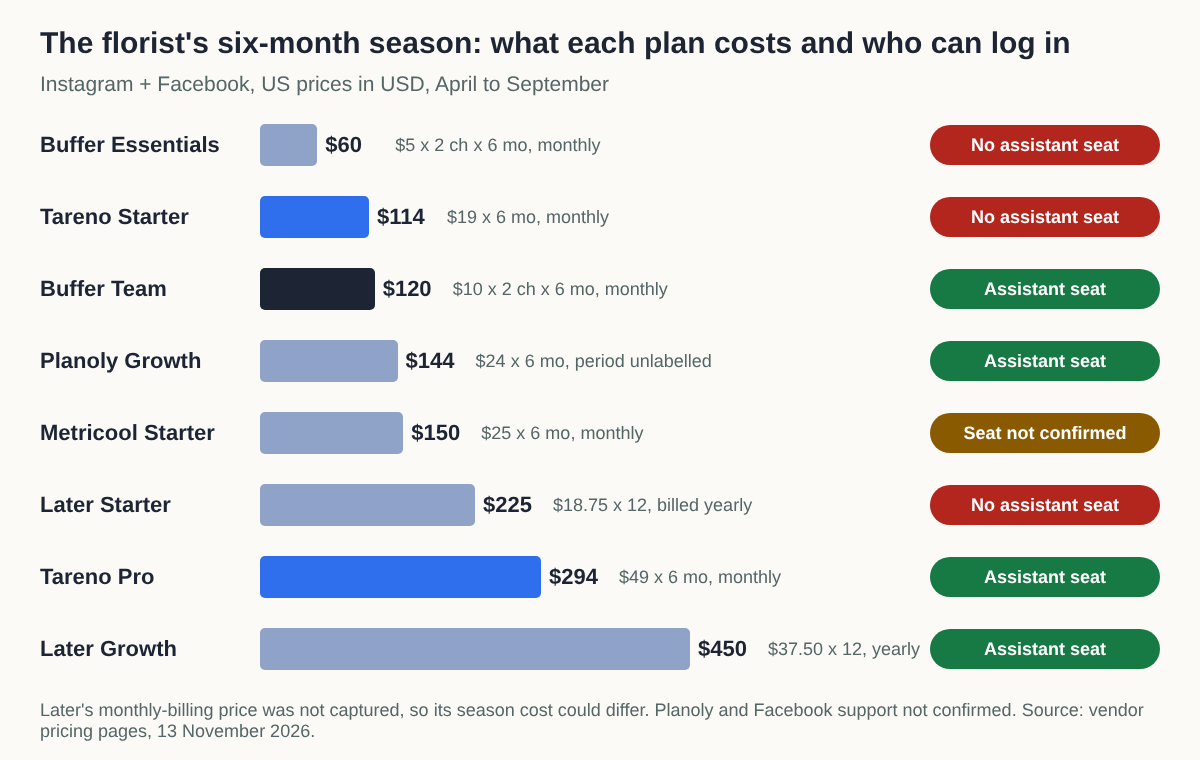
Season cost for two channels and whether the assistant gets a seat. US prices, 13 November 2026.
Buffer Essentials  $5 x 2 channels = $10/mo  x 6 months = $60
Buffer Team        $10 x 2 channels = $20/mo x 6 months = $120
Planoly Growth     $24/mo x 6 = $144   (billing period not labelled on the page; Facebook support not confirmed)
Metricool Starter  $25/mo monthly x 6 = $150  (seat count not confirmed)
Tareno Starter     $19/mo monthly x 6 = $114  (no assistant seat)
Tareno Pro         $49/mo monthly x 6 = $294
Later Starter      $18.75 x 12 = $225 billed yearly, 1 user only
Later Growth       $37.50 x 12 = $450 billed yearly
Later's monthly-billing price was not captured, so its season cost could be higher or lower than shown.
The filled worksheet
She keeps one row per item. These four rows are invented for the example:
| date | asset file | format | channel | caption | story link needed? | publish route | owner |
|---|---|---|---|---|---|---|---|
| Mon 6 Apr | oak-barn-wedding-01..10.jpg | Carousel | "Soft peach and sage at the oak barn" | no | auto | owner | |
| Wed 8 Apr | arch-install-timelapse.mp4 | Reel (45 s) | "Arch build, start to finish" | no | auto | owner | |
| Fri 10 Apr | open-saturday-18apr.jpg | Story | "Saturday 18 April is open" | yes, booking link | notify | assistant | |
| Mon 6 Apr | oak-barn-wedding-01..10.jpg | Carousel | same caption | no | auto | owner |
The verdict
| Situation | Pick | Why |
|---|---|---|
| Owner alone, Instagram only, no Facebook, no budget, and Instagram's help page confirms a horizon that covers the plan | Native Instagram scheduler | Free, no second login needed |
| Owner plus assistant, Instagram and Facebook, lowest cost, Stories as reminders | Buffer Team, $20/mo monthly | Per-channel pricing, no member cap, no queue cap below the 5,000-per-channel fair-use limit |
| Assistant only supplies files; owner is the only login | Buffer Essentials, $10/mo monthly | Same queue, one seat |
| Profile grid look and link-in-bio shop matter, one seat enough | Later Starter, watching the 30-per-profile cap | Visual Planner on all plans; Growth if she adds Stories |
| Analytics and competitor tracking matter | Metricool, worth a trial | Its Free plan lists 5 competitor profiles and 30 days of analytics, but 20 posts a month fails her volume; Starter is $25 monthly |
| She also wants the same install clips on TikTok or Pinterest | Tareno Pro, with caveats below | Reuse across channels, 3 team members, team features that start at Pro |
For this florist the short answer is Buffer Team.
Where Tareno fits and where it does not
Tareno is a cross-platform planner, so it earns its place when Instagram is one of several channels. Tareno's scheduling feature offers week, month and day views with drag and drop, CSV import (the page says "500+ posts") and a draft, review, schedule flow. Its Instagram page lists feed posts, Reels, Stories and carousels from one calendar. If she wanted to reuse the install clips elsewhere, the repurposing queue recycles content on 30, 60 or 90 days with at least 48 hours between reposts on the same platform. A "helper drafts, owner approves" setup uses approval workflows; team features start at Pro.
It is not her first pick. Starter has no assistant seat, and Pro at $49/mo monthly costs more than Buffer Team for the same two channels. We also found no statement on the public pages of a grid preview or a first-comment feature for Instagram, so we do not claim either. Plans, including a free plan with 2 channels and 15 scheduled posts and a 14-day trial that needs a payment method, are on Tareno pricing.
If the installation clips will also go to TikTok or Pinterest, check the destination formats before duplicating the Instagram row. Use the team approval workflow for the helper-to-owner handoff.
Native Instagram: what we could and could not confirm
This is the one place the caveat applies in full. A search summary reported that Instagram's own scheduler needs a professional account, reaches 75 days ahead, allows 25 posts a day, and excludes product tagging, collaboration posts, Facebook cross-posting and ads on scheduled content. We could not open Instagram's help article (it returned an empty page), so none of these numbers is confirmed here. Open Instagram's help center yourself before you plan 12 weeks around them.
Trial checklist: nine checks before you pay
- Connect the Instagram professional account and confirm the tool names it as "Business" or "Creator", not "personal".
- Schedule a carousel with the maximum number of images you really use.
- Schedule a Reel at your normal length and see whether it says auto or notify.
- Schedule a Story with a link sticker and read the publish route.
- Add a second login and see what the tool lets that person do.
- Connect the Facebook Page and publish one mirrored post.
- Fill the queue to your real horizon and watch for a cap message.
- Edit the Friday Story reminder after saving it and check that the time stays.
- Check whether first comment and grid preview exist on the plan you would buy, for example for the Saturday carousel.
Common mistakes
- Comparing the monthly price without the billing unit. Buffer charges per channel, Later per social set, Metricool per brand.
- Counting queue size, monthly posts and posts per day as the same thing.
- Buying a yearly plan for a six-month season.
- Assuming a Story with a link sticker will publish unattended.
- Trusting "hours saved" claims. Comparison pages we read gave such figures without a method, and we make no such claim.
When to use this approach, and when not to
Use the four-input method when you are choosing between two or more tools and the shortlist differs on seats, channels or queue size. Do not use it as a replacement for a trial: nothing here was operated on a live account, and vendor limits change.
Key takeaways
- Decide the Story question first; it does not depend on the tool.
- Write down the weekly plan and multiply it before reading any pricing page.
- Compare the billing unit, not the headline price.
- Pay monthly for seasonal work.
- Confirm Facebook publishing, assistant seats and Story routes in the trial.
FAQ
What is the best tool to schedule Instagram posts?
It depends on seats, channels, queue size and Stories. One person on Instagram alone can start with the native scheduler. Two people on Instagram and Facebook fit Buffer Team in the example above; grid-first planners should look at Later.
Does Instagram let you schedule posts without a third-party tool?
Reportedly yes, for professional accounts; see the native section for what is unconfirmed. Meta's API documentation describes no scheduling parameter, which is why third-party tools hold the post themselves.
Can scheduling tools publish Stories automatically?
Partly. Buffer's documentation says Story text, links, stickers and music require notification publishing. Later's page promises automatic Story publishing for business and creator accounts; we could not confirm which elements are included.
Is Buffer free enough for Instagram?
Buffer Free gives up to 3 channels and 10 scheduled posts per channel with one team member, so it suits a light queue, not a 36-item queue.
Do I need a business account to schedule?
For automatic publishing, yes. Meta's API works for professional accounts, and Buffer's automatic route needs a Business or Creator account.
Does Tareno support Instagram scheduling?
Yes, for feed posts, Reels, Stories and carousels from one calendar. Starter allows up to 100 posts scheduled at a time and has no team members; US price $19/mo monthly or $15/mo yearly.
Does scheduling hurt or improve reach?
We did not find a source for either and we measured nothing, so we make no claim.
Conclusion
Pick the tool by the four inputs, not by a ranking. If you juggle several platforms and want one calendar, try Tareno's free plan or 14-day trial and run the checklist above before you commit.