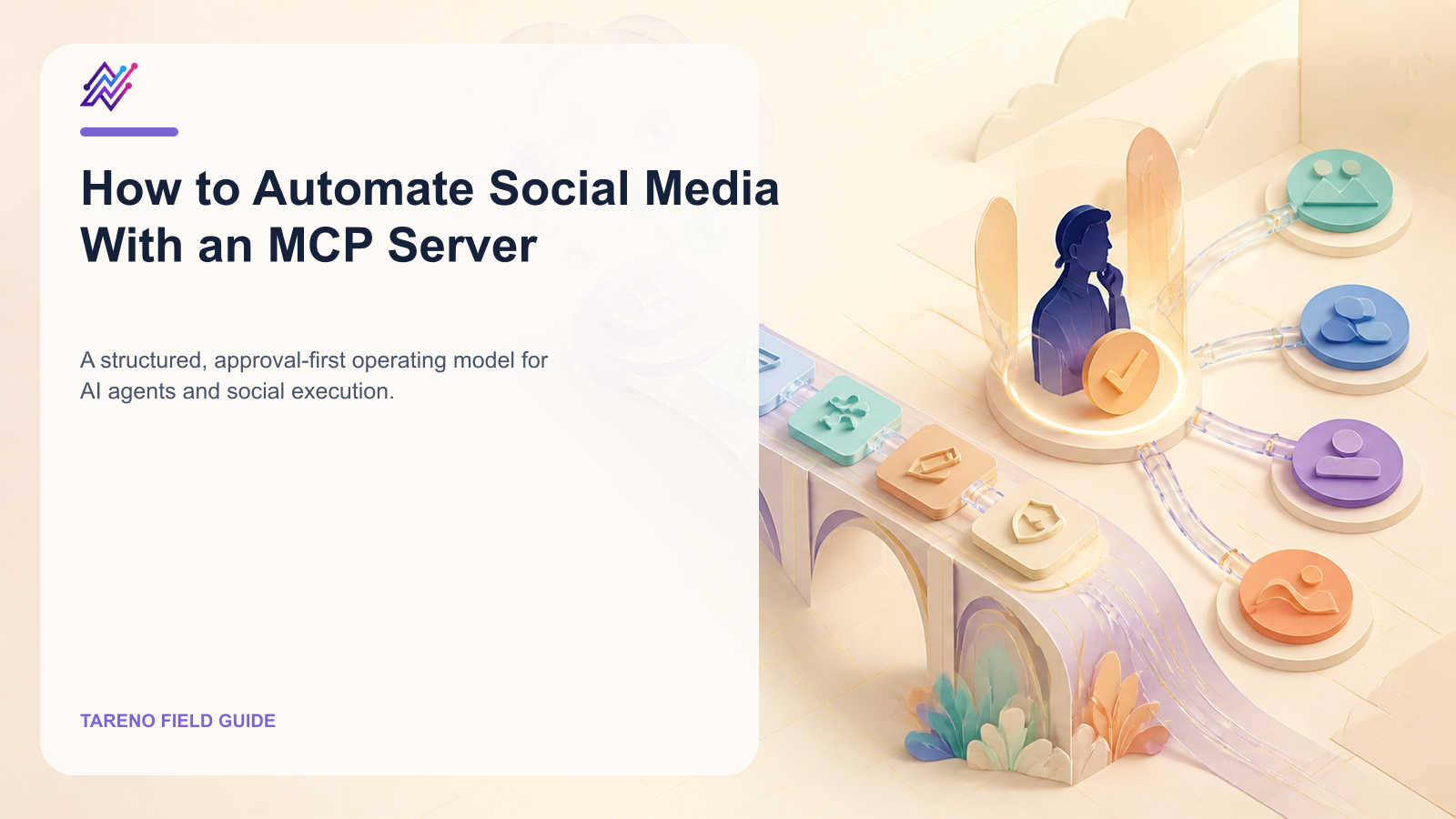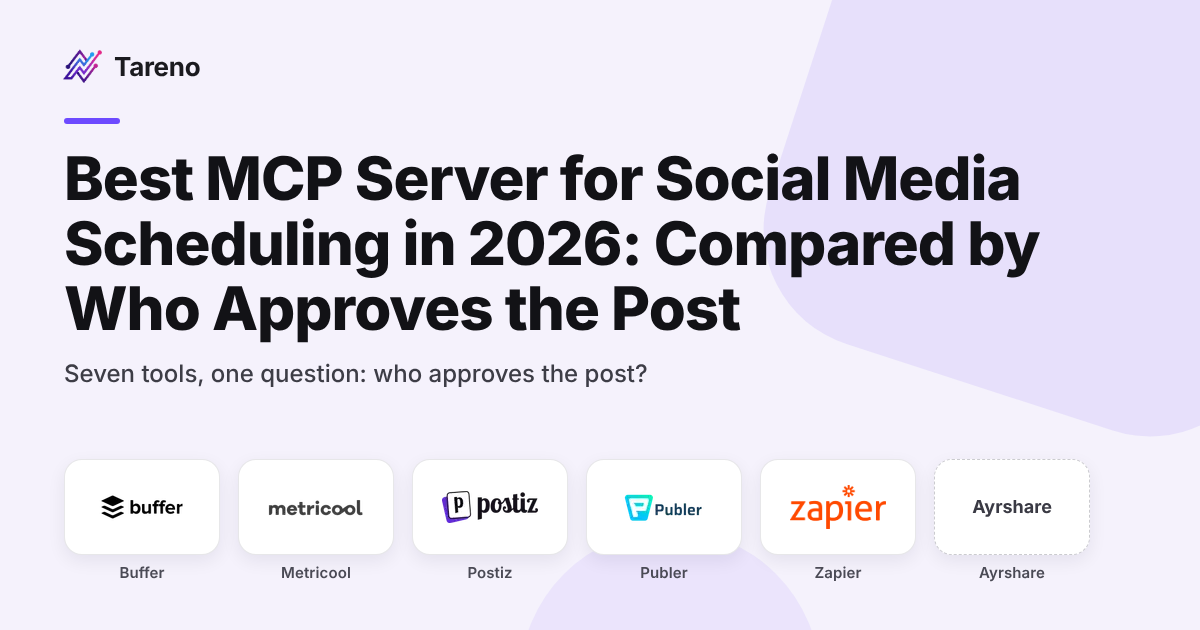
The best MCP server for social media scheduling depends on three things: who may approve a post, how your videos get in, and what you already pay for. If you already use Buffer and only want drafts, use Buffer's MCP. If you need self-hosting, use Postiz. If every schedule or publish step by an AI agent must wait for a person's approval in a dashboard, Tareno is built for that. Tareno's own docs describe this as server-enforced approval. Disclosure: this article is published by Tareno, which is one of the tools compared, so it gets its own "when not" like everyone else.
TL;DR
- There is no universal winner. Pick the scheduler first and treat MCP as a tiebreaker, which is also the stance of planpo.st's comparison (a competitor's page, read as a pattern, not as proof).
- The deciding question is who can publish: the agent, or only a person. A plan-level approval feature is not the same as an approval that also binds posts created through MCP.
- Video is the weak spot. Most documented tool lists import media from a URL; none of the pages I read describes uploading a file from a chat.
- Nothing here was operated or tested by us. Competitor facts come from vendor pages read on 2026-11-09; Tareno facts come from tareno.co pages retrieved 2026-11-07.
Quick definition
MCP (Model Context Protocol) lets an AI assistant such as Claude or ChatGPT call tools on a remote server. For scheduling, those tools create drafts, list channels, schedule or publish posts. An MCP server for social media is therefore a login plus a permission set for an agent, not a new scheduler.
The five criteria that decide it
- Who can publish? Can the same connection that drafts also schedule or publish, or does a human have to approve?
- Does MCP cost extra? Several vendors include it in every plan; one does not.
- How do videos get in? Link import, manual dashboard upload, or unclear.
- How much self-hosting or developer work?
- What limits apply? Rate limits, task quotas, plan caps.
Choose the client as well as the server: compare the Claude connection guide, ChatGPT setup and Cowork document workflow. Client setup does not replace the server-side approval policy.
The tools compared
All entries come from the vendor's own pages; the date each row was read is in the last column. Prices are US prices in USD. Prices change; check the linked page.
| Tool | MCP access | Price signals (USD) | Approval | Strength | When not | Read |
|---|---|---|---|---|---|---|
| Buffer | Every plan including Free; OAuth or personal API key | Free: 3 channels, 10 scheduled posts per channel; Essentials $60 per channel per year; Team $120 per channel per year | Approval workflows only on Team plan; whether they bind MCP-created posts is not documented in what I read | Cheap start; 17 tools; create_post accepts saveToDraft (developer guide) |
Access covers the whole account with no organization separation; MCP requests share the API rate limits; no media-upload tool among the 17 | 2026-11-09 |
| Metricool | Any plan including Free, plan limits still apply | Free $0 (1 brand, 20 scheduled posts per month); Starter from $20 yearly or $25 monthly; Advanced from $53 yearly or $67 monthly | Approval system only on Advanced | Also covers analytics, inbox and ads | The MCP page does not mention drafts; approval needs the top tier | 2026-11-09 |
| Postiz | Every plan; OAuth; 30+ platforms | Standard $29 monthly or $23 yearly (5 channels); Team $39 or $31 (10 channels); Pro $49 or $39 (30 channels) | The MCP page describes no built-in approval block and recommends scheduling rather than publishing | Open source (AGPL-3.0), self-hostable (repository) | Self-hosting needs Docker, Postgres, Redis and your own developer app per platform; the repo says Meta, YouTube or TikTok approval "can take weeks" | 2026-11-09 |
| Publer | Business and Enterprise only; OAuth, or API key with scopes | Plan gate only, price not checked | Not documented in what I read | Scoped API keys (posts, media, analytics) | Not available on lower plans | 2026-11-09 |
| Zapier MCP | Every plan | Each tool call uses 2 tasks from your shared quota | No approval step described; actions are logged in history | Fits teams already built on Zapier | Not social-specific; every call spends tasks | 2026-11-09 |
| Ayrshare | MCP only mentioned as a link; docs page returned 404 | Premium $149 per month (1 profile); no free plan | Not verified | API product with broad network coverage | Developer-oriented and the most expensive entry here | 2026-11-09 |
| Tareno | Remote server https://tareno.co/api/mcp; OAuth or a tk_live_ API key; 38 tools. The current MCP documentation includes access in Trial (100 calls), Pro (2,000 monthly calls) and Business; Free and Starter do not include it |
Free (2 channels, 15 posts scheduled at a time); Starter $19 monthly or $15 yearly; Pro (15 channels, 3 team members besides the owner) $49 monthly or $37 yearly | Drafts are created directly; scheduling, publishing and edits to scheduled posts need approval in the dashboard | Approval enforced on the server, ten channels, many agents listed (agents page) | Not for fully automatic posting; X / Twitter needs Pro. The MCP has analytics tools (get_analytics_overview, get_platform_analytics, get_post_analytics) and list_post_comments, but no ads tools and no inbox are described |
2026-11-07 |
Not checked at all: Hootsuite, Typefully, Planable, Sprout Social. Absence from this table says nothing about their MCP support.
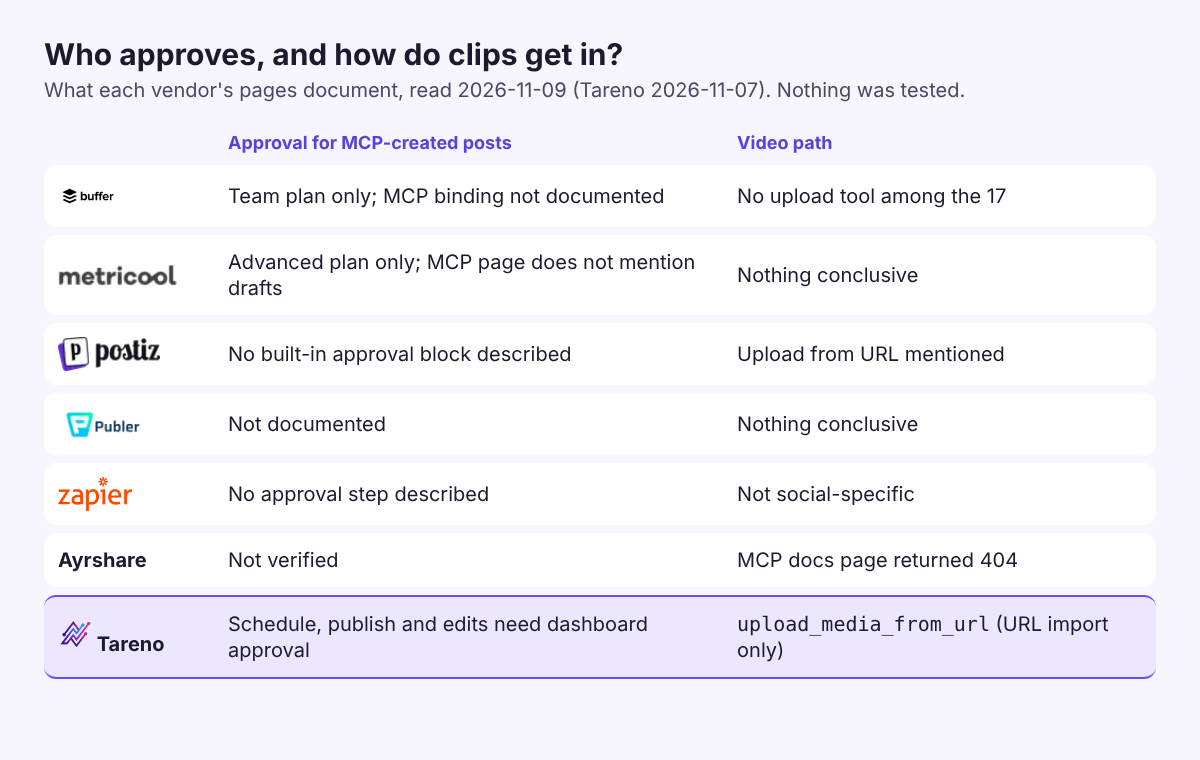
What each vendor's pages document; nothing was tested.
What the tables cannot tell you
Two caveats apply to every row. First, "not documented" is not "missing": I read public pages and did not log in anywhere. Second, the competitor ranking pages (SocialRobot, Eden, overads, planpo.st) are written by vendors who list themselves, so their order proves nothing. Their criteria were useful; their winners are not evidence.
The worked decision: a bouldering gym with two staff
This is a constructed teaching example, not a customer case and not something I ran. It shows how the criteria turn into a choice.
Input. A gym has a front-desk community manager and a route setter. Neither is a developer. Each Monday the route setter writes notes after resetting a wall, and films vertical, uncut phone clips. Three things need posting: the weekly route update, a beginners' night, and a membership promo. Channels: Instagram, Facebook, TikTok. The rule: a person looks at every post before it appears.
Route setter's notes:
Wall 4 (overhang), new set
- Red V3: sloper start, heel hook at move 4 is the crux
- Blue V5: dynamic move to a pinch, no feet on the volume
Beginners' night Thursday 6 pm, shoe rental included
Decision. Apply the criteria in order of weight:
- No scheduler yet, so tool and MCP are chosen together.
- Approval is the main rule. The front desk must see everything before it is live, even when the route setter drafts through a chat agent.
- Video path. Tareno's tool list has
upload_media_from_url, and the docs describe URL import. Buffer's 17 listed tools include no upload tool. Postiz's page mentions uploading media from a URL. For Publer and Metricool I found nothing conclusive about file or URL upload. So for any of them the clips need a link the server can fetch, or a manual upload in the dashboard. Whether this works at each vendor is untested. - Budget and effort. Self-hosting Postiz is out: three platform developer apps and server upkeep are too much for two people. Postiz cloud is out for a different reason: its MCP page describes no approval block and recommends scheduling over publishing, so the review rule would rest on habit, not on the tool. Metricool is out: approval exists only on Advanced ($53 per month billed yearly, $67 monthly), and its MCP page does not mention drafts. Ayrshare at $149 per month is out. Publer is out on its plan gate alone (Business and Enterprise only; I did not check its price). Zapier MCP only makes sense if the gym already runs Zapier.
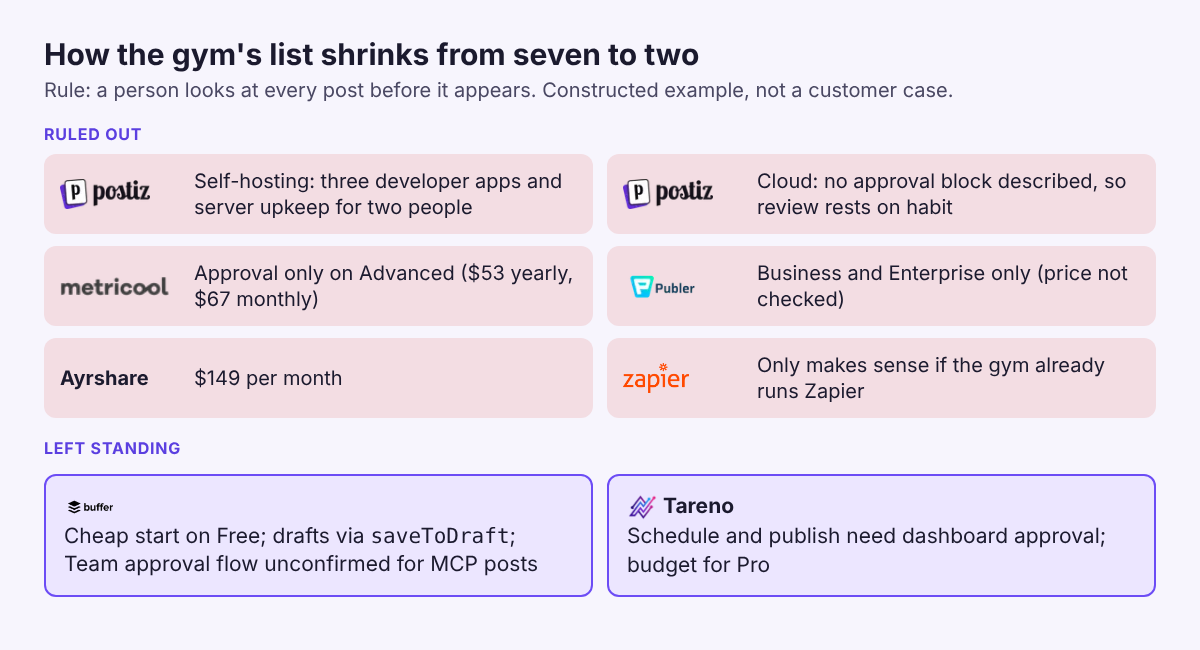
Constructed teaching example, not a customer case.
That leaves Buffer and Tareno. The matrix:
| Criterion | Buffer | Tareno |
|---|---|---|
| Approval for agent-created posts | Team plan has approval workflows; MCP interaction undocumented; saveToDraft available |
Schedule and publish need dashboard approval, per Tareno docs |
| Video path | No upload tool in the 17; link support unconfirmed | upload_media_from_url (URL import only) |
| Cost for 3 channels | Free: 3 channels, 10 scheduled posts per channel, $0. Essentials: 3 x $60 = $180 per year; Team: 3 x $120 = $360 per year | Pro: 12 x $37 = $444 per year billed yearly (12 x $49 = $588 monthly). Only if Starter were confirmed for MCP: 12 x $15 = $180 yearly |
| Setup effort | Sign in with OAuth in the chat client | Sign in with OAuth |
Two finalists, two sentences each.
- If the gym wants to start cheap (I did not check whether Buffer Free supports TikTok, so that channel is open) and is happy to look at drafts in the Buffer queue itself, Buffer is the pick, starting on Free and moving to the Team plan only if roles must enforce the review. Caveat: I could not confirm that the Team approval flow also holds for posts created through MCP.
- If the rule is that no agent write that schedules or publishes can pass without someone in the dashboard approving it, Tareno is the pick. Budget for Pro ($37 per month billed yearly, US price). Pro also includes three team members besides the owner, enough for the front desk and the route setter.
Execution. The route setter connects the chat agent, then sends one prompt:
Draft three posts from these route notes: an Instagram Reel caption,
a Facebook event post for Thursday's beginners' night, and a TikTok caption.
Do not schedule or publish anything.
Output. Illustrative drafts the front desk would then review:
- Instagram Reel: "New set on Wall 4. The red V3 starts on a sloper, and the heel hook at move 4 is the whole problem. Blue V5 asks for a dynamic move to a pinch. Come try them."
- Facebook event: "Beginners' night, Thursday 6 pm. Shoe rental included. No experience needed."
- TikTok: "Heel hook at move 4. Can you find it? New red V3 on Wall 4."
With Tareno, the drafts appear immediately and the front desk approves scheduling in the dashboard. With Buffer, drafts land in the queue as drafts or scheduled posts. The first route-update clip would be added by link or by hand in either case. Nothing in this section was executed.
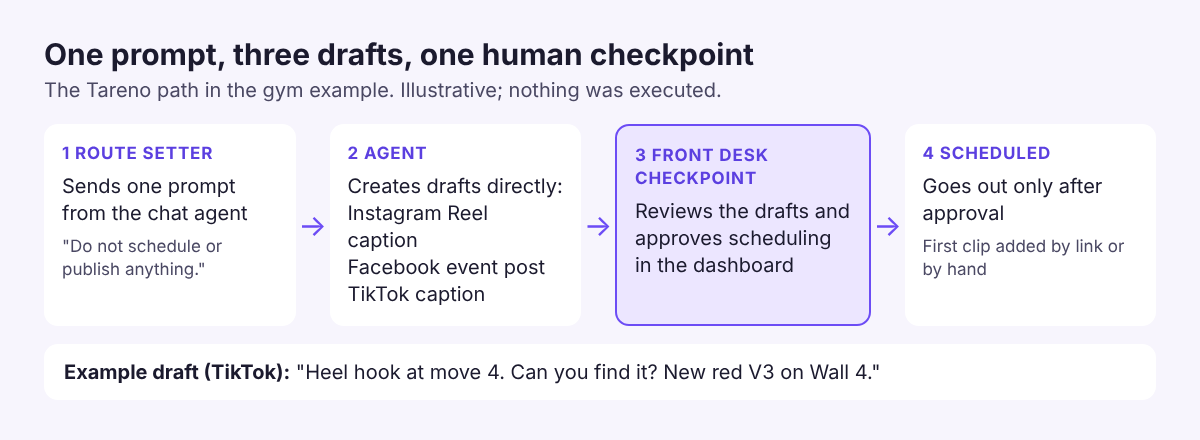
Illustrative flow; nothing was executed.
When an MCP server is the wrong tool
- You only need a calendar view and a few posts per week. A scheduler's own editor is faster than a chat.
- Your team never uses AI assistants for drafting. MCP adds a login and a permission surface for no gain.
- You need guaranteed publishing at a set time with no human involved. Approval-gated tools will wait for a person; that is deliberate.
- Your clips are files on a phone and you have no shared link. Plan a manual upload step.
A safety check before you pay
Connect with the narrowest permission the vendor offers and revoke keys you no longer use (Buffer documents revocation under Settings, API). Then test in a free account or ask the vendor: does a post created by an agent obey the approval workflow? Ask the agent to schedule a post and confirm it does not go live without a person. The governance template covers the wider approval setup. Audit trails, rate limits and token rights beyond revocation were not documented clearly enough in the pages I read to compare, so this article leaves them out.
Key takeaways
- Choose the scheduler first, then check its MCP; do not pick an MCP server in isolation.
- Ask who can publish. A plan-level approval feature and an approval that binds MCP calls are different claims, and most vendors document only the first.
- Check the video path before the price. URL import is common; file upload from chat was not documented in the pages I read.
- Self-hosting saves license fees but costs setup and platform approvals.
- Treat vendor-written "best of" lists, including this one, as input to your criteria, not as a verdict.
FAQ
What is the best MCP server for social media scheduling for a small non-technical team?
For a team that wants a low-cost start and reviews drafts in the tool, Buffer. For a team that needs every schedule or publish action approved in a dashboard, Tareno. The gym example above shows how to decide.
Do I need a paid plan to use a social media MCP server?
It differs. Buffer, Metricool, Postiz and Zapier say MCP is available on every plan. Publer limits it to Business and Enterprise. For Tareno, MCP access is documented for Trial, Pro and Business; Free and Starter do not include it.
Can an AI agent publish without my approval?
With most tools it depends on the connection's permissions and plan. Tareno documents that scheduling and publishing need dashboard approval. For the other tools I found no documentation that plan-level approval also applies to MCP-created posts.
Can an agent upload my videos, and is self-hosting Postiz or Zapier MCP worth it?
Video upload from a chat is not documented in the pages I read, so provide a link or upload manually. Self-hosting Postiz only makes sense with technical help, and Zapier MCP only for teams already on Zapier. Details are in the table.
Which AI assistants work with Tareno?
Tareno lists Claude, Claude Code, Claude Cowork, ChatGPT, Manus and Grok Bot as tested connections, and Codex as documented. Setup is on the agents page and the OpenAI setup page.
Conclusion
Pick by approver, video path and existing stack, not by a vendor's own ranking. If you want to see how agent drafts wait for human approval, start with Tareno's MCP docs.