Meta Muse AI can help you draft captions and images for Instagram and Facebook, but it does that inside Meta's own AI surfaces, not as a content calendar. Meta says Muse Image results can be downloaded and shared "directly to your chat, story, or feed" (Meta, July 2026). Scheduling or automatic publishing to Instagram or Facebook Pages is not described in the Meta announcements we read. So the practical workflow is: let Muse draft, let a person check every fact, and publish manually or through a scheduler.
TL;DR
- "Muse" is three different things at Meta: Muse Spark (a language model), Muse Image (an image model) and Muse (a personal AI agent app). Only the first two matter for drafting posts.
- Use Muse Spark for caption drafts and Muse Image for graphics with text. Do not use either as the source of truth for prices, condition grades, dates or addresses.
- As of Meta's July announcement, Muse Image is available in the Meta AI app and on meta.ai; Facebook was listed as "coming soon", and we found no later confirmation.
- A human approval step with a short checklist catches the errors that matter, such as an inflated condition grade.
- Publishing is a separate step. Tareno can schedule Instagram and Facebook posts, but Meta Muse is not a confirmed Tareno connection.
Quick definition
Meta Muse AI is Meta's 2026 family of AI models and apps, built around the Muse Spark language model. In this article it means the drafting tools you can reach through the Meta AI app and meta.ai: Muse Spark for text and Muse Image for pictures.
Where to use it. Meta's announcements point to the Meta AI app and meta.ai for both models; Muse Image also reaches Instagram Stories (US only) and WhatsApp in limited countries. We found no documented commands or special syntax: you type an ordinary prompt and download or share the result. Menus differ by app version and region, so we describe no screens.
Which "Muse" are you asking about?
The name is used for three products, and mixing them up is the most common source of wrong advice.
| Name | What it is | Where it appears | Useful for social drafting? |
|---|---|---|---|
| Muse Spark | Language model, announced April 2026 | Powers the Meta AI app and meta.ai; Meta says it is rolling into WhatsApp, Instagram, Facebook, Messenger and Threads (Meta) | Yes: caption drafts, variants, rewrites |
| Muse Image | Image generation and editing model, announced 7 July 2026 | Meta AI app, meta.ai, Instagram Stories (US only) and WhatsApp (limited countries) (Meta AI blog) | Yes: graphics and edits, with care |
| Muse (agent) | Personal AI agent that runs on a "Muse Secure VM", launched 8 September 2026 in the US | App "Muse" and muse.ai (Meta) | Not shown to post or schedule; Meta's announcement does not mention it |
Availability differs by product. A secondary source, California Today, lists the agent's staged country rollout, with no EU date as of 29 October. For Muse Image we found no EU availability statement; treat Europe as unconfirmed.
The worked example: a record shop announces six arrivals
This is an illustrative scenario, not a real customer and not a product test. A neighbourhood record shop has an owner and one weekend assistant. They want to announce six new arrivals and a Saturday listening night on Instagram and Facebook.
Input. A stock table, phone photos of the sleeves, and the event details. The artists and prices below are invented.
| # | Artist and title | Pressing | Price | Sleeve / vinyl |
|---|---|---|---|---|
| 1 | The Harbour Lights, Salt Air | 1978 first pressing | $34 | VG+ / NM |
| 2 | Odile Marr, Late Trains | 1983 reissue | $22 | NM / NM |
| 3 | Kestrel Union, Open Ground | 1971 first pressing | $58 | VG / VG+ |
| 4 | Tomás Ruiz Trio, Blue Courtyard | 1996 reissue | $26 | NM / NM |
| 5 | Pale Meridian, Glass Weather | 1989 first pressing | $30 | VG+ / VG+ |
| 6 | Anneke Vos, Quiet Hours | 1975 first pressing | $41 | VG+ / VG |
Event: listening night, Saturday 7 pm, entry free (example data).
Decision. Who does what:
| Task | Muse Spark | Muse Image | Human |
|---|---|---|---|
| Draft the Instagram caption from a pasted table row | Yes | Checks every field | |
| Draft a longer Facebook version with opening hours | Yes | Checks hours, address | |
| Make a listening-night flyer with legible text | Yes | Checks the date, time and spelling | |
| Clean the background of a sleeve photo | Yes, if at all | Confirms the photo still shows the actual copy | |
| Read sleeve details from a photo | Unverified | Do it from the table instead | |
| Confirm price, pressing and condition | Never the source | Never the source | Owner, against the table |
| Approve and publish | Owner only |
Meta says its AI can interpret images (Muse Spark announcement). Whether it reads record sleeves reliably is not documented, so the plan sends text from the table, not from the photo. Meta says Muse Image can "render text cleanly inside your visuals" and that "the text comes out legible and styled to match" (Meta, July 2026). That is a description, not a guarantee of correct dates or spelling, so the shop checks every word. It uses it only for the flyer, never to generate a "photo" of a record it sells.
Execution. The assistant pastes one row at a time with a prompt like this (example prompt, wording is ours):
Write a 2-sentence Instagram caption for this record. Use only the
facts below. Do not add condition, price or year details that are
not listed. End with "Listening night Saturday, 7 pm."

The Harbour Lights, Salt Air. 1978 first pressing. $34.
Sleeve VG+, vinyl NM.
A draft might come back like this:
Fresh in the bins: The Harbour Lights, "Salt Air" (1978 first
pressing). Near Mint copy, $34. Come hear it Saturday.
The error case (built on purpose). The draft says "Near Mint copy". The table says sleeve VG+, vinyl NM, so the sleeve is not Near Mint. A language model smoothing a sentence will round up; here we built the failure to show the check. The owner corrects it:
Fresh in the bins: The Harbour Lights, "Salt Air" (1978 first
pressing), $34. Sleeve VG+, vinyl NM. Listening night Saturday,
7 pm, free entry.
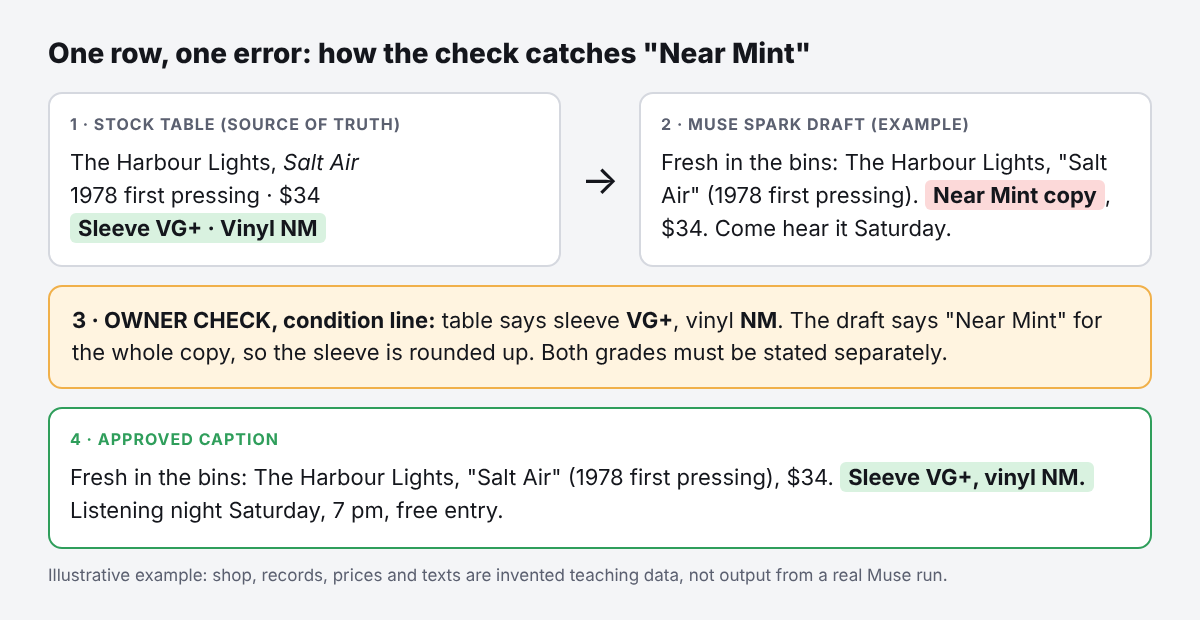
The same record row through draft, check and approval. Illustrative example with invented data.
Facebook version (example). For the same row, the assistant adds the opening hours as an input fact (example hours, invented) and asks for a longer text:
Write a Facebook post of 3-4 sentences for the record below. Use only
these facts. Opening hours: Tue-Sat 11-18. Listening night Saturday,
7 pm, free entry.

The Harbour Lights, Salt Air. 1978 first pressing. $34.
Sleeve VG+, vinyl NM.
An approved version could read:
New in the shop: The Harbour Lights, "Salt Air", a 1978 first
pressing for $34 (sleeve VG+, vinyl NM). Come by Tuesday to Saturday,
11-18, and join our free listening night this Saturday at 7 pm.
Flyer (example). The prompt for Muse Image: "Poster, dark blue background, large headline 'Listening Night', below it 'Saturday, 7 pm, free entry', small line 'New arrivals: Harbour Lights, Odile Marr, Kestrel Union'." The owner reads the generated flyer letter by letter against the table and the event details: weekday, 7 pm, "free entry", and each artist name spelled exactly. A single wrong letter in a name means regenerating or fixing the text outside Muse. These texts and the flyer prompt are teaching examples, not output from a real Muse run.
Result. The row yields an approved Instagram caption, a Facebook text and a flyer brief; the remaining five rows follow the same loop. The owner ticks the checklist below before anything goes live.
The approval checklist
Run this on every draft, in this order. It takes the unreliable parts of AI output and puts them back on the table.
[ ] Artist and title spelled exactly as in the stock table
[ ] Pressing / year matches the table
[ ] Price matches the table (currency shown)
[ ] Condition grades match the table, sleeve and vinyl separately
[ ] Photo shows the actual copy for sale, not a generated image
[ ] Event day, time, address and entry terms are correct
[ ] Text inside a Muse Image graphic re-read letter by letter
[ ] AI-made graphics are labelled as such in the post text
[ ] Cover art rights: a small shop photo of a sleeve is the usual
    case, but check your own situation (not legal advice)
[ ] Owner has approved
The labelling line is a house rule, not a Meta requirement. Meta says Muse Image output carries a "Content Seal", an invisible watermark that survives cropping, compression and screenshots, and it previews a detection tool at meta.ai/identification (Meta AI blog). That blog does not mention C2PA. Whether Instagram or Facebook automatically add a visible AI label to Muse Image output is not documented in the sources we read, so do not count on it.
Getting the drafts out the door
Once the text is approved, you have two routes.
- Manual. Use Meta's share option to send the image to your story or feed, or copy the text into the Instagram and Facebook apps. Fine for one post a week.
- A scheduler. For six arrivals plus an event across two networks, a planning tool saves repeated copy-and-paste. Tareno supports Instagram (feed posts, Reels, Stories, Carousels) and Facebook (feed posts, Reels, Stories, Page content).
On Tareno's pricing page, the Free access level covers 2 channels and up to 15 scheduled posts at a time, which fits this shop's two profiles: six arrivals plus the event on two networks make 14 posts, just under the limit. The Starter plan (US price $19/month billed monthly, $15/month billed yearly) allows up to 100 posts scheduled at a time. Team features start at Pro (US price $49/month billed monthly, $37/month billed yearly, 3 team members besides the workspace owner), which is the plan to look at if the assistant should prepare drafts for a second person to review. Free and Starter list no team members.
One limit to state plainly: Meta Muse appears in Tareno's agent catalog as submitted, with connection evidence still pending. Do not assume Muse can create or schedule posts in Tareno. The setup page for supported agent connections is the MCP documentation.
Inspect the post-scheduling workflow after the owner approves the text. The cloud-agent directory distinguishes available agent connections; a listing is not evidence that Meta Muse has been connected.
What to ask Muse, and what not to
| Good fit | Poor fit |
|---|---|
| Caption variants for a short, fixed fact set | Prices, stock levels, availability |
| Rewriting your text in a different length or tone | Condition grades, authenticity, provenance |
| A flyer with a headline, date and time | Photos of the product you actually sell |
| Backgrounds and edits you review against the original | Anything that must be right without a human reading it |
Privacy: your Instagram photos and Muse Image
At launch, Muse Image's @-mention feature let people use public Instagram accounts as image references; Meta removed it on 10 July 2026. ComputerBase described an opt-out toggle under "Sharing and reuse" in Instagram's settings (ComputerBase, 10 July); verify it in your app. How your own prompts and uploads are used for training is not stated in the posts we read.
When to use Muse, and when not to
Use it when you have structured facts in front of you, you want several wordings quickly, and a person will read every line before posting.
Skip it when the post makes a claim you cannot check against a record (condition, authenticity, price), when you need scheduled publishing from the same tool, or when you are outside the countries where the product is available.
Key takeaways
- Separate Muse Spark, Muse Image and the Muse agent before you plan a workflow.
- Give Muse the facts and forbid additions; never ask it to supply them.
- Read generated text, including text inside images, letter by letter.
- Scheduling is not described in Meta's announcements; check availability for your country and platform.
FAQ
Is Meta Muse AI free for Instagram and Facebook content?
Meta's July announcement says everyday use is free and heavier use falls under Meta subscription plans. It gives no limits or prices for Muse Image. For the Muse agent, Meta's September post says it is free for most of what people need, with subscription plans.
Can Meta Muse AI post to Instagram or Facebook for me?
Meta says Muse Image results can be shared to your chat, story or feed. Scheduling or automatic posting to Instagram or Facebook Pages is not described in the announcements we read, including the one for the Muse agent.
Is Muse Image available on Facebook?
Meta listed Facebook as "coming soon" on 7 July 2026. We found no later confirmation, so check the Meta AI app for your region.
Does Meta Muse work with Tareno?
Not as a confirmed connection. The current public agent directory does not list a confirmed Meta Muse connection. You can still use Muse for drafts and paste the approved text into a scheduler.
Are Muse Image pictures labelled as AI?
Meta describes an invisible Content Seal watermark and a detection tool preview. Whether Instagram or Facebook add a visible label automatically is not documented in the sources we read, so label AI graphics yourself.
Can I stop Meta using my Instagram photos with Muse Image?
ComputerBase reported a setting under "Sharing and reuse" that switches off reuse of your posts and Reels by AI features. Meta later removed the @-mention reference feature. Verify the setting in your app. The Decoder reported (8 July 2026, press source) that already generated images are not deleted when you opt out.
Conclusion
Use Meta Muse AI as a fast first-draft partner for Instagram and Facebook text and graphics, and keep prices, grades and dates under human control with a written checklist. When the drafts are approved and you need to schedule across both networks, start with Tareno's Free access and see whether two channels and 15 scheduled posts fit your week.