TL;DR
- To plan LinkedIn posts consistently, fix the rhythm first (this guide uses three posts per week), then plan backwards from each publish date: draft, approval, scheduled.
- Decide the voice per post lane: a partner's profile or the Company Page. LinkedIn's rules differ for each, for example scheduling windows and who may schedule.
- Mine material you already have, such as call notes and a webinar recording, instead of staring at a blank calendar. In the example below, 12 raw items become 12 posts.
- LinkedIn lets you schedule profile posts from 10 minutes to 3 months ahead and Page posts from 1 hour to 3 months ahead. On Pages, polls, multi-photo posts and reshares cannot be scheduled natively; on profiles LinkedIn lists only events and jobs.
- The whole system also works with LinkedIn's own scheduler and a spreadsheet. A tool such as Tareno adds one calendar and a review step for a team.
Quick definition
A consistent LinkedIn plan is a fixed weekly rhythm, a source of ideas that does not run dry, and lead times that give every post a draft, a review and a scheduled slot before its publish date. It is a standard operating procedure (SOP) for a team, not a list of post ideas.
The case used throughout: a three-person nurse-staffing consultancy
Everything below is one worked example. It is a constructed teaching example: the firm, the people, the quotes and the dates are invented for illustration, and no result of this plan was measured.
The firm. Three partners place nurses in hospitals.
- Partner A recruits nurses.
- Partner B owns the hospital clients.
- Partner C runs operations.
The problem. Posts used to appear in bursts after the monthly webinar, followed by gaps of two or three weeks.
The raw material. Handwritten notes from about eight client and candidate calls in the month, and one 45-minute webinar recording held on the first Thursday (here: Thursday, 7 January 2027).
The goal. One month of 12 finished, approved and scheduled posts, published 25 January to 19 February 2027.
Step 1: Decide the audiences, lanes and voices
Posts that mix audiences are the first thing that makes a feed look random. This firm has two audiences, so it gets three lanes.
| Lane | Audience | Topics | Voice | Why this voice |
|---|---|---|---|---|
| Nurse-facing | Nurses and candidates | Shift models, onboarding, credential questions | Partner A's profile | A recruiter's profile is where candidates already look |
| Leader-facing | Hospital leaders | Vacancy thinking, onboarding gaps, retention | Partner B's profile | B owns these relationships |
| Webinar | Both | Announcements and recaps | Company Page | The Page is the firm's official channel |
This split is a judgment call, not a LinkedIn rule. The platform facts only shape it: Page posts are less flexible than profile posts. LinkedIn's help page for scheduling Page posts lists events, multiple photos, reshares, polls, jobs and service posts as unsupported, so the Page lane carries the plain, text-led posts. The profile help page lists only events and jobs as unsupported and does not mention polls or multiple photos for profiles; this guide did not test that, so check it before putting a poll in a personal lane. For Pages, polls and multi-photo posts are published by hand (see Step 6).
Step 2: Set the rhythm
Three posts per week, one per lane: Monday on A's profile, Wednesday on B's profile, Friday on the Page. That is 12 posts in four weeks.
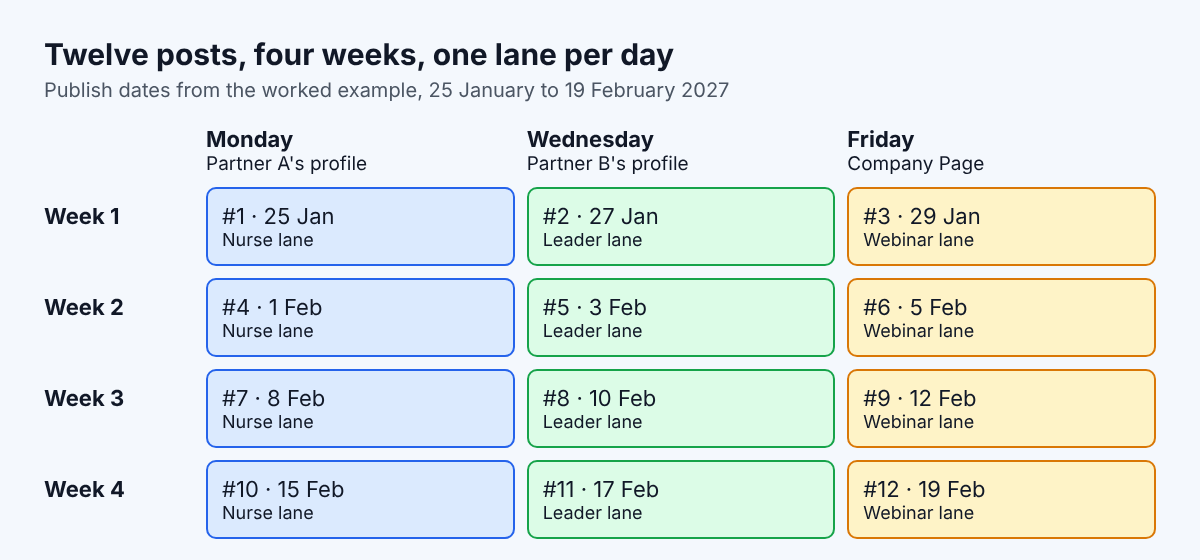
The three-posts-per-week rhythm of the worked example (invented case).
This number is an editorial recommendation, not a measured optimum. Two practitioner guides, Creator's 90-day B2B plan and Cleverly's content calendar guide, both suggest about three posts a week as a floor for a working cadence. Both are commercial sources and their statistics are mostly unsourced, so treat them as opinion. The deciding argument for this firm is practical: three partners can sustain one post each per week, and four weeks of that stays well under the scheduling limits discussed below.
Step 3: Mine the raw material (days 1 to 2 after the webinar)
The day after the webinar, one person goes through two sources and produces 12 candidate items.
- From the recording, pick 6 segments, each with a timestamp.
- From the call notes, pick 6 questions that came up more than once.
- Strip names, clinics and patient detail from every item.
- Mark each item
ok to publish,needs consentordrop. Anything markedneeds consentwaits until the person agrees in writing.
An anonymisation example, from a note to a publishable line (the note is invented):
Call note:    "Maria K., ICU night nurse, left Sunrise Clinic after 3 weeks.
               Nobody showed her where the medication room was. Wants 12-hour
               shifts, max 3 nights in a row."

Publishable:  "A night nurse told us she nearly quit in week one, and not
               because of the work. Nobody had shown her where things were
               kept. Which of these does your onboarding cover on day one?"

Status:       ok to publish (no name, no employer, no unit, no detail
               that identifies a person)
Notice what was removed: name, clinic, unit and the shift preference. What was kept is the pattern, which is the part readers care about. For the legal side of recruitment advertising and data protection, have your own counsel review the rules that apply to you; this guide does not cover them.
Use Content Boards to keep source material and working briefs together if the team needs more than a spreadsheet. Retain the consent and source checks in your own process.
Step 4: Fill the month and set the lead times
Lead times are counted backwards from the publish date T in working days: draft due at T-7, approval at T-3, scheduled at T-2. These numbers are this firm's internal buffer, not a LinkedIn rule. LinkedIn itself would accept a profile post 10 minutes before publication; the buffer exists so that a sick day does not cause a gap.
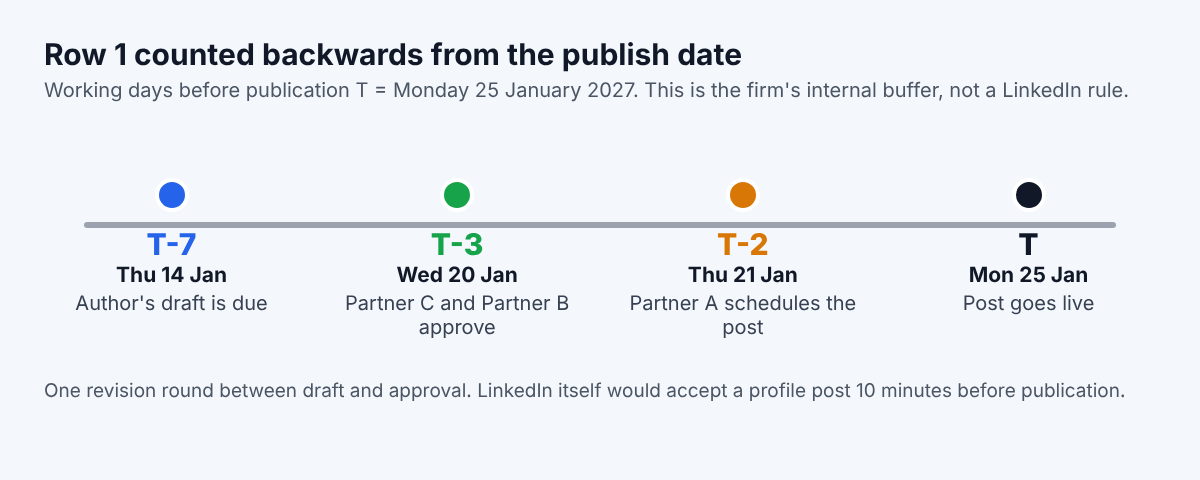
Lead times for row 1, counted in working days.
The month, using the 12 mined items (timestamps and quotes are illustrative):
| # | Publish | Lane | Voice | Source item | Hook line | Drafts | Approvers | Draft due | Approval due | Scheduled on |
|---|---|---|---|---|---|---|---|---|---|---|
| 1 | Mon 25 Jan | Nurse | A profile | Call question 1 | "What to ask before you accept a 12-hour night rotation" | A | C + B | Thu 14 Jan | Wed 20 Jan | Thu 21 Jan |
| 2 | Wed 27 Jan | Leader | B profile | Call question 2 | "Count the empty shift before you count the invoice" | B | C + A | Mon 18 Jan | Fri 22 Jan | Mon 25 Jan |
| 3 | Fri 29 Jan | Webinar | Page | Segment 1 (04:10) | "Webinar recap: the first week sets the tone" | B | C + A | Wed 20 Jan | Tue 26 Jan | Wed 27 Jan |
| 4 | Mon 1 Feb | Nurse | A profile | Call question 3 | "Five things a good onboarding week shows you" | A | C + B | Thu 21 Jan | Wed 27 Jan | Thu 28 Jan |
| 5 | Wed 3 Feb | Leader | B profile | Call question 4 | "Who answers the new nurse's questions at 3 a.m.?" | B | C + A | Mon 25 Jan | Fri 29 Jan | Mon 1 Feb |
| 6 | Fri 5 Feb | Webinar | Page | Segment 2 (12:30) | "Float pool or agency: the question we got most" | A | C + B | Wed 27 Jan | Tue 2 Feb | Wed 3 Feb |
| 7 | Mon 8 Feb | Nurse | A profile | Segment 3 (21:15) | "Which documents to gather first when you change employer" | A | C + B | Thu 28 Jan | Wed 3 Feb | Thu 4 Feb |
| 8 | Wed 10 Feb | Leader | B profile | Segment 4 (28:40) | "The exit-interview question that tells you the most" | B | C + A | Mon 1 Feb | Fri 5 Feb | Mon 8 Feb |
| 9 | Fri 12 Feb | Webinar | Page | Segment 5 (33:05) | "One slide from the webinar, in words" | B | C + A | Wed 3 Feb | Tue 9 Feb | Wed 10 Feb |
| 10 | Mon 15 Feb | Nurse | A profile | Call question 5 | "Is a 6-week contract right for you? Questions to ask" | A | C + B | Thu 4 Feb | Wed 10 Feb | Thu 11 Feb |
| 11 | Wed 17 Feb | Leader | B profile | Call question 6 | "Why we ask about onboarding before we ask about pay" | B | C + A | Mon 8 Feb | Fri 12 Feb | Mon 15 Feb |
| 12 | Fri 19 Feb | Webinar | Page | Segment 6 (41:20) | "The last webinar question, and the next date: Thursday 4 March" | A | C + B | Wed 10 Feb | Tue 16 Feb | Wed 17 Feb |
The sums, shown once: for row 1, T is Mon 25 Jan. Counting back seven working days gives Thu 14 Jan, three give Wed 20 Jan, and two give Thu 21 Jan. Row 2 crosses a weekend, which is why T-3 for Wednesday 27 Jan is Friday 22 Jan. No public holidays were taken into account; Presidents' Day (Mon 15 Feb 2027, a US holiday) falls on the publish date of row 10, so check holidays in your own market.
Check the table against the mining step: all drafts are due on or after 14 January, after the raw material was processed on 8 and 11 January, so no draft waits for ideas.
The Page lane is drafted by A and B in turn; Partner C schedules it because of the role rule in Step 6.
Step 5: Write three sample posts, one per lane
These are the finished texts for rows 1, 2 and 3 (invented for the example).
Row 1, nurse lane, Partner A's profile, Mon 25 Jan
12-hour nights are not all the same job.

Before you accept a rotation, ask three things:
1. How many nights in a row, and who covers the fourth?
2. Who is your named contact in week one?
3. Where do you park and where is the medication room?

A night nurse told us she nearly quit in week one, and not because of
the work. Nobody had shown her where things were kept.

Which of these did your last employer get right?
Row 2, leader lane, Partner B's profile, Wed 27 Jan
An empty shift has a price before anyone sends an invoice.

Overtime for the team that covers it. The ward manager's hours spent
phoning around. The patient list that gets shorter.

Count the empty shift first. Then compare it with the cost of a
planned placement.

How does your unit count a vacancy today?
Row 3, webinar lane, Company Page, Fri 29 Jan
Webinar recap: the first week sets the tone.

From our January session (segment at 04:10):
- Name one contact for every new nurse.
- Show the medication room, the break room and the parking on day one.
- Check in on day three, not at the end of the probation period.

The recording is available on request. Our next session is on
Thursday 4 February.
Each post carries one idea, one question for the reader and no claim about results.
Step 6: Schedule inside LinkedIn's actual limits
Who schedules what, and the facts that decide it, read from LinkedIn's help pages on 8 November 2026:
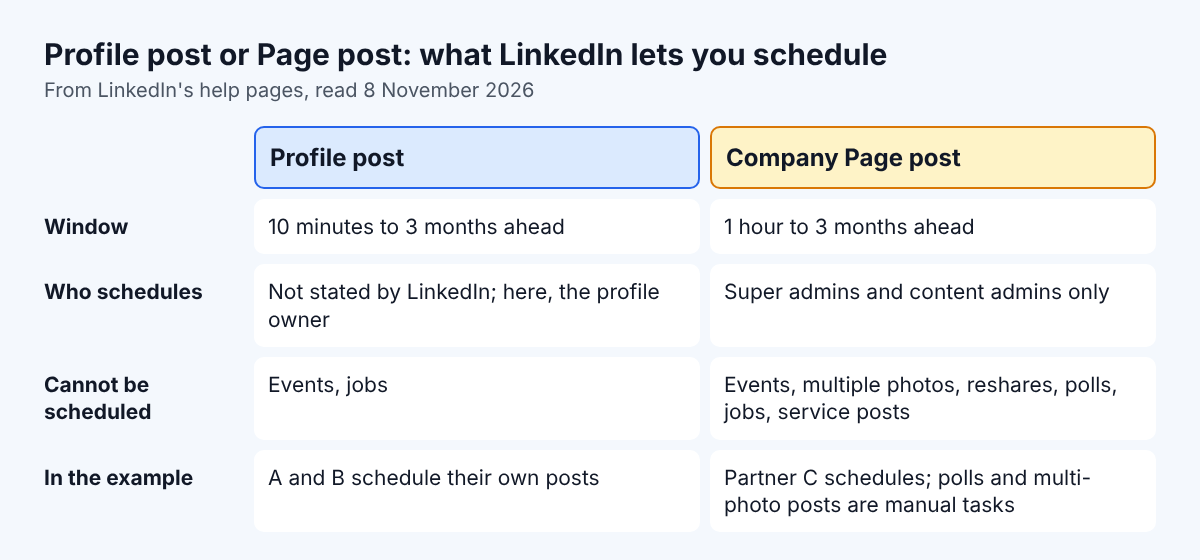
Scheduling rules per LinkedIn help pages, read 8 November 2026.
| Question | Profile post | Company Page post |
|---|---|---|
| Earliest and latest slot | At least 10 minutes and up to 3 months ahead | At least 1 hour and up to 3 months ahead |
| Who can schedule | The help page does not state eligibility; here, the profile owner | Super admins and content admins only |
| Not schedulable | Events, jobs | Events, multiple photos, reshares, polls, jobs, service posts |
| Time zone | Times are converted to UTC from the device time zone | Not checked for Pages in this guide |
| Changing a slot | More > Modify schedule, or Edit post | Modify schedule, then click Schedule again or the new time does not apply |
Practical consequences for the firm (the click paths are also walked through in Plainrival's scheduling guide, a secondary source):
- A and B schedule on their own profiles. Before scheduling, they check that the device time zone is the audience's time zone, because the help page says times are converted from the device.
- C schedules all Page posts and must be a super admin or content admin on the Page.
- On the Page, polls, multi-photo posts and reshares are published by hand on the day. Put them in the calendar as a manual task, not as a scheduled post.
- A scheduled Page post cannot be promoted from "Browse existing content" in Campaign Manager until it has been published, per the Page scheduling page.
- After scheduling, check the clock-icon badge on the share box: the help page says it shows the number of queued posts. The count should equal the plan for that profile.
- Editing a scheduled Page post is possible: LinkedIn's Page scheduling overview lists Post now, Edit post, Modify schedule and Delete post, and says admins can also edit and reschedule posts scheduled by other Page admins.
Step 7: Approval in one round
The approval chain for every post, within the lead times above:
Author drafts (T-7)
   -> Partner C checks facts, confidentiality, links (by T-3)
   -> The partner who did not draft checks tone (by T-3)
   -> One revision round, then approved (T-3)
   -> The profile owner or C schedules (T-2)
The Approvers column in the Step 4 table follows this chain: C plus the partner who did not draft. Page posts drafted by A are toned by B, and the other way round. One revision round is a rule of the SOP, not a recommendation from a source. It stops a post from drifting past its slot.
The approval-workflow guide explains the product-side review chain. It does not replace the confidentiality check in this SOP.
Step 8: Review the month in 20 minutes
At the end of the four weeks:
- Did all 12 posts go out on the planned day? Compare the badge counts and the table.
- For each lane, which posts got replies from the target audience (nurses or leaders)? Note it in the table.
- Which source items were dropped, and why (consent, quality, time)?
- Next webinar: the 4 February session feeds the following month's table. Start the mining step the day after it.
Compare the month to your own plan, not to outside benchmarks. This guide gives no engagement benchmarks because it found no primary data for them.
For a related analytics-led drafting method, the ChatGPT LinkedIn workflow starts from your own results rather than an invented performance benchmark.
Running the same table in Tareno
The month table works unchanged in a spreadsheet plus LinkedIn's scheduler. Tareno adds a single calendar for all channels and a review step for a team.
- Tareno's scheduling pipeline runs First-Draft, Review, Schedule, with optional team approval, and a calendar in week, month and day views with drag and drop. Rows 1 to 12 become drafts on dates. The Step 7 chain maps onto the Review step: the author's draft sits in First-Draft, C and the partner who did not draft act as reviewers in Review, and the post moves to Schedule once approved. How reviewers are assigned in the product is not covered by the public page, so check it in your account.
- Team features start at Pro. Pro has the owner plus 3 invited team members, so three partners fit. Starter has 0 team members and no team features. The US price for Pro is $49 per month billed monthly or $37 per month billed yearly.
- The LinkedIn channel page lists text, image and video posts and company updates. How Tareno treats a personal profile compared with a Company Page connection is not confirmed here, so check that for the lanes in Step 1 before moving the plan.
- Twelve scheduled posts stay under the Free limit of 15 and the Starter limit of 100 scheduled at a time. The case needs at least three LinkedIn connections (A's profile, B's profile, the Page), so it needs at least Starter (5 channels); Free has only 2 channels and no team features. The team approval chain needs Pro.
An AI agent connected via Tareno's MCP server can create drafts directly, and requests approval for scheduling. See the agents overview for the connection options. This is optional and the SOP does not depend on it.
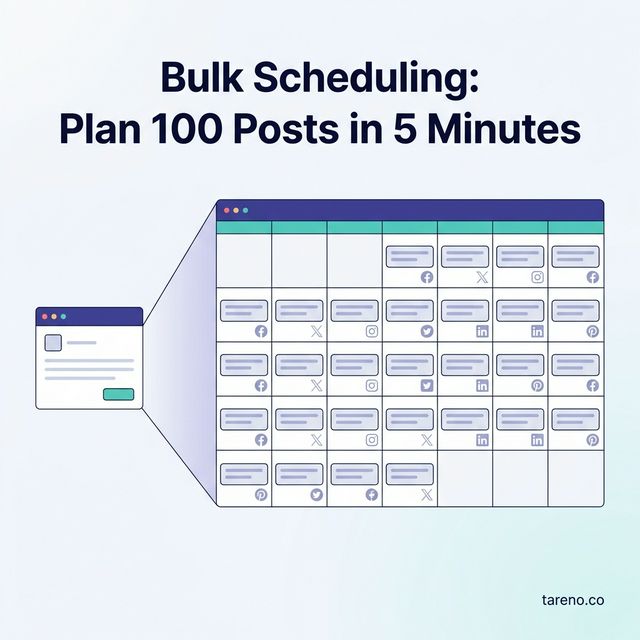
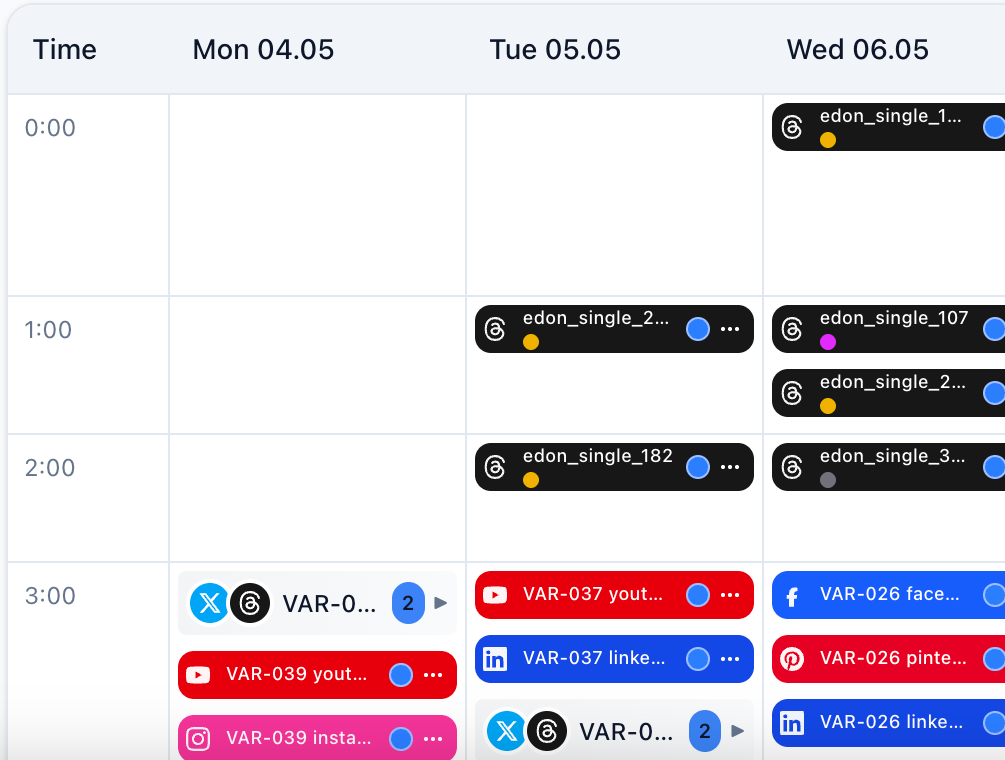
Use the calendar’s dated columns and account badges to check which LinkedIn lane each scheduled entry belongs to. This existing capture illustrates the calendar layout, not the consultancy’s twelve-post plan.
What goes wrong and where native planning stops
| Failure | Cause | Fix |
|---|---|---|
| Gaps after a busy week | Drafts started at T-1 | Hold the T-7 date; the buffer is the point |
| Post goes out at the wrong hour | Device was in another time zone | Check the time zone before scheduling |
| Page post missing | The scheduler was not a super admin or content admin | Assign scheduling to C |
| A poll or multi-photo post fails to schedule | LinkedIn does not support it for Pages | Publish manually, mark it as a task |
| Anonymisation slipped | Notes copied word for word | Status column: ok to publish, needs consent, drop |
When to use this SOP, and when not
Use it when:
- Two or three people share a LinkedIn presence and approval matters.
- You have recurring raw material, such as calls, a webinar or customer questions.
- Your past pattern is bursts and gaps.
Skip or adapt it when:
- You are a solo author with no review step. Cut Step 7 and keep the rhythm and the lead time.
- Your content depends on live reactions. Keep at least one slot open each week.
- Your sector has advertising or data-protection rules for recruiting or health content. Get your own legal check first.
Key takeaways
- Fix the rhythm first, then work backwards: draft T-7, approval T-3, scheduled T-2 (working days) is this guide's internal buffer, not a LinkedIn rule.
- Choose the voice per lane. Profile and Page scheduling windows and permissions differ (table in Step 6).
- Mine existing material and strip names, clinics and details before drafting.
- On Pages, polls, reshares, events and multi-photo posts cannot be scheduled natively, so plan them as manual tasks. On profiles, LinkedIn lists only events and jobs.
- Measure against your own plan after 20 minutes of review, not against outside benchmarks.
FAQ
How many LinkedIn posts per week should I plan?
Start with the number your team can sustain every week without exception. This guide uses three, following practitioner guides that name about three as a minimum. It is an editorial recommendation and not a measured optimum.
How far ahead can I schedule a LinkedIn post?
Profiles allow a shorter lead than Pages; both run up to 3 months ahead. The exact windows are in the Step 6 table (LinkedIn help pages, read 8 November 2026).
Can I edit or reschedule a scheduled post?
On a profile, LinkedIn's help page lists More > Modify schedule and Edit post. For Pages, rescheduling needs a final click on Schedule or the new time does not apply. Editing the content of a scheduled Page post is also possible, via Edit post, per LinkedIn's Page scheduling overview.
Which time zone does a scheduled post use?
The help page says scheduled times are converted to UTC from your device time zone. Set the device to the audience's time zone before scheduling.
Can two people schedule for the same Page?
Super admins and content admins can create and schedule Page posts, per LinkedIn's Page help pages. Each person needs one of those roles.
Do I need a paid tool to plan LinkedIn posts?
No. LinkedIn's scheduler and a spreadsheet are enough for this SOP. A paid tool helps when you need one calendar across channels and a review step. Tareno's team features start at Pro, and its Free plan offers 2 channels and 15 posts scheduled at a time.
Can I plan a month of LinkedIn posts from one webinar?
Yes, in the example the webinar supplies 6 segments and the call notes supply 6 questions. How well the posts perform was not measured here.
Conclusion
To plan LinkedIn posts consistently, decide the lanes and voices, fix the rhythm, mine your own material and plan backwards from each publish date. If you want the month table as a team calendar with a review step, start with Tareno's scheduling features.