Client approval is where many social media workflows break.
The post is drafted.
The creative is ready.
The caption is almost final.
Then feedback happens in email, Slack, screenshots, voice notes, spreadsheets, or a long message that says:
Looks good, but can we change the second sentence?
Now the team has to figure out which version was approved, who requested changes, whether the client approved the final caption, and whether the post can safely be scheduled.
That is not just annoying.
It creates risk.
A client approval workflow should make review clear, version-specific, and connected to publishing.
For teams that want approvals connected directly to scheduling, Tareno's approval workflows and social media approval workflow software are the core product pages to compare against standalone client review tools.
The best social media tools for client approvals help agencies, consultants, creators, and teams collect feedback, control publishing, track approvals, manage revisions, and turn approved content into scheduled posts, reports, and repurposing actions.
This guide compares the best social media tools for client approval workflows in 2026 by actual workflow fit.
TL;DR: best client approval tools by use case
Client approval needBest fitWhyWorkflow approvals plus automationTarenoClient/team workspaces, boards, approvals, activity visibility, repurposing, Make, n8n, APIDedicated review and collaborationPlanableComments, internal notes, external review, approval collaborationAgency client dashboardsSendibleClient dashboards, approval workflows, reports, agency workflowsAgency scheduling approvalsSocialPilotClient approvals, manager approvals, bulk scheduling, white-label reportsInbox/moderation assignmentsAgorapulseInbox assignments, moderation workflows, saved replies, team reportsSimple team approvalsBuffer TeamLightweight approval flow inside a simple schedulerVisual client planningLaterVisual calendar and creator-style planning workflowsBroad suite approvalsHootsuiteApprovals inside broader publishing, inbox, analytics, and listening suite
Short version: Planable is strong when feedback and review are the main problem. Sendible and SocialPilot are strong for agency-style client workflows. Tareno is stronger when client approval needs to connect with boards, scheduling, reporting, repurposing, workflow automation, Make, n8n, API, roles, and activity visibility.
What is a client approval workflow?
Client approvals become manageable when each post version has a visible status, owner, and review checkpoint.
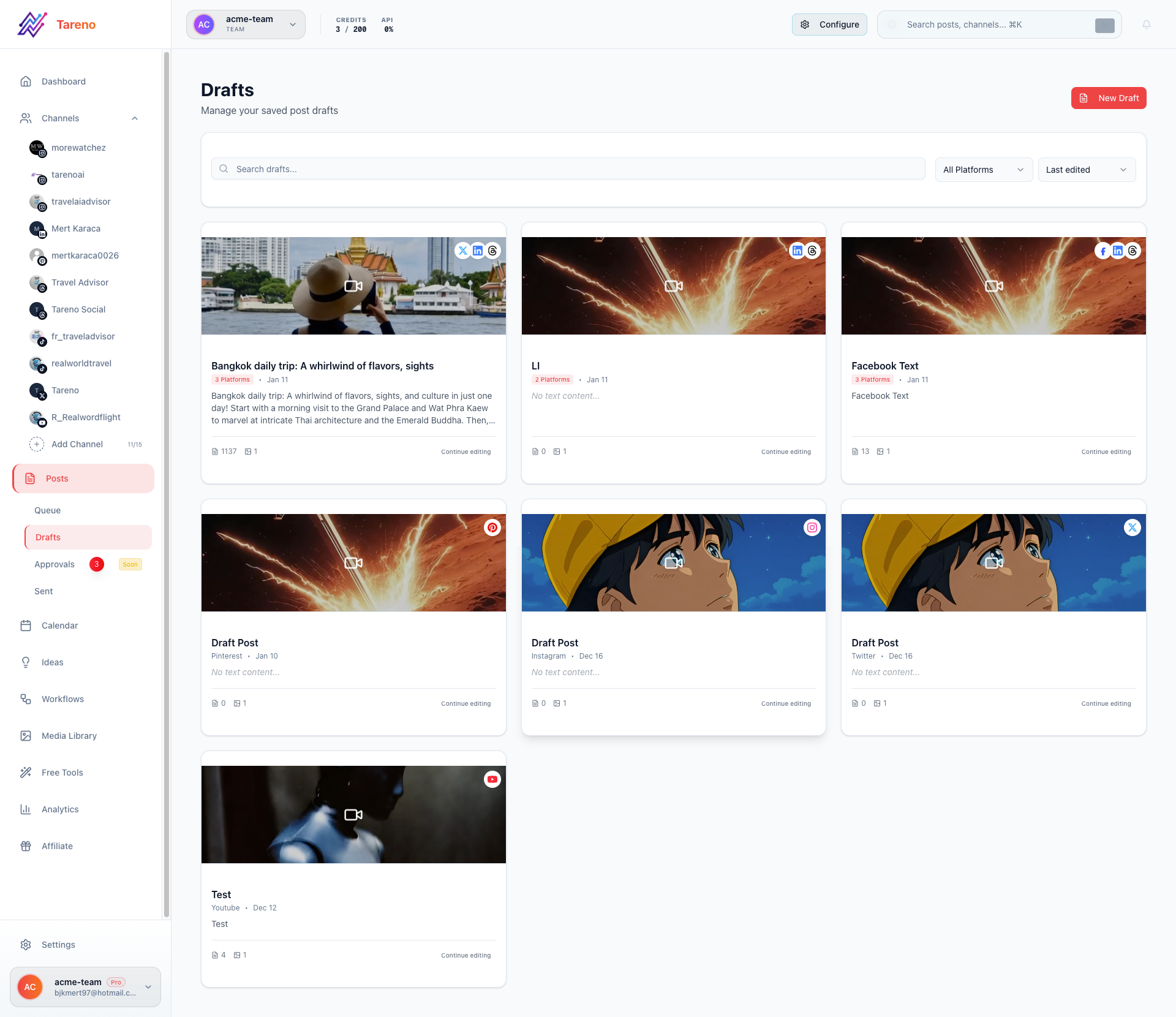
A clear draft queue keeps every approval state visible before a post reaches publish.
A client approval workflow is the structured process for getting content reviewed, revised, approved, and scheduled before it goes live.
It usually defines:
who drafts the content
who reviews internally
who sends content to the client
how the client gives feedback
what version is approved
who can request changes
who gives final sign-off
when content can be scheduled
what happens after publishing
how reports and repurposing are handled
A basic client approval workflow:
Draft
Client review
Approved
Scheduled
A stronger agency workflow:
Brief
Draft
Internal review
Client review
Changes requested
Final approval
Scheduled
Published
Report
Repurpose
The second workflow is better because client approval is not isolated.
It connects to the full content lifecycle.
Why client approvals get messy
Client approvals usually get messy for predictable reasons.
Feedback happens outside the workflow
If feedback happens in email, Slack, WhatsApp, screenshots, or comments in different tools, the final decision becomes unclear.
Approval is not version-specific
A client may approve an earlier version, but the team later changes the caption.
Now nobody knows whether the final version is approved.
Internal review is skipped
The client sees weak drafts, incomplete captions, or assets that should have been checked internally.
There is no publish gate
If unapproved content can still be scheduled, the approval workflow is not protecting the team.
Reporting is disconnected
The client approves posts, but later reports do not connect performance back to future content decisions.
Repurposing is forgotten
Approved client content is used once and then disappears, even when it performed well.
A good tool reduces these problems.
The CLIENT framework
The CLIENT framework is useful because it defines explicit approval checkpoints instead of relying on ad hoc messages.
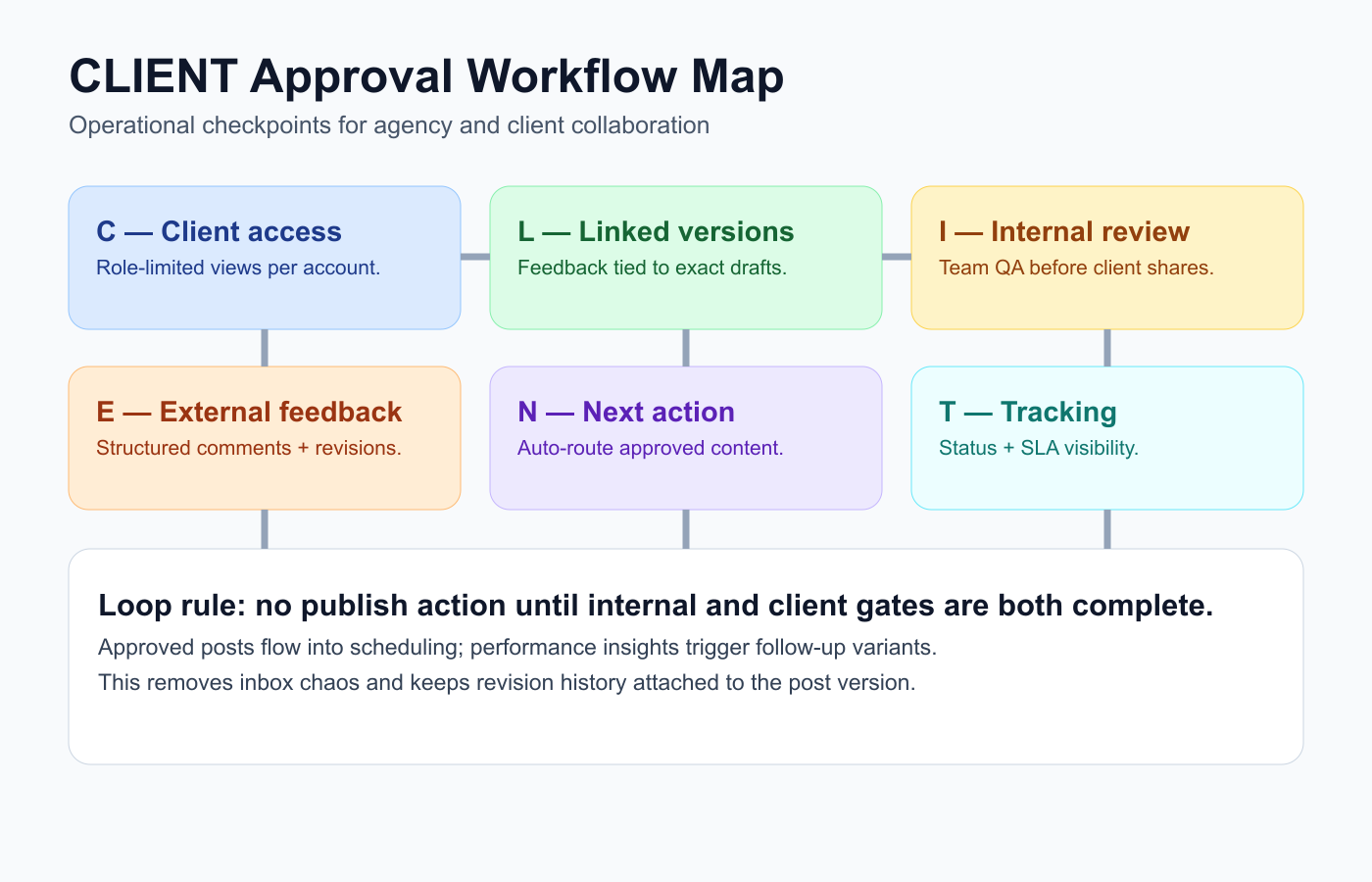
The CLIENT framework maps the checkpoints that prevent approval drift and missed revisions.
Use the CLIENT framework to choose a client approval tool.
C — Client access
L — Linked versions
I — Internal review
E — External feedback
N — Next action after approval
T — Tracking and reporting
This helps evaluate tools beyond a simple “approve” button.
C — Client access
The client needs a simple way to review content.
Good client access should be:
easy to understand
not overly technical
limited to relevant content
separated by client or workspace
clear about what needs review
clear about what has been approved
safe from accidental editing if needed
Some teams need full client dashboards.
Others only need review links.
The best option depends on the client relationship.
An enterprise client may need structured approval.
A small client may need a simple review screen.
L — Linked versions
Approval should be linked to the exact version.
This matters because posts change.
A client may approve the image but request caption changes.
They may approve Instagram but not LinkedIn.
They may approve a post for one date but not another.
A good system should show:
version history
current caption
attached media
target platform
requested changes
final approval
who approved
when it was approved
Without version clarity, approvals can create confusion instead of reducing it.
I — Internal review
Agencies and teams should review internally before sending to the client.
Internal review should check:
strategy fit
brand voice
campaign alignment
product claims
pricing mentions
competitor references
visual quality
spelling
links
CTA
platform fit
Client review should not be the first quality check.
If every client review becomes a rewrite, the internal workflow is weak.
E — External feedback
Client feedback should be easy to capture and act on.
Look for:
comments
change requests
approval status
internal notes
external comments
resolved comments
reviewer assignment
notifications
clear next steps
External feedback should not mix with internal notes in a way that confuses the client.
Teams often need both:
internal comments for the team
client comments for external review
That separation matters.
N — Next action after approval
Approval should trigger the next workflow step.
Examples:
approved → schedule
approved → notify publisher
approved → update client tracker
approved → create reporting row
approved → trigger Make scenario
approved → trigger n8n workflow
published → create analytics task
high-performing → create repurposing task
If approval does not create a next action, the team still needs manual coordination.
The best approval workflows connect review to execution.
T — Tracking and reporting
Client approval should connect to reporting.
A monthly report should show:
what was approved
what was published
what performed well
what needs improvement
what should be repurposed
what is planned next
This makes client communication stronger.
Instead of approval and reporting being separate, they become part of one loop.
1. Tareno — best for client approval workflows plus automation
Tareno is a strong fit when client approvals need to connect with broader content operations.
It is useful for agencies, consultants, and teams that need client workspaces, board stages, approvals, scheduling, reporting, repurposing, and automation.
Tareno is best for
Choose Tareno if you need:
client/team workspaces
content boards
approval workflows
workflow builder
repurposing queue
roles and permissions
activity visibility
unified analytics
competitor analysis
white-label reports
AI captions and hashtags
Make integration
n8n integration
API access
Where Tareno wins
Tareno is strongest when approval is not the end of the workflow.
Example:
Draft → Internal Review → Client Approval → Schedule → Publish → Report → Repurpose
This matters because agencies and client-facing teams need more than “approved.”
They need the approved content to move into execution and later into reporting or repurposing.
Not ideal for
Tareno may be more than needed if you only need a simple review link and no workflow automation, reporting, or repurposing.
2. Planable — best for dedicated client review
Planable is a common benchmark when teams prioritize client-facing review experiences over broader automation depth.

Real Planable landing page snapshot used for competitor context in approval-focused stacks.
Planable is one of the strongest options for dedicated content review and approval.
It is useful when the main bottleneck is stakeholder feedback.
Planable is best for
Planable is best for:
client comments
internal notes
external review
approval workflows
multi-step approvals on relevant plans
content collaboration
stakeholder sign-off
Where Planable wins
Planable is strong when clients need a clear place to review content and leave comments.
It helps reduce approval chaos.
Where Planable may not be enough
Planable may be less ideal if approvals need to connect to:
repurposing queues
workflow builder automation
Make/n8n workflows
analytics-to-action
activity visibility across the full content lifecycle
reporting-to-repurposing workflows
Planable helps content get approved.
A workflow-first system helps approved content move through operations.
3. Sendible — best for agency client dashboards

Sendible is included as a product/website reference for this ranked tool comparison.
Sendible is useful for agencies that want client dashboards and agency-style workflows.
Sendible is best for
Sendible is best for:
client dashboards
approval workflows
permissions
reports
social inbox
client profile connection
white-label workflows
engagement monitoring
Where Sendible wins
Sendible is strong when agencies need a traditional client management layer.
It can help organize client access, profiles, approvals, and reports.
Where Sendible may not be enough
Sendible may be less ideal if the team needs:
workflow-first repurposing
approval-triggered automation
Make/n8n workflows around content stages
board-based production depth
analytics-to-action workflow movement
4. SocialPilot — best for agency scheduling approvals

SocialPilot is included as a product/website reference for this ranked tool comparison.
SocialPilot is practical for agencies that need client approval connected to scheduling.
SocialPilot is best for
SocialPilot is best for:
client approvals
manager approvals
bulk scheduling
account/user scaling
white-label reports
agency social scheduling
advanced analytics
Where SocialPilot wins
SocialPilot is useful when the workflow is centered on scheduling many posts across many accounts.
It can be a good fit for small agencies that need approvals without enterprise complexity.
Where SocialPilot may not be enough
SocialPilot may be less ideal if the agency needs:
deeper workflow builder logic
repurposing queues
Make/n8n content workflows
activity visibility around content movement
analytics-to-repurpose actions
5. Agorapulse — best for inbox and moderation approvals
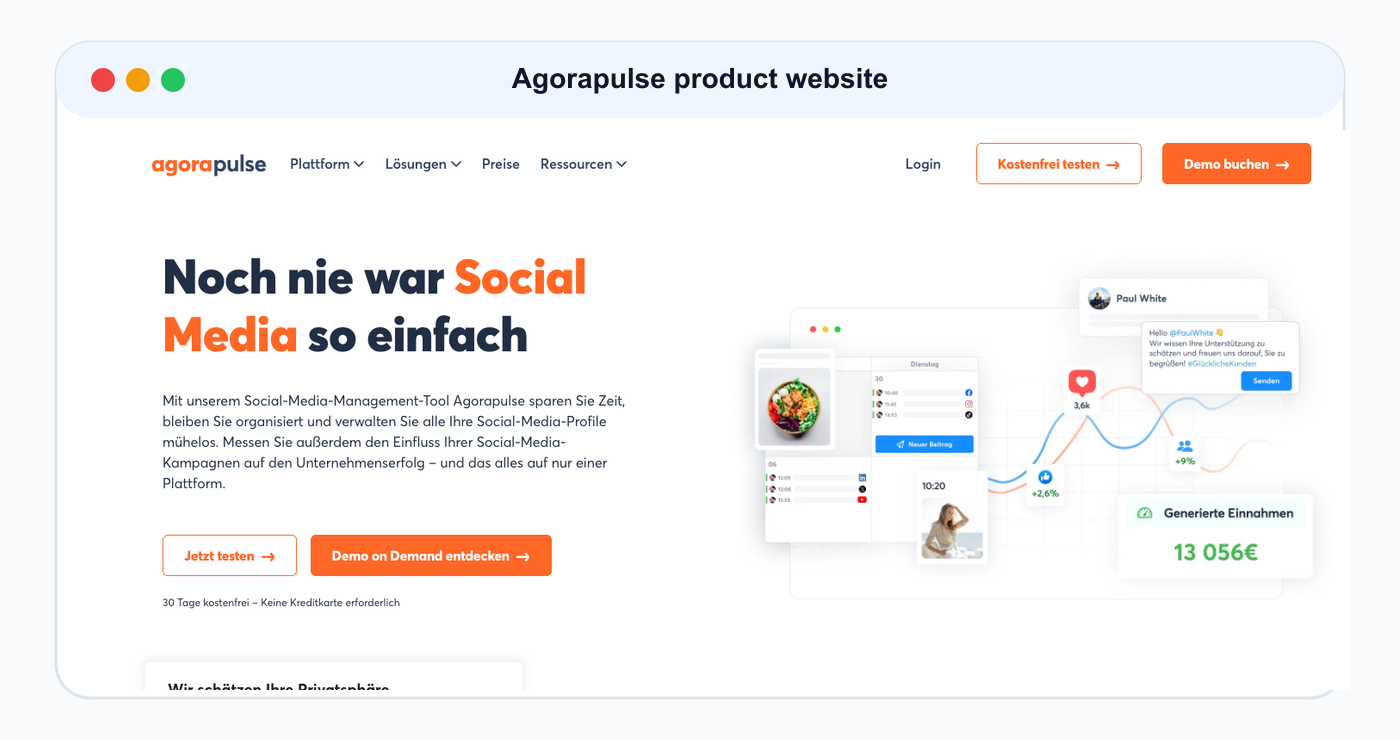
Agorapulse is included as a product/website reference for this ranked tool comparison.
Agorapulse is useful when client-facing workflows involve comments, inbox, moderation, and assignments.
Agorapulse is best for
Agorapulse is best for:
social inbox
comment management
ad comments
assignments
moderation rules
saved replies
labels
team reports
ROI-style reports
Where Agorapulse wins
Agorapulse is strong when approval-like workflows are needed for engagement and moderation, not only content publishing.
Where Agorapulse may not be enough
Agorapulse may be less ideal if the team needs:
dedicated repurposing queue
content board stages
approval-triggered content automation
Make/n8n workflows
full content lifecycle activity visibility
Client approval tool comparison table
ToolBest forApproval strengthMain limitationTarenoApproval plus workflow automationBoards, approvals, roles, activity visibility, repurposingMore than needed for simple reviewPlanableDedicated client reviewComments, notes, external approvalLess post-approval automationSendibleAgency dashboardsClient workflows, reports, permissionsLess workflow-first repurposingSocialPilotAgency schedulingClient/manager approvals and schedulingLess deep workflow automationAgorapulseInbox/moderationAssignments and moderation workflowsLess content production workflowBufferSimple approvalsLightweight team reviewLimited client workflow depthLaterVisual reviewVisual planning and approval contextLess automation depthHootsuiteBroad suite approvalsPublishing/inbox/reporting suiteCan be heavy for lean agencies
Client approval workflow examples
Agency workflow
Client brief is added.
Copywriter drafts post.
Designer adds creative.
Account manager reviews internally.
Client reviews exact version.
Changes are requested or approved.
Approved post is scheduled.
Performance is reported.
Winner enters repurposing queue.
Consultant workflow
Consultant drafts content.
Client reviews weekly batch.
Consultant updates requested changes.
Client approves.
Posts are scheduled.
Monthly report creates next ideas.
Creator with sponsor
Creator drafts sponsored post.
Sponsor reviews exact caption and asset.
Creator updates.
Sponsor approves.
Creator schedules.
Performance is shared.
Repurposing only happens if allowed.
What to look for in client approval tools
Look for:
client review access
approval statuses
comments
internal notes
external comments
change requests
reviewer assignment
version history
publish gates
workspace separation
activity visibility
roles and permissions
reporting connection
repurposing support
Make/n8n/API support
The right tool depends on whether you need simple review or full client content operations.
Client approval mistakes to avoid
Mistake 1: Getting approval in email only
Email is easy, but it can create version confusion.
Mistake 2: No internal review
Clients should not be the first quality filter.
Mistake 3: No version control
Approval should apply to a specific version.
Mistake 4: Scheduling before approval
Unapproved content should not go live.
Mistake 5: No reporting loop
Client approvals should connect to what performed and what happens next.
Mistake 6: Not repurposing approved winners
Approved high-performing content can often be reused in new formats.
How Tareno fits into client approvals
Tareno is useful when client approvals are part of a broader social media workflow.
Relevant Tareno components include:
client/team workspaces
content boards
approval workflows
workflow builder
repurposing queue
roles and permissions
activity visibility
analytics
competitor analysis
white-label reports
AI captions and hashtags
Make integration
n8n integration
API access
This matters because client approval should not be isolated.
It should connect to scheduling, reporting, repurposing, and next-month planning.
Related Tareno resources
Keep building the workflow
Product Tareno Features See the planning, scheduling, approval, and workflow features behind this guide. Explore features -> Plans Tareno Pricing Match the workflow depth in this article to the right plan and trial option. View pricing -> Compare Comparison Hub Compare Tareno with common social media management tools by workflow fit. Compare tools -> Workflow Approval Workflows Build structured review stages before posts reach the calendar. Review approvals ->
FAQ
What is the best social media tool for client approvals?
It depends on the workflow. Planable is strong for dedicated client review. Sendible is strong for agency client dashboards. SocialPilot is strong for agency scheduling approvals. Tareno is strong when approvals need to connect with boards, reporting, repurposing, Make, n8n, and API workflows.
What should a client approval workflow include?
It should include internal review, client review, change requests, approval status, version visibility, publish gates, activity history, and next actions after approval.
Should clients approve every social media post?
It depends on the relationship and risk level. High-risk content, product claims, pricing, campaigns, and sponsored content should usually be approved. Low-risk evergreen content may use lighter review rules.
Can approved client content be repurposed?
Yes, but repurposing should respect the original approval context. Old, sponsored, pricing-related, or client-sensitive content should be reviewed again before reuse.
How can agencies make client approvals faster?
Agencies can speed up approvals by using clear client workspaces, internal review before client review, batch approvals, version-specific comments, approval deadlines, and workflow automation.
Can client approvals trigger automation?
Yes. Approval can trigger scheduling, notifications, reporting rows, Make/n8n workflows, repurposing tasks, or client tracker updates.
Final thoughts
Client approval should make social media safer and clearer.
It should not create more confusion.
The best tool depends on what your client workflow needs.
If you only need comments and review, a dedicated approval tool may be enough.
If you need dashboards, choose an agency client workflow tool.
If you need approvals connected to scheduling, reporting, repurposing, Make, n8n, API, roles, and activity visibility, choose a workflow-first system.
Primary CTA: Explore Tareno features to see how client workspaces, approval workflows, boards, reporting, repurposing queues, Make, n8n, API, roles, and activity visibility work together.
Secondary CTA: Compare Tareno with Planable, Sendible, SocialPilot, Agorapulse, Buffer, and Later on the compare hub.