Creators rarely struggle because they have no ideas.
The real problem is turning ideas into a repeatable publishing system.
A creator may have:
a long-form YouTube video
a podcast episode
a customer question
a product launch
a personal story
a useful thread
an old high-performing post
a campaign deadline
several platforms
several languages
The content exists.
The workflow around it is inconsistent.
One idea stays in notes.
Another becomes a rushed Instagram caption.
A YouTube video is published once and never reused.
A good LinkedIn post is forgotten after one week.
A sponsor asks for approval in a private message.
A multilingual version is translated too literally.
An AI-generated draft sounds generic.
The creator is still doing the operational work manually.
That is where AI social media automation becomes useful.
The goal is not to replace the creator.
The goal is to protect the creator’s time, voice, and attention.
Tareno can act as the content operating layer behind that system.
AI can help with research, scripts, adaptation, localization, and analysis.
Tareno can manage drafts, approvals, scheduling, analytics, and repurposing.
This guide explains how to build that workflow step by step.
TL;DR
A practical creator automation system looks like this:
capture every idea in one content board
choose one primary source asset
use AI to research, structure, or draft
create platform-native versions
review voice, claims, and originality
save everything as Tareno drafts
publish through connected accounts
review performance after a defined period
move winners into a repurposing queue
localize only the strongest content
use AI agents for planning and analysis, not unchecked public publishing
The central principle is:
Automate the repeated work around creativity, not the creator’s point of view.
The creator workflow problem
A creator’s work often moves through several disconnected tools.
Example:
Idea in Notes
  ↓
Research in browser
  ↓
Script in Google Docs
  ↓
Asset in Canva
  ↓
Feedback in WhatsApp
  ↓
Scheduling in another app
  ↓
Analytics in each platform
  ↓
No repurposing system
Every handoff creates friction.
The creator needs one operating loop.
Idea
  ↓
Research
  ↓
Draft
  ↓
Asset
  ↓
Review
  ↓
Schedule
  ↓
Publish
  ↓
Analyze
  ↓
Repurpose
Tareno can connect these stages.
What should creators automate?
Not every task deserves automation.
Good automation targets:
repeated intake
transcript analysis
first-draft generation
platform adaptation
scheduling preparation
approval reminders
analytics summaries
repurposing tasks
multilingual first drafts
evergreen queue maintenance
Tasks that should remain human-led:
personal story
final point of view
sensitive claims
sponsor commitments
relationship-based community replies
important brand decisions
final approval for public actions
The creator should decide what the content means.
Automation should reduce the work required to express and distribute it.
The creator content operating model
A strong model has six layers.
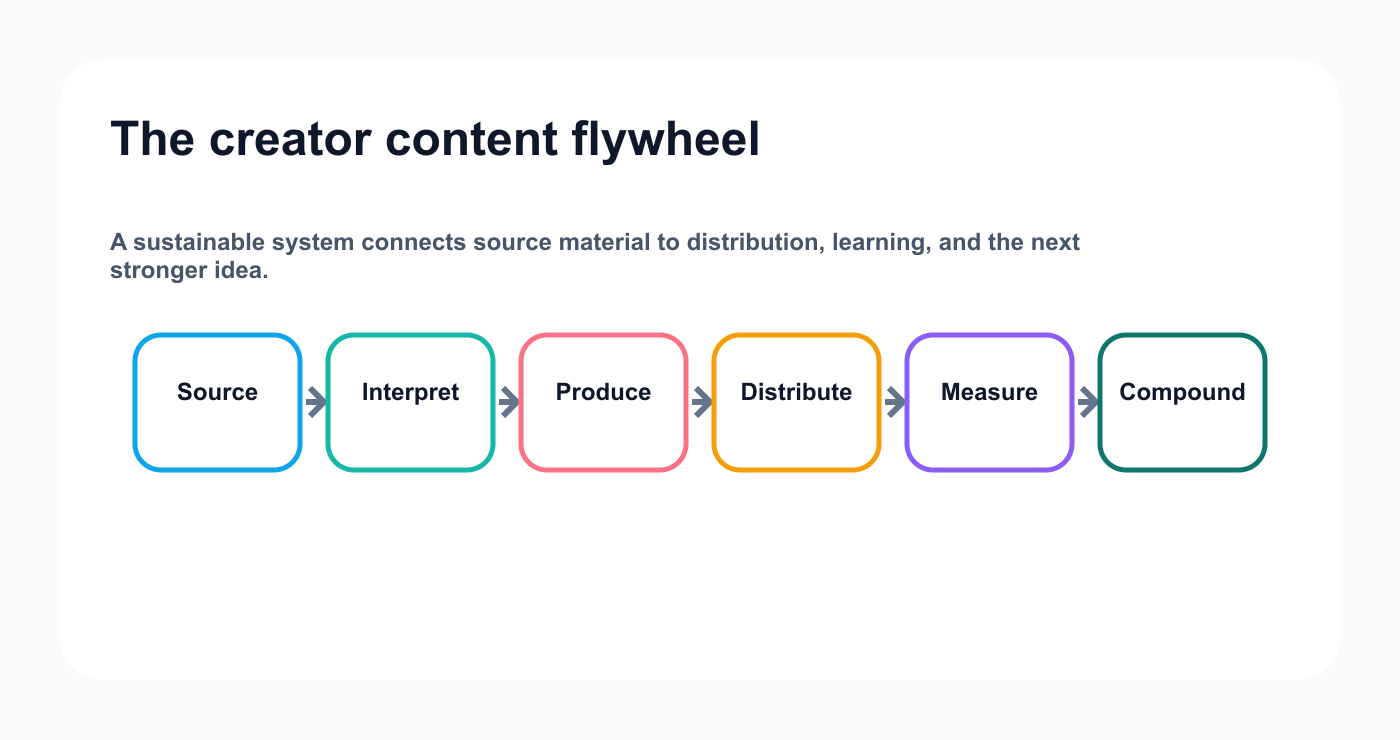
The creator flywheel protects the original idea while making every publishing cycle more useful than the last.
1. Source
The original idea, video, conversation, or insight.
2. Interpretation
The creator’s point of view.
3. Production
Scripts, captions, and assets.
4. Distribution
Platform-native versions and scheduling.
5. Measurement
Performance by platform and format.
6. Compounding
Repurposing, evergreen reuse, and follow-up content.
Architecture:
Source
  ↓
Creator point of view
  ↓
AI-assisted production
  ↓
Tareno drafts
  ↓
Review
  ↓
Publishing
  ↓
Analytics
  ↓
Repurposing
Step 1: create one idea inbox
Every idea should enter the same system.
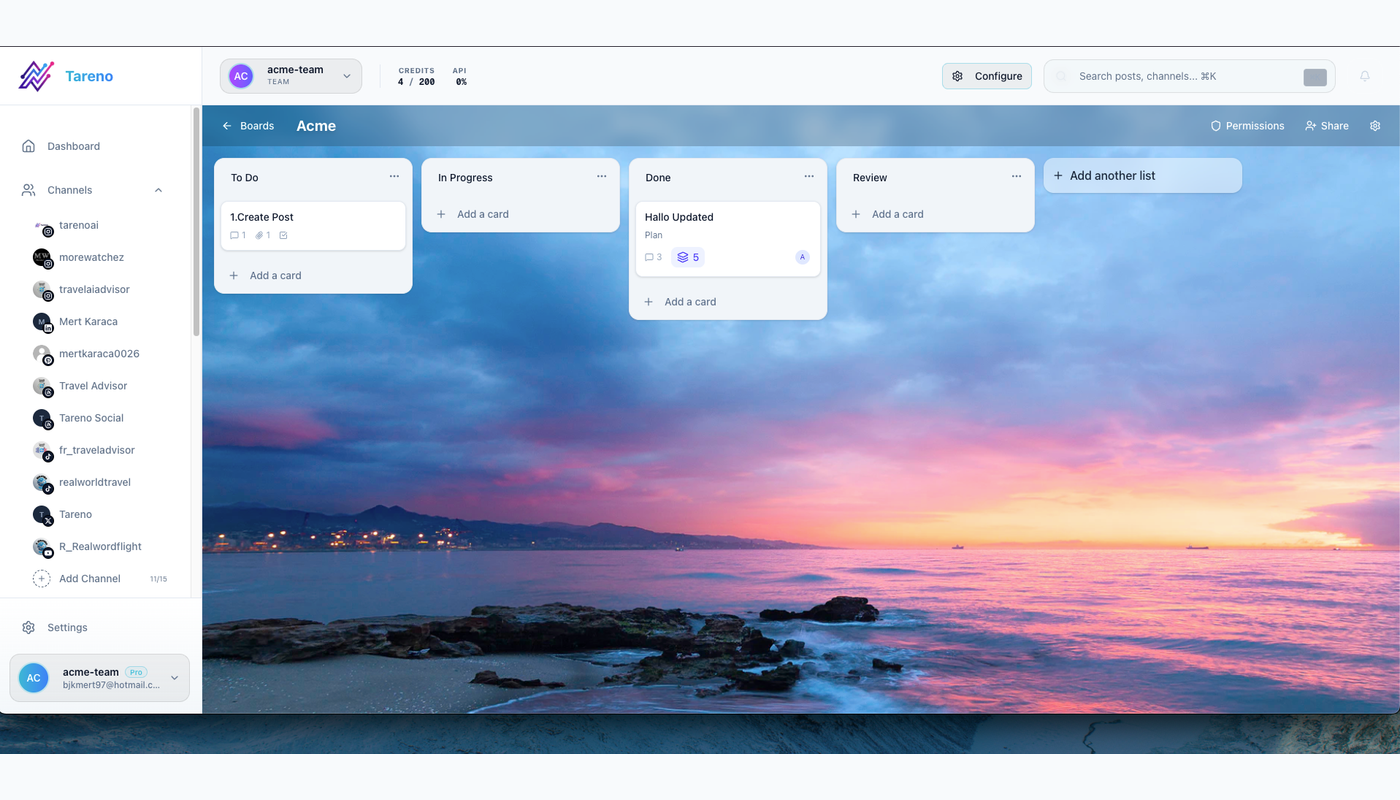
A single idea inbox makes source material traceable before AI turns it into drafts or formats.
Possible sources:
voice note
Notion
Airtable
form
email
browser bookmark
podcast transcript
YouTube URL
comment
customer question
AI-agent suggestion
Recommended fields:
Idea:
Source:
Audience:
Problem:
Point of view:
Platform potential:
Format potential:
Business relevance:
Urgency:
Evergreen value:
Owner:
Do not require a complete brief at intake.
Capture first.
Clarify when the idea is selected.
Step 2: score ideas before producing them
Use a simple score.
AreaScore 1–5Audience relevancePersonal authorityBusiness relevancePlatform flexibilityEvergreen valueProduction effort
A high score does not guarantee performance.
It helps prioritize.
The creator should not produce every idea.
Automation should improve selection, not only volume.
Step 3: choose a primary source asset
A content system works better when one asset leads the cycle.
Possible primary sources:
YouTube video
podcast episode
live stream
long-form article
customer interview
founder note
product demo
educational thread
webinar
personal story
The source contains the full context.
Short-form content becomes a distribution layer.
Example:
Primary source:
12-minute YouTube video

Derived assets:
- 3 Shorts
- 1 LinkedIn post
- 1 Bluesky thread
- 1 Mastodon guide
- 1 carousel
- 1 email
Step 4: use Get Viral Now for video research
Get Viral Now can help turn a YouTube URL into structured content research.
Workflow:
paste the URL
retrieve transcript
review transcript quality
analyze hook
identify tension
map structure
identify proof
identify payoff
generate original angles
create scripts
The responsible use is not copying.
Use the source to understand:
what made the opening strong
how information was sequenced
where the viewer received proof
what made the ending satisfying
Then build a new script around your own audience, experience, and message.
Step 5: create multiple hook options
A creator should not accept the first AI-generated hook.
Generate several types.
Direct promise
Here is the simplest way to turn one video into a week of content.
Mistake
Most creators waste their best content after publishing it once.
Contrarian
Posting more is not the answer if every post starts from zero.
Story
I used to open five tools every time I wanted to publish one idea.
Proof first
One YouTube video gave us nine platform-ready drafts.
Question
What if your best post automatically became the next five drafts?
Select the hook that matches the creator’s voice.
Step 6: generate platform-native versions
One core idea should become different executions.
Use:
strong visual hook
saveable takeaway
concise caption
carousel or Reel structure
clear CTA
TikTok
Use:
spoken language
immediate tension
fast payoff
strong visual rhythm
simple CTA
YouTube Shorts
Use:
clear topic
retention structure
satisfying ending
possible bridge to long-form content
Use:
professional context
clear lesson
personal or business example
restrained CTA
Threads
Use:
conversational tone
short rhythm
personal observation
discussion-friendly ending
Bluesky
Use:
concise idea
low-hype tone
self-contained value
optional thread
Mastodon
Use:
more context
community-aware tone
hashtags where useful
content warning where relevant
Use:
searchable title
clear visual promise
useful description
evergreen framing
The core insight remains.
The execution changes.
Step 7: build a creator brand voice guide
AI needs clear boundaries.
Include:
Voice:
Direct, practical, opinionated, not aggressive.

Audience:
Creators and small teams.

Avoid:
Generic motivation, exaggerated claims, fake personal experience, corporate filler.

Prefer:
Specific examples, short sentences, clear tradeoffs, honest uncertainty.

CTA style:
Natural next step, not pressure.
Add real examples.
Show:
approved hooks
approved captions
rejected phrases
preferred vocabulary
common sentence rhythm
A brand voice guide is more useful than asking AI to “sound human.”
Step 8: review AI drafts properly
Review five areas.
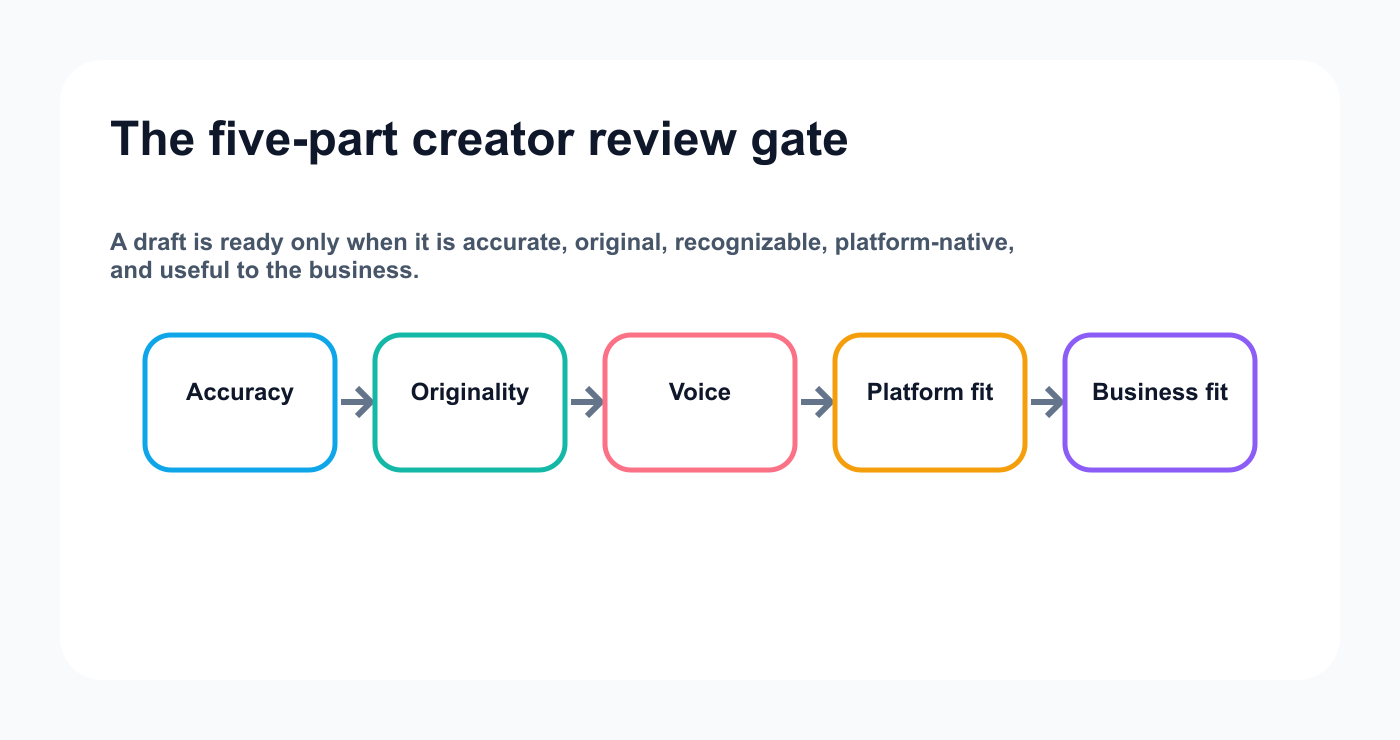
The review gate keeps automation from trading a creator's voice for faster output.
Accuracy
Is every claim true?
Does the product work as described?
Is pricing current?
Is the example real?
Originality
Is the wording original?
Is another creator’s story being copied?
Does the content contain a real point of view?
Voice
Would the creator say this?
Does it sound too polished or generic?
Is the emotional tone correct?
Platform fit
Does the structure belong on the platform?
Is the CTA natural?
Is the length appropriate?
Business fit
Does the content support the creator’s actual goals?
Does it attract the right audience?
Is the next action clear?
AI creates speed.
Review creates trust.
Step 9: save content as structured drafts
Every draft should include:
source
platform
format
caption or script
asset
CTA
campaign
language
risk level
approval state
publish target
measurement date
repurposing potential
This makes the content operational.
A draft should not live only in a chat conversation.
Step 10: use approval even as a solo creator
Approval is not only for teams.
A solo creator can use a self-approval step.
Why?
Because drafting and publishing are different mental states.
The review step helps catch:
emotional overreaction
unsupported claim
wrong account
wrong asset
weak CTA
poor timing
sponsor disclosure
accidental repetition
A simple solo workflow:
Draft
  ↓
Ready for review
  ↓
Final check
  ↓
Approved
  ↓
Scheduled
The creator gains distance before publishing.
Step 11: manage sponsor content
Sponsored content needs additional fields.
Sponsor:
Campaign:
Required message:
Disclosure:
Required tag:
Usage rights:
Publish deadline:
Brand approver:
Creator approver:
Paid usage:
Repurposing allowed:
AI can help adapt the content.
It should not remove or hide disclosure.
The exact final sponsor version should be approved.
Step 12: schedule from one calendar
A creator calendar should show:
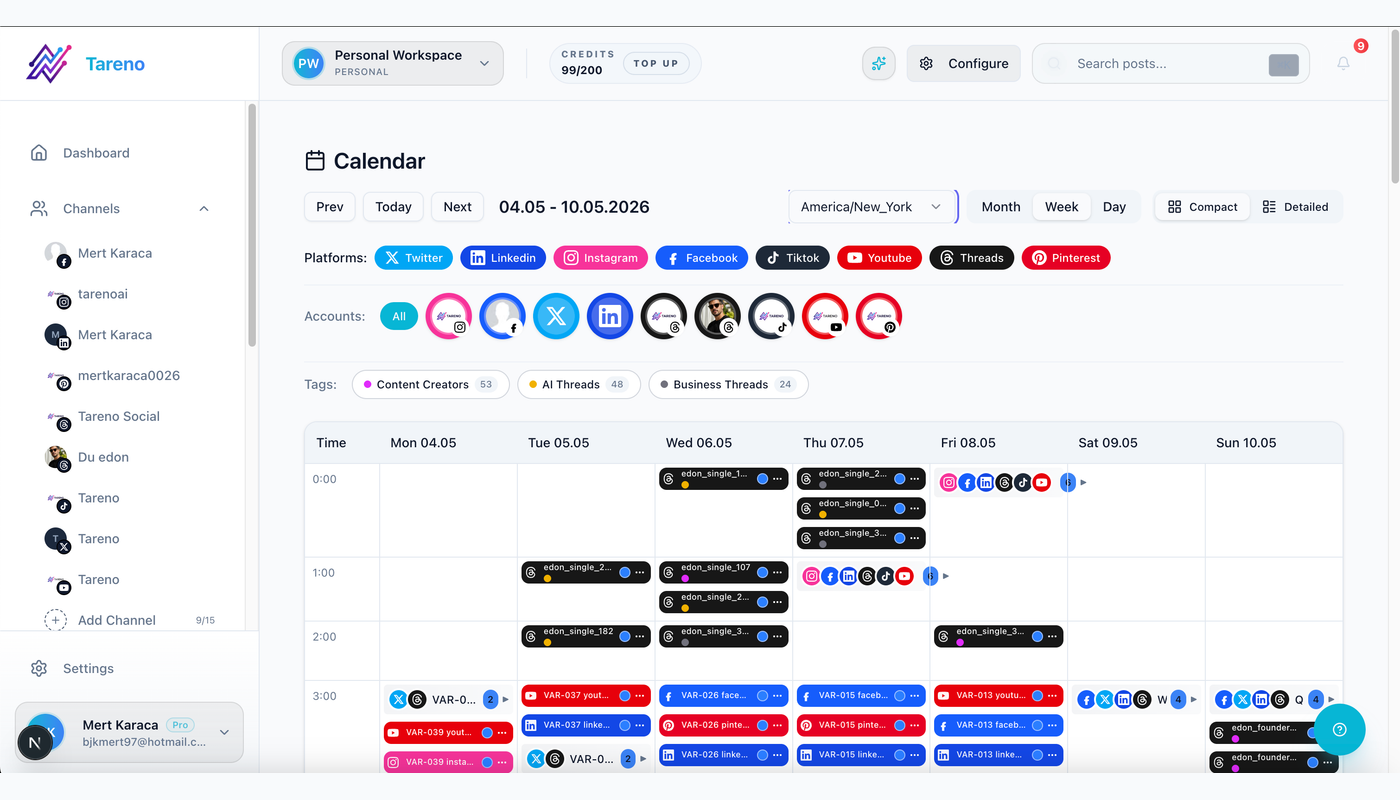
One calendar makes cadence, channel balance, and sponsor commitments visible before publishing.
platform
account
format
topic
campaign
language
status
approval
publish time
timezone
Example:
DayPlatformAssetStatusMondayYouTube ShortsMain clipScheduledTuesdayLinkedInLessonApprovedWednesdayBlueskyShort insightDraftThursdayInstagramCarouselReviewFridayMastodonDeep explanationPlanned
This turns content into a visible system.
Step 13: create an evergreen queue
Not every post should disappear after publication.
A post is a good evergreen candidate when it is:
still accurate
still relevant
useful without a current event
not tied to expired pricing
not overused
strong enough to adapt
Possible queue rules:
oldest strong post first
highest-performing eligible post
specific content pillar
maximum reuse frequency
platform-specific adaptation
duplicate protection
Before reuse, check freshness.
Step 14: use analytics to decide what comes next
Do not review analytics only to feel good or bad.
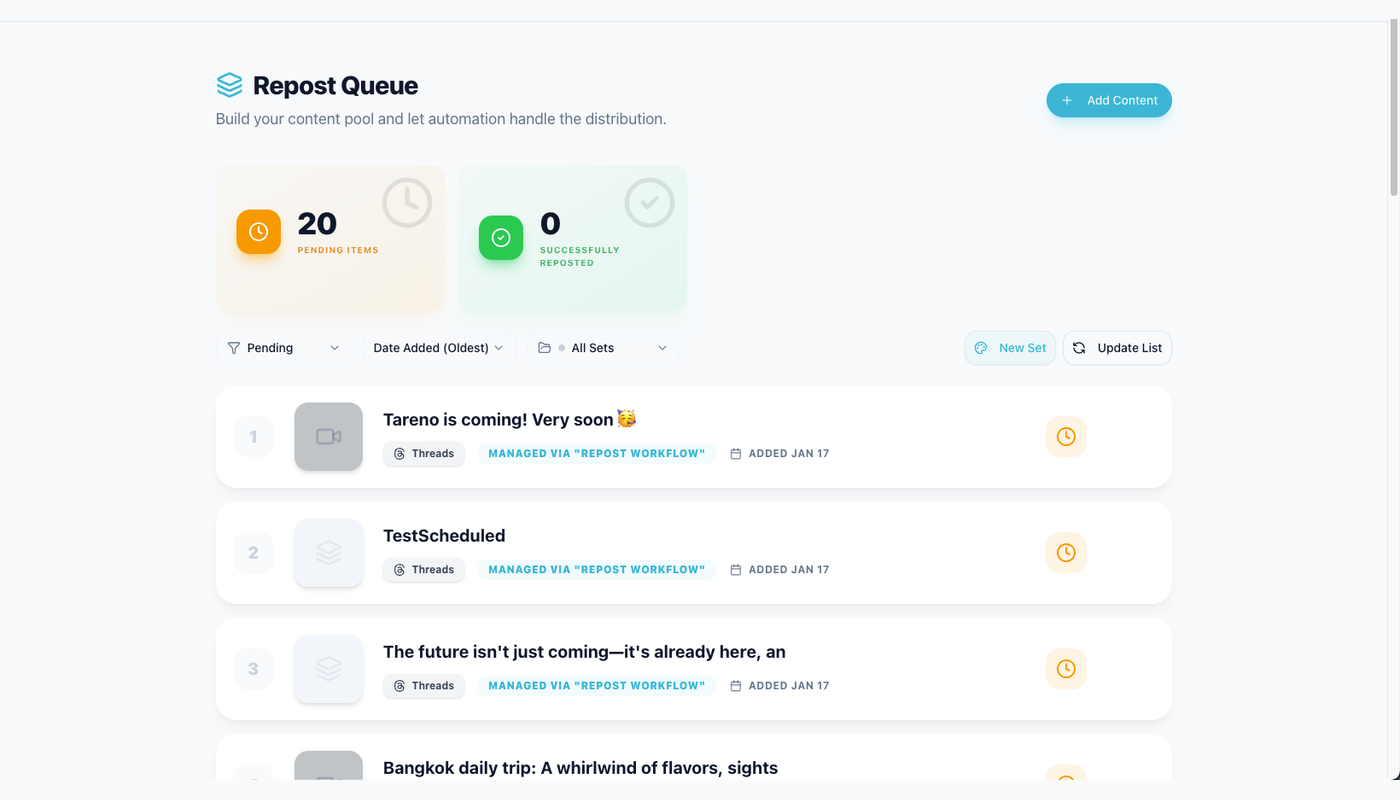
Performance compounds when winners move into a deliberate reuse queue instead of disappearing into a report.
Use them to create decisions.
High saves
Create:
checklist
carousel
downloadable template
Pinterest version
High comments
Create:
FAQ
response video
deeper opinion
community discussion
High watch time
Create:
second video
series
longer explanation
similar pacing
High clicks
Create:
landing-page content
comparison post
tutorial
product education
High shares
Create:
broader campaign
translated version
community-specific version
Analytics should feed the next queue.
Step 15: build a weekly creator review
Weekly questions:
What performed?
What created meaningful replies?
What attracted the right audience?
What content is still unfinished?
What is waiting for review?
What can be repurposed?
Which platform needs attention?
Which content pillar is missing?
What should stop?
Prompt for an agent:
Review my last seven days, pending drafts, unused ideas, and repurposing queue. Recommend the five highest-value next actions. Do not schedule anything.
This keeps the creator in control.
Step 16: connect ChatGPT
ChatGPT can act as a conversational interface.
Prompts:
Review my Tareno analytics and suggest three content directions.
Create platform-native drafts from this idea and save drafts only.
Show everything waiting for review.
Build next week’s plan from recent performance.
The final action should still be visible and reviewable.
Step 17: connect Codex
Codex is useful for technical creators.
Examples:
release notes to content
repository changes to product education
code examples to developer posts
technical articles to social campaigns
Prompt:
Use the approved documentation to create one LinkedIn post, one Bluesky thread, one Mastodon post, and one short-form script. Save drafts through Tareno.
Step 18: connect OpenClaw
OpenClaw can serve as a persistent creator operator.
Examples:
weekly audit
content gap analysis
account check
analytics review
repurposing suggestions
multilingual planning
Keep the tool surface limited.
Start with read and draft capabilities.
Step 19: connect Hermes Agent
Hermes Agent can support configurable creator workflows.
Use:
MCP discovery
tool filtering
local or remote agent logic
analytics and drafting
multilingual review preparation
Again, the agent should not have broad destructive permissions by default.
Step 20: automate with n8n
Example:
YouTube video published
  ↓
Get transcript
  ↓
Get Viral Now analysis
  ↓
Create platform variants
  ↓
Create Tareno drafts
  ↓
Notify creator
Other n8n workflows:
new Notion idea → Tareno board
high-performing post → evergreen queue
approved draft → schedule request
monthly analytics → content plan
Use n8n for custom and self-hosted logic.
Step 21: automate with Make
Make scenario:
Approved source idea
  ↓
Router by platform
  ↓
AI transformation
  ↓
Tareno drafts
  ↓
Review notification
Use iterators for languages.
Use Data Store for draft IDs.
Make is useful for visual workflows.
Step 22: automate with Zapier
Simple workflows:
new blog post → draft
new YouTube URL → script draft
new testimonial → proof draft
approved Airtable row → Tareno
pending approval → reminder
published post → reporting sheet
Zapier is useful for straightforward automation.
Step 23: create multilingual content
Tareno supports workflows across:
English
German
French
Spanish
Portuguese
Russian
Italian
Japanese
Arabic
Do not localize everything.
Start with content that already works.
Workflow:
Strong source post
  ↓
Select markets
  ↓
AI localization
  ↓
Native review
  ↓
Tareno drafts
  ↓
Local scheduling
For Japanese and Arabic, review visuals and typography.
A creator should build market-specific learning over time.
Step 24: expand to Bluesky and Mastodon
Use different roles.
Bluesky
short observations
creator opinions
useful threads
product notes
Mastodon
deeper context
community participation
technical or educational posts
open-web discussion
Do not copy the same X caption.
Adapt the idea.
Step 25: protect originality
AI can create generic repetition.
Use an originality checklist.
- [ ] Real creator point of view
- [ ] Original wording
- [ ] Specific example
- [ ] No invented experience
- [ ] No copied story
- [ ] No unsupported claim
- [ ] Platform-native structure
- [ ] Natural CTA
A content system should make the creator more recognizable, not less.
Step 26: create a creator content scorecard
Review monthly.
AreaScore 1–5Idea captureDraft speedVoice consistencyPlatform adaptationApproval disciplinePublishing consistencyAnalytics useRepurposing outputMultilingual qualityAutomation reliability
Fix low-scoring workflow areas before increasing volume.
Step 27: build a creator reporting dashboard
Track:
Output
posts published
drafts created
platforms active
languages active
approval time
production time
Performance
reach
saves
shares
comments
clicks
watch time
conversions
Compounding
posts repurposed
evergreen queue size
source-to-output ratio
second-wave performance
local-market winners
This helps distinguish activity from progress.
Duplicate prevention
Use:
sourceId + platform + accountId + language + format
Store:
source URL
draft ID
action ID
post ID
content hash
publish date
status
Before creating a new output:
check existing drafts
compare format
compare language
update or skip duplicates
This matters when agents and automations rerun.
Error handling
Handle:
missing transcript
unsupported URL
disconnected account
expired token
missing media
duplicate post
failed publish
approval expired
wrong language
invalid schedule
AI parsing failure
Recommended routes:
Source error -> return to creator
Account error -> reconnect
Media error -> return to asset stage
Approval expired -> review again
Platform outage -> retry with limit
Permanent failure -> create incident
Security checklist
- [ ] Use scoped Tareno credentials
- [ ] Store secrets outside prompts
- [ ] Begin with read-only and draft tools
- [ ] Keep publishing behind approval
- [ ] Keep deletion behind approval
- [ ] Use explicit account IDs
- [ ] Validate media URLs
- [ ] Track action IDs
- [ ] Prevent duplicate actions
- [ ] Revoke unused access
- [ ] Review third-party agent tools
- [ ] Separate personal and client workspaces
Twenty creator automation ideas
Voice note → content idea
YouTube URL → Get Viral Now
Video transcript → five scripts
Podcast → content atoms
Blog → platform drafts
LinkedIn winner → carousel
High-comment post → FAQ
High-save post → evergreen queue
Product update → launch package
Sponsor brief → approval workflow
Bluesky expansion
Mastodon expansion
Nine-language localization
Weekly analytics review
Comment mining
Content gap analysis
Draft-ready reminder
Failed-publish alert
Monthly creator report
Weekly AI operator
Common creator mistakes
Mistake 1: automating before defining a voice
AI needs clear context.
Mistake 2: publishing the first draft
Review it.
Mistake 3: using one caption everywhere
Adapt by platform.
Mistake 4: creating more than can be reviewed
Volume is not the goal.
Mistake 5: translating weak content
Localize proven ideas.
Mistake 6: never revisiting winners
Use a repurposing queue.
Mistake 7: no approval as a solo creator
Create distance before publishing.
Mistake 8: no source tracking
Store the original idea or URL.
Mistake 9: letting AI invent experience
Protect authenticity.
Mistake 10: measuring only reach
Track meaningful signals.
Related Tareno resources
Build the next part of this workflow
AI contentExplore resource →Content calendarExplore resource →Repurposing queueExplore resource →Get Viral NowExplore resource →
FAQ
Can creators automate social media with AI?
Yes. AI can support research, drafting, adaptation, localization, analytics, and repurposing. Public actions should remain controlled.
Can Tareno turn YouTube videos into scripts?
Get Viral Now can support a YouTube URL-to-transcript-to-original-script workflow, subject to final product verification.
Can creators use ChatGPT with Tareno?
Yes, through the supported app, plugin, or MCP connection at publication time.
Can creators use OpenClaw or Hermes Agent?
Yes. Both can use Tareno as an MCP social execution layer where the final integration is supported.
Can Tareno publish to Bluesky and Mastodon?
Yes, where the accounts are connected and the final integrations are available.
Can content be created in several languages?
Yes. Tareno supports multilingual workflows across nine languages, subject to final verification.
Should a solo creator use approvals?
Yes. Self-approval creates a valuable final review step.
Is AI-generated content bad for a creator brand?
It becomes weak when it is generic, inaccurate, or disconnected from the creator’s real point of view. AI-assisted content can still be strong when the creator controls the message.
Should creators use n8n, Make, or Zapier?
Use the tool that matches the workflow. n8n is strong for technical control, Make for visual scenarios, and Zapier for simple app connections.
What should be automated first?
Start with idea intake, draft creation, analytics review, or repurposing. Add approval-first scheduling later.
Final thoughts
A creator does not need a machine that publishes more generic content.
A creator needs a system that protects attention and compounds good ideas.
Capture the idea.
Build the source asset.
Use AI for research and structure.
Create native platform versions.
Review the final voice.
Schedule from one calendar.
Measure meaningful signals.
Repurpose what works.
Localize proven content.
Use agents to help decide and prepare.
Keep the final public action visible.
Tareno can connect those stages into one creator operating system.
That is how automation becomes leverage instead of noise.
Primary CTA: Build one creator content board in Tareno and connect your primary social accounts.
Secondary CTA: Start with one draft-only automation and one analytics-to-repurposing workflow.