Social media agencies have a different automation problem from individual creators.
A creator may manage three or five accounts.
An agency may manage:
multiple clients
multiple brands
several workspaces
several reviewers
different approval rules
different languages
different timezones
different brand voices
different risk levels
different reporting expectations
The danger is not only publishing the wrong caption.
It is publishing the right caption to the wrong client account.
It is sending an unapproved post live.
It is using outdated product claims.
It is mixing client data.
It is publishing a translated version that was never reviewed.
It is allowing an AI agent to act across every workspace without boundaries.
That is why agency automation needs more than speed.
It needs structure.
Tareno can act as the agency’s approval-first social media operating layer.
AI agents can help with research, planning, drafting, analytics, and repurposing.
n8n, Make, and Zapier can automate deterministic workflows.
Tareno can manage the client workspaces, connected accounts, approvals, scheduling, publishing, analytics, reports, and repurposing queues.
The best agency workflow is not fully autonomous.
It is selectively automated, client-safe, and visible.
This guide explains how to build that system.
TL;DR
A strong agency automation workflow looks like this:
create one Tareno workspace per client or brand
map every social account explicitly
define internal and client roles
standardize content intake
use AI for research and drafts
route content through risk-based review
require client approval for consequential content
schedule only approved versions
track every action and version
produce reports that create next actions
move winners into repurposing queues
increase autonomy only when the workflow is proven
The key principle is:
Automate the agency’s repeated work without automating away client accountability.
Why agencies need a different architecture
An individual workflow can sometimes survive ambiguity.
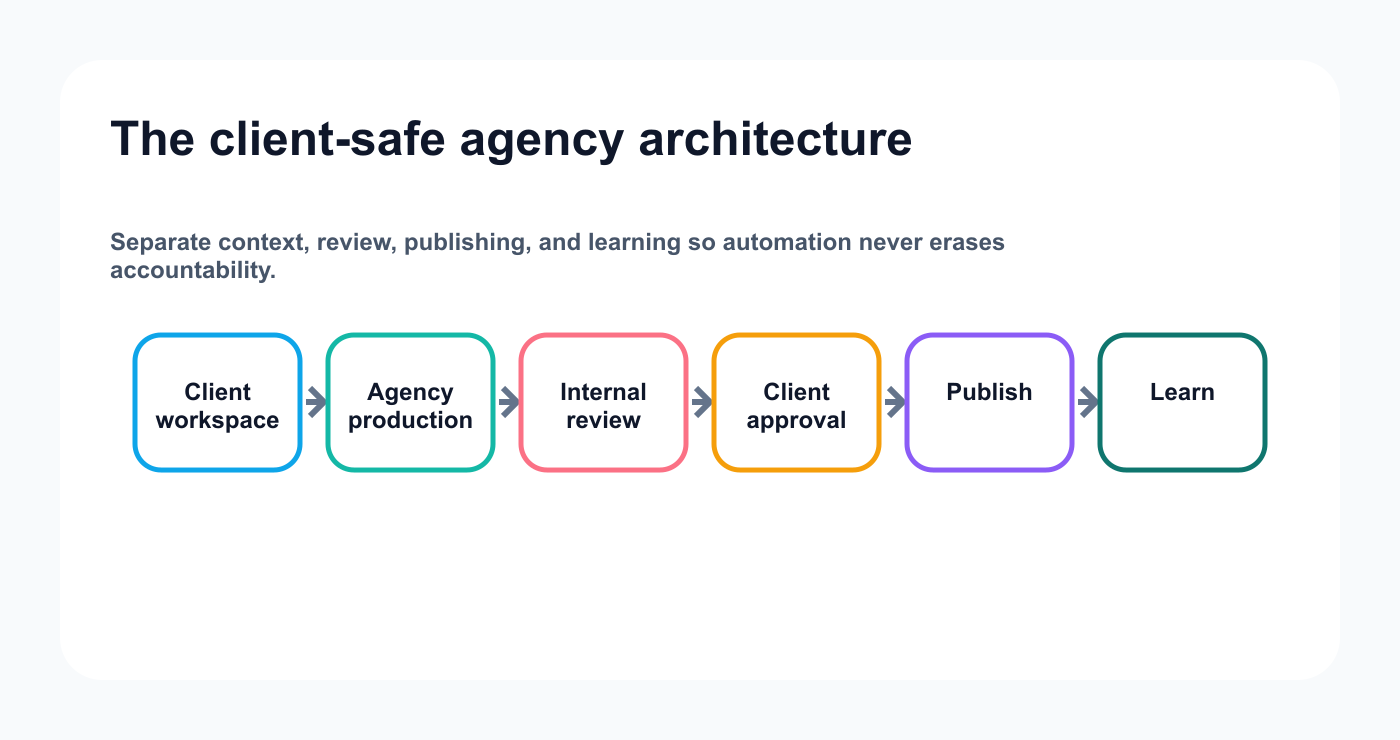
A client-safe architecture keeps account context and approval authority explicit from intake through learning.
An agency workflow cannot.
Agency systems need explicit answers to these questions:
Which client owns this content?
Which workspace contains the account?
Which account should receive the post?
Which reviewer checks brand voice?
Which client approver has final authority?
Which version was approved?
Which language was approved?
Which asset belongs to the campaign?
Which timezone applies?
Which report should receive the result?
Which repurposing rule applies?
If those answers live only in someone’s memory, automation will eventually create errors.
The workflow needs a data model.
The agency operating model
A clean agency architecture has five layers.
1. Client layer
Each client has:
workspace
accounts
brand voice
product facts
languages
approval rules
reporting goals
campaign calendar
2. Agency production layer
The agency manages:
briefs
research
ideas
drafts
assets
internal review
scheduling preparation
3. Client approval layer
The client reviews:
final copy
final asset
claim accuracy
campaign timing
platform
CTA
4. Publishing layer
Tareno manages:
connected accounts
platform requirements
scheduling
publishing
action status
failures
5. Learning layer
The agency uses:
analytics
client reports
performance interpretation
content experiments
repurposing
workflow improvement
The architecture becomes:
Client brief
  ↓
Agency workspace
  ↓
Research and drafting
  ↓
Internal review
  ↓
Client approval
  ↓
Tareno publishing queue
  ↓
Social networks
  ↓
Analytics and report
  ↓
Repurposing and next-month plan
Step 1: separate clients by workspace
Do not manage every client inside one undifferentiated content queue.
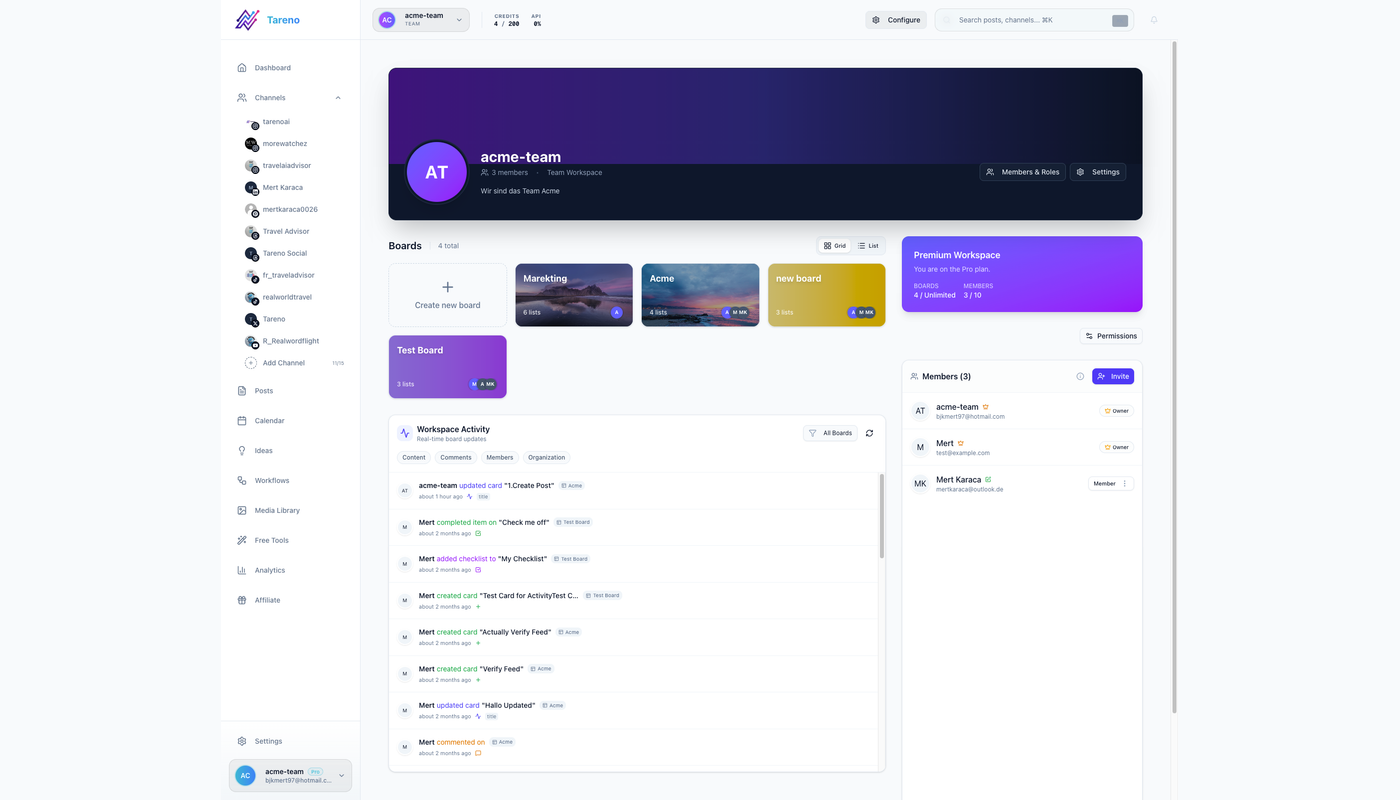
Separate workspaces reduce account confusion and keep each client's people, assets, and approval rules in the right context.
Use a separate Tareno workspace for each client or brand where appropriate.
Each workspace should contain:
connected accounts
team members
client reviewers
campaign boards
calendar
approvals
analytics
reports
repurposing queue
This reduces cross-client mistakes.
A workspace should answer:
Whose content is this?
before anyone creates or schedules anything.
Step 2: map every account explicitly
Never use logic such as:
Use the first LinkedIn account.
Store explicit mappings.
Example:
{
  "client": "Client A",
  "workspaceId": "workspace_a",
  "accounts": {
    "linkedin": "account_linkedin_a",
    "instagram": "account_instagram_a",
    "bluesky": "account_bluesky_a",
    "mastodon": "account_mastodon_a"
  }
}
Every external action should include:
client
workspace ID
account ID
platform
campaign
language
approver
This should be deterministic.
The AI agent may suggest content.
It should not guess the target account.
Step 3: define roles and permissions
A typical agency needs several roles.
Content strategist
Can:
create plans
create briefs
review analytics
propose repurposing
Copywriter or creator
Can:
create drafts
revise content
attach notes
Designer
Can:
upload assets
update visuals
add alt text
Internal reviewer
Can:
request changes
approve for client review
Client reviewer
Can:
approve
reject
request changes
Scheduler or publisher
Can:
prepare the final schedule
confirm the approved version
Admin
Can:
manage connections
roles
workspaces
API credentials
Do not grant every team member administrative access.
Use the minimum permission required.
Step 4: standardize client onboarding
Automation becomes easier when onboarding data is structured.
Client onboarding should capture:
Client name:
Workspace:
Primary contact:
Approvers:
Social accounts:
Target audiences:
Content pillars:
Brand voice:
Banned phrases:
Product facts:
Claims allowed:
Claims requiring review:
Competitors:
Languages:
Markets:
Timezones:
CTA library:
Reporting goals:
Posting cadence:
Sensitive topics:
Sponsor or disclosure rules:
This becomes the agent and workflow context.
A weak onboarding form creates repeated clarification.
A strong onboarding form reduces future review cycles.
Step 5: create a content intake workflow
Every content request should include:
client
campaign
goal
audience
platform
format
source
owner
deadline
CTA
asset requirement
language
risk level
reviewer
approver
measurement goal
Bad request:
Make a post about the new feature.
Better request:
Create a LinkedIn product-education post for Client A explaining the new approval workflow. Use the approved release notes, avoid pricing claims, include the product screenshot, and route it to product review before client approval.
Automation depends on good input.
Step 6: use AI for research, not invented authority
AI can help agencies:
summarize source material
identify content angles
create first drafts
adapt platform versions
classify comments
analyze performance
create repurposing ideas
localize content
organize campaign plans
AI should not invent:
customer results
product features
pricing
legal claims
sponsor requirements
competitor facts
client experience
approval state
Provide approved sources.
Examples:
product documentation
release notes
client interview
case study
approved testimonial
brand glossary
previous high-performing posts
The agent should cite or store the source internally.
Step 7: create a risk-based approval matrix
Not every post needs the same path.
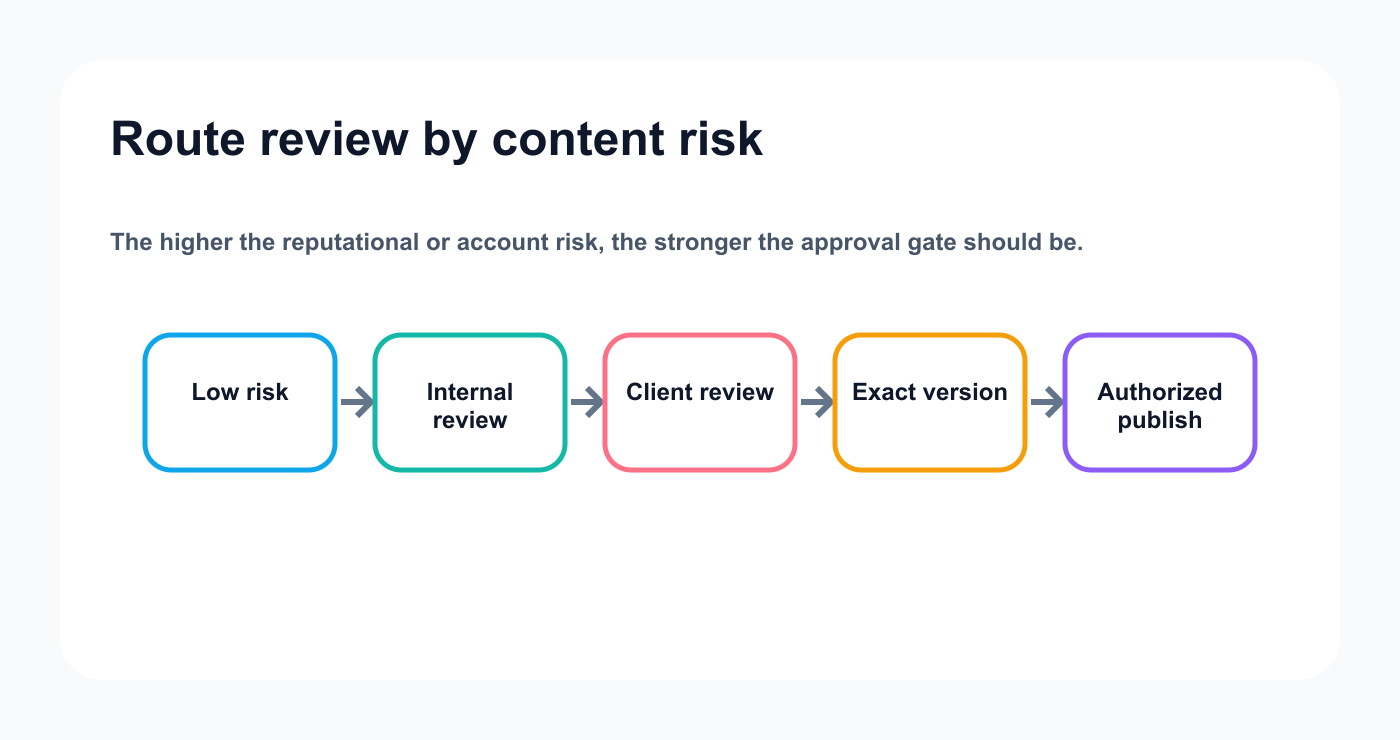
A risk-based matrix gives routine work speed while reserving stronger controls for sensitive client content.
Content typeInternal reviewClient approvalSpecialist reviewEvergreen tipYesOptionalNoCommunity questionYesOptionalNoProduct educationYesYesProduct if neededCustomer resultYesYesCustomer successPricingYesYesProduct or financeCompetitor comparisonYesYesMarketing or legalSponsored contentYesYesBrand or sponsorJapanese/Arabic campaignYesYesNative and visualImmediate responseYesDependsDependsDeletionYesYesAdmin
The matrix should live in the system.
Do not rely only on team memory.
Step 8: separate internal review from client approval
These are different stages.
Internal review asks:
Is the strategy correct?
Is the content well written?
Does it fit the platform?
Are claims supported?
Is the asset ready?
Is the client likely to approve it?
Client approval asks:
Is this accurate?
Is this aligned with the brand?
Is this the exact version that can go public?
Is the timing acceptable?
Is the CTA correct?
Skipping internal review makes the client your editor.
That slows approvals and weakens trust.
Step 9: approve the exact version
Approval should apply to:
caption
asset
account
platform
date
CTA
disclosure
language
campaign
If any material field changes, define whether reapproval is required.
Material changes:
new claim
changed price
different asset
changed CTA
changed account
changed disclosure
changed client language
changed schedule around a campaign event
A version history helps explain what changed.
Step 10: use approval-first AI agents
An AI agent can support the agency without bypassing clients.
Prompt:
Review the brief and source material for Client A. Create native drafts for LinkedIn, Bluesky, Mastodon, and Threads. Save drafts only. Flag every product, pricing, competitor, and customer claim. Do not select another workspace.
Another prompt:
Review recent analytics and propose next month’s content plan. Do not create drafts until the strategist approves the plan.
The agent can think flexibly.
Tareno keeps client actions controlled.
Step 11: connect ChatGPT, Codex, OpenClaw, or Hermes
ChatGPT
Useful for:
strategist conversations
content planning
client-report interpretation
multilingual drafting
Codex
Useful for:
SaaS release notes
technical clients
developer content
product launches tied to repositories
OpenClaw
Useful for:
persistent agency operations
recurring workspace audits
multi-tool orchestration
Hermes Agent
Useful for:
configurable agent environments
MCP tool filtering
custom agency workflows
The same Tareno MCP layer can support multiple agent interfaces.
Step 12: filter agent tools by role
A strategist agent may need:
accounts
analytics
drafts
reports
repurposing
It may not need:
account deletion
immediate publishing
credential management
A client-report agent may need only:
analytics
reports
campaign data
A draft agent may need:
source context
create draft
update draft
attach approved media
Use the smallest useful tool set.
Step 13: automate with n8n
n8n is useful for:
custom client routing
self-hosted workflows
databases
policy checks
custom code
detailed error handling
agent webhooks
Example:
Client brief approved in Notion
  ↓
n8n loads client configuration
  ↓
AI generates platform versions
  ↓
Risk classifier
  ↓
Tareno drafts
  ↓
Internal reviewer notification
Add a deterministic check:
If client ID does not match workspace ID,
stop workflow.
Step 14: automate with Make
Make is useful for visual agency scenarios.
Example:
Approved Airtable record
  ↓
Load client map
  ↓
Router by platform
  ↓
Router by language
  ↓
Tareno drafts
  ↓
Approval notification
The visual flow can be easier for account managers to understand.
Use Make Data Store for:
source ID
client ID
Tareno draft ID
status
language
platform
Step 15: automate with Zapier
Zapier is useful for simpler agency flows.
Examples:
approved Notion page → Tareno draft
new client testimonial → review queue
new blog post → social drafts
Tareno approval pending → Slack notification
published post → reporting sheet
For complex multi-client branching, Make or n8n may be easier.
Step 16: automate with Tareno Workflow Builder
Native workflows are useful when the logic remains inside Tareno.
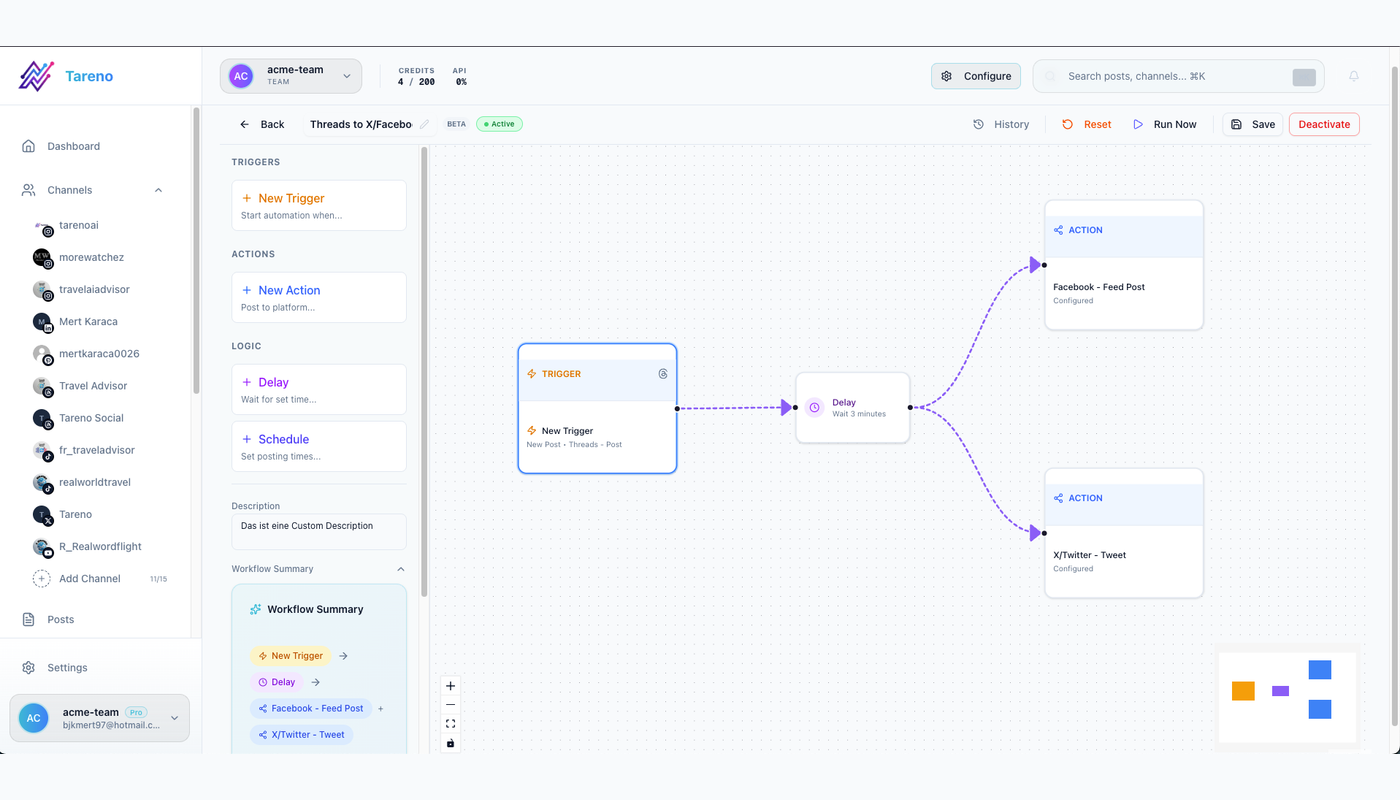
Workflow automation is safest when triggers, owners, and approval states are visible and testable.
Examples:
internal approval → client approval
client approval → scheduling preparation
published post → analytics task
high-performing post → repurposing queue
approved LinkedIn post → delayed Bluesky draft
approved source post → Mastodon adaptation
Native logic reduces unnecessary external integrations.
Step 17: manage multilingual client campaigns
Tareno supports workflows across:
English
German
French
Spanish
Portuguese
Russian
Italian
Japanese
Arabic
Agency multilingual workflow:
Approved master campaign
  ↓
Market and language matrix
  ↓
AI localization
  ↓
Native review
  ↓
Client approval
  ↓
Local-time scheduling
  ↓
Analytics by market
Each market should define:
language
country
audience
tone
terminology
CTA
timezone
native reviewer
Do not treat language as market.
Step 18: manage Bluesky and Mastodon for clients
Clients may request both networks without understanding their differences.
The agency should define the role of each.
Bluesky
Useful for:
concise commentary
product updates
founder insights
technical community discussion
Mastodon
Useful for:
context-rich educational posts
open-source communities
community participation
niche technical topics
Do not copy X captions without adaptation.
The client approval should show the network-specific final version.
Step 19: use Get Viral Now for creator and video clients
Agency workflow:
client submits YouTube URL
Get Viral Now analyzes transcript
agency selects content atoms
AI creates original scripts
strategist reviews angles
client approves selected scripts
Tareno schedules outputs
analytics create the next wave
Possible outputs:
TikTok
Reels
YouTube Shorts
LinkedIn
Bluesky
Mastodon
carousel
Pinterest
Do not copy another creator’s wording or personal story.
Step 20: build client reports that create work
A strong monthly report should include:
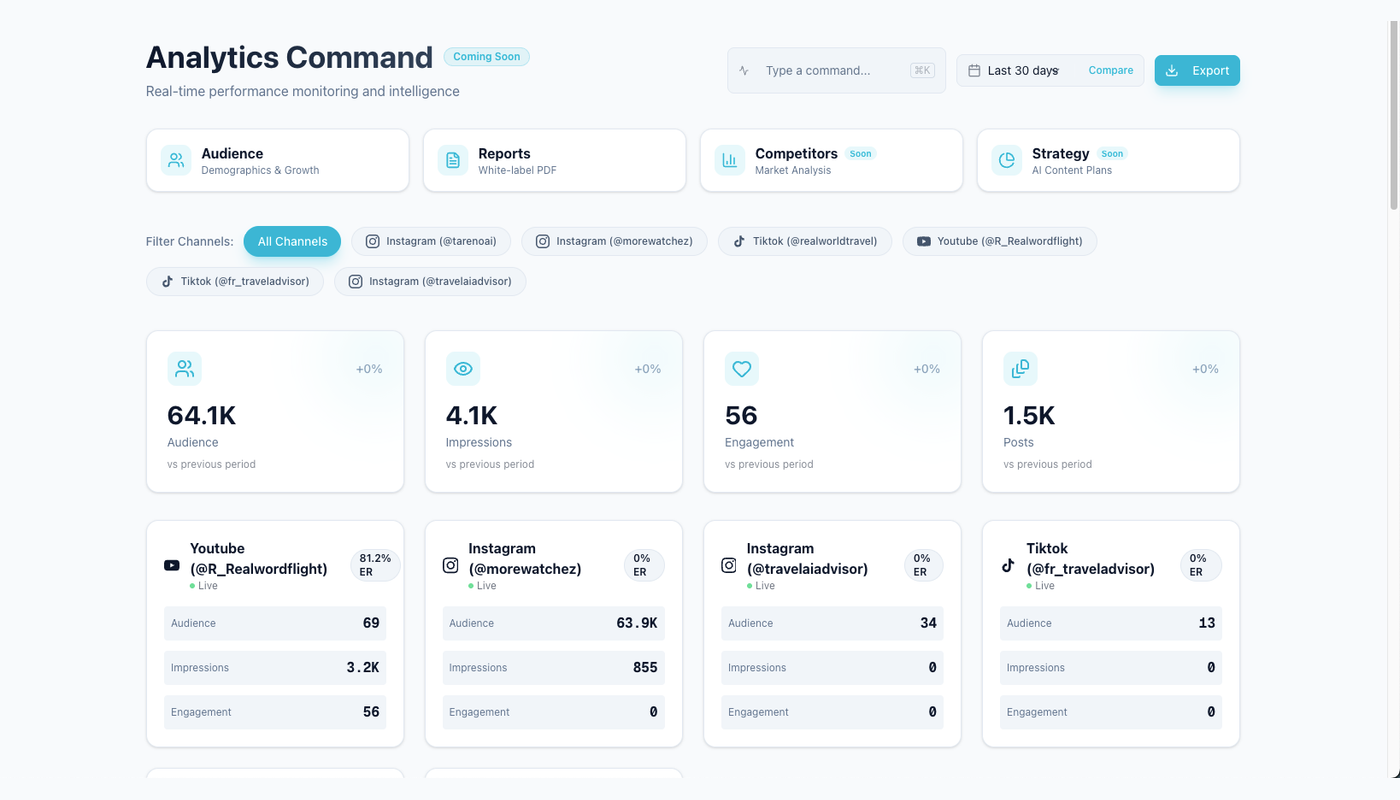
Useful client reporting turns performance signals into an owner, a next action, and a repurposing decision.
executive summary
KPI scorecard
top content
weak content
audience questions
platform comparison
experiment results
workflow delays
next-month plan
repurposing tasks
The report should answer:
What should we do next?
not only:
What happened?
Tareno analytics and reporting can support this decision loop.
White-label reporting workflow
A white-label agency report may include:
Client:
Reporting period:
Executive summary:
Primary goal:
Top three results:
Top three posts:
What worked:
What did not:
Audience insights:
Platform insights:
Approval delays:
Recommended experiments:
Next-month content plan:
Repurposing actions:
The agency can maintain a consistent reporting framework while adapting the narrative for each client.
analytics-to-repurposing
Workflow:
Monthly analytics
  ↓
Identify meaningful winners
  ↓
Score evergreen value
  ↓
Create new formats
  ↓
Add to client repurposing queue
  ↓
Review
Example:
SignalNew taskHigh savesCarouselHigh commentsFAQ seriesStrong watch timeNew short videoHigh clicksLanding-page expansionStrong sharesBroader campaignHigh client leadsCommercial follow-up
This turns performance into retained agency value.
Agency automation dashboard
Track both content and operations.
Content metrics
reach
saves
shares
comments
clicks
conversions
watch time
Workflow metrics
approval time
revision count
missed deadlines
failed publishing
duplicate prevention events
client response time
percentage repurposed
draft-to-publish time
A client may have strong content but a broken workflow.
The agency should report both where relevant.
Duplicate prevention
Use a composite key:
clientId + sourceId + platform + accountId + language + campaign
Store:
Tareno workspace ID
draft ID
action ID
post ID
source version
content hash
status
This prevents:
repeated drafts
repeated publishing
cross-client duplication
automation loops
Error handling
Agency-specific failures include:
wrong client map
disconnected account
client approval expired
product claim changed
asset missing
translation incomplete
account token expired
duplicate campaign item
wrong timezone
failed platform publish
Recommended routes:
Wrong mapping -> stop and alert admin
Missing asset -> return to designer
Approval expired -> request new approval
Platform outage -> retry with limit
Authentication failure -> alert account owner
Permanent failure -> create incident
Do not silently move on.
Security checklist
- [ ] Separate client workspaces
- [ ] Use explicit account IDs
- [ ] Use minimum permissions
- [ ] Use client-specific credentials where needed
- [ ] Keep publishing behind approval
- [ ] Keep deletion behind approval
- [ ] Protect webhooks
- [ ] Validate media URLs
- [ ] Log every external action
- [ ] Prevent duplicates
- [ ] Revoke former-team access
- [ ] Review agent tool access
- [ ] Separate staging and production
- [ ] Never place credentials in prompts
Client-safe AI checklist
- [ ] Correct client selected
- [ ] Correct workspace selected
- [ ] Correct account selected
- [ ] Approved source used
- [ ] Claims flagged
- [ ] Platform version adapted
- [ ] Language reviewed
- [ ] Asset reviewed
- [ ] Client approval recorded
- [ ] Final version matches approved version
- [ ] Schedule and timezone confirmed
Common agency mistakes
Mistake 1: one workspace for every client
Separate them.
Mistake 2: AI can access every account
Filter tools and workspaces.
Mistake 3: client approval before internal review
The agency should review first.
Mistake 4: approval not tied to version
Store the exact approved version.
Mistake 5: no account mapping
Use IDs.
Mistake 6: no risk matrix
Not every post needs the same path.
Mistake 7: reports without decisions
Create next actions.
Mistake 8: no workflow metrics
Measure approval and production delays.
Mistake 9: literal multilingual translation
Localize by market.
Mistake 10: immediate autonomous publishing
Increase autonomy gradually.
Twenty agency workflow examples
Client brief → draft queue
Notion approval → Tareno draft
Airtable campaign → platform branches
Blog post → social package
YouTube video → Get Viral Now
Product release → launch campaign
Testimonial → proof post
Client question → FAQ series
LinkedIn winner → carousel
High-save post → evergreen queue
Bluesky expansion
Mastodon expansion
Nine-language campaign
Native review routing
Client approval reminder
Expired approval renewal
Failed publish incident
Monthly white-label report
Report → next-month plan
Analytics → repurposing tasks
Related Tareno resources
Build the next part of this workflow
Approval workflowsExplore resource →Workflow builderExplore resource →n8n integrationExplore resource →Make integrationExplore resource →
FAQ
Can an agency automate social media safely?
Yes, when workspaces, accounts, roles, approval rules, and public actions are clearly separated.
Should AI agents publish for clients automatically?
Not initially. Use AI for research, planning, drafts, and analysis. Keep client publishing approval-first.
Can Tareno separate client workspaces?
Yes. Tareno’s workspace model can support separate client environments, subject to final plan and feature verification.
Can agencies use ChatGPT, Codex, OpenClaw, or Hermes?
Yes, where the relevant Tareno MCP or plugin integration is supported. Agent access should be scoped by role and client.
Can n8n automate agency workflows?
Yes. n8n is useful for custom client routing, databases, policy checks, and self-hosted workflows.
Can Make automate client workflows?
Yes. Make is useful for visual routers, language branches, and app mapping.
Can agencies manage Bluesky and Mastodon?
Yes. The posts should be adapted separately for each network.
Can agencies localize campaigns into several languages?
Yes. Tareno supports multilingual workflows across nine languages, subject to final verification.
Can Get Viral Now support agency clients?
Yes. It can help analyze YouTube videos and generate original content directions and scripts.
What should be measured beyond performance?
Approval time, revision count, publishing failures, duplicate prevention, and draft-to-publish time.
Final thoughts
Agency automation should make the agency faster without making client risk invisible.
The strongest system has clear boundaries.
Each client has a workspace.
Each account has an explicit mapping.
Each draft has an owner.
Each risk level has a review path.
Each public action has approval.
Each report creates the next task.
Each winning post enters a repurposing loop.
AI agents can help agencies produce and analyze more.
n8n, Make, and Zapier can remove repeated operational work.
Tareno can keep the client accounts, approvals, publishing, analytics, and repurposing in one controlled layer.
That is how an agency scales capacity without scaling chaos.
Primary CTA: Create one client workspace in Tareno and map every connected account explicitly.
Secondary CTA: Build one draft-only automation before adding client approval and scheduling.