

When a promising content request stalls, the missing piece is often not another idea. It is a clear owner, an approved version, or a defined next action.
A good idea enters the system, but nobody owns the next step. A draft appears without enough context for review, a calendar date hides an unapproved version, or a report ends without creating next week’s task. That is why content request management needs a repeatable workflow builder and a simple operating model.
The goal is not process for its own sake. It is to make the next action obvious for every request. This guide gives content teams, agencies, creators, and SaaS teams a practical framework, copyable checklists, review rules, automation ideas, and a direct path from strategy to publishing and repurposing.
TL;DR
A strong system for content request management should include:
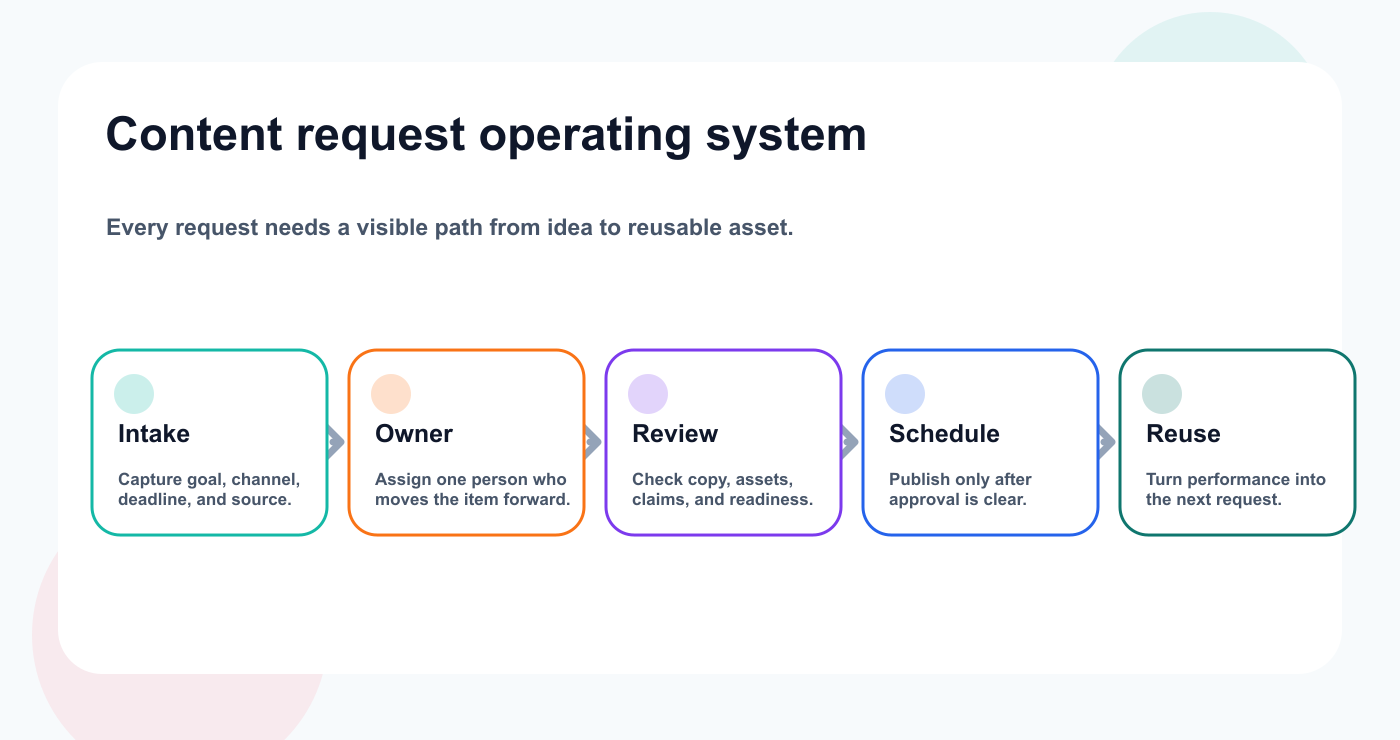
A visible request path turns scattered ideas into reusable content.
a clear intake point
one owner per item
simple workflow stages
review and approval rules
platform-specific execution
safe automation
a review cadence
The key rule:
If the next action is not obvious, the workflow is not clear enough.
A tool can help, but the system has to be designed first.
Why this workflow matters
Content request management becomes difficult when work is scattered across chats, docs, spreadsheets, calendars, and disconnected tools.
The common symptoms are easy to recognize:
ideas get lost
drafts wait too long for review
assets are missing
clients or stakeholders give feedback too late
AI drafts are created faster than they can be reviewed
reports do not create action
old high-performing posts are forgotten
nobody knows which version was approved
scheduled content is not actually ready
A good workflow fixes these issues by creating a single path from input to outcome.
That path should show what is being created, why it matters, who owns it, what needs review, when it publishes, how it performed, and whether it should be reused.
The operating framework
Use this simple framework:
StagePurposeMain questionIntakeCapture the request or ideaWhat are we making and why?DraftCreate the first versionDoes the content match the brief?ReviewImprove qualityWhat needs to change before approval?ApprovalControl riskCan this move forward?SchedulePrepare publishingIs the final version ready?PublishConfirm outputDid it go live correctly?AnalyzeLearn from performanceWhat signal did it create?RepurposeCreate leverageShould this become another asset?
This framework is intentionally simple.
Most teams do not need more stages. They need the existing stages to be used consistently.
Step 1: Define the intake
Every workflow starts with intake.
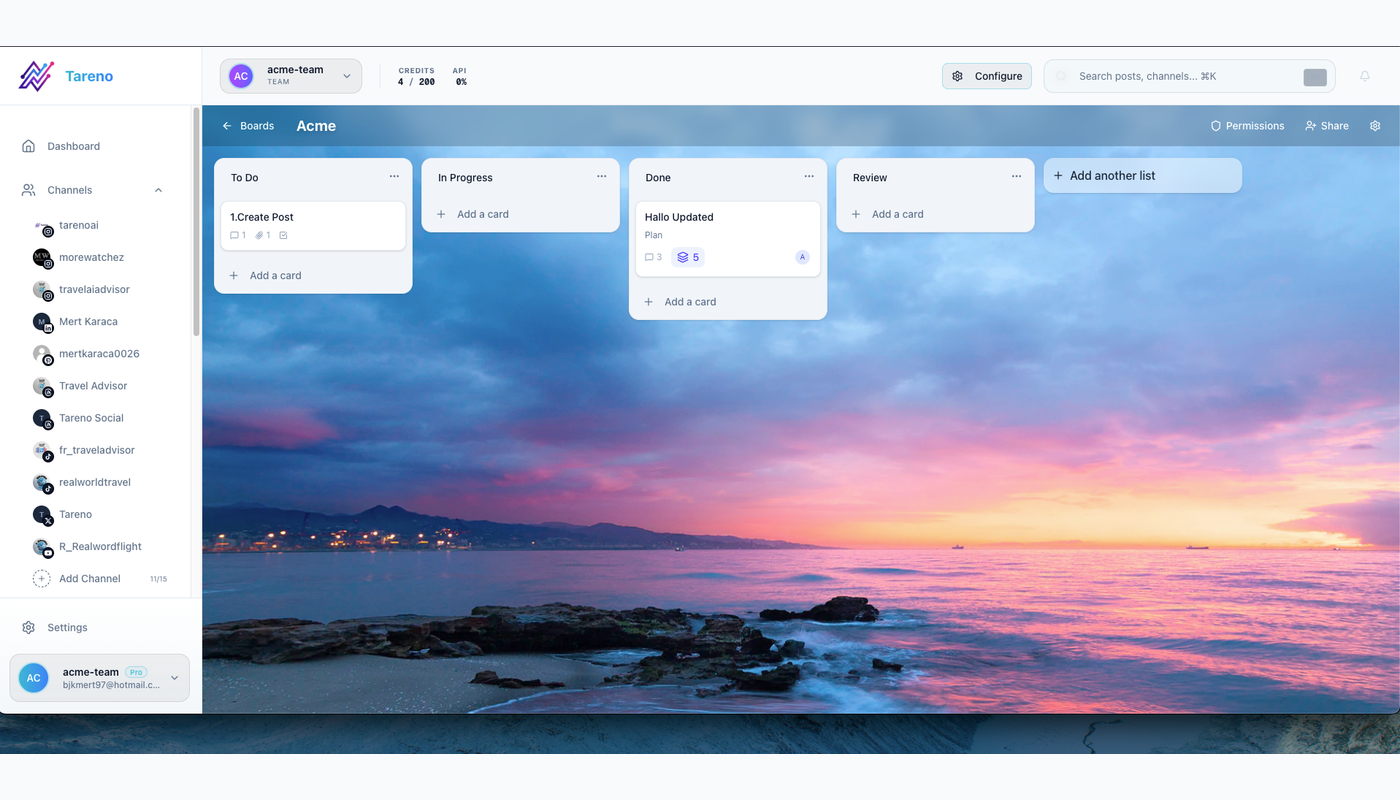
A shared intake board gives every request context, an owner, and a next step.
For content request management, intake should capture enough information to prevent rework.
Use these fields:
stable request ID
title
source
goal and definition of done
audience
platform
format
owner
deadline
CTA
asset requirement
risk level
reviewer
final approver
measurement goal
repurposing potential
The intake should not be a long form that nobody wants to complete.
It should be a lightweight way to make sure the work starts with context.
Bad intake:
Make a post about this.
Better intake:
Create a LinkedIn post for social media managers about why approval gates prevent wrong-version publishing. Use a practical tone, avoid pricing claims, and send to the marketing lead for review before scheduling.
Step 2: Assign one owner
Every workflow item needs one owner.
The owner is not responsible for doing every task.
The owner is responsible for movement: recording the next action, its due date, and any blocker before handing work to a contributor or reviewer.
Owner responsibilities:
clarify missing context
update status
request assets
request review
follow up on approval
confirm scheduling
add measurement date
move winners to repurposing queue
A post without an owner eventually becomes invisible.
Ownership is one of the simplest workflow improvements a team can make.
Step 3: Use simple statuses
Use statuses that people actually understand.
Recommended statuses:
Idea
Selected
Draft
Asset Needed
Review
Changes Requested
Approved
Scheduled
Published
Analyze
Repurpose
Archive
Avoid creating too many statuses.
A workflow with 30 columns may look sophisticated, but it often becomes harder to maintain than the work itself.
Simple statuses create adoption.
Step 4: Define review rules
Review should match risk.
Low-risk content can move quickly.
High-risk content needs stronger checks.
Risk levelExamplesReview ruleLowevergreen tips, simple educational postsowner reviewMediumproduct education, campaign posts, customer examplesinternal reviewHighpricing, competitors, sponsors, client content, legal-sensitive claimsfinal approval gate
This is important for content request management because not every item deserves the same approval process.
Over-approving every small item slows the team down.
Under-approving risky content creates avoidable mistakes.
Step 5: Connect approval to scheduling
Scheduling should depend on readiness.
A post is ready when:
the final caption is complete
the asset is attached
the platform version is correct
the CTA and link are checked
the exact caption, asset, CTA, link, destination account, and publish time share a stable revision ID with an approver and approval timestamp
publish date and timezone are confirmed
owner is assigned
measurement date is set
A calendar date does not mean the content is ready.
A strong workflow distinguishes planned content from approved content.
That distinction prevents wrong-version publishing.
Step 6: Make reporting create decisions
Reports should not end with metrics.
They should create next actions.
For every useful signal, record the comparison baseline, the decision, one owner, and the next review date.
SignalDecisionHigh savesTurn into checklist, carousel, or pinHigh commentsCreate FAQ or objection-handling postHigh clicksExpand into blog, comparison, or landing page sectionStrong watch timeReuse hook and pacingWeak CTARewrite and test againApproval delayImprove workflow, not content
The strongest teams do not only report performance.
They convert performance into the next content cycle.
Step 7: Build repurposing into the system
Repurposing should not be an afterthought.
A good repurposing workflow includes:
source post
performance signal
target platform
new format
owner
approval needed
due date
publish target
second-wave measurement
Examples:
LinkedIn post -> carousel
carousel -> Pinterest pin
TikTok script -> YouTube Short
customer comment -> FAQ
report insight -> next campaign angle
old top post -> evergreen queue item
Repurposing helps teams get more value from ideas that already proved themselves.
Step 8: Automate handoffs, not judgment
Automation can help, but only after the workflow is clear.
Good automations:
new intake -> create board item
draft ready -> notify reviewer
changes requested -> notify owner
approved -> notify scheduler
published -> create measurement task
high performer -> create repurposing item
report completed -> create next-action tasks
Avoid starting with automatic publishing.
Automation should move work forward, preserve the stable request ID and source revision, and stop when required context is missing. Make retries idempotent so one webhook or approval event cannot create duplicate board cards, schedules, or measurement tasks. It should not bypass human review for risky content.
Copy/paste workflow checklist
Use the checklist below to confirm that intake, review, scheduling, reporting, and reuse are operationally complete.
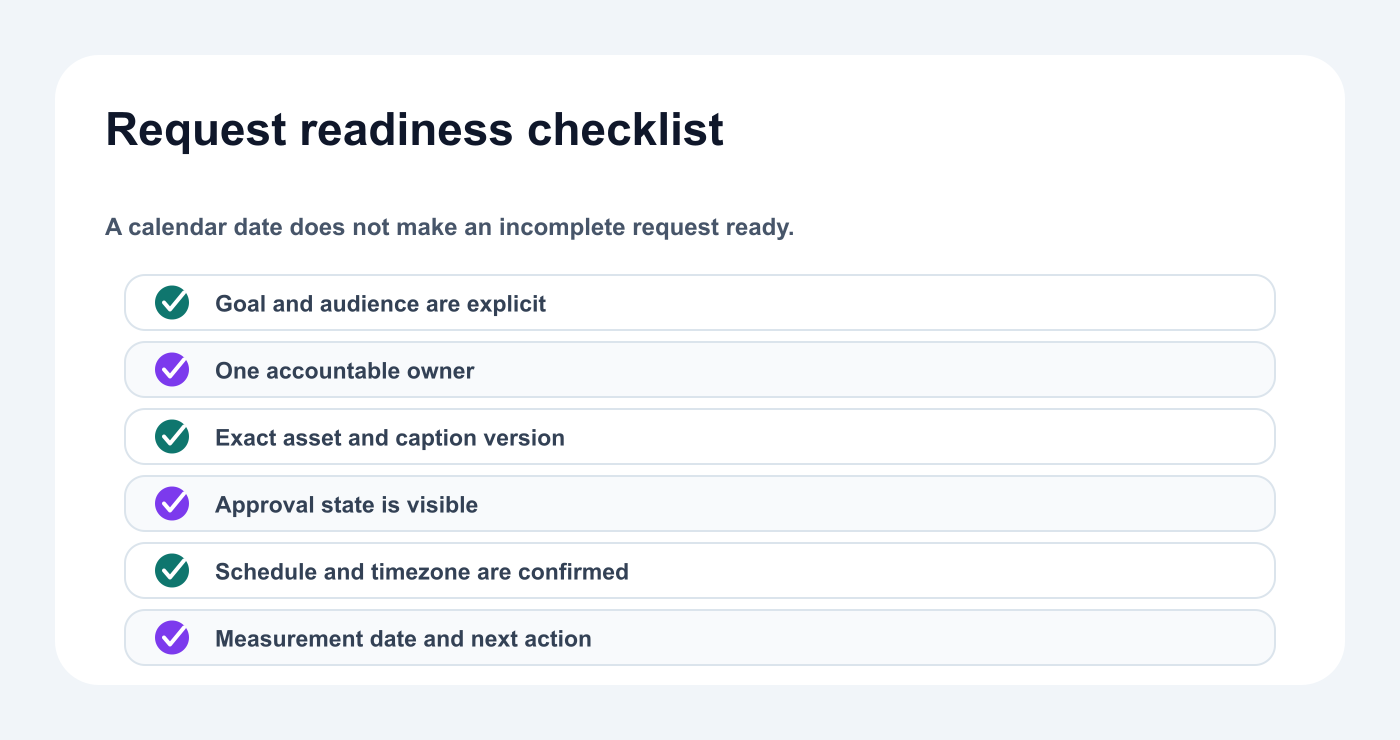
A request is ready only when context, ownership, approval, scheduling, and measurement are explicit.
## Workflow Checklist

Intake:
- [ ] Goal defined
- [ ] Audience defined
- [ ] Platform and format selected
- [ ] Owner assigned
- [ ] CTA added
- [ ] Asset requirement defined
- [ ] Risk level selected

Review:
- [ ] Draft complete
- [ ] Asset attached
- [ ] Internal review completed
- [ ] Claims checked
- [ ] Final approver assigned

Scheduling:
- [ ] Final version approved
- [ ] Date/time/timezone confirmed
- [ ] Link checked
- [ ] Campaign label added
- [ ] Measurement date set

Reporting:
- [ ] Performance reviewed
- [ ] Signal interpreted
- [ ] Next task created
- [ ] Repurposing decision recorded
How Tareno fits this workflow
Tareno is useful when content request management needs to connect planning, approval, scheduling, analytics, repurposing, and automation.
Relevant Tareno components include:
content boards
content calendar
approval workflows
repurposing queue
analytics
competitor analysis
team/client workspaces
roles and permissions
activity visibility
workflow builder
AI captions and hashtags
Make integration
n8n integration
API access
The workflow becomes:
intake -> draft -> review -> approval -> schedule -> publish -> analyze -> repurpose
This is stronger than managing content across disconnected chats, docs, calendars, and spreadsheets.
Common mistakes
Mistake 1: Starting without context
Weak intake creates weak drafts.
Mistake 2: No owner
If nobody owns the item, nobody moves it.
Mistake 3: Approval is unclear
Approval should apply to one immutable revision. Any material change to the caption, asset, CTA, link, destination account, or publish time should invalidate the earlier approval and return the item to review.
Mistake 4: Calendar dates hide readiness
A scheduled date does not mean a post is approved.
Mistake 5: Reports create no tasks
Reporting should change future content.
Mistake 6: Repurposing is forgotten
High-performing content should become future output.
Mistake 7: Automation is added too early
Automate after the workflow is stable.
Related Tareno resources
Keep building the workflow
Workflow builderExplore resource →Approval workflowExplore resource →Content boardsExplore resource →Browse alternativesExplore resource →
FAQ
What is the purpose of this workflow?
The purpose is to move content from request or idea to approved, scheduled, measured, and reusable output without losing ownership or context.
Who should own each workflow item?
One person should own each item. The owner moves the item forward, even if other people write, design, review, or approve it.
Does every item need approval?
No. Approval should match risk. Low-risk content can move faster, while high-risk content needs stronger review.
How should reports connect to workflow?
Reports should create content tasks, repurposing tasks, or workflow improvements. A report without next actions is incomplete.
Can AI be used in this workflow?
Yes. AI can help with drafts, hooks, summaries, and repurposing. Human review should check accuracy, brand voice, claims, and approval requirements.
Can this workflow be automated?
Parts of it can be automated. Handoffs, reminders, measurement tasks, and repurposing tasks are good automation candidates.
Implementation and final checklist
Start with one request and run it through the entire path: record its ID and goal, assign an owner, approve the exact version, verify the live result, and turn one measured signal into an owned next task. If any handoff is unclear, fix that step before adding automation or more volume.
Implementation notes for teams that want to go deeper
If your team wants to make this workflow more reliable, add three lightweight habits.
First, review the board once per week and remove items that no longer matter. A backlog that is never cleaned becomes a storage bin, not a workflow.
Second, review the approval rules once per month. If the same type of content gets delayed repeatedly, the approval path may be unclear or too heavy.
Third, review repurposing candidates after every reporting cycle. A strong post should not disappear after one publish date. It should become a reusable signal for future content.
This does not require a large operations team. It requires a repeatable rhythm with visible owners and decision points:
Monday: select and assign work
Wednesday: review blockers and approvals
Friday: confirm scheduled content and measurement tasks
Month end: review performance and create repurposing tasks
This rhythm keeps content moving without turning the workflow into bureaucracy.
Extra checklist: workflow health score
Use this scorecard monthly as a conversation starter, not a performance statistic. Score each area from 1 (no named owner or evidence) to 5 (repeatable evidence and a reliable handoff). Record one example behind each score, then give the lowest-scoring area an owner and a fix date.
AreaScore 1–5Intake qualityOwner clarityReview speedApproval clarityScheduling accuracyReporting usefulnessRepurposing outputAutomation reliability
If one area scores low two months in a row, fix the workflow before adding more content volume.
More content will not solve unclear operations.
Clear operations make more content possible.


