OpenClaw can interpret a goal, choose tools, sequence multi-step work, and stop at an explicit approval boundary.
Tareno provides the durable social layer: connected accounts, drafts, media, scheduling, approvals, analytics, and a repurposing queue. Connecting the two through the Model Context Protocol creates a practical agent workflow without making the agent the system of record.
The important part is not that an agent can “post automatically.”
That alone is easy to demonstrate and risky to operate.
The useful part is that the agent can help with the entire operating loop:
inspect the available accounts
understand platform requirements
analyze existing performance
propose a strategy
prepare platform-specific drafts
request scheduling
wait for human approval
publish through Tareno
review the result
create the next repurposing task
This is a much stronger model than giving an autonomous agent unrestricted access to your brand accounts.
OpenClaw handles reasoning and orchestration.
Tareno handles social execution and control.
This guide explains the integration, safe MCP setup, practical prompts, approval gates, and when to choose an agent instead of deterministic automation.
TL;DR
A practical OpenClaw and Tareno workflow looks like this:
Create a scoped Tareno API credential.
Add the Tareno remote MCP server to OpenClaw.
Test the connection and inspect the available tools.
Filter the visible tool set to the minimum required.
Begin with read-only account and analytics tasks.
Add draft creation.
Keep immediate publishing and deletion tightly controlled.
Review all consequential actions in Tareno.
Measure published content and reuse the strongest ideas.
The key principle is:
Give the agent enough access to be useful, but not enough unchecked access to become dangerous.
OpenClaw’s MCP tooling supports remote HTTP servers, tool discovery, diagnostics, authentication settings, and per-server tool filters. Tareno adds the publishing, approval, and reporting layer needed to turn that connection into a real social media workflow.
How OpenClaw and Tareno work together
What OpenClaw contributes
OpenClaw is useful in this setup because it acts as the agent runtime.
It can interpret a broad instruction such as:
Review my recent content, identify the best topic, create adapted posts for LinkedIn, Bluesky, Mastodon, and Threads, and prepare them for next week. Do not publish without approval.
That request contains several subproblems:
inspect analytics
compare performance
identify a topic
generate new versions
adapt tone by platform
select target accounts
prepare a schedule
respect an approval boundary
A deterministic automation usually needs every step designed in advance.
An agent can decide which tools to use based on the request.
That flexibility is why MCP matters.
OpenClaw saves remote server definitions and tool filters. status and plain doctor inspect configuration without connecting; use probe or doctor --probe to prove live connectivity and inspect the current catalog before an agent task.
This allows OpenClaw to remain the reasoning layer while Tareno contributes the social media capabilities.
What Tareno contributes
Tareno is not only a destination for finished captions.
It is the operating layer behind the agent.
Relevant capabilities include:
connected social accounts
workspaces
multi-platform drafts
account and platform requirements
media handling
scheduling
approval workflows
activity visibility
analytics
reports
Get Viral discovery, credit quotes, and analysis blueprints
content boards
repurposing queue
workflow builder
Make integration
n8n integration
Zapier integration
API and MCP access
That matters because an AI agent should not need direct passwords for Instagram, LinkedIn, Bluesky, Mastodon, TikTok, or other networks.
The agent talks to Tareno.
Tareno manages the authenticated platform connections and applies its own validation and permissions.
This creates a cleaner architecture:
User
  ↓
OpenClaw
  ↓
Tareno remote MCP server
  ↓
Tareno account, scope, and platform validation
  ↓
Draft or pending action
  ↓
Human approval in Tareno
  ↓
Publishing queue
  ↓
Social platforms
Why MCP is better than browser automation for this use case
An agent can theoretically control a browser and click through a scheduler.
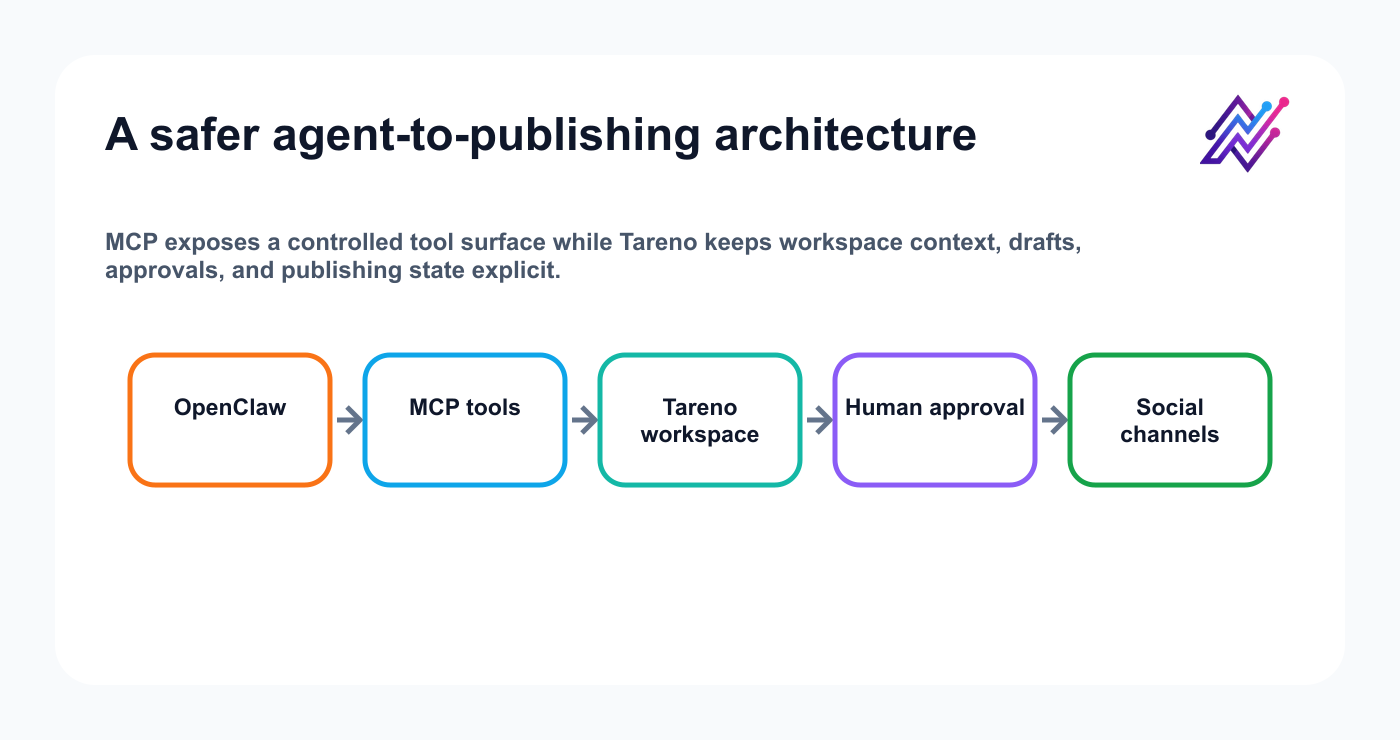
Structured MCP calls keep inspection and drafting separate from approval-controlled publishing.
That is not the best foundation for a durable workflow.
Browser automation is fragile because:
layouts change
buttons move
text can be misread
session state can expire
the agent may select the wrong account
reviewability is poor
actions may be difficult to validate before execution
MCP gives the agent structured tools.
A tool has a name, description, and input schema.
Instead of guessing where to click, the agent can call a defined action.
For example, a Tareno MCP surface may expose capabilities for:
listing workspaces
listing connected accounts
reading platform requirements
creating drafts
importing media
preparing scheduled posts
reading analytics
checking pending action status
Tool names can change as the server evolves, so inspect the live catalog before writing filters or production prompts.
The architectural point is stable:
Structured tool calls are easier to validate than simulated browser clicks.
Connect and test safely
Prerequisites
Before connecting OpenClaw to Tareno, prepare:
an active Tareno workspace
connected social accounts
a Tareno API credential
the minimum required scopes
an installed OpenClaw environment
a secure way to store credentials
a clear approval policy
at least one test account or low-risk workflow
Do not begin with full autonomous publishing.
A safer rollout is:
list accounts
read analytics
create drafts
upload media
prepare scheduling requests
approve in Tareno
expand gradually
This lets you validate the connection before allowing consequential actions.
Connect the Tareno MCP server to OpenClaw
Save Tareno as a remote Streamable HTTP server with a scoped key in the Authorization header.
Keep the configuration owner-only, load the token from an environment variable, and never commit a literal credential. The ${TARENO_API_KEY} environment reference is resolved by OpenClaw when it reads the saved configuration, so the variable must be available to the process that owns the MCP connection—not only to the shell that runs the setup command:
export TARENO_API_KEY='tk_live_your_key'
openclaw mcp set tareno '{"url":"https://tareno.co/api/mcp","transport":"streamable-http","requestTimeoutMs":30000,"connectionTimeoutMs":10000,"headers":{"Authorization":"Bearer ${TARENO_API_KEY}"}}'
Inspect the saved definition, then prove live connectivity and enumerate the current catalog:
openclaw mcp status --verbose
openclaw mcp doctor tareno --probe
OpenClaw distinguishes saved configuration from live connectivity and warns about literal secrets. A saved change may also require openclaw mcp reload, a Gateway configuration publish, or a restart of the process that owns the MCP client; run the live probe again after that reload boundary. Tareno uses capability-specific scopes such as workspaces:read, accounts:read, posts:draft, analytics:read, and actions:read; grant viral:run only when the agent may request a quoted, dashboard-approved analysis. Check the official MCP CLI reference and live Tareno tool catalog before setting filters.
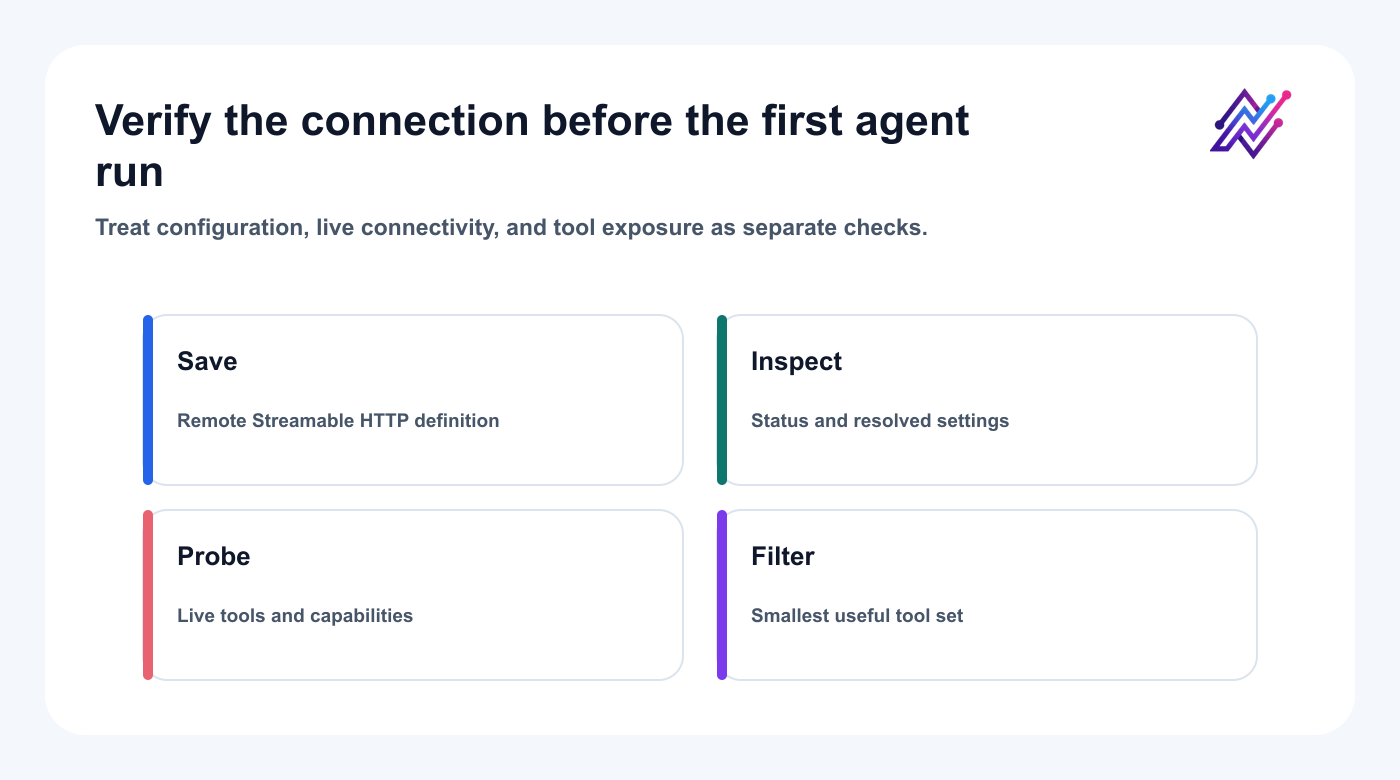
A saved MCP server is not a verified connection; probe it live before narrowing the exposed tools.
Filter the tool surface
Connecting every available tool is not always the best idea.
OpenClaw supports per-server tool filtering.
Start with read-only and draft-oriented tools.
A conservative first phase might include:
list workspaces
list accounts
read platform requirements
read analytics
create drafts
check action status
Then add scheduling preparation later.
Keep destructive actions excluded until you have a clear reason to expose them.
A representative filter workflow might look like:
openclaw mcp tools tareno \
  --include 'list_workspaces,list_accounts,get_platform_schema,list_posts,get_post,get_analytics_overview,get_platform_analytics,get_action_status,create_drafts'
Build filters from the tool names returned by the live probe rather than copying a stale pattern.
The operating principle is more important than the exact command:
Expose the smallest useful tool set.
This reduces accidental calls and makes the agent’s choices easier to understand.
Test the connection safely
Do not make the first prompt:
Run my entire social media account.
Start with inspection.
Test 1: Tool discovery
List the Tareno tools available to you. Group them into accounts, drafts, media, publishing, analytics, and approvals. Do not call any write tool.
Test 2: Account inspection
List my Tareno workspaces and connected social accounts. Do not make any changes.
Test 3: Platform requirements
Show me the publishing requirements for my LinkedIn, Bluesky, and Mastodon accounts.
Test 4: Analytics
Review my last seven days of analytics and summarize the strongest topic. Do not create drafts yet.
Test 5: Draft creation
Create one draft for Bluesky based on the strongest topic. Save it as a draft only.
If all five work, the integration is ready for a controlled scheduling test.
Seven practical workflows
Workflow 1: Create platform-native drafts
One of the strongest OpenClaw use cases is adapting one idea across several platforms.
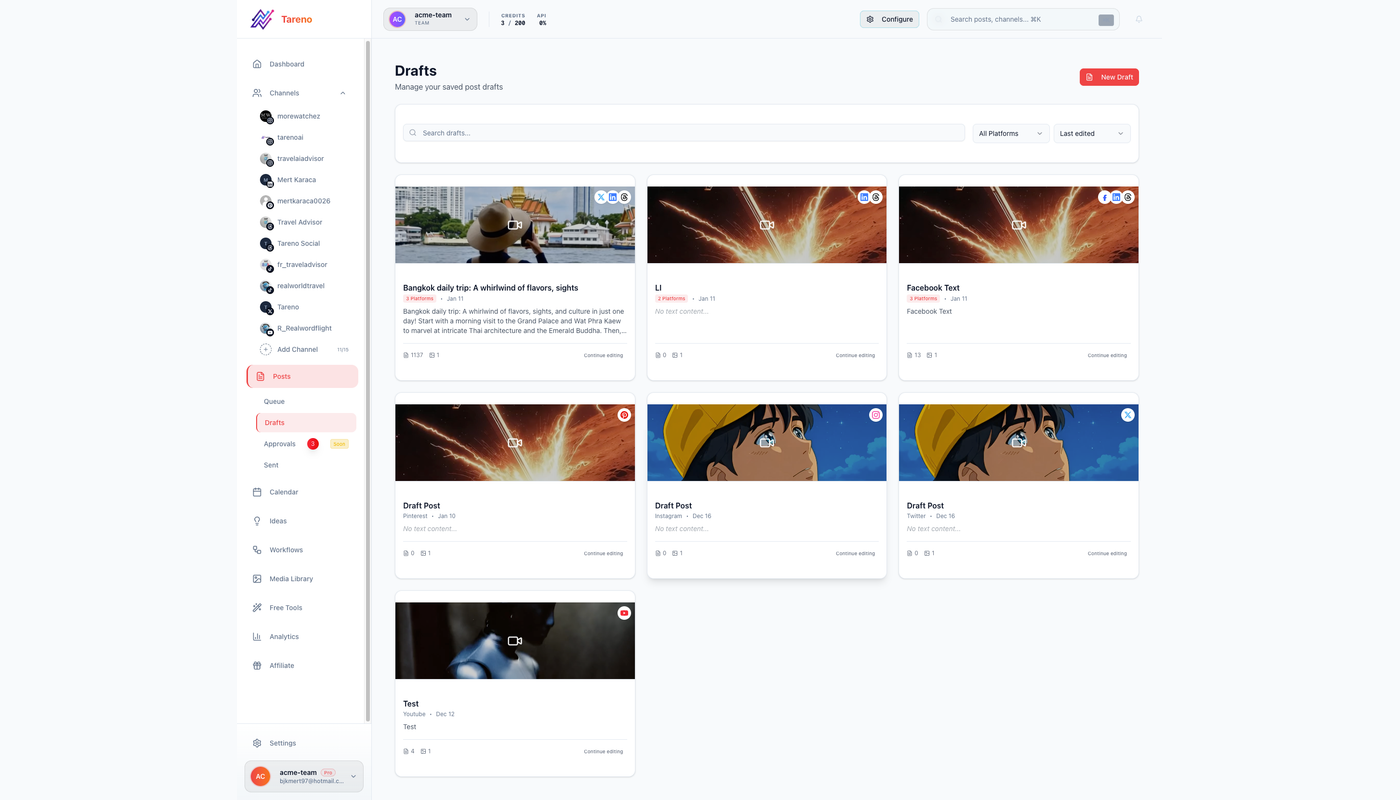
Draft-first operation gives editors a visible checkpoint for claims, links, tone, and platform fit.
Prompt:
Use this core message to create native drafts for LinkedIn, Threads, Bluesky, Mastodon, and X. Do not mechanically shorten the same caption. Adapt the hook, structure, tone, and CTA for each network. Save drafts only.
The agent should treat each platform differently.
stronger professional framing
more context
a clear business lesson
restrained CTA
Threads
conversational opening
shorter sentences
opinion or personal observation
room for replies
Bluesky
concise, clear language
less corporate tone
a self-contained idea
optional thread structure
Mastodon
community-aware tone
useful context
appropriate content warning where relevant
sensitivity to instance norms
X
concise hook
fast payoff
optional thread
direct CTA where appropriate
Tareno can keep all variants in the same workflow while preserving platform-specific captions.
Workflow 2: Approval-first scheduling
Once the drafts are ready, ask OpenClaw to prepare a schedule.
Prompt:
Prepare the approved LinkedIn, Bluesky, and Mastodon drafts for next Tuesday, Wednesday, and Thursday at 10:00 AM Europe/Berlin. Show me the complete plan before requesting approval. Do not publish immediately.
The agent should identify:
target account
platform
caption
media
date
time
timezone
approval requirement
Tareno should convert the consequential action into a reviewable state.
The user can then approve or reject it in the dashboard.
This is safer than allowing the agent to publish directly.
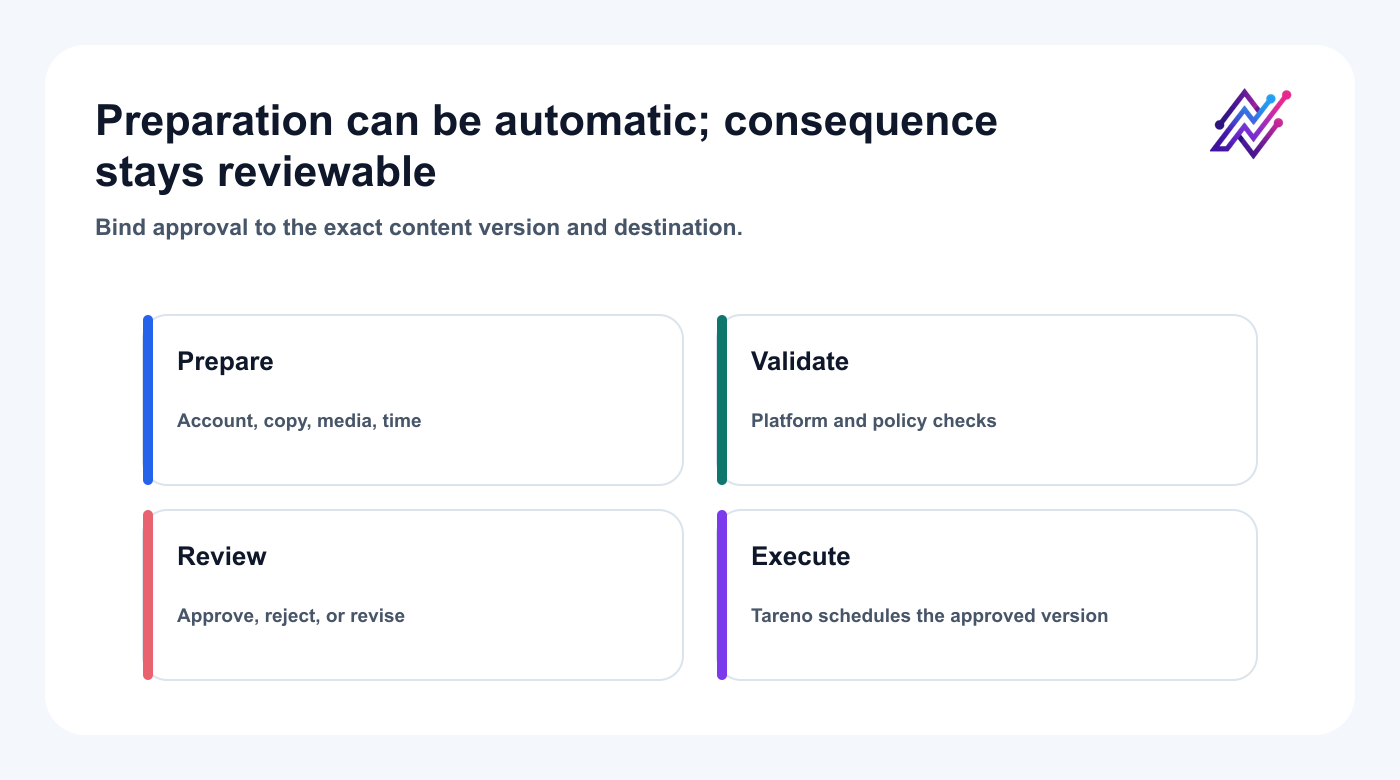
The agent prepares the complete action; a person approves the exact account, version, media, and time.
Workflow 3: Analytics to repurposing
Prompt:
Review my last 30 days of performance. Find the three posts with the strongest meaningful signals, not only reach. For each one, explain why it likely worked and propose two repurposing options.
Use analytics reports to compare meaningful signals such as:
saves
shares
comments
clicks
watch time
completion rate
conversions
profile visits
Then continue:
Save the strongest three repurposing ideas as drafts. Add the source post and original performance signal to the internal notes.
This creates traceability.
The new draft is connected to the evidence that justified it.
Workflow 4: Build a weekly content plan
Prompt:
Review my recent analytics, current drafts, pending approvals, and unused repurposing ideas. Build a five-post plan for next week. Balance education, product, opinion, proof, and CTA. Do not schedule anything yet.
The output should include:
DayPlatformTopicFormatGoalStatusMondayLinkedInWorkflow lessonTextEducationProposedTuesdayBlueskyShort opinionTextEngagementProposedWednesdayInstagramChecklistCarouselSavesProposedThursdayMastodonPractical guideTextCommunityProposedFridayTikTokShort scriptVideoReachProposed
Then ask:
Create drafts for the plan. Route any post containing a product claim to review.
This is an example of agentic planning combined with deterministic approval rules.
Workflow 5: multilingual campaigns
Tareno's general AI-output language list includes English, German, French, Spanish, Portuguese, Russian, Italian, Polish, Japanese, and Arabic. Check the selected MCP tool's live schema before assuming that every feature accepts every language.
OpenClaw can help create the first localized versions.
Prompt:
Localize this campaign for English, German, French, Spanish, Portuguese, Russian, Italian, Polish, Japanese, and Arabic. Preserve the offer and CTA intent. Adapt tone and sentence structure rather than translating literally. Flag versions that need native review. Save drafts only.
A serious localization workflow should check:
language
market
formality
idioms
CTA phrasing
punctuation
text direction
line length
visual layout
product terminology
cultural assumptions
Arabic and Japanese versions may need additional visual review because line breaks, text direction, typography, and formality can affect the final asset.
AI can accelerate the first draft.
Human approval should remain part of high-value multilingual campaigns.
Workflow 6: Open-network distribution with Bluesky and Mastodon
Bluesky and Mastodon are valuable additions because they expand distribution beyond the largest centralized networks.
Do not treat them as identical copies of X.
Prompt:
Take this LinkedIn post and create one Bluesky version and one Mastodon version. Keep the core insight. Remove corporate language. Make the Bluesky post concise and self-contained. Give the Mastodon version more context and a community-friendly tone. Save drafts only.
Tareno moves the same source idea through:
platform-specific drafting
approval
scheduling
analytics
repurposing
The user does not need a separate manual workflow for every network.
Workflow 7: Use OpenClaw as the strategist, not only the publisher
A weak agent workflow says:
Post this.
A stronger workflow says:
Review what is working, identify the next opportunity, prepare the content, and request approval.
Prompt:
Act as my weekly social media strategist. Review recent performance, identify one content gap, choose one proven topic to repurpose, and propose one experiment. Explain your reasoning. Save drafts only after I select the ideas.
This preserves human direction without requiring complete autonomy.
It can improve the quality of decisions while the user keeps control.
Approval gates and tool choice
What should require review?
A sensible policy looks like this:
ActionDefault policyList accountsRun directlyRead analyticsRun directlyRead platform requirementsRun directlyCreate draftRun directly or notifyUpload approved mediaRun directly with validationPrepare scheduleRequire approvalPublish immediatelyRequire approvalEdit scheduled postRequire approvalDelete contentRequire approvalChange account connectionRequire approval
For agencies, add client-level approval.
For sponsored content, add sponsor or brand approval.
For product claims, add product review.
The agent should not decide all risk rules dynamically.
Important rules should be encoded in Tareno’s workflow.
Choose the client for the job
OpenClaw fits a persistent agent workflow that spans several systems. Tareno's published setup guides explicitly cover Codex, Claude Code, and Cursor as remote MCP clients. Those are useful when social operations are part of an existing coding or editing workflow. In every client, confirm the live tool catalog, required scopes, and approval behavior before granting write access.
OpenClaw vs n8n, Make, Zapier, and Tareno workflows
Use OpenClaw when the task needs interpretation.
Examples:
analyze and decide
compare performance
create a campaign plan
adapt tone
choose which content to repurpose
explain why a post worked
Use n8n, Make, Zapier, or Tareno’s workflow builder when the task is deterministic.
Examples:
new RSS item → create draft
new database row → prepare a post
approved content → notify Slack
published post → create analytics task
new YouTube video → create repurposing workflow
A mature system can combine both. If the decision also includes the underlying scheduler or social suite, review the broader social media tool alternatives separately from the agent-runtime choice.
Example:
n8n collects source material.
OpenClaw analyzes it.
Tareno creates drafts.
A human approves.
Tareno publishes.
Make updates the reporting sheet.
OpenClaw reviews the result.
Security and troubleshooting
Security and reliability checklist
Before allowing OpenClaw to control social media tools:
- [ ] Use a dedicated Tareno credential
- [ ] Store credentials outside prompts
- [ ] Use minimum required scopes
- [ ] Filter the exposed MCP tools
- [ ] Begin with read-only access
- [ ] Test drafts before scheduling
- [ ] Keep publishing behind approval
- [ ] Keep deletion behind approval
- [ ] Review connected workspaces
- [ ] Use explicit account names in prompts
- [ ] Check pending actions regularly
- [ ] Revoke unused credentials
- [ ] Review third-party OpenClaw skills before installing them
OpenClaw can be powerful because it can use external tools.
That same power requires discipline.
Do not install untrusted skills casually.
Do not expose unnecessary tools.
Do not give a general-purpose agent more permission than the workflow requires.
Troubleshooting
Diagnose the failing layer before changing permissions or retrying a write.
OpenClaw cannot connect to Tareno
Check:
endpoint
transport type
authentication
credential
API scope
network access
timeout
TLS
Run:
openclaw mcp status --verbose
openclaw mcp doctor tareno --probe
OpenClaw connects but sees no tools
Check:
server capability response
tool filters
excluded patterns
expired authentication
OpenClaw runtime reload
Tareno plan or scope requirements
Draft creation works but scheduling does not
Possible causes:
scheduling tool is filtered out
target account is disconnected
platform requirements are missing
approval is pending
credential scope is too narrow
action limit has been reached
If a program or transport fails during a write, do not assume nothing happened. OpenClaw does not automatically replay a failed program because earlier calls may have changed state and a failed call may have partially applied. For Tareno's consequential MCP tools, reuse the same stable idempotency key, check the returned action ID or action status when available, and inspect drafts or pending actions. Retry only after reconciling the intended account, revision, and schedule; using a new key before reconciliation can turn an uncertain result into a duplicate request.
The agent selects the wrong workspace
Use explicit prompts:
Use the workspace named “Client A.” Do not use any other workspace.
For high-risk agency setups, use separate credentials per workspace.
The agent creates generic captions
Provide stronger context:
audience
product
positioning
examples
brand voice
banned phrases
platform goal
CTA
The agent is only as specific as the context it receives.
Twenty useful prompts
The strongest prompts define the workspace, desired evidence, allowed tools, output state, and stopping point. Adapt each example to the tools returned by your live MCP probe; a prompt does not create a capability that the connected server does not expose.
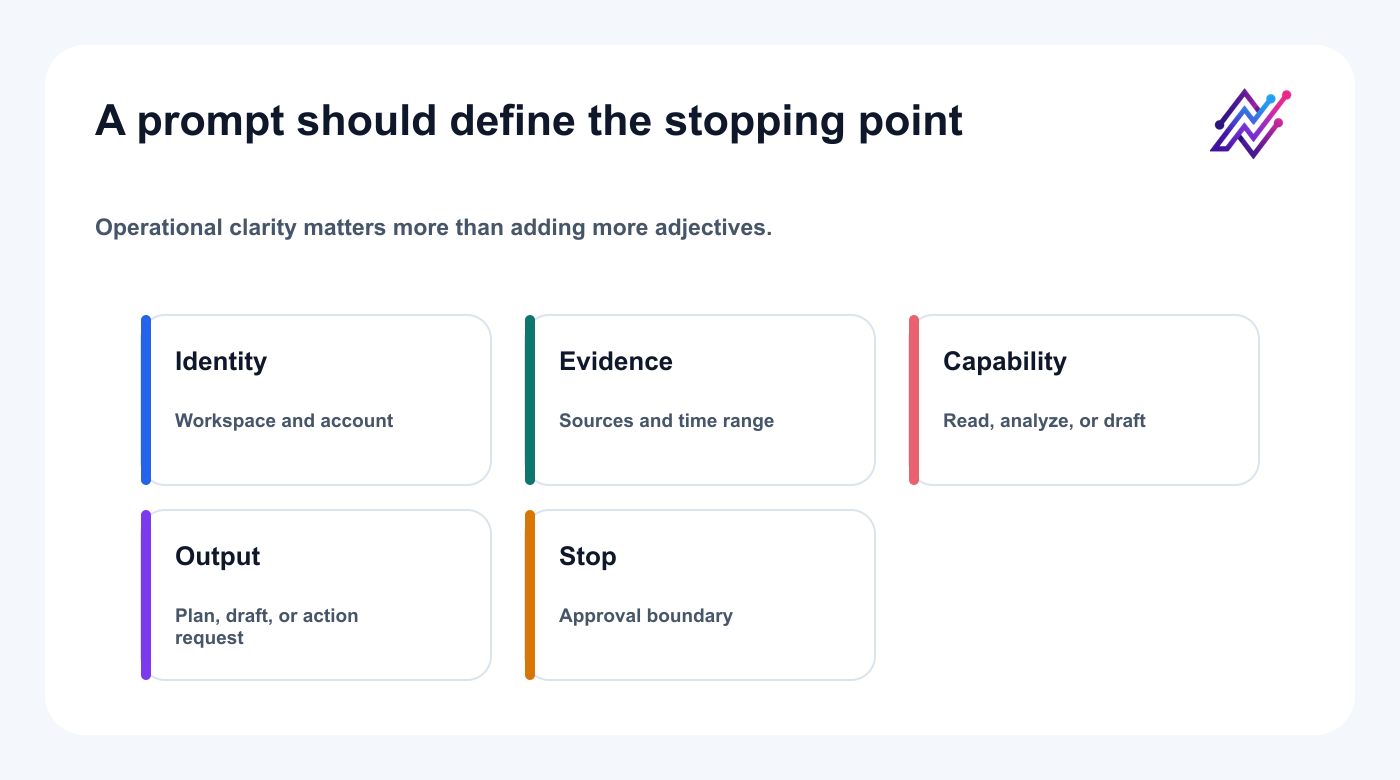
A useful prompt specifies identity, evidence, capability, output state, and the point where the agent must stop.
Inspection
“List my Tareno workspaces and accounts. Do not change anything.”
“Show disconnected or incomplete social account connections.”
“List pending Tareno actions and explain what each one will do.”
“Show the platform requirements for my Bluesky and Mastodon accounts.”
Drafting
“Create native drafts for LinkedIn, Bluesky, Mastodon, and Threads.”
“Turn this blog section into five short-form post ideas.”
“Create three hooks for this campaign and save the strongest one as a draft.”
“Rewrite this product post without hype or unsupported claims.”
Analytics
“Find my best post by saves and shares.”
“Compare platform performance over the last 30 days.”
“Identify topics that consistently underperform.”
“Find comments that could become FAQ posts.”
Repurposing
Repurposing prompts should preserve both the source content and the performance signal that justified a new version.
“Turn my top LinkedIn post into a carousel outline.”
“Convert this video script into a Bluesky thread.”
“Create a Mastodon version with more context.”
“Add the strongest evergreen posts to a repurposing plan.”
Approval and scheduling
“Prepare next week’s schedule but do not publish.”
“Show all posts waiting for approval.”
“Explain what changed between the approved and scheduled versions.”
“Check the schedule for conflicts, duplicate topics, and wrong timezones.”
Position Tareno in the OpenClaw ecosystem
The weak message is:
Connect OpenClaw to another scheduler.
The stronger message is:
Give OpenClaw a controlled social media operating layer.
Tareno adds the pieces an agent needs after reasoning:
account access
platform validation
structured drafts
media
approval
scheduling
analytics
audit visibility
repurposing
deterministic workflows
The user gets the flexibility of an agent without turning publishing into an uncontrolled experiment.
That is the real product story.
Related Tareno resources
Continue building the workflow
Workflow builderExplore resource →Repurposing workflowExplore resource →
FAQ
Can OpenClaw post through Tareno?
It can inspect context, prepare drafts, and request actions through a scoped Tareno MCP connection. Consequential actions should remain reviewable.
Does OpenClaw need social platform passwords?
No. Tareno owns the platform connections; the agent uses only its assigned Tareno credential and scopes.
Is MCP required?
MCP is the cleanest structured connection for agent tool discovery. A custom API integration can also work, but it must recreate schemas, validation, permissions, and maintenance.
Can it prepare Bluesky, Mastodon, and multilingual drafts?
Yes, when those accounts and languages are supported in the connected workspace. Each version still needs platform and market review.
Should immediate publishing be enabled?
Start with reads and drafts; add approval-first scheduling only after identity and recovery checks are reliable.
Is OpenClaw better than n8n?
Use OpenClaw for interpretation and adaptive decisions. Use n8n, Make, Zapier, or native workflows for deterministic event-driven steps.
Final thoughts
The future of social media automation is not a giant fixed workflow and it is not unrestricted autonomous posting.
It is a controlled agent loop.
OpenClaw understands the goal.
Tareno exposes the tools.
The agent prepares the work.
The user approves the consequence.
Tareno publishes and measures the result.
Then the agent learns from the signal and prepares the next version.
That is how AI can manage more of social media without taking control away from the person responsible for the account.
Begin with a read-only account audit, then create one draft-only multi-platform workflow before enabling approval-first scheduling.