
Multi-platform publishing sounds simple.
Write one post, choose several platforms, schedule it, and publish.
But in practice, cross-posting is rarely that clean.
Instagram needs a different caption than LinkedIn.
TikTok needs a different hook than Pinterest.
Threads needs a more conversational tone.
YouTube Shorts needs a title and description.
Pinterest needs search intent.
LinkedIn needs a business angle.
A simple cross-posting tool can publish the same content everywhere.
A stronger multi-platform publishing workflow helps you adapt one idea for each platform, approve the right version, use post scheduling at the right time, track performance, and repurpose winners.
That difference matters.
This guide compares the best social media tools for multi-platform publishing in 2026 by actual workflow: simple scheduling, visual planning, analytics, approvals, evergreen content, agency publishing, and workflow automation.
TL;DR: best multi-platform publishing tools by use case
Multi-platform needBest fitWhyWorkflow-based multi-platform publishingTarenoPlatform-specific versions, boards, approvals, repurposing, workflow builder, Make, n8n, APISimple cross-platform schedulingBufferClean publishing queue and simple schedulingVisual multi-platform planningLaterVisual calendar, Social Sets, Link in Bio, creator workflowsBroad social suite publishingHootsuitePublishing, inbox, analytics, AI, listening, enterprise workflowsAgency publishing and approvalsSocialPilotBulk scheduling, client approvals, account/user scalingEvergreen category publishingSocialBeeContent categories, recurring queues, re-queueingAnalytics-led publishingMetricoolDashboards, competitor tracking, reporting, planning contextApproval-first publishingPlanableComments, review, internal notes, stakeholder approvalInbox-heavy publishingAgorapulsePublishing plus social inbox, moderation, assignments
Short version: If you only need simple scheduling, Buffer may be enough, but teams comparing broader workflows should review a Buffer alternative. If you need platform-specific workflows, approvals, repurposing, analytics-to-action, Make, n8n, API, roles, and activity visibility, Tareno is a stronger fit.
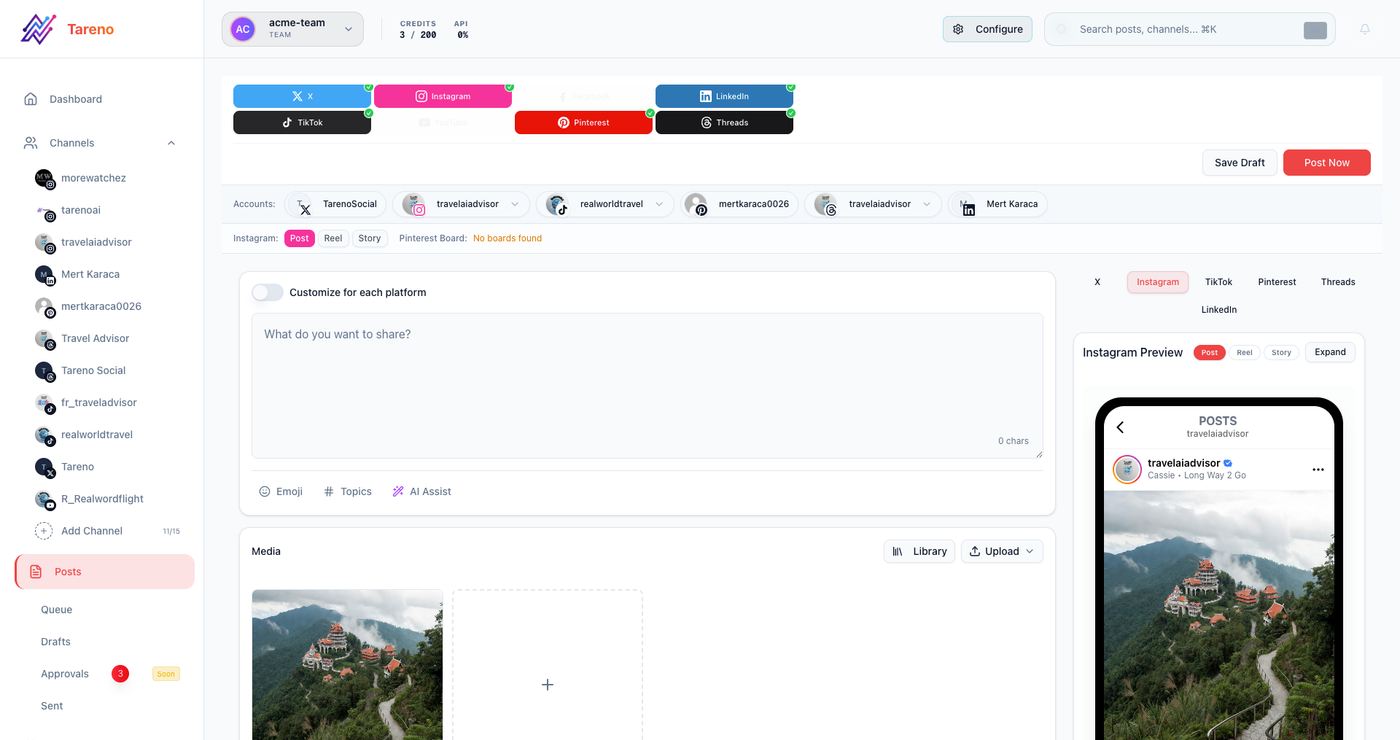
A workflow-first tool keeps platform versions, reviews, and publishing steps close together.
What is multi-platform publishing?
Multi-platform publishing means planning, adapting, scheduling, and publishing content across more than one social channel.
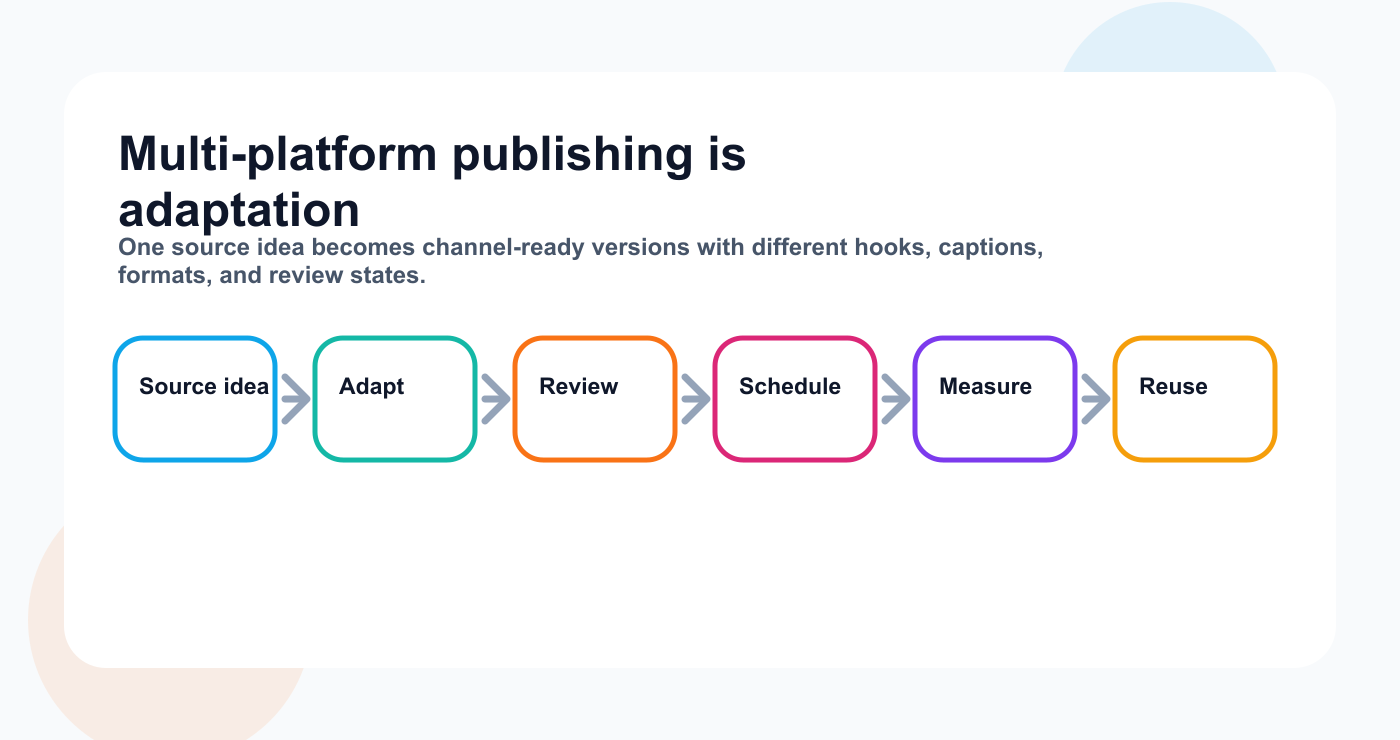
A useful publishing system adapts the idea before it reaches the calendar.
Common platforms include:
Instagram
TikTok
LinkedIn
Threads
YouTube
Pinterest
Facebook
X / Twitter
A basic multi-platform workflow:
Write one post.
Select platforms.
Schedule.
Publish.
A stronger workflow:
Create one source idea.
Adapt the idea for each platform.
Add platform-specific captions, hooks, media, links, and CTAs.
Review versions.
Approve.
Schedule.
Publish.
Measure.
The second workflow is better because it respects platform context.
Cross-posting vs multi-platform publishing
Cross-posting usually means sending the same post to several platforms.
Multi-platform publishing means adapting content for several platforms.
Example source idea:
Social media reporting is not enough. Reports should create actions.
Simple cross-post:
Publish the same caption on LinkedIn, Threads, Instagram, and Facebook.
Multi-platform publishing:
LinkedIn: professional workflow lesson
Threads: short opinion
Instagram: carousel checklist
TikTok: short hook and script
Pinterest: search-friendly pin
YouTube Shorts: concise explanation
The idea is the same.
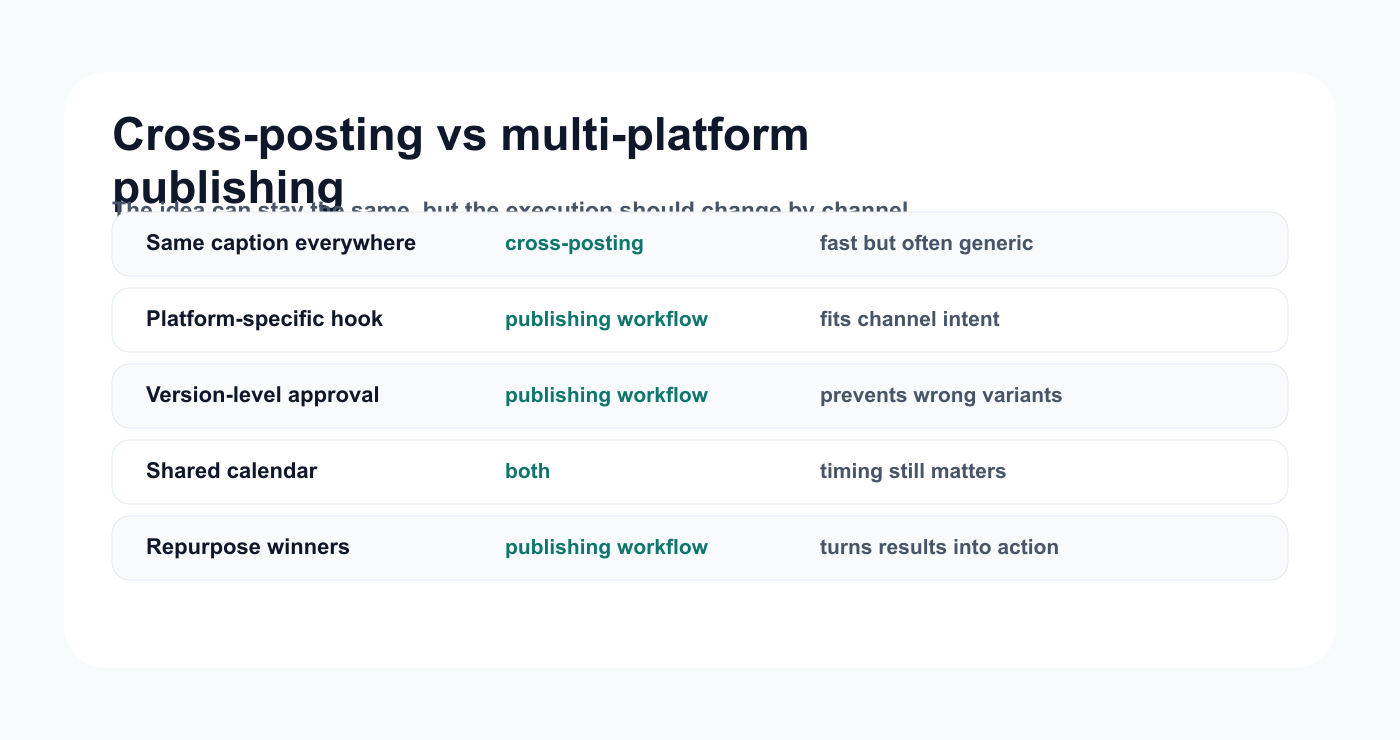
Cross-posting duplicates a post; multi-platform publishing adapts it.
The execution changes.
That is what separates basic cross-posting from serious multi-platform publishing.
The PLATFORM framework
Use the PLATFORM framework to evaluate multi-platform publishing tools.
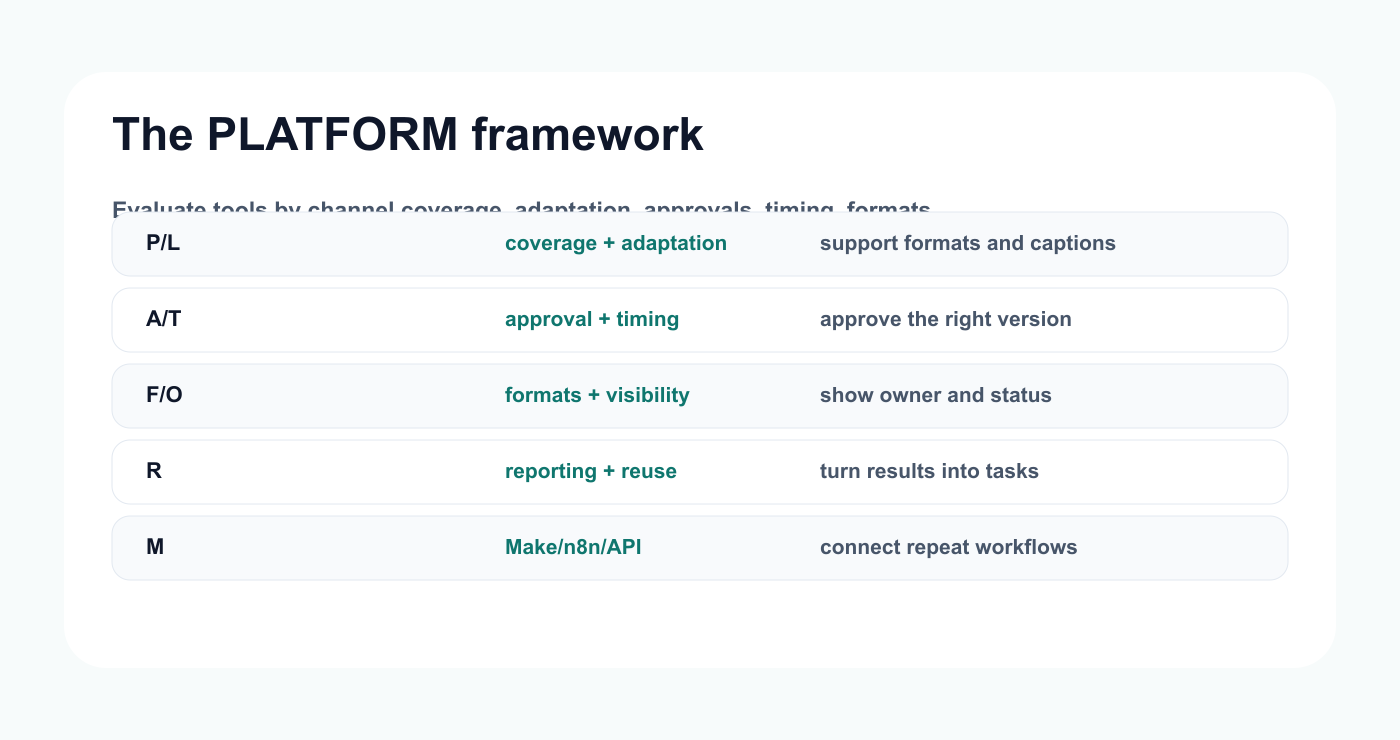
The PLATFORM filter keeps channel count from hiding workflow gaps.
P — Platform coverage
L — Local adaptation
A — Approval workflow
T — Timing and calendar
F — Format support
O — Operational visibility
R — Reporting and repurposing
M — Make/n8n/API automation
This helps you choose a tool based on workflow depth, not just channel count.
P — Platform coverage
Start with the platforms you actually need.
A multi-platform tool should support your priority channels.
Ask:
Does it support Instagram?
Does it support TikTok?
Does it support LinkedIn?
Does it support Threads?
Does it support YouTube?
Does it support Pinterest?
Does it support Facebook?
Does it support X / Twitter?
Does it support the post formats you use?
Are there API restrictions for certain formats?
Not every tool supports every format equally.
A tool may support a platform but not support every content type.
Before choosing, verify official platform support and publishing limitations.
L — Local adaptation
Local adaptation means each platform version can be adjusted.
Look for:
separate captions per platform
different hashtags per platform
different CTAs
different links
different post formats
different media versions
alt text support where relevant
first-comment support where relevant
platform-specific previews
This is critical.
If one caption has to fit every platform, the content becomes generic.
A good multi-platform tool should help you adapt without rebuilding everything from scratch, especially when you use channel utilities like a TikTok hook generator before review.
A — Approval workflow
Multi-platform content often needs review.
Approval becomes more important when:
several people work on content
a post has many platform versions
content includes product claims
content mentions pricing
a client or sponsor reviews content
old content is being repurposed
an agency manages multiple brands
Approval should apply to the right version, which is why structured approval workflows matter more as platform variants multiply.
A LinkedIn post may be approved while the TikTok caption still needs changes.
A good workflow should show this clearly.
T — Timing and calendar
Scheduling is still important.
A content calendar should show:
platform
date
time
campaign
status
owner
approval state
format
repurposing source
But timing is only one part of the workflow.
The calendar should connect to content status; a dedicated Instagram, TikTok, and YouTube scheduler workflow should show what is approved, adapted, and ready.
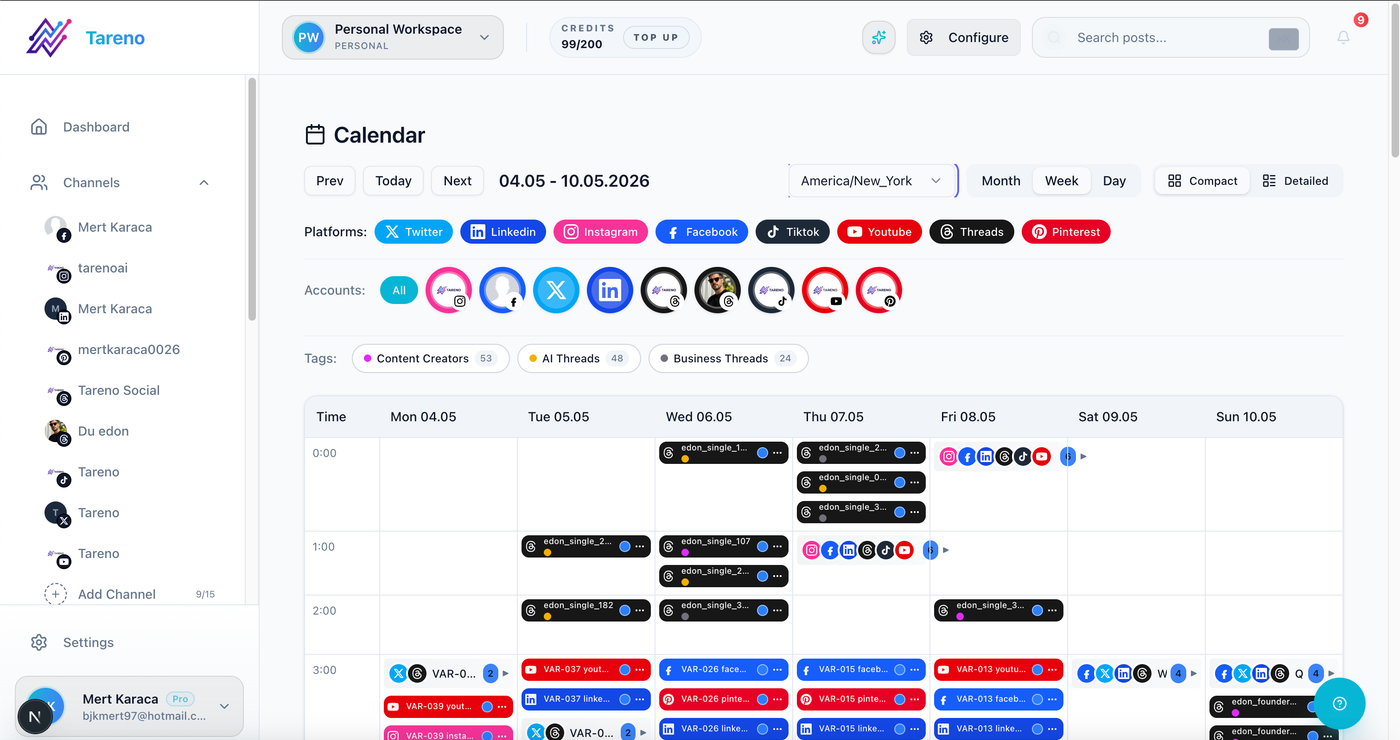
The calendar is useful when timing, status, owner, and approval state stay connected.
A post should not look ready just because it has a publish date.
It should be ready because the correct version is approved.
F — Format support
Different platforms require different formats.
Examples:
Instagram Reels
Instagram carousels
Instagram Stories
TikTok videos
LinkedIn text posts
LinkedIn carousels
Threads posts
YouTube Shorts
Pinterest pins
Facebook posts
X posts
A strong tool should help manage these differences.
Format support matters because “multi-platform” does not only mean “many channels.”
It means many content formats.
O — Operational visibility
Teams need visibility.
A multi-platform workflow should show:
who owns each version
what is still in draft
what needs review
what is approved
what is scheduled
what was published
what performed well
what should be repurposed
Activity visibility helps teams avoid confusion.
This is especially important for agencies and small teams.
R — Reporting and repurposing
Publishing is not the end.
Multi-platform performance should feed the next workflow.
Ask:
Which platform version performed best?
Which hook worked?
Which format worked?
Which post should be repurposed?
Should the LinkedIn version become a blog?
Should the TikTok become an Instagram Reel?
Should the Pinterest pin link to a tool page?
Should the idea become a content series?
A strong tool helps turn performance into action.
M — Make/n8n/API automation
Make, n8n, and API workflows matter when multi-platform publishing connects to other systems.
Example automations:
approved post → create tracker row
published post → notify team
top post → add to repurposing queue
blog published → create social drafts
client approval → move content to scheduling
performance threshold → create follow-up task
Automation should support handoffs.
It should not bypass human approval.
1. Tareno — best for workflow-based multi-platform publishing
Tareno is strongest when multi-platform publishing needs to be part of a full content workflow.
It is useful for creators, small teams, and agencies that need planning, platform-specific content, approvals, scheduling, repurposing, and analytics in one workflow.
Tareno is best for
Choose Tareno if you need:
multi-platform scheduling
platform-specific captions
content boards
content calendar
approval workflows
repurposing queue
workflow builder
team workspaces
roles and permissions
activity visibility
unified analytics
competitor analysis
AI captions and hashtags
Make integration
n8n integration
API access
Where Tareno wins
Tareno wins when one idea needs to become multiple platform-specific posts.
Example:
Source idea → TikTok script → Instagram caption → Threads post → LinkedIn rewrite → Pinterest pin → Approval → Schedule → Publish → Measure → Repurpose
This is deeper than basic cross-posting.
Not ideal for
Tareno may be more than needed if you only need to publish the same post to two platforms with no approval, repurposing, or team workflow.
2. Buffer — best for simple cross-platform scheduling
Buffer is strong for simple social media scheduling.
Buffer is best for
Buffer is best for:
clean publishing queues
simple scheduling
small teams and creators
low learning curve
lightweight analytics
straightforward cross-posting
Where Buffer wins
Buffer is useful when the content workflow is simple.
If you mainly need to publish posts to multiple channels and do not need deep workflow structure, Buffer can be a good fit.
Where Buffer may not be enough
Buffer may be less ideal if you need:
deeper approval workflows
repurposing queue
workflow builder
platform-specific content lifecycle
Make/n8n workflow automation
detailed activity visibility
3. Later — best for visual multi-platform planning
Later is useful for creators and visual brands.
Later is best for
Later is best for:
visual calendar
Social Sets
Instagram planning
TikTok planning
Link in Bio
creator workflows
visual campaign planning
Where Later wins
Later is strong when the team needs to see content visually before publishing.
This can be valuable for Instagram, TikTok, and visual-first campaigns.
Where Later may not be enough
Later may be less ideal if multi-platform publishing requires:
workflow automation
repurposing queue
approval-triggered actions
Make/n8n workflows
roles and activity visibility
deeper board-based production
4. Hootsuite — best for broad social suite publishing
Hootsuite is useful when publishing is part of a broad social suite.
Hootsuite is best for
Hootsuite is best for:
publishing
scheduling
inbox
AI tools
templates
analytics
listening
reporting
enterprise workflows
Where Hootsuite wins
Hootsuite is strong when a team wants publishing, inbox, analytics, listening, and reporting inside one mature platform.
Where Hootsuite may not be enough
Hootsuite may be less ideal if the team wants lean workflow-first publishing, repurposing queues, Make/n8n automation, and board-level content movement.
5. SocialPilot — best for agency multi-platform publishing
SocialPilot is useful for agencies and teams managing many accounts.
SocialPilot is best for
SocialPilot is best for:
bulk scheduling
account/user scaling
client approvals
manager approvals
white-label reports
agency publishing workflows
multi-channel scheduling
Where SocialPilot wins
SocialPilot is practical for agencies that need to schedule across many accounts and manage approvals.
Where SocialPilot may not be enough
SocialPilot may be less ideal if the agency needs deeper workflow automation, repurposing queues, Make/n8n triggers, or content operations visibility.
6. SocialBee — best for evergreen multi-platform queues
SocialBee is useful when multi-platform publishing is based on content categories.
SocialBee is best for
SocialBee is best for:
evergreen content
content categories
recurring libraries
re-queueing
category schedules
content variations
Where SocialBee wins
SocialBee is strong for category-based publishing.
This is useful when a team wants recurring content distributed across multiple channels.
Where SocialBee may not be enough
SocialBee may be less ideal if the team needs approval-connected repurposing, board-based workflows, analytics-to-action, or Make/n8n workflow logic.
Multi-platform tool comparison table
ToolBest forPublishing strengthMain limitationTarenoWorkflow-based publishingPlatform versions, approvals, repurposing, automationMore than needed for simple cross-postingBufferSimple schedulingClean queues and easy publishingLimited workflow depthLaterVisual planningVisual calendar and Social SetsLess workflow automationHootsuiteBroad suitePublishing, inbox, analytics, listeningCan be heavy for lean teamsSocialPilotAgenciesBulk scheduling and approvalsLess workflow-first repurposingSocialBeeEvergreen queuesCategory-based recurring contentLess approval/analytics workflow depthMetricoolAnalytics-led publishingReporting and planningLess content workflow executionPlanableReview-heavy publishingCollaboration and approvalsLess post-approval automation
The ranked shortlist uses real local logo assets for Tareno, Buffer, Later, Hootsuite, SocialPilot, and SocialBee.
Multi-platform publishing workflow examples
Creator workflow
Choose one source idea.
Create TikTok, Instagram, Threads, Pinterest, and LinkedIn versions.
Use AI for draft variations.
Edit for voice.
Schedule.
Review performance.
Repurpose the best version.
Agency workflow
Client brief creates source idea.
Team creates platform versions.
Internal review happens.
Client approves versions.
Posts are scheduled.
Report identifies platform winners.
Strong posts enter repurposing queue.
SaaS team workflow
Blog or feature update becomes source idea.
LinkedIn explains business value.
TikTok shows quick use case.
Pinterest links to tool or blog.
Threads posts the short opinion.
Analytics decide what becomes a deeper page.
Multi-platform publishing mistakes to avoid
Mistake 1: Same caption everywhere
Each platform needs context.
Mistake 2: No approval per version
A platform version can be wrong even if the source idea is approved.
Mistake 3: Ignoring format differences
A TikTok script is not a LinkedIn post.
Mistake 4: No reporting loop
Publishing should feed the next cycle.
Mistake 5: Not repurposing winners
The best platform version should become future content.
Mistake 6: Choosing only by platform count
Support depth matters more than logo count.
What to look for in multi-platform publishing tools
Look for:
supported channels
supported post formats
separate platform captions
platform previews
content calendar
approval workflow
team roles
activity visibility
AI caption support
repurposing queue
analytics
Make/n8n/API support
pricing at scale
The right tool depends on whether you need basic cross-posting or full workflow publishing.
Related Tareno resources
Keep the workflow moving
Feature Post Scheduling Plan approved versions on a calendar built for publishing visibility. Explore feature -> Workflow Instagram TikTok YouTube Scheduler See how multi-channel publishing can run as one repeatable flow. Open workflow -> Alternative Later Alternative Compare visual planning with broader multi-platform workflows. Compare -> Tool TikTok Hook Generator Create platform-specific hooks before adapting posts for each channel. Try tool ->
FAQ
What is the best tool for multi-platform publishing?
It depends on your workflow. Buffer is strong for simple scheduling. Later is strong for visual planning. Hootsuite is strong for broad suite needs. Tareno is strong for platform-specific workflows, approvals, repurposing, analytics, Make, n8n, and API automation.
What is the difference between cross-posting and multi-platform publishing?
Cross-posting usually means publishing the same content to multiple platforms. Multi-platform publishing means adapting one idea for each platform’s format, tone, caption, and audience.
Should I use the same caption on every platform?
Usually no. The same idea can work across platforms, but captions, hooks, CTAs, hashtags, and formats should be adapted.
Which platforms should a multi-platform tool support?
Common platforms include Instagram, TikTok, LinkedIn, Threads, YouTube, Pinterest, Facebook, and X / Twitter. The best tool depends on your priority channels and content formats.
Do multi-platform posts need approval?
Yes, especially for teams, agencies, sponsors, product claims, pricing mentions, and repurposed content. Each platform version may need separate review.
Can multi-platform publishing be automated?
Yes. Teams can automate handoffs, approval notifications, scheduling, reporting tasks, repurposing triggers, and external updates with workflow builders, Make, n8n, or API integrations.
Final thoughts
Multi-platform publishing is not only about sending one post to many channels.
It is about turning one idea into the right version for each platform.
A simple scheduler can help you publish.
A workflow-first system helps you adapt, approve, schedule, measure, and repurpose.
The best tool depends on your workflow.
If you only need basic cross-posting, keep it simple.
If you need platform-specific content, team review, repurposing, analytics, roles, Make, n8n, and API workflows, choose a deeper system.
Primary CTA: Explore Tareno features to see how multi-platform scheduling, platform-specific captions, boards, approvals, repurposing queues, analytics, Make, n8n, API, roles, and activity visibility work together.
Secondary CTA: Compare Tareno with Buffer, Later, Hootsuite, SocialPilot, SocialBee, and Metricool on the compare hub.


