
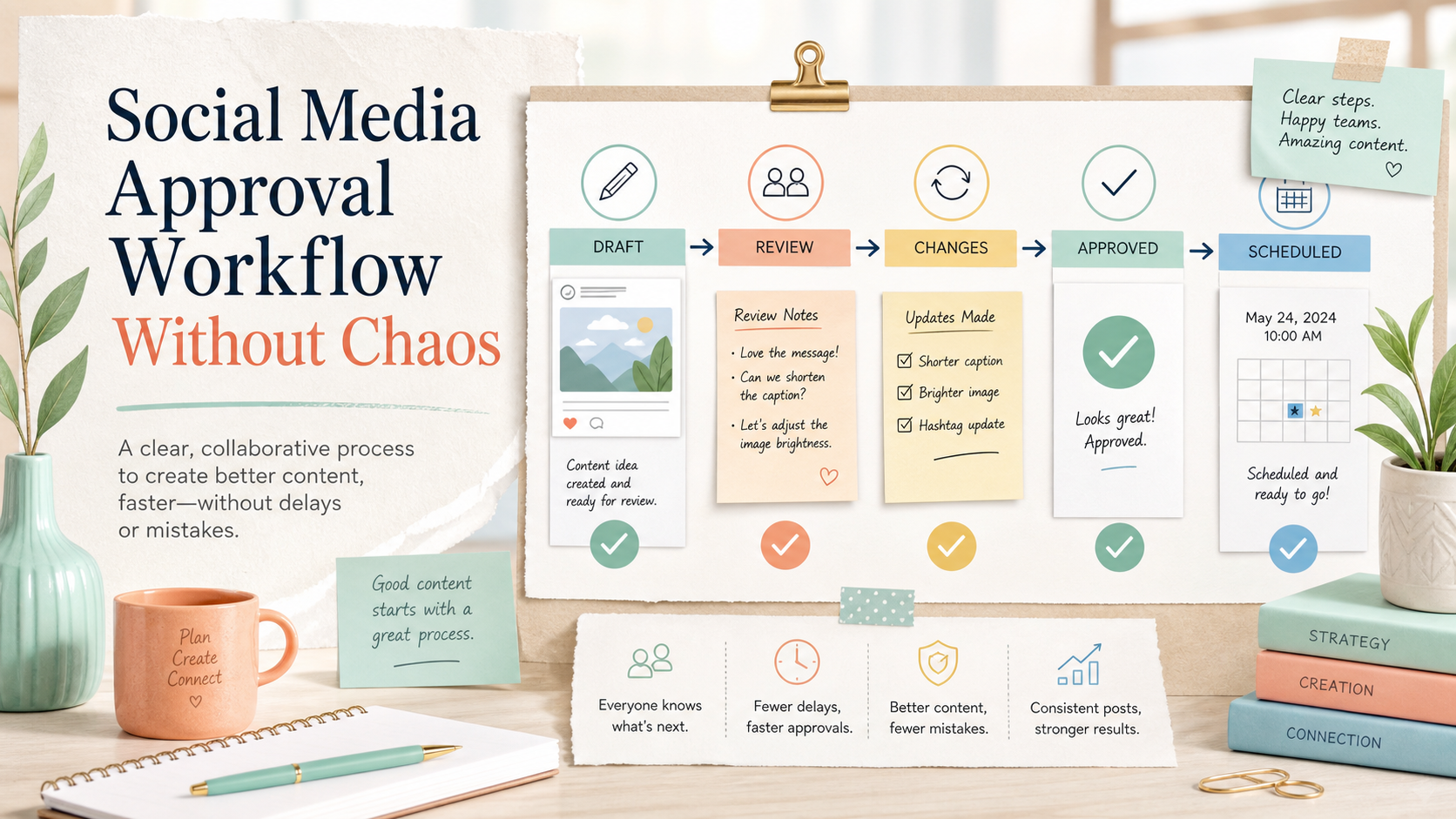
A social media approval workflow is the difference between a team that publishes calmly and a team that is always chasing feedback five minutes before a post goes live.
Most content mistakes do not happen because the team is bad.
They happen because the workflow is unclear.
A caption is approved in Slack, but the image is still outdated.
A client says “looks good,” but nobody knows which version they approved.
A designer updates the creative, but the social media manager schedules the old file.
A founder gives feedback in a voice note, but it never makes it into the final post.
A team member publishes before legal has reviewed the claim.
That is not a content problem.
That is an approval problem.
A good social media approval workflow makes review clear, ownership visible, and publishing safer. It also makes automation more reliable because content only moves forward when the right approval step is complete.
This guide explains how to build a social media approval workflow for creators, teams, agencies, and multi-brand social operations.
If your team is searching for social media approval software, focus on the handoff between draft, review, final approval, and scheduling. Tareno's approval workflows turn that handoff into a visible queue, while the approval workflow software page explains how the system fits agencies, regulated teams, and multi-brand operators.
TL;DR
A strong social media approval workflow should include:
clear content stages
assigned owners
review roles
approval gates
version visibility
client or stakeholder review where needed
activity history
publishing rules
repurposing review
automation after approval
The goal is not to slow down content.
The goal is to remove confusion.
The best approval workflows protect quality while keeping content moving.
What is a social media approval workflow?
A social media approval workflow is a structured process for reviewing and approving social media content before it is published, often implemented in approval workflow software.
It defines:
who creates the content
who reviews it
who gives final approval
what happens if changes are needed
when the post can be scheduled
when automation is allowed to continue
how approved content is tracked
whether repurposed content needs review
A simple workflow might look like this:
Idea
Draft
Internal review
Approval
Scheduled
Published
Repurpose
A more advanced workflow might include:
platform-specific review
brand review
legal review
client review
manager approval
multi-step approvals
approval-triggered automation
activity logs
revision history
workspace-specific rules
The core principle is simple:
A post should not move to publishing until the right approval step is complete.
Why social media approvals break
Social media approvals usually break for one of six reasons.
1. Feedback happens in too many places
Feedback may be spread across:
Slack
email
WhatsApp
Google Docs
screenshots
comments
meetings
voice notes
project management cards
When feedback is scattered, nobody knows what the final version is.
2. Approval is not tied to a specific version
“Approved” only matters if everyone knows what was approved.
Was it the caption?
The image?
The carousel?
The video?
The first comment?
The hashtags?
The platform-specific version?
If approval is not tied to a version, mistakes happen.
3. Roles are unclear
A social media manager may think the founder needs to approve.
The founder may think the marketing lead already approved.
The designer may think the client still needs to review.
Unclear roles create silent delays.
4. There is no publish gate
A publish gate is a rule that says:
This content cannot be scheduled or published until it is approved.
Without a publish gate, content can go live before review is complete.
5. Repurposed content skips review
Teams often treat repurposed content as safe because it was already published once.
That can be risky.
Old content may contain outdated claims, expired offers, old pricing, or context that no longer applies.
6. Automation runs before the process is clear
If you automate a messy approval process, you simply make mistakes happen faster.
Automation should come after approval rules are clear.
The APPROVE framework
Use the APPROVE framework to build a stronger social media approval process with a repeatable workflow builder approach.
A — Assign ownership
P — Prepare content stages
P — Protect publishing with gates
R — Review by risk level
O — Organize feedback in one place
V — Verify final versions
E — Execute automation after approval
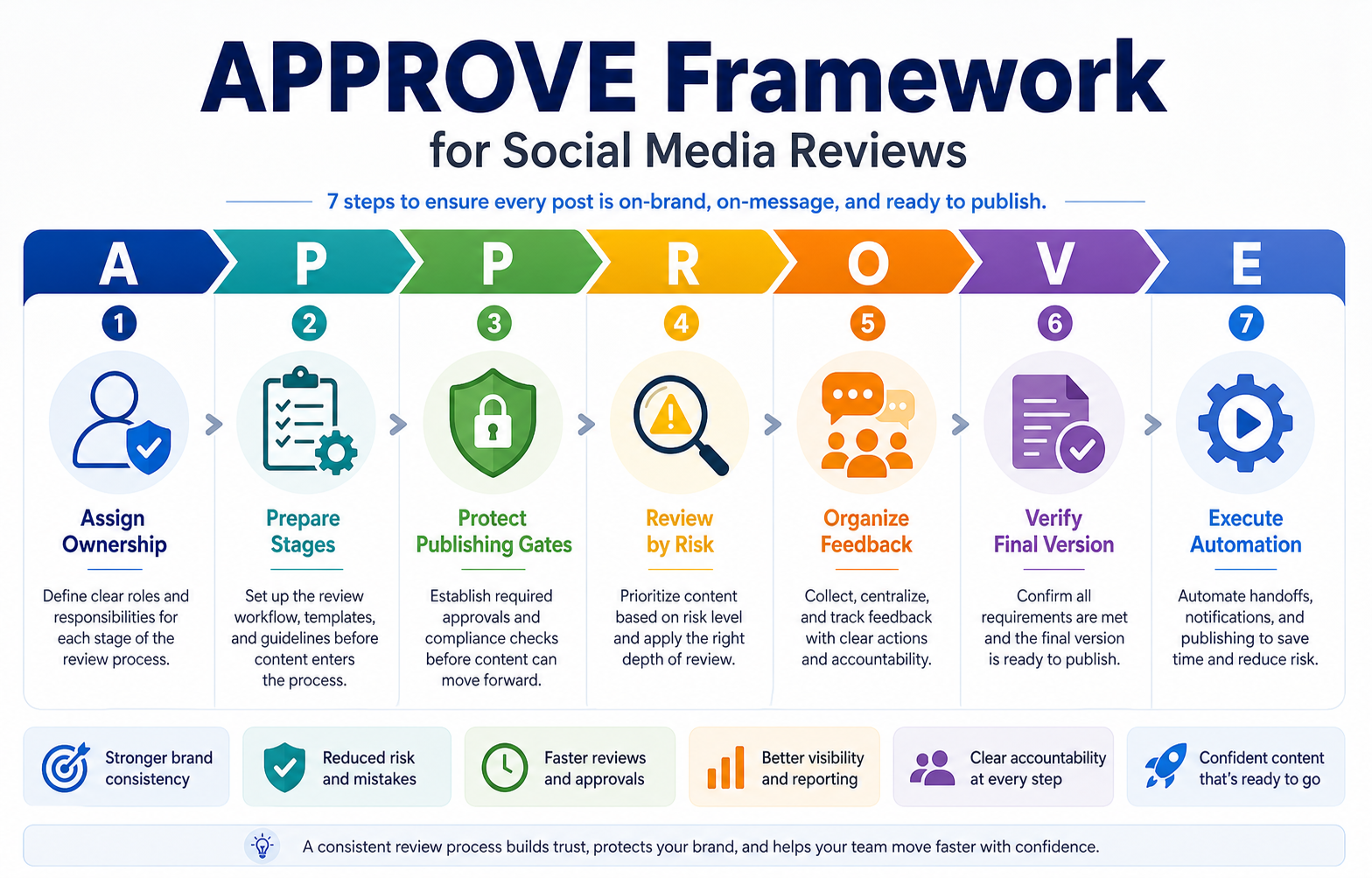
The APPROVE framework aligns ownership, review depth, and automation across the full approval lifecycle.
A — Assign ownership
Every post needs an owner.
Not every person in the workflow owns the post.
There should be one person responsible for moving the content forward.
That owner may be:
creator
social media manager
content strategist
account manager
campaign manager
client lead
founder
editor
Ownership answers:
who is responsible for this post?
who collects feedback?
who moves it to review?
who checks final approval?
who schedules it?
who handles changes?
A post without an owner becomes a floating task.
Floating tasks cause delays.
Ownership example
For a creator:
creator drafts
assistant checks caption
creator approves
assistant schedules
For an agency:
copywriter drafts
designer adds creative
account manager reviews
client approves
social media manager schedules
For a team:
social media manager drafts
brand lead reviews
legal reviews high-risk claims
marketing lead approves
publisher schedules
The owner does not need to do every step.
They need to make sure the workflow moves.
P — Prepare content stages
A social media approval workflow should have visible stages.
Example stages:
Idea
Draft
Needs Internal Review
Needs Client Review
Changes Requested
Approved
Scheduled
Published
Repurpose
Stages make progress visible.
Without stages, content status lives in someone’s memory.
That creates unnecessary messages like:
“Did this get approved?”
“Which version are we using?”
“Is the client still reviewing?”
“Who is waiting on this?”
“Can I schedule this now?”
A workflow board solves this by making status visible.
A stage-based board makes handoffs visible so everyone knows exactly where each draft is stuck or ready.
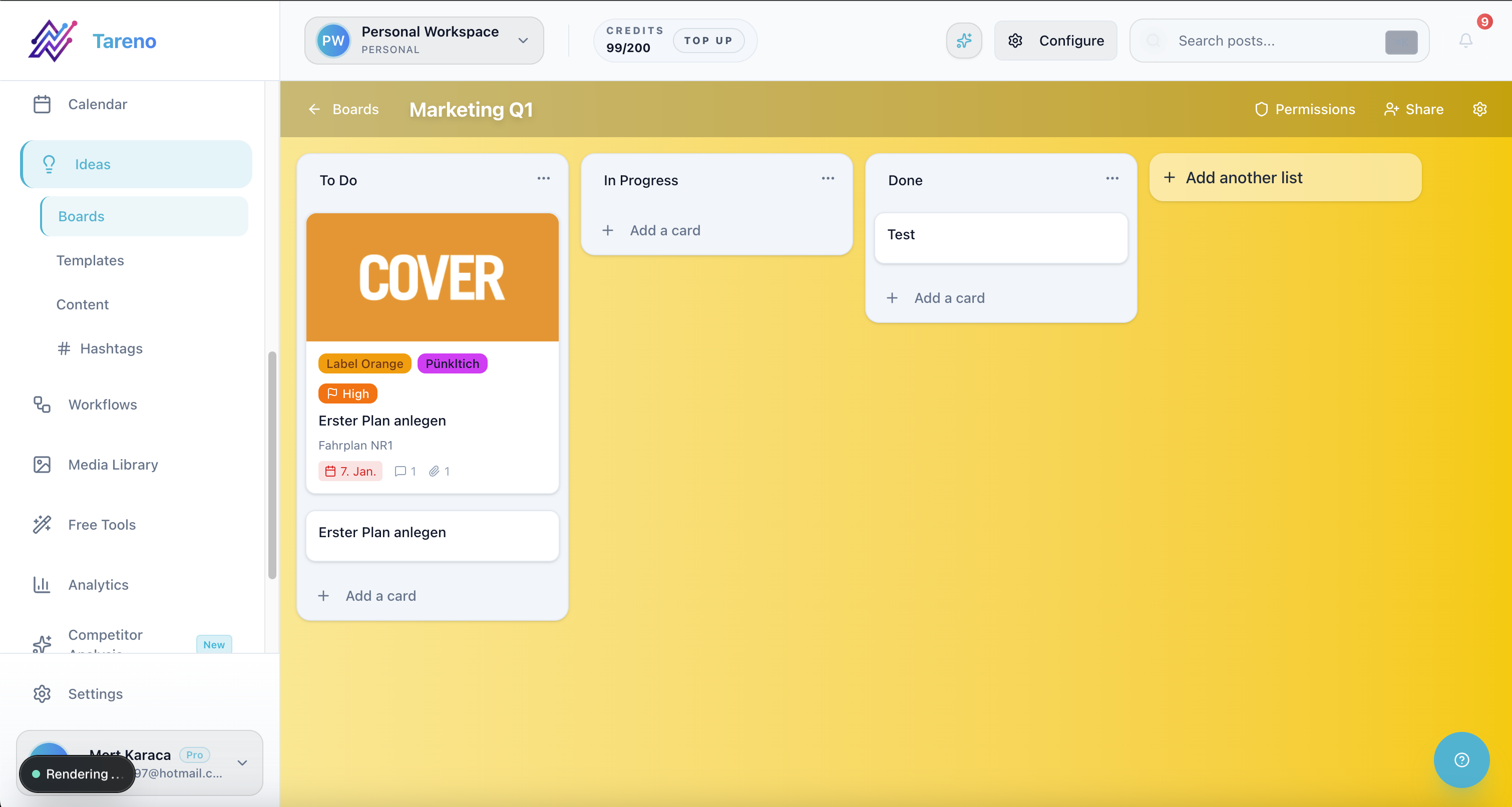
A shared stage board removes approval ambiguity and keeps publish readiness visible.
P — Protect publishing with gates
A publish gate prevents unapproved content from going live.
This is one of the most important parts of the workflow.
A simple publish gate:
Only content in “Approved” can be scheduled.
An advanced publish gate:
Content with pricing, competitor claims, legal claims, or client-facing campaign language requires manager approval before scheduling.
Publish gates can be based on:
content type
platform
campaign
client
risk level
brand
language
region
claim type
asset type
Examples:
memes may need simple review
product claims need product review
pricing claims need verification
competitor comparisons need fact-checking
legal-sensitive posts need legal review
client content needs client approval
repurposed old content needs freshness review
The key is not to approve everything with the same level of friction.
The key is to match review depth to risk.
R — Review by risk level
Not every post needs the same approval process.
A simple behind-the-scenes post should not go through the same process as a pricing comparison or legal-sensitive claim.
Use risk levels.
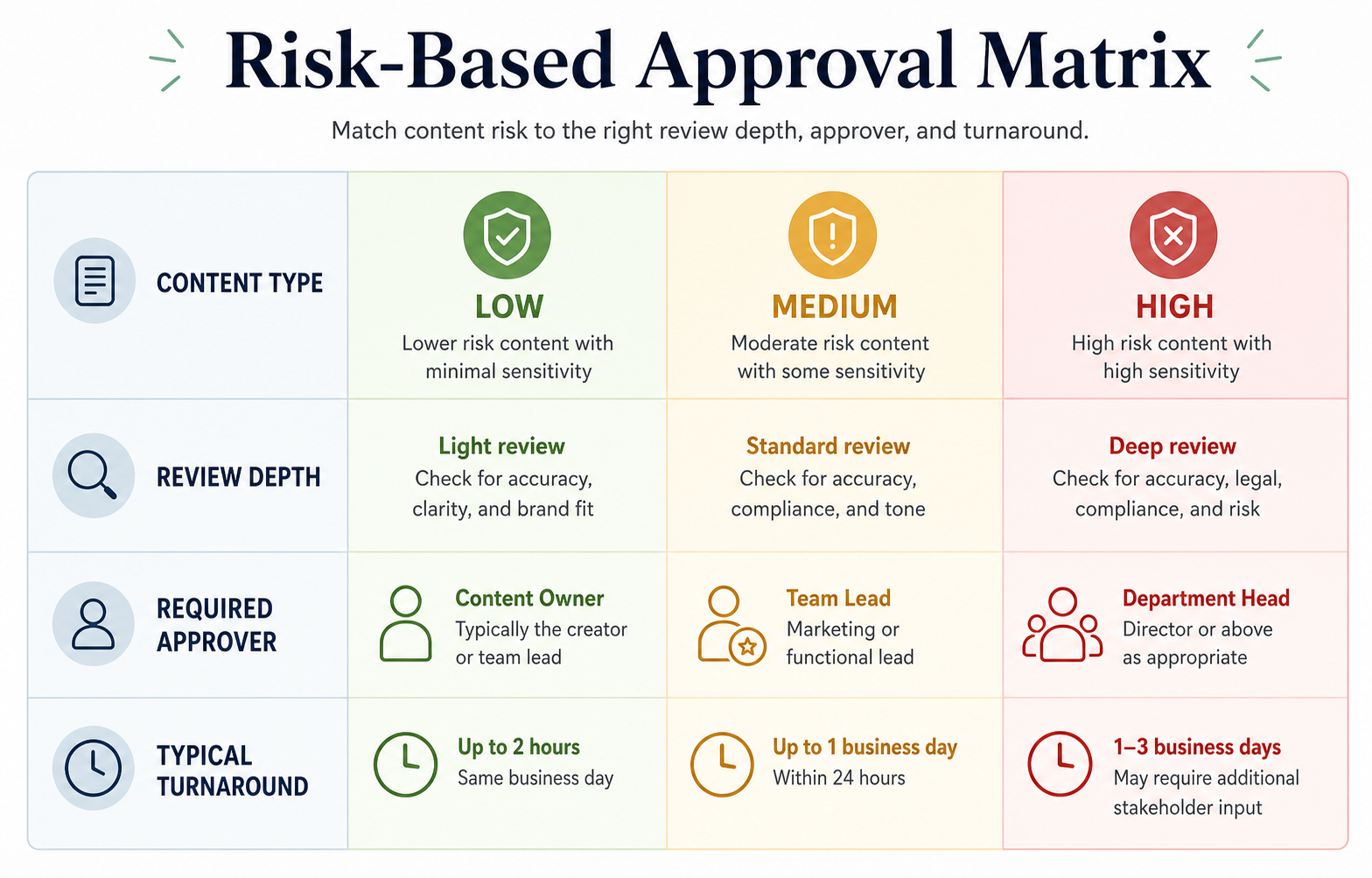
Risk-based review depth helps teams move low-risk posts fast without weakening control on high-risk content.
Low-risk content
Examples:
generic tips
evergreen reminders
simple behind-the-scenes content
non-sensitive quotes
basic engagement posts
Approval process:
creator or social manager review
simple quality check
schedule
Medium-risk content
Examples:
product feature claims
customer-facing campaign posts
partner mentions
platform-specific advice
repurposed content from older posts
Approval process:
internal review
product/brand review if needed
final approval
High-risk content
Examples:
pricing claims
competitor comparisons
legal claims
medical, financial, or compliance-sensitive content
public statements during a crisis
contractual or partner claims
Approval process:
internal review
fact-check
legal or leadership review
final approval
source or screenshot record
This matters because heavy approval for everything slows the team down.
But light approval for risky content creates mistakes.
A good workflow uses the right level of review.
O — Organize feedback in one place
Feedback should live where the content lives.
That means the team should avoid final approvals being scattered across:
email
Slack
screenshots
private messages
meeting notes
voice memos
A good feedback system should show:
the content draft
the asset
platform version
reviewer comments
requested changes
resolved comments
approval status
final version
activity history
This is why approval tools and workflow boards are useful.
The team should not have to reconstruct the decision trail.
Bad approval message
Looks good.
This is too vague.
Better approval message
Approved for Instagram and LinkedIn. Please update the TikTok caption with the shorter hook before scheduling.
That approval is clearer because it identifies the platforms and the remaining change.
Best approval workflow
The reviewer approves or requests changes directly on the content item, and the status changes accordingly.
V — Verify final versions
Final version checks prevent small mistakes.
Before publishing, verify:
caption
image
video
thumbnail
hashtags
first comment
link
mention tags
platform-specific changes
campaign name
pricing claims
competitor claims
language
spelling
visual safe zones
publish date/time
approval status
This step is especially important for repurposed content.
A post that was accurate six months ago may not be accurate today.
If a post references pricing, features, competitors, or platform rules, it should be verified before reuse.
Final check example
Before scheduling a competitor comparison post:
check competitor pricing screenshot
check feature claim
check date of verification
confirm region/currency
add verification note
approve final version
This protects the team from publishing outdated claims.
E — Execute automation after approval
Automation should happen after approval, not before.
Once a post is approved, automation can help move it forward.
Examples:
approved post moves to scheduled
reviewer gets notified when changes are requested
client approval triggers a scheduling task
publishing triggers a delay
delay triggers repurposing
published post gets added to reporting
high-performing post enters repurposing queue
Make or n8n updates another system
API workflow syncs post data to analytics
This is where approval workflows and automation work together, then flow directly into post scheduling.
The approval protects quality.
The automation protects speed.
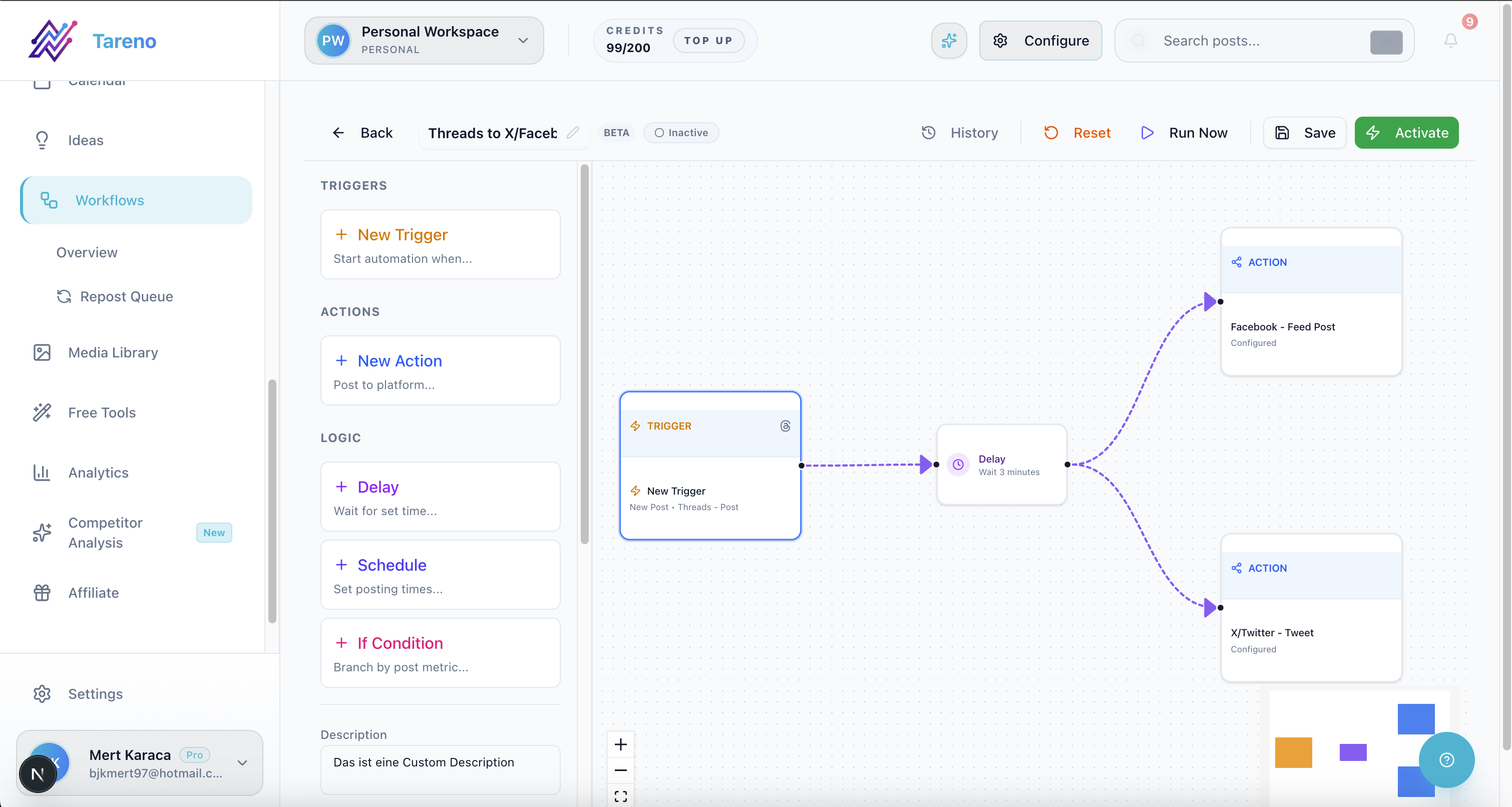
Automation should trigger after approval so scheduling and reporting handoffs happen without manual follow-up.
Social media approval workflow for creators
Creators often think approvals are only for teams.
But creators also need review systems when they work with:
assistants
editors
sponsors
brand deals
collaborators
agencies
clients
multiple platforms
A creator approval workflow might look like this:
Idea added to board
Creator records video
Assistant drafts caption
Creator reviews caption
Sponsored posts require brand approval
Approved post is scheduled
Published post is tracked
Strong posts move to repurposing queue
This prevents brand deal mistakes and makes repurposing safer.
Social media approval workflow for agencies
Agencies need approval workflows because multiple stakeholders touch every post.
A typical agency workflow:
Strategist adds campaign idea
Copywriter drafts post
Designer adds visual
Account manager reviews internally
Client reviews
Changes are requested or approved
Approved post is scheduled
Published post is tracked
Strong content is repurposed
Monthly report includes performance and next actions
The biggest mistake agencies make is treating client approval as the only approval.
Internal approval matters too.
The agency should not send weak drafts to clients.
A strong workflow protects client trust.
Social media approval workflow for small teams
Small teams often have informal approval processes.
That works until content volume increases.
A small team workflow might look like this:
Social manager drafts post
Brand lead reviews
Product lead reviews feature claims
Marketing lead approves
Scheduler publishes
Analytics are reviewed weekly
Winners enter repurposing queue
This workflow is simple but clear.
It avoids unnecessary bureaucracy while preventing risky publishing.
Approval workflow for repurposed content
Repurposed content needs approval too.
Many teams skip this step because they think:
We already published this once, so it must be safe.
That is not always true.
Repurposed content should be reviewed if:
it is old
it references pricing
it references competitor features
it includes a claim
it is being adapted to a new audience
it is being posted on a new platform
it was originally created for a time-sensitive campaign
Repurposing review can be lighter than original review, but it should not be ignored.
Example repurposing approval flow:
Post enters repurposing queue
Owner selects target platform
Caption is rewritten
Platform-specific version is reviewed
Approved version is scheduled
Performance is tracked
This keeps repurposing from becoming spammy or outdated.
How to connect approvals with Make and n8n
Approval workflows become more powerful when connected to automation tools.
Example Make workflow:
trigger: post status changes to Approved
action: create task in project management tool
action: add row to campaign tracker
action: notify publishing owner
action: schedule post or prepare scheduling step
Example n8n workflow:
trigger: post approved in workspace
action: send content data to database
action: wait 7 days after publish
action: check performance
action: if performance meets threshold, add to repurposing queue
The point is not to automate judgment.
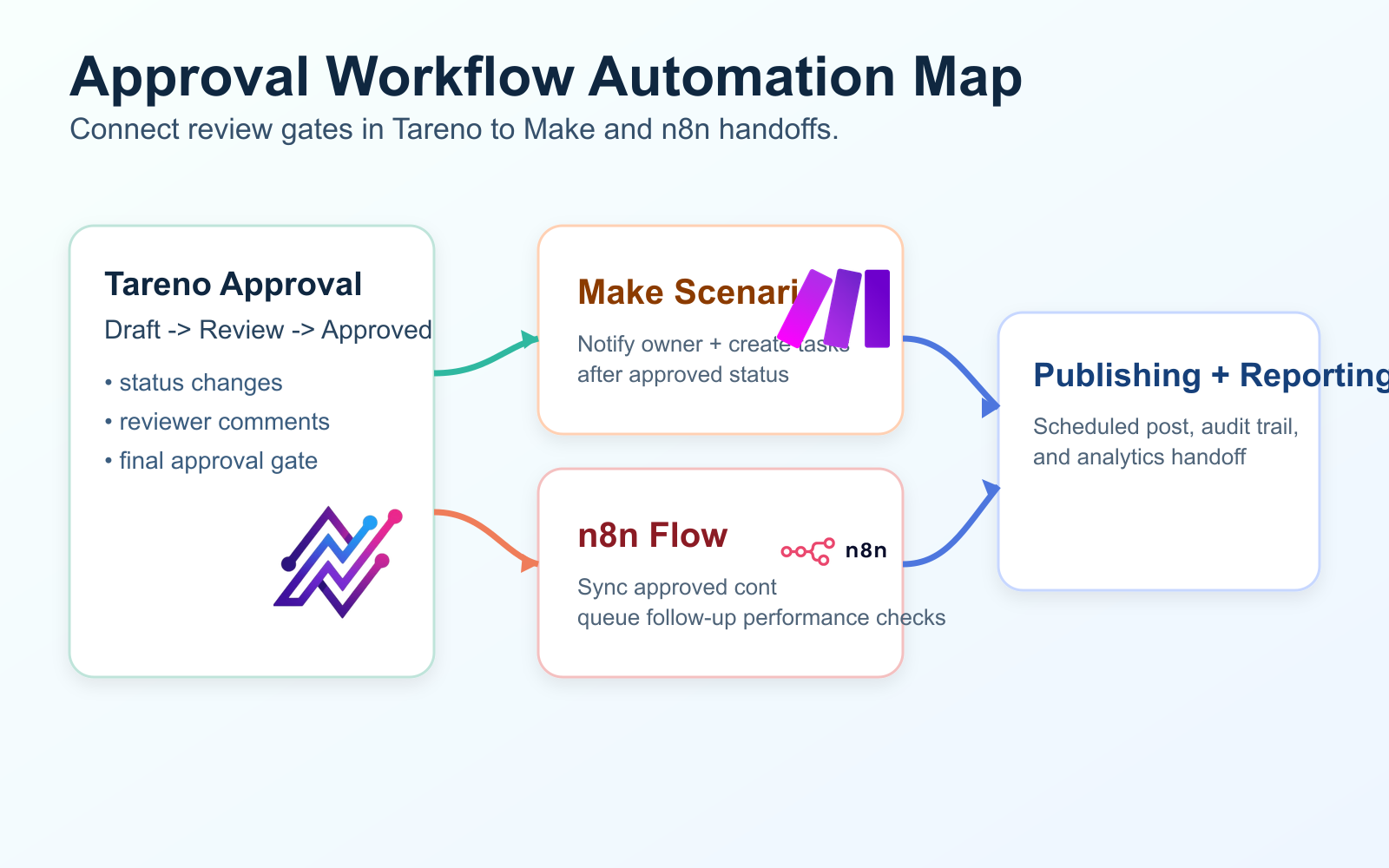
Use Make and n8n to automate handoffs after approval while keeping judgment and risk checks human-led.
The point is to automate handoffs.
Approvals should reduce risk, and automation should reduce manual coordination.
Together, they make the workflow faster and safer.
Approval workflow mistakes to avoid
Mistake 1: Too many approvers
If every post needs five approvals, publishing slows down.
Use risk-based approval instead.
Mistake 2: No final owner
If everyone is responsible, nobody is responsible.
Every post needs one owner.
Mistake 3: Approving in chat
Chat is useful for discussion.
It is bad as the final approval record.
Mistake 4: No version control
If the team cannot tell which version was approved, the approval is not reliable.
Mistake 5: Publishing before approval
This should be impossible in the workflow.
Mistake 6: Treating repurposed content as automatically safe
Repurposed content still needs freshness and context review.
Mistake 7: Automating too early
Fix the workflow before automating it.
How Tareno fits into social media approval workflows
Tareno is designed for teams that need workflow execution, not just scheduling.
Relevant Tareno components include:
content boards
workflow builder
approval workflows
team workspaces
roles and permissions
activity visibility
repurposing queue
competitor analysis
unified analytics
AI captions and hashtags
API access
Make integration
n8n integration
This matters because approval is not an isolated step.
Approval connects to:
planning
scheduling
publishing
repurposing
reporting
team accountability
automation
A simple approval tool can help content get reviewed.
A workflow-first system helps approved content move through the rest of the operation.
Tool comparison context
Different tools solve different approval problems.
NeedTool type that often fitsDedicated approval collaborationPlanable-style toolAgency client dashboards and approvalsSendible-style toolSimple team approvals inside schedulingBuffer Team-style schedulerInbox assignments and moderation approvalsAgorapulse-style platformVisual planning approvalsLater-style plannerWorkflow approvals plus automation and repurposingTareno-style workflow system
If approvals are the only problem, a dedicated approval tool may be enough.
If approvals need to connect to automation, boards, roles, repurposing, and analytics, a workflow-first system is stronger.
Social media approval workflow checklist
Use this before publishing.
Ownership
Is there one owner for the post?
Is the reviewer assigned?
Is the final approver clear?
Version control
Is the caption final?
Are platform versions separate?
Are assets final?
Are links correct?
Are hashtags final?
Approval
Is approval recorded in the system?
Is the correct version approved?
Are requested changes resolved?
Is client approval needed?
Is legal or product review needed?
Risk
Does the post include pricing?
Does it mention competitors?
Does it include product claims?
Does it include sensitive topics?
Is the content outdated or repurposed?
Publishing
Is the post approved?
Is the correct time selected?
Are platform-specific changes done?
Is the first comment ready?
Is the post safe to automate?
Repurposing
Should this post enter the repurposing queue?
Does the repurposed version need approval?
Is the claim still accurate?
Is the platform context different?
Related Tareno resources
Use Tareno Features, Tareno Pricing and Compare Hub to place this recommendation in the broader Tareno stack. For vendor context, compare it with Planable Alternative, Sendible Alternative, Agorapulse Alternative, Buffer Alternative and Later Alternative.
FAQ
What is a social media approval workflow?
A social media approval workflow is a structured process for reviewing, editing, approving, scheduling, and publishing social media content with clear roles and approval gates.
Why do social media teams need approval workflows?
Approval workflows prevent mistakes, reduce delays, clarify ownership, keep feedback in one place, and make sure the correct version is published.
What should be included in a social media approval process?
A strong approval process includes content stages, assigned owners, reviewers, approval status, version visibility, feedback, publishing rules, and activity history.
How many approval steps should social media content have?
It depends on risk. Low-risk content may need one review. Pricing, competitor claims, legal-sensitive posts, or client campaigns may need multiple approvals.
Should repurposed content be approved again?
Yes, especially if the content is old, references pricing, mentions competitors, includes claims, or is being adapted for a new platform or audience.
How can automation help approval workflows?
Automation can notify reviewers, move approved posts to scheduling, trigger Make or n8n workflows, add posts to campaign trackers, and move high-performing content into repurposing queues.
What is the best tool for social media approval workflows?
It depends on the bottleneck. Planable is strong for dedicated approval collaboration. Sendible is strong for agency client dashboards. Tareno is strong when approvals need to connect with boards, workflow automation, repurposing, roles, activity visibility, Make, n8n, and API workflows.
Final thoughts
Social media approval workflows are not about slowing content down.
They are about making content safer, clearer, and easier to move.
A strong approval workflow helps teams avoid:
unclear feedback
wrong versions
missing approvals
last-minute chaos
outdated claims
accidental publishing
risky repurposing
The best workflow is simple enough to use and structured enough to protect quality.
For creators, it creates consistency.
For agencies, it protects client trust.
For teams, it turns content operations into a repeatable system.
If approval currently happens in Slack, screenshots, emails, and memory, the next improvement is not another calendar.
It is a real approval workflow.
Primary CTA: Explore Tareno features to see how boards, approval workflows, workflow builder, repurposing queue, Make, n8n, API, roles, and activity visibility can work together.
Secondary CTA: Compare Tareno with Planable, Sendible, Agorapulse, Buffer, and Later on the compare hub.


