Switching social media management tools sounds easy until you start moving the actual workflow.
The calendar is in one platform.
Approvals are in another.
Reports live in PDFs.
Old posts are buried in exports.
Client feedback sits in email.
Automations are connected to Make, n8n, Zapier, Google Sheets, Airtable, or internal dashboards.
And the team still needs tomorrow’s posts to go live.
That is why social media tool migration should be treated like an operational project, not a quick account change.
A good migration protects your content calendar, profile connections, approval process, reporting history, repurposing queue, roles, and integrations.
This checklist gives creators, agencies, SaaS teams, startups, and content teams a practical way to switch social media management tools without losing workflow context.
TL;DR
Use this migration sequence:
Audit the current setup.
Export content, reports, and historical data.
List connected social profiles.
Document approval workflows.
Map roles and permissions.
Rebuild content boards and calendar.
Reconnect integrations.
Recreate reports.
Move repurposing candidates.
Test publishing with low-risk posts.
Switch in phases.
Monitor failures for 14 days.
The key rule:
Do not migrate only posts. Migrate the workflow.
A migration is successful when the team can keep publishing, approving, reporting, and repurposing without confusion.
When should you switch social media tools?
A migration makes sense when your current tool creates consistent friction.
Common reasons to switch:
approvals are too shallow
reporting is not actionable
pricing becomes too high at scale
platform support is missing
content workflows are spread across too many tools
repurposing is manual
team roles are unclear
clients cannot review content easily
analytics do not create next actions
Make, n8n, API, or workflow automation is limited
the team spends too much time on manual handoffs
the tool was chosen for scheduling, but the team now needs operations
Do not switch because of one annoying feature.
Switch when the workflow no longer fits, and use the alternatives hub to benchmark whether the next tool solves the real bottleneck.
The MIGRATE framework
Use the MIGRATE framework to plan the move.
M — Map the current workflow
I — Inventory profiles and assets
G — Gather exports and reports
R — Rebuild stages and roles
A — Automate carefully
T — Test before switching
E — Evaluate after launch
This keeps the migration focused on the full system.
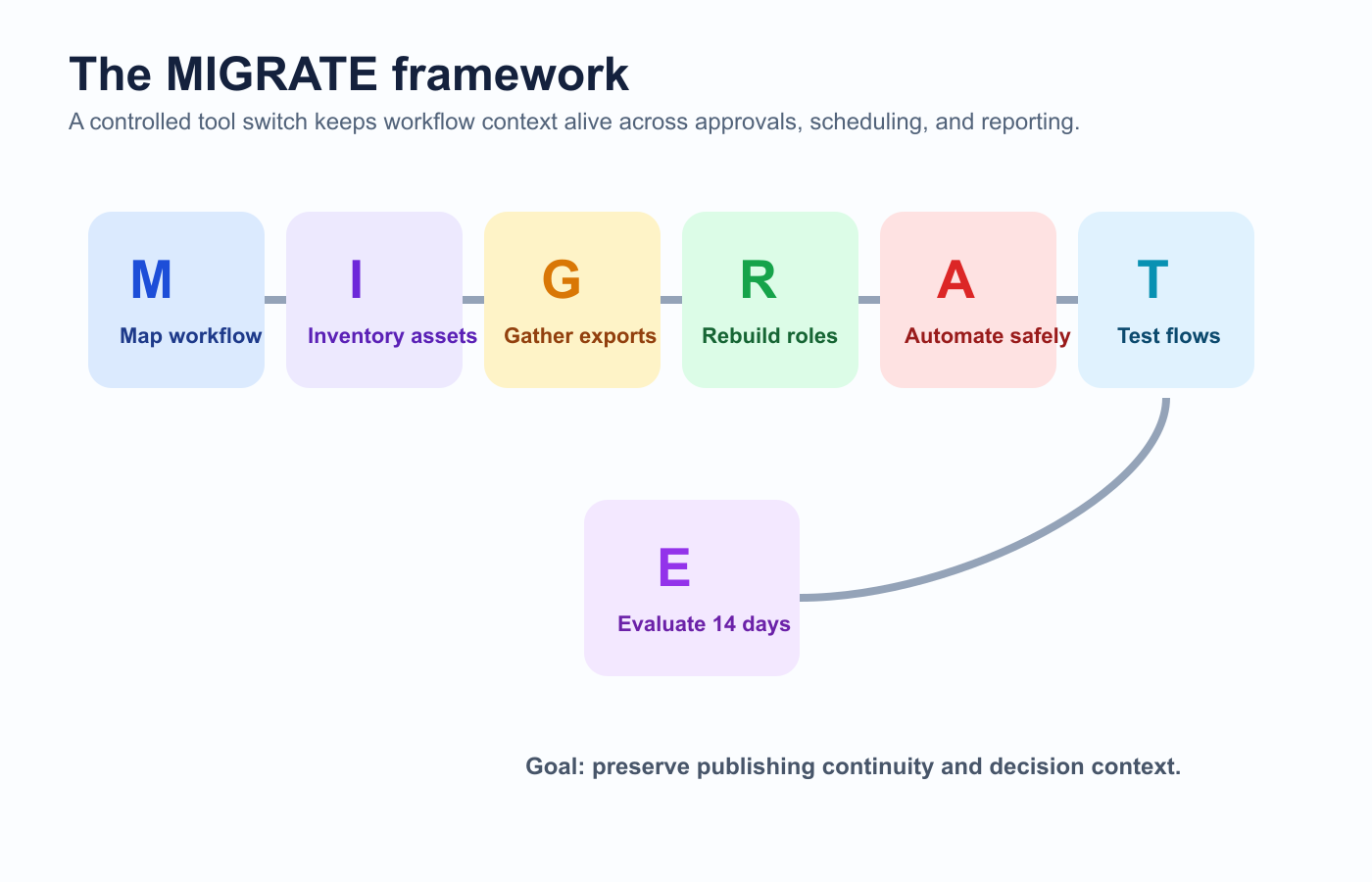
A controlled tool migration protects workflow context from audit through post-launch review.
M — Map the current workflow
Before moving anything, document how content currently works.
Map:
idea capture
draft creation
design/assets
internal review
client or stakeholder approval
scheduling
publishing
analytics
reporting
repurposing
integrations
ownership
Use a simple table:
Workflow stageCurrent toolOwnerProblemIdeasNotionSocial leadNot connected to calendarApprovalEmailClientVersion confusionSchedulingOld schedulerSocial managerNo repurposing queueReportingPDF exportAccount managerNo next actions
This shows what needs to be rebuilt.
I — Inventory profiles and assets
List everything connected to the old system.
Social profiles
Include:
Instagram accounts
TikTok accounts
LinkedIn pages
Facebook pages
YouTube channels
Pinterest accounts
Threads accounts
X / Twitter accounts
Google Business Profiles
For each profile, capture:
owner
login/admin access
token status
connected tool
publish permissions
analytics permissions
two-factor authentication owner
backup admin
This prevents token and permission problems during migration.
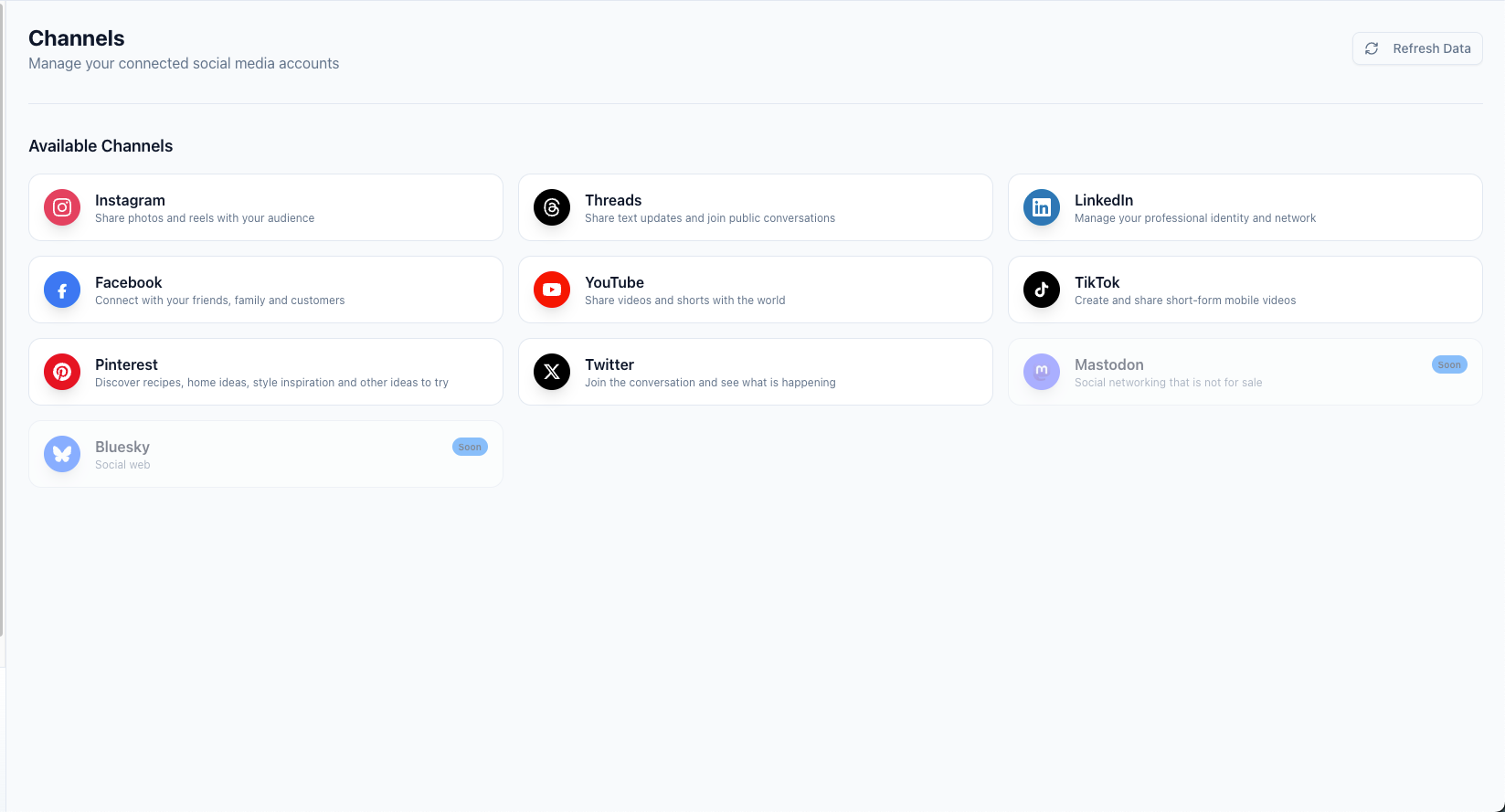
A profile inventory should capture account ownership, permissions, and connection status before the switch.
Assets
Inventory:
scheduled posts
drafts
media files
caption libraries
hashtag lists
evergreen queues
campaign labels
client notes
approval history
report exports
UTM templates
saved replies
workflow templates
A migration fails when hidden assets are forgotten.
G — Gather exports and reports
Export what you can before disconnecting the old tool.
Export:
scheduled posts
draft posts
published post history
analytics data
campaign reports
client reports
top post lists
content labels
approval records
media files
CSV exports
report PDFs
calendar exports
Not every tool exports everything.
Prioritize the data that your team will actually need.
Most important:
upcoming scheduled content
top-performing posts
client approval records
reporting history
content that should be repurposed
active campaigns
The goal is not to preserve everything forever.
The goal is to preserve decision-making context.
Rebuild the new system
R — Rebuild stages and roles
Your new tool should not simply copy old chaos.
Use the migration to clean the workflow.
Recommended workflow stages:
Ideas
Selected
Draft
Asset Needed
Internal Review
Changes Requested
Approved
Scheduled
Published
Analyze
Repurpose
Archive
Then map roles:
RolePermissionCreator / WriterCreate draftsDesignerUpload assetsReviewerRequest changesApproverApprove final contentPublisherSchedule and publishAnalystReview performanceClient / GuestReview selected contentAdminManage profiles and settings
Do not give everyone publish access by default.
Permissions should match responsibility.
Rebuild approval workflows
Approvals often break during migration.
Document:
who reviews internally
who approves externally
which content needs client approval
which content needs product/legal review
what counts as final approval
whether changes after approval require re-approval
whether unapproved content can be scheduled
how change requests are handled
who handles late approvals
A strong approval workflow should include a publish gate.
That means:
Only approved content can be scheduled as final.
This is especially important for agencies, SaaS companies, regulated industries, sponsors, and product-led teams.
Move scheduled content carefully
Scheduled content is the riskiest part of migration.
Before moving:
Export upcoming scheduled posts.
Record platform, date, time, timezone, caption, asset, and approval state.
Pause new scheduling in the old tool.
Recreate posts in the new tool with post scheduling rules that match the new approval path.
Verify media, captions, links, tags, and dates.
Confirm approvals.
Check timezones.
Do a final calendar review.
Avoid running both tools in parallel for the same profile unless you have a clear rule.
Duplicate publishing is a common migration mistake.
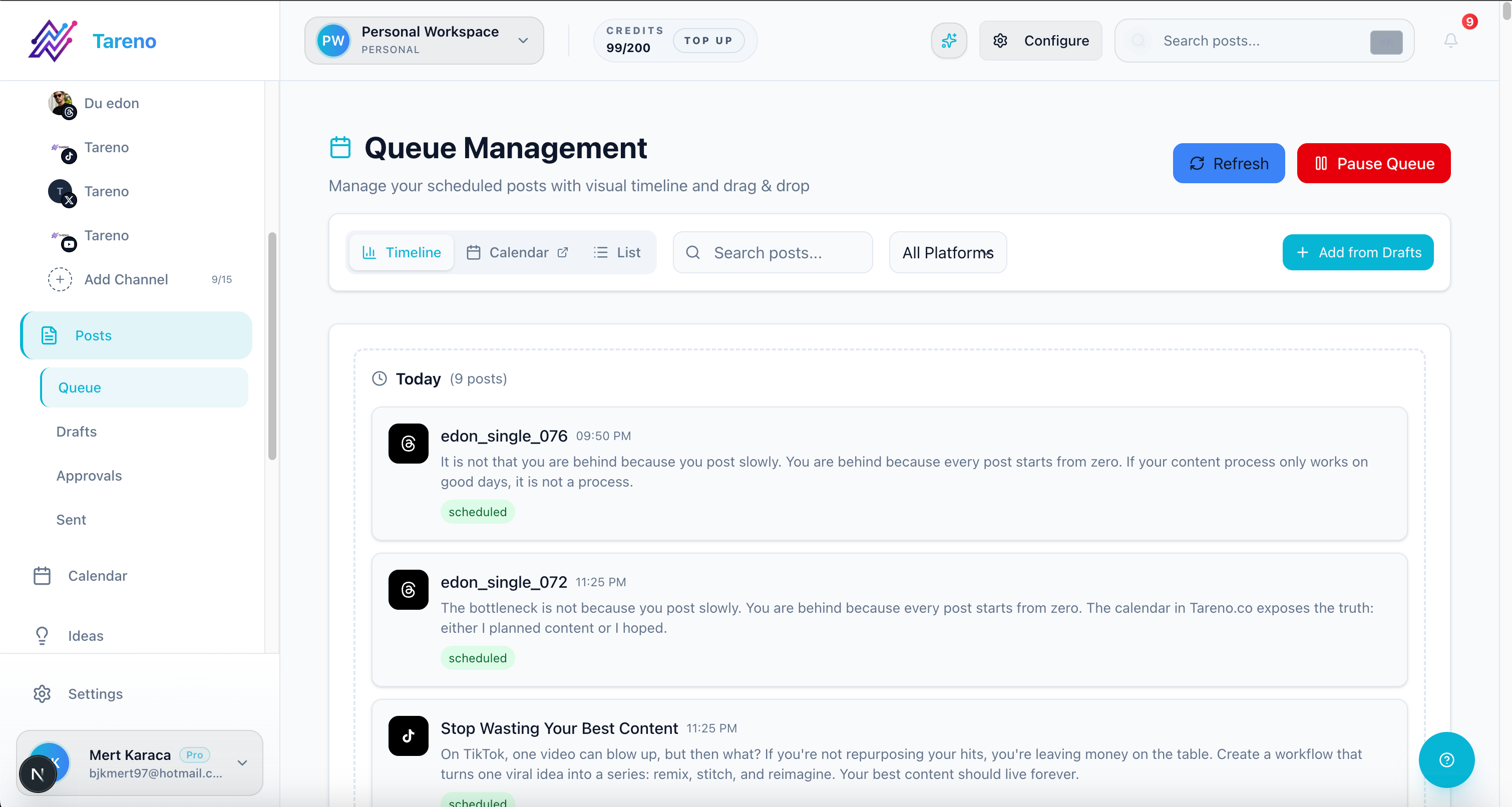
Scheduled posts need a line-by-line rebuild of date, timezone, asset, and approval state.
Move analytics and reporting context
You may not be able to import all historical analytics into the new tool.
That is okay.
Preserve the context.
Create a migration report with insights from analytics reports so the new system starts with context instead of guesswork:
last 3 to 6 months of top posts
best platforms
best formats
high-click posts
high-save posts
weak formats
competitor notes
client report history
evergreen winners
posts worth repurposing
This lets the new workflow start with intelligence instead of a blank slate.
Build or move your repurposing queue
Repurposing is often forgotten during migration.
Create a repurposing workflow queue with:
source post
original platform
performance signal
target platform
new format
owner
approval needed
due date
scheduled date
second-wave performance
Example:
SourceSignalTargetStatusLinkedIn post about reportingHigh clicksBlog + carouselDraftInstagram carousel about captionsHigh savesPinterest + TikTokReviewTikTok workflow videoHigh watch timeYouTube Short + ThreadsApproved
This turns old content into future output.
A — Automate carefully
Migration is a good time to clean automations.
List current automations:
Make scenarios
n8n workflows
Zapier zaps
API scripts
Google Sheets syncs
Slack notifications
Airtable workflows
Notion automations
reporting dashboards
webhook listeners
For each automation, document:
trigger
action
owner
connected account
failure handling
whether it still matters
Do not recreate every old automation.
Only rebuild the ones that support the new workflow.
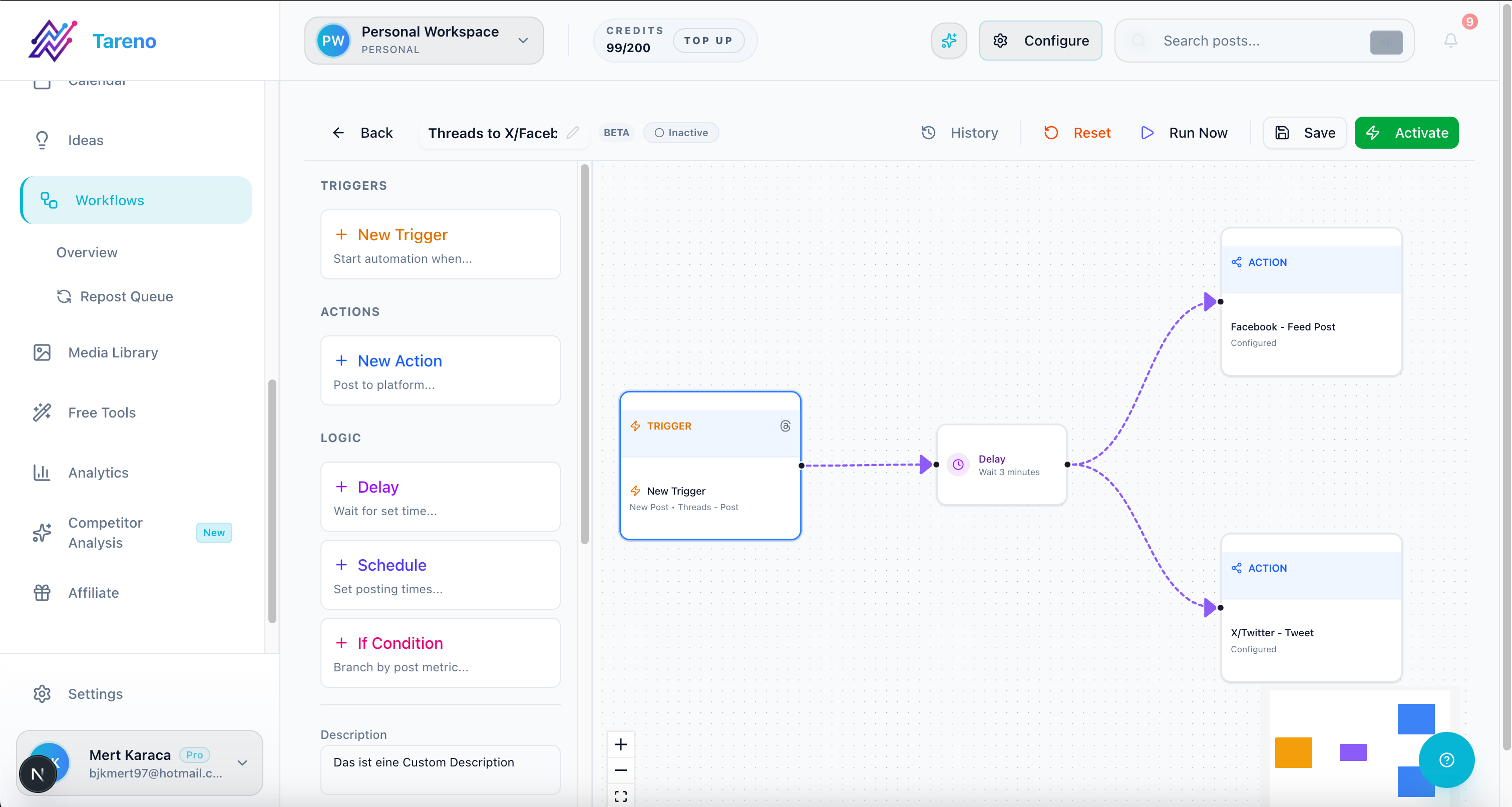
Rebuild only the automations that support the cleaner workflow you want to keep.
Useful automations after migration:
draft ready -> notify reviewer
approved -> move to scheduling
published -> create reporting task
high performer -> add to repurposing queue
client approved -> update tracker
report completed -> create next-month tasks
T — Test before switching
Do not migrate and launch on the same day without testing.
Test with:
one internal profile
one low-risk post
one approval workflow
one scheduled post
one published post
one analytics check
one repurposing task
one Make/n8n/API workflow if relevant
Test checklist:
- [ ] Social profile connected
- [ ] Draft created
- [ ] Platform-specific caption added
- [ ] Asset uploaded
- [ ] Reviewer assigned
- [ ] Changes requested works
- [ ] Approval works
- [ ] Unapproved publishing blocked if required
- [ ] Scheduled post appears correctly
- [ ] Published post goes live
- [ ] Analytics appear
- [ ] Repurposing task created
- [ ] Integration trigger works
Only migrate active workflows after the test passes.
E — Evaluate after launch
The migration is not finished on launch day.
Monitor for 14 days.
Check:
failed publishes
duplicate posts
missing captions
wrong timezones
disconnected profiles
broken approvals
missing client access
missing reports
failed Make/n8n/API workflows
team confusion
unclear ownership
missing repurposing tasks
Hold a short migration review after two weeks.
Ask:
what broke?
what was slower?
what improved?
which old workflow should not be rebuilt?
which new automation should be added?
what training is needed?
A migration should improve the system, not only change the software.
Migration timeline
Use this timeline for most teams.
Week 1: Audit
map workflow
export data
list profiles
identify risks
choose migration owner
Week 2: Setup
connect profiles
create workspaces
create roles
rebuild boards
configure approval workflow
import or recreate scheduled posts
Week 3: Test
test internal posts
test approval flow
test publishing
test analytics
test integrations
fix issues
Week 4: Switch
pause old scheduling
move final posts
notify team
monitor publish queue
keep old exports accessible
First 14 days after switch
monitor failures
review reports
check profile tokens
collect team feedback
improve automations
How Tareno fits migration projects
Tareno is useful when the reason for migration is workflow depth, especially when your next stack needs a configurable workflow builder instead of another basic scheduler.
Relevant Tareno components include:
content boards
content calendar
approval workflows
workflow builder
repurposing queue
analytics
competitor analysis
team workspaces
roles and permissions
activity visibility
AI captions and hashtags
Make integration
n8n integration
API access
Tareno is a strong fit when the team is switching because the old tool handled scheduling but not the full workflow. Teams comparing lightweight schedulers can start with the Buffer alternative or the Metricool alternative before they decide how much workflow depth they actually need.
Typical migration path:
old scheduler -> Tareno boards, approvals, scheduling, analytics, repurposing, automation
Migration mistakes to avoid
Mistake 1: Migrating only scheduled posts
Move workflows, approvals, reports, and repurposing context too.
Mistake 2: Disconnecting the old tool too early
Keep exports and access until the new workflow is verified.
Mistake 3: Forgetting timezones
Wrong timezones can break scheduled content.
Mistake 4: Rebuilding bad workflows
Use the migration to simplify.
Mistake 5: Not testing approvals
Approvals are where many migrations fail.
Mistake 6: Ignoring integrations
Make, n8n, API, and reporting workflows need a separate migration plan.
Copy/paste migration checklist
## Social Media Tool Migration Checklist

Audit:
- [ ] Current workflow mapped
- [ ] Current tools listed
- [ ] Social profiles listed
- [ ] Users and roles listed
- [ ] Approval process documented
- [ ] Reports exported
- [ ] Scheduled posts exported
- [ ] Drafts exported
- [ ] Top posts exported
- [ ] Repurposing candidates listed

Setup:
- [ ] Workspaces created
- [ ] Profiles connected
- [ ] Roles configured
- [ ] Boards created
- [ ] Approval stages created
- [ ] Calendar reviewed
- [ ] Scheduled posts recreated
- [ ] Reports rebuilt
- [ ] Repurposing queue created

Integrations:
- [ ] Make workflows reviewed
- [ ] n8n workflows reviewed
- [ ] API scripts reviewed
- [ ] Webhooks tested
- [ ] Error notifications configured

Testing:
- [ ] Test draft created
- [ ] Test approval completed
- [ ] Test post scheduled
- [ ] Test post published
- [ ] Analytics checked
- [ ] Repurposing task created
- [ ] Integration trigger tested

Launch:
- [ ] Old scheduling paused
- [ ] Team notified
- [ ] Client access checked
- [ ] Calendar reviewed
- [ ] Monitoring owner assigned
Related Tareno resources
Keep building the workflow
Product Tareno Features See the planning, scheduling, approval, and workflow features behind this guide. Explore features -> Plans Tareno Pricing Match the workflow depth in this article to the right plan and trial option. View pricing -> Compare Comparison Hub Compare Tareno with common social media management tools by workflow fit. Compare tools -> Docs Make Automation Guide Connect workflow automation when your social process needs external triggers. Open docs ->
FAQ
How do you migrate social media management tools?
Audit the current workflow, export scheduled posts and reports, list connected profiles, rebuild workspaces and approvals, reconnect integrations, test publishing, then switch in phases.
What should I export before switching tools?
Export scheduled posts, drafts, reports, analytics, top posts, client approval records, content labels, media files, and repurposing candidates.
Can I use two social media tools at once during migration?
You can, but be careful. Running two tools on the same profiles can create duplicate publishing or confusion unless you clearly define which tool is active.
How do agencies migrate social media tools?
Agencies should migrate by client workspace, preserve approval records, recreate reports, verify client access, and test scheduling before moving all accounts.
What happens to old analytics after migration?
You may not be able to import all historical data. Export key reports and create a migration summary with top posts, benchmarks, and repurposing candidates.
Should I rebuild all old automations?
No. Review each Make, n8n, API, or Zapier workflow and rebuild only the automations that support the new workflow.
Final thoughts
Switching social media tools is not just a software change.
It is a workflow migration.
The safest migration protects scheduled content, approvals, reports, profile connections, integrations, and repurposing context.
Move slowly enough to avoid mistakes.
Use the switch as an opportunity to clean the system.
And remember:
The goal is not only to move posts. The goal is to move the operating system.
A good migration protects tomorrow’s publish queue while giving the team a cleaner operating system on the other side. Compare workflow depth across the alternatives hub and keep your post-migration review focused on what improved, not only what moved.