
Short answer: Choose Tareno when approval must reliably move content into scheduling, reporting, and automation; choose Planable for dedicated content review; choose Sendible or SocialPilot for agency and client workflows; and choose Buffer for lightweight team review.
A social media approval workflow prevents unapproved posts and makes feedback, ownership, and the next action visible. The right tool depends on whether you only need comments and sign-off or an end-to-end process from draft to review to publication.
This guide compares the best social media approval workflow tools in 2026 by actual use case, including client feedback, scheduling controls, and workflow automation.
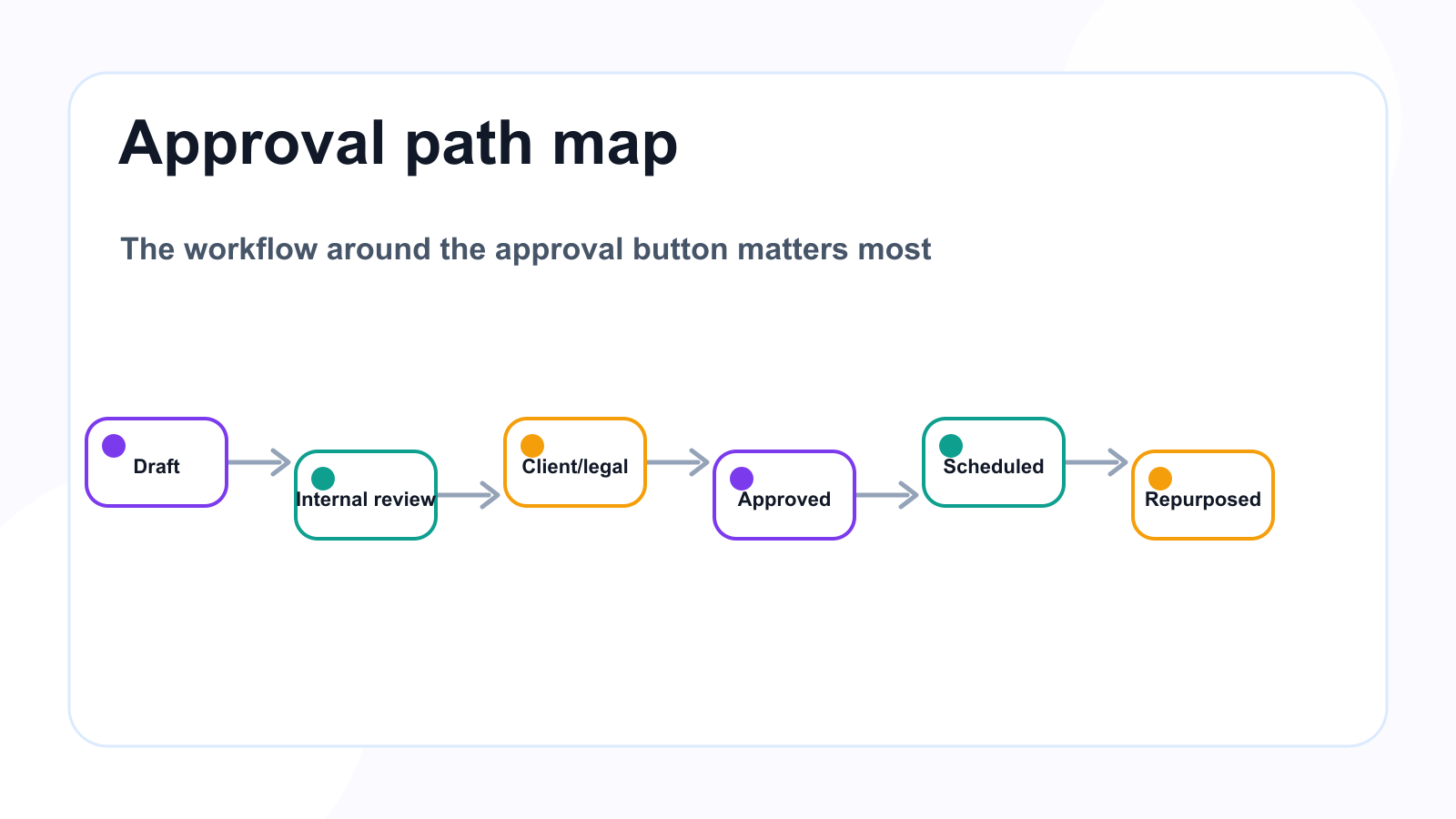
A complete approval workflow covers the handoff before and after the click.
TL;DR: best approval tools by workflow type
Approval workflowBest fitWhyWorkflow approvals plus automationTarenoApprovals connected to boards, workflow builder, repurposing, roles, activity visibility, Make, n8n, APIDedicated content reviewPlanableComments, internal notes, external review, approval collaborationClient dashboards and approvalsSendibleAgency client workflows, approvals, dashboards, reportsAgency scheduling approvalsSocialPilotManager approval, client approval, scheduling and reportsInbox and moderation assignmentsAgorapulseInbox assignments, moderation rules, saved replies, team workflowsSimple team approvalsBuffer TeamLightweight content approvals inside a simple schedulerVisual planning approvalsLaterUseful for visual content planning and profile-group workflowsBroad suite approvalsHootsuiteApproval workflows inside a larger publishing/inbox/reporting suite
Short version: If approval is only review, a dedicated approval tool may be enough. If approval needs to trigger scheduling, repurposing, reporting, Make/n8n workflows, and team accountability, a workflow-first system like Tareno is stronger.
Tareno, Planable, Sendible, SocialPilot, Agorapulse, Buffer each fit a different workflow need.
What is a social media approval workflow?
A social media approval workflow is a structured process for reviewing and approving content before it is published.
It usually defines who drafts the content, who reviews it, who requests changes, who gives final approval, what version is approved, whether the post can be scheduled, whether client approval is needed, whether legal/product review is needed, what happens after approval, and who can see activity history.
A simple approval workflow:
Draft
Review
Approved
Scheduled
A more advanced workflow:
Idea
Draft
Internal review
Client review
Changes requested
Approved
Scheduled
Published
Repurpose
Report
The best workflow depends on the team.
Why approval workflows matter
Approval workflows prevent common mistakes.
They help avoid publishing the wrong version, scheduling unapproved content, losing client feedback, missing legal or product review, using outdated pricing, publishing inaccurate competitor claims, skipping sponsor review, confusing internal comments with final approval, and repurposing old content without freshness checks.
Approvals are not about slowing teams down.
They are about reducing confusion.
A good approval workflow makes publishing faster because everyone knows what happens next.
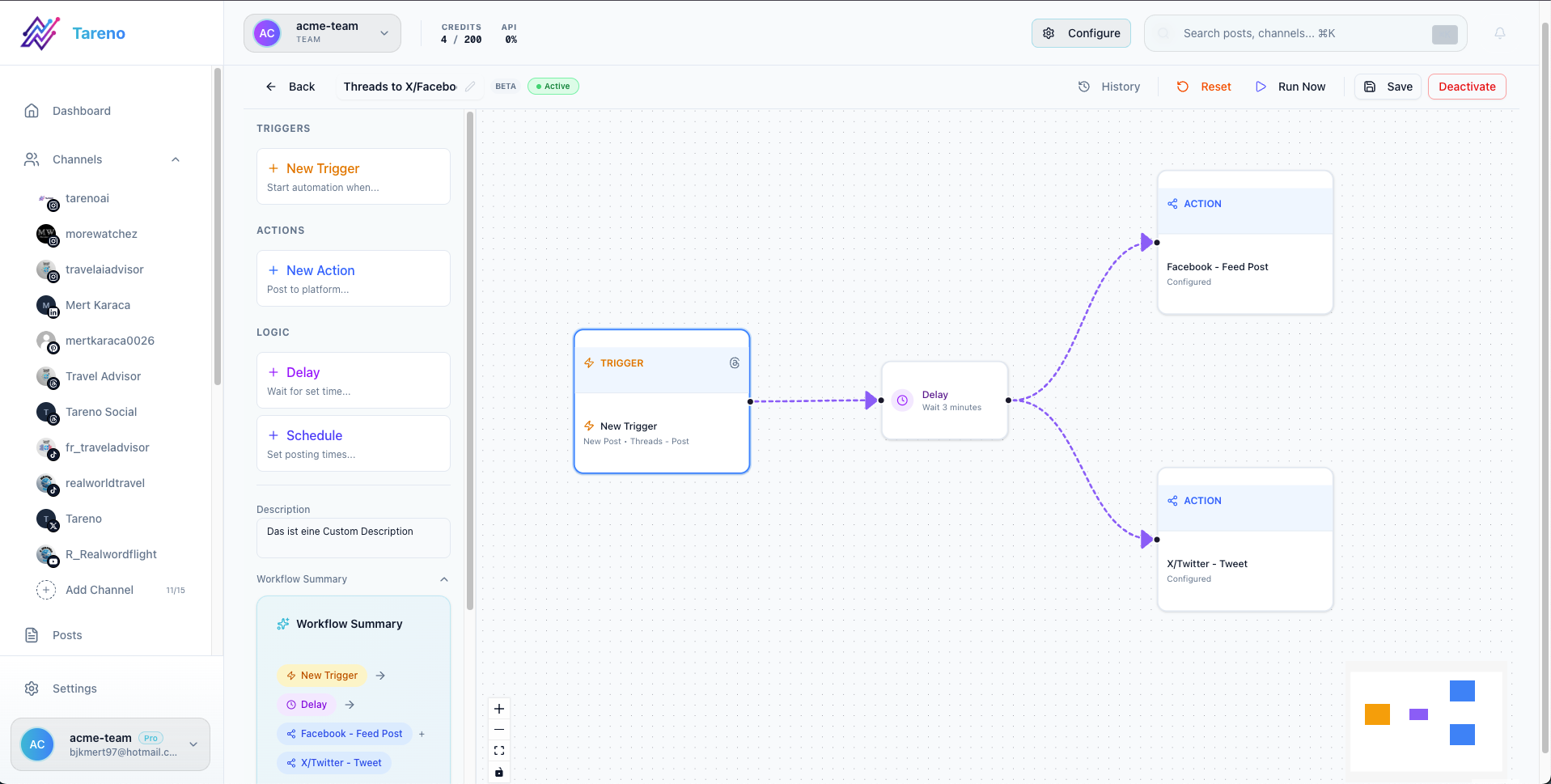
Approval workflows need clear gates, ownership, and next-step automation.
How to choose an approval tool
Use this framework.
1. Who needs to approve content?
Possible approvers include creator, assistant, editor, account manager, client, sponsor, product manager, brand lead, legal reviewer, or agency lead.
The more approvers involved, the more structure you need.
2. Where does feedback happen?
If feedback happens in Slack, email, screenshots, or comments across tools, you need a central review system; teams can also use a social media approval workflow to keep every reviewer in sequence.
3. Does approval block publishing?
It should.
If unapproved content can still be scheduled or published, the approval workflow is weak.
4. What happens after approval?
Approval should often trigger a next step through a workflow builder:
schedule post
notify publisher
move to calendar
send to Make
send to n8n
add to report
prepare repurposing
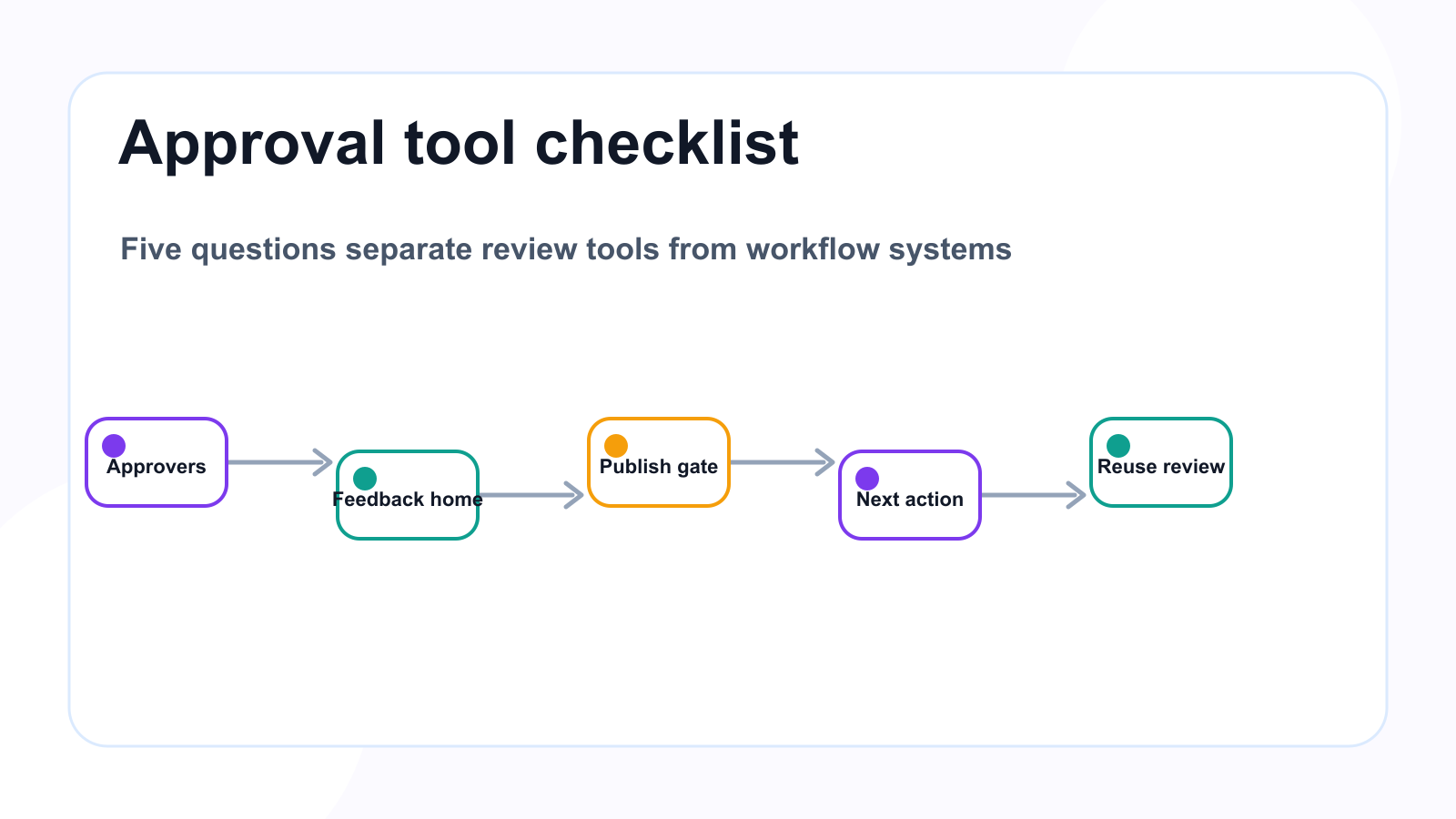
The best approval tool depends on reviewers, gates, and what happens next.
5. Does repurposed content need approval?
Usually yes, especially if content is old, references pricing, or mentions competitors.
1. Tareno — best for workflow approvals plus automation
Tareno is best for teams that need approvals connected to the broader workflow.
It is not only about saying yes or no to a post.
It is about what happens before and after approval.
Tareno is best for
Choose Tareno if you need:
approval workflows
content boards
workflow builder
repurposing queue
team workspaces
roles and permissions
activity visibility
AI captions and hashtags
unified analytics
competitor analysis
API access
Make integration
n8n integration
Where Tareno wins
Tareno is strongest when approval needs to connect to scheduling, repurposing, reporting, automation, platform adaptation, team accountability, and client/team workspaces.
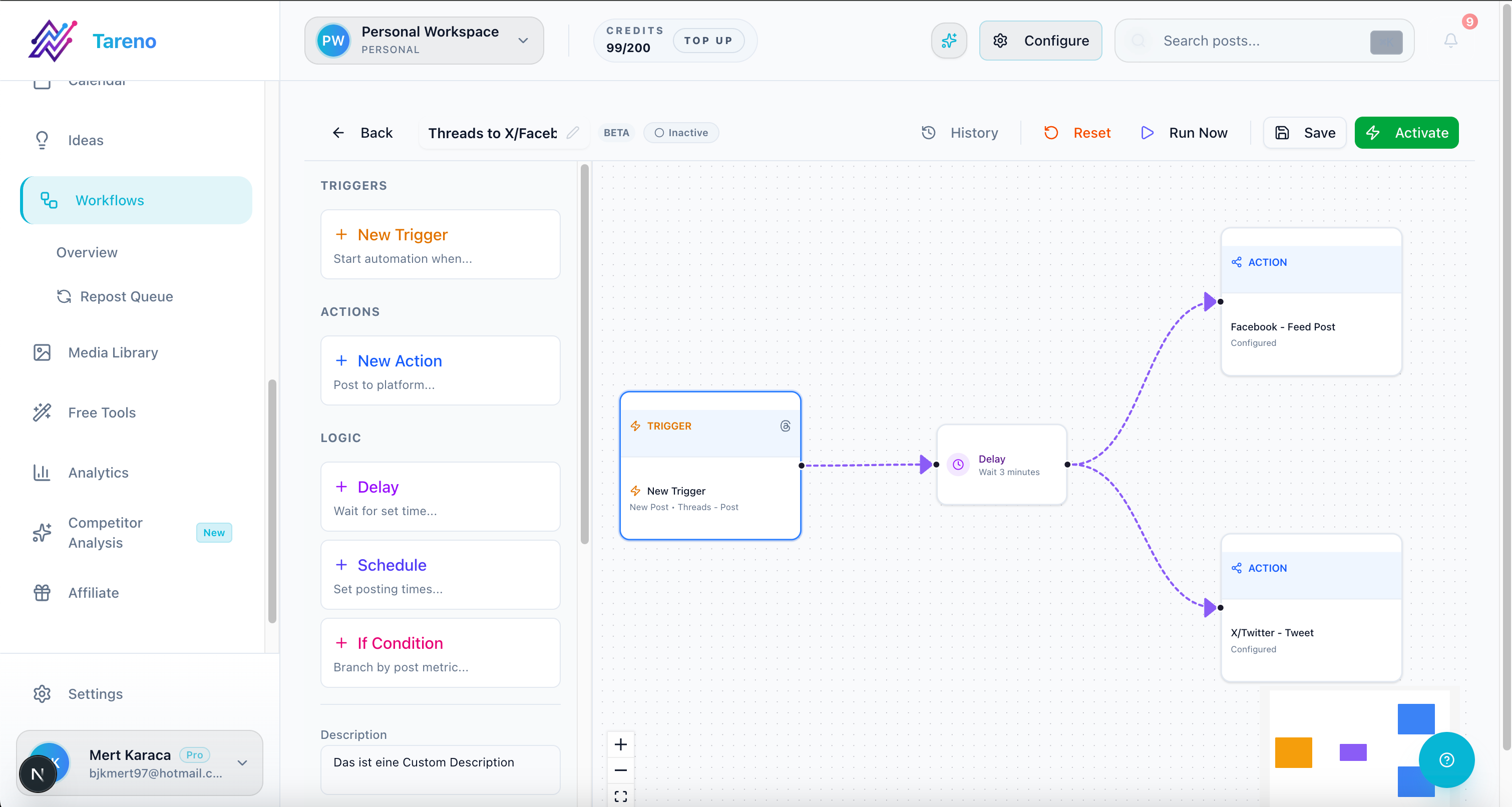
After approval, automation keeps scheduling and reporting steps from drifting.
Example workflow:
Draft → Review → Approved → Schedule → Publish → Measure → Repurpose
This is deeper than a simple approval button.
Not ideal for
Tareno may be more than needed if the team only wants a lightweight review tool and does not need workflow automation, repurposing, roles, or integrations.
2. Planable — best for dedicated content review
Planable is one of the strongest dedicated approval and collaboration tools.
It is useful when the main bottleneck is feedback and review.
Planable is best for
Planable is best for comments, internal notes, external review, stakeholder feedback, client approval, multi-level approval on higher plans, and collaboration around content drafts.
Where Planable wins
Planable is strong when teams need to centralize feedback.
If review currently happens in screenshots, Slack threads, or emails, Planable can make the process clearer.
Where Planable may not be enough
Teams comparing review-only tools can also read the Planable alternative. Teams comparing review-only tools can also read the Planable alternative. Teams comparing review-only tools can also read the Planable alternative. Planable may be less ideal if approvals need to connect to repurposing queues, workflow builder, Make or n8n workflows, analytics-to-action, and activity visibility around the full content lifecycle.
Planable helps content get approved.
A workflow-first system helps approved content move through the rest of the operation.
3. Sendible — best for agency client dashboards and approvals
Sendible is useful for agencies that need client-facing workflows.
Sendible is best for
Sendible is best for client dashboards, client profile connection, approval workflows, reports, social inbox, permissions, white-label agency workflows, and engagement monitoring.
Where Sendible wins
Sendible is strong when agencies need a client management layer.
It helps agencies organize clients, approvals, dashboards, and reports in a more traditional agency workflow.
Where Sendible may not be enough
Sendible may be less ideal if the agency needs repurposing queues, workflow builder automation, approval-triggered repurposing, Make/n8n content workflows, and board-based production depth.
4. SocialPilot — best for agency scheduling approvals
SocialPilot is useful for agencies; if scheduling depth is the decision point, compare the SocialPilot alternative too. SocialPilot is useful for agencies; if scheduling depth is the decision point, compare the SocialPilot alternative too. SocialPilot is useful for agencies; if scheduling depth is the decision point, compare the SocialPilot alternative too. SocialPilot is useful for agencies that need scheduling plus manager or client approvals.
SocialPilot is best for
SocialPilot is best for agency scheduling, client approvals, manager approvals, bulk scheduling, account/user scaling, white-label reports, and advanced analytics.
Where SocialPilot wins
SocialPilot is strong when the approval process is tied to agency scheduling and client review.
It can be a practical fit for agencies that need approval without a broader enterprise suite.
Where SocialPilot may not be enough
SocialPilot may be less ideal if the team needs workflow builder, repurposing queue, Make/n8n workflow logic, activity visibility around full production, and approval-triggered automation.
5. Agorapulse — best for inbox and moderation workflows
Agorapulse is strong for teams that need approval-like workflows around inbox, comments, moderation, and assignments.
Agorapulse is best for
Agorapulse is best for social inbox, message assignments, comment management, ad comment monitoring, saved replies, labels, moderation rules, bulk actions, team performance reports, and ROI reporting.
Where Agorapulse wins
Agorapulse is strong when the approval challenge is around engagement and moderation, not only content publishing.
Where Agorapulse may not be enough
Agorapulse may be less ideal if the team needs repurposing queues, content board stages, Make/n8n workflows, approval-triggered content automation, and content lifecycle activity visibility.
6. Buffer Team — best for simple team approvals
Buffer Team can work for lightweight approval needs inside a simple scheduling workflow.
Buffer is best for
Buffer is best for simple scheduling, clean publishing queue, small teams, lightweight content approvals, and low operational complexity.
Where Buffer wins
Buffer is useful when a team wants simple publishing with basic approval support.
Where Buffer may not be enough
Buffer may be less ideal if the team needs advanced approval workflow stages, repurposing queue, workflow builder, board-based production, Make/n8n integrations, detailed activity visibility, and client approval depth.
7. Later — best for visual planning approvals
Later can fit creators or teams that need approval inside a visual planning workflow.
Later is best for
Later is best for visual planning, Social Sets, Instagram/TikTok workflows, Link in Bio, creator-style planning, profile-group workflows, and approvals on relevant plans.
Where Later wins
Later is strong when the approval process is tied to visual content and creator-style planning.
Where Later may not be enough
Later may be less ideal if approvals need to connect to workflow automation, repurposing queues, Make/n8n workflows, board-based content operations, and activity visibility beyond visual planning.
8. Hootsuite — best for broad suite approvals
Hootsuite can support approval workflows inside a broader social media management suite.
Hootsuite is best for
Hootsuite is best for publishing, inbox, AI tools, templates, analytics, listening, reporting, bulk scheduling, approvals on relevant plans, and enterprise workflows.
Where Hootsuite wins
Hootsuite is strong when a team wants approvals as part of a broad suite with publishing, inbox, analytics, listening, and reporting.
Where Hootsuite may not be enough
Hootsuite may be less ideal if the team specifically needs lean workflow automation, repurposing queue, Make/n8n workflows, board-based content operations, and workflow-first execution rather than suite-first coverage.
Approval workflow comparison table
ToolBest forApproval strengthMain limitationTarenoWorkflow approvals and automationApprovals connected to boards, repurposing, automation, rolesMore than needed for simple reviewPlanableDedicated reviewComments, notes, external review, approvalsLess post-approval automationSendibleAgency client workflowsClient approvals and dashboardsLess workflow-first repurposingSocialPilotAgency schedulingClient and manager approvalsLess deep workflow automationAgorapulseInbox/moderationAssignments and moderation workflowsLess content production automationBufferSimple teamsLightweight approvalsLimited workflow depthLaterVisual teamsVisual planning approvalsLess automation depthHootsuiteBroad suiteApprovals inside larger platformCan be heavy for lean teams
Approval workflow examples
Creator with sponsor
Creator drafts post.
AI suggests captions.
Creator edits for voice.
Sponsor reviews exact version.
Creator approves final version.
Post is scheduled.
Performance is reported.
Agency with client
Copywriter drafts post.
Designer adds asset.
Account manager reviews internally.
Client reviews.
Changes are requested or approved.
Approved post is scheduled.
Published post is measured.
Winner enters repurposing queue.
Small team
Social manager drafts post.
Product owner checks claims.
Brand lead reviews tone.
Marketing lead approves.
Post is scheduled.
Analytics create next actions.
Workflow-heavy team
Idea enters board.
Draft is created.
Review is assigned.
Approval triggers scheduling.
Publishing triggers measurement.
High performer triggers repurposing.
Make/n8n syncs tasks.
Approval mistakes to avoid
Mistake 1: Approving in chat only
Chat is useful for discussion, but it is weak as the final approval record.
Mistake 2: No version control
Approval must apply to a specific version.
Mistake 3: No publish gate
Unapproved content should not be publishable.
Mistake 4: Too many approvers
Use risk-based approval instead of forcing every post through every reviewer.
Mistake 5: Skipping review for repurposed content
Old content may include outdated claims or context.
Mistake 6: No activity history
Teams need to know who changed, approved, or scheduled content.
Mistake 7: Approval does not trigger action
Approval should lead to scheduling, publishing, repurposing, or reporting.
What to look for in an approval tool
Look for reviewer assignment, approval statuses, comments, internal notes, external review, publish gates, version visibility, activity history, roles and permissions, workspace separation, client review, approval-triggered automation, repurposing review, and reporting connection.
The right tool depends on how deep your approval process is.
How Tareno fits into approval workflows
Tareno is strongest when approvals are part of the full content lifecycle.
Relevant Tareno components include:
approval workflows
content boards
workflow builder
repurposing queue
team workspaces
roles and permissions
activity visibility
unified analytics
competitor analysis
AI captions and hashtags
API access
Make integration
n8n integration
This matters because approval is not the end.
Approval should connect to scheduling, publishing, reporting, and repurposing.
Tareno is built for that larger workflow.
Related Tareno resources
Use Tareno Features, Tareno Pricing and Compare Hub to place this recommendation in the broader Tareno stack. For vendor context, compare it with Planable Alternative, Sendible Alternative, SocialPilot Alternative, Agorapulse Alternative and Buffer Alternative.
FAQ
What is a social media approval workflow?
A social media approval workflow is a structured process for reviewing, requesting changes, approving, scheduling, and publishing content with clear roles and status.
What is the best social media tool for approvals?
It depends on the workflow. Planable is strong for dedicated review. Sendible is strong for agency client dashboards. SocialPilot is strong for agency scheduling approvals. Tareno is strong for workflow approvals connected to automation and repurposing.
Do creators need approval workflows?
Creators need approval workflows when they work with sponsors, editors, assistants, collaborators, agencies, or brand partners.
Do repurposed posts need approval?
Yes, especially if they are old, mention pricing, include claims, reference competitors, or are adapted for a new audience.
What should approval workflows include?
They should include reviewers, comments, approval status, version visibility, publish gates, activity history, roles, and next actions after approval.
Can approval workflows be automated?
Yes. Automation can notify reviewers, move approved posts to scheduling, trigger Make/n8n workflows, create reporting tasks, and add winners to repurposing queues.
Final thoughts
Approval workflows are not only about preventing mistakes.
They are about making social media operations clearer.
A strong approval workflow helps teams know who owns content, which version is approved, what happens next, and whether publishing is safe.
For simple teams, a lightweight approval feature may be enough.
For agencies, client review may be the priority.
For workflow-heavy teams, approvals need to connect with boards, scheduling, reporting, repurposing, Make, n8n, API, roles, and activity visibility.
That is where a workflow-first system becomes more valuable than a simple approval button.
Primary CTA: Explore Tareno features to see how approval workflows, boards, workflow builder, repurposing queues, Make, n8n, API, analytics, roles, and activity visibility can work together.
Secondary CTA: Compare Tareno with Planable, Sendible, SocialPilot, Agorapulse, Buffer, and Later on the compare hub.
Related Tareno resources
Keep the workflow moving
Feature Approval Workflows Route draft content through review before publishing. Explore approvals -> Workflow Approval Workflow Software Map reviewer roles, gates, and publishing controls. Open workflow -> Feature Workflow Builder Trigger next steps after content is approved. See builder -> Alternative Planable Alternative Compare review-first tools with workflow-first systems. Compare ->


