Your old Instagram posts may be one of your most underused content assets.
Most creators publish a post once, check how it performed, and move on.
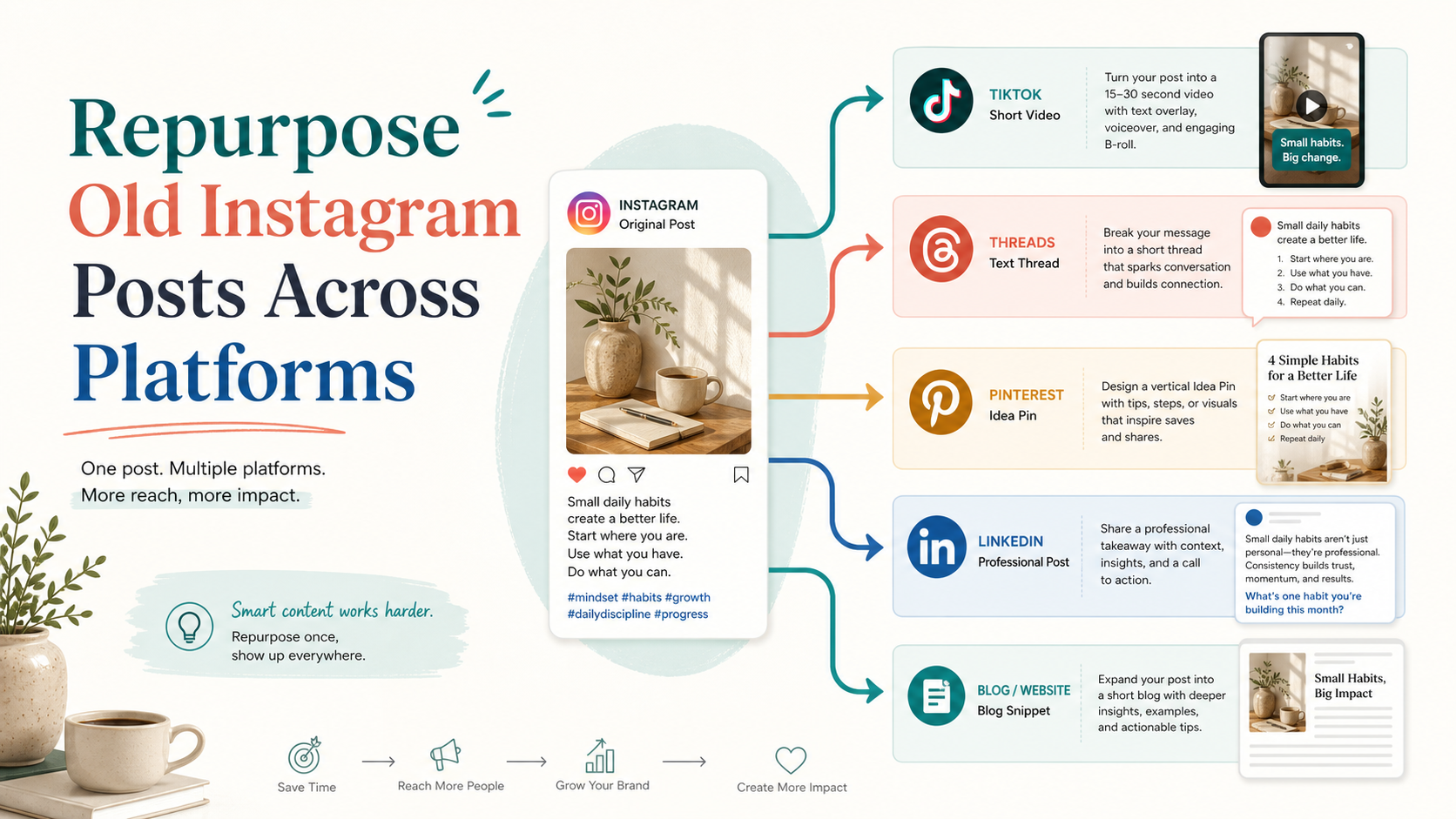
But if a post worked on Instagram, the idea may also work on TikTok, Threads, Pinterest, LinkedIn, YouTube Shorts, or even a blog.
The mistake is copying the exact same post everywhere.
The better workflow is to repurpose the idea.
A strong Instagram carousel can become a TikTok script.
A high-save Instagram caption can become a Threads post.
A useful Instagram tip can become a Pinterest pin.
A behind-the-scenes Reel can become a LinkedIn lesson.
A comment-heavy post can become a follow-up series.
This guide shows how to repurpose old Instagram posts across TikTok, Threads, Pinterest, and LinkedIn using a structured workflow, repurposing queue, approval step, and performance loop.
TL;DR
To repurpose old Instagram posts:
Find posts that already performed well.
Check whether the idea is still relevant.
Add winners to a repurposing queue.
Rewrite the idea for each target platform.
Change the hook, caption, format, CTA, and visual.
Review or approve the new version.
Schedule and publish.
Measure the second-wave performance.
Reuse again if the idea keeps working.
The key rule:
Repurpose the idea, not the identical Instagram post.
Why old Instagram posts are valuable
Old Instagram posts are valuable because they are already tested.
They can show:
what your audience saves
what your audience shares
what creates comments
what drives profile visits
what topics people care about
what formats work
what hooks perform
what questions repeat
what visuals hold attention
You do not need to start from zero every time.
If you have 100 old Instagram posts, you may already have a content library.
The question is:
Which posts deserve a second life?
A social media repurposing workflow helps answer that.
Repurposing vs reposting Instagram content
Reposting means publishing the same content again.
Repurposing means adapting the idea for a new context.
Example Instagram post:
“Your TikTok caption is too vague.”
Repost:
Publish the same caption on Threads and LinkedIn.
Repurpose:
TikTok: short video showing vague vs search-friendly captions
Threads: short opinion about vague captions
Pinterest: before/after pin
LinkedIn: workflow lesson about caption clarity
Blog: section about captions as content context
Same source idea.
Different platform execution.
That is the difference.
The INSTAGRAM framework
Use the INSTAGRAM framework to repurpose old posts.
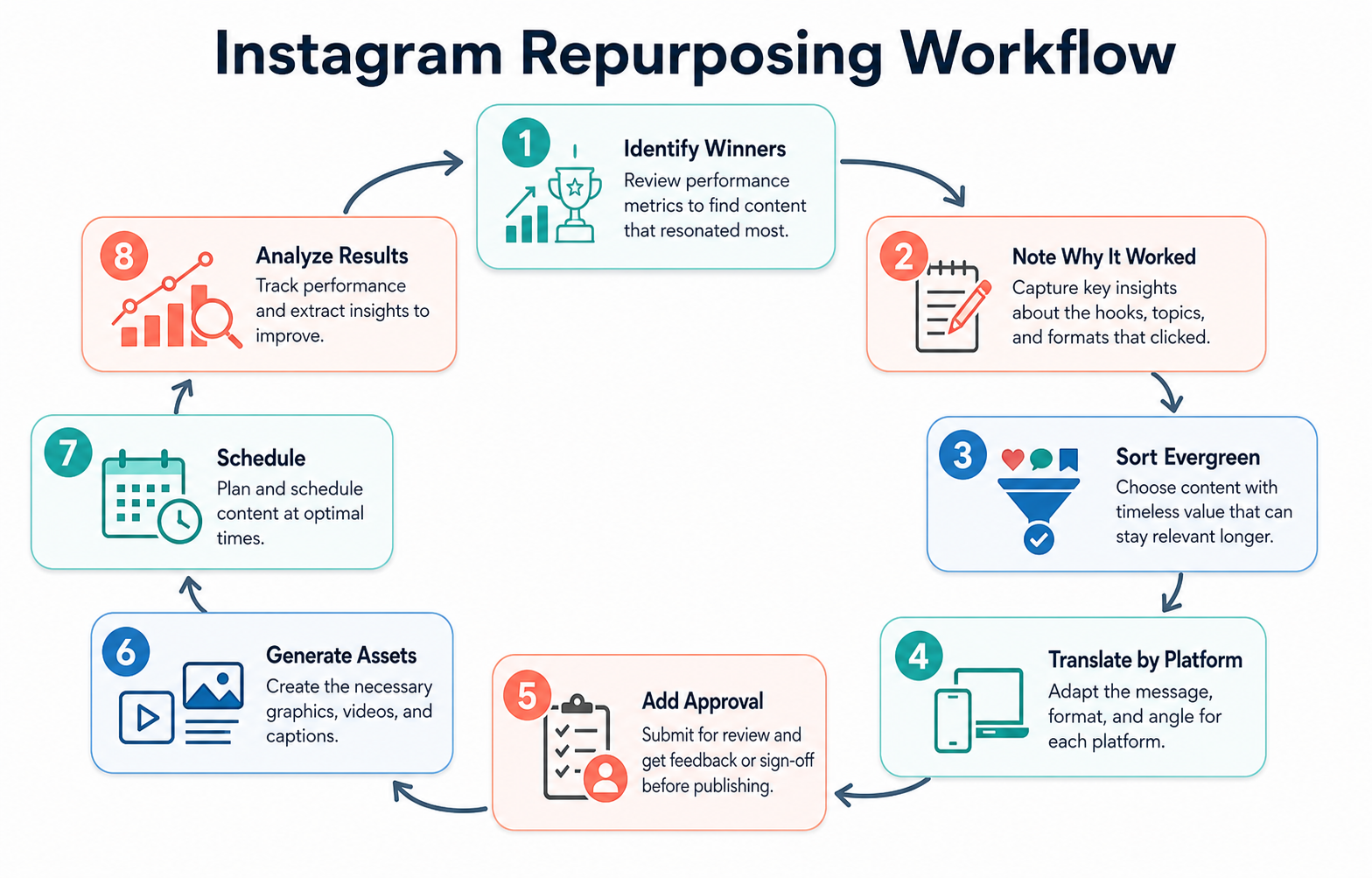
A structured repurposing workflow keeps old Instagram winners useful across multiple platforms.
I — Identify winners
N — Note the original reason
S — Sort by evergreen potential
T — Translate the idea by platform
A — Add approval where needed
G — Generate new assets
R — Route into scheduling
A — Analyze second-wave results
M — Move winners back into the queue
This creates a repeatable repurposing system.
I — Identify winners
Start by finding Instagram posts worth reusing.
Look for:
high saves
high shares
strong comments
above-average reach
strong profile visits
strong link clicks
high Reel watch time
strong carousel completion
useful questions in comments
evergreen topic relevance
Do not repurpose everything.
The point is to reuse the best ideas.
A low-performing post can still be useful if the idea was strong but the execution was weak.
But in general, start with evidence.
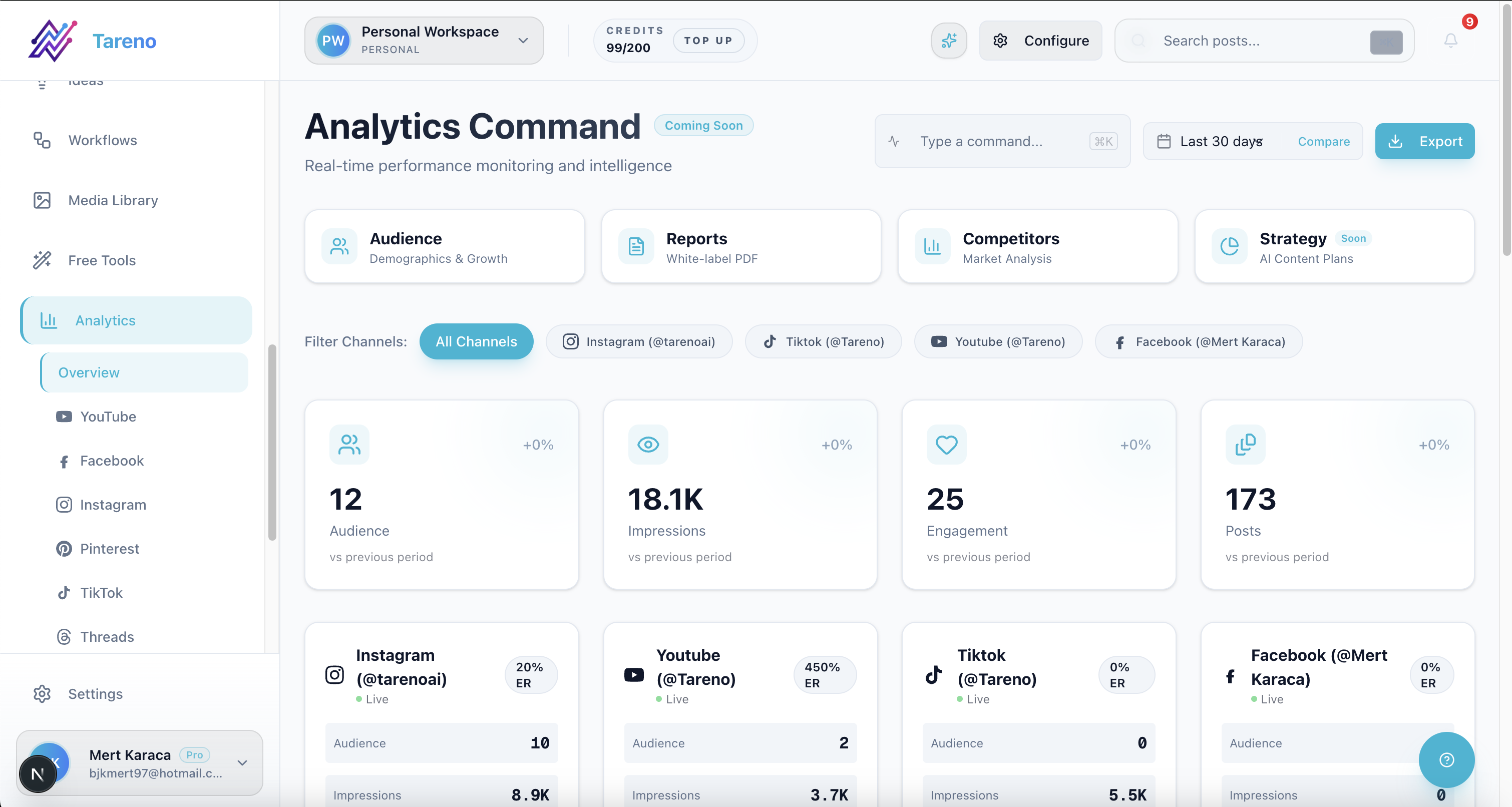
Analytics helps you choose Instagram posts with clear evidence before repurposing.
N — Note the original reason
Before rewriting, understand why the post worked.
Was it:
the hook?
the topic?
the format?
the visual?
the timing?
the pain point?
the example?
the CTA?
the audience question?
the controversy?
the simplicity?
If you do not understand why the post worked, you may repurpose the wrong part.
Example:
If an Instagram carousel worked because the checklist was clear, the repurposed TikTok should focus on the checklist.
If a Reel worked because the hook was strong, the Threads version should keep the sharp opinion.
If a caption worked because it answered a common question, the Pinterest version should become a search-friendly tutorial.
S — Sort by evergreen potential
Not every old Instagram post should be reused.
Evergreen posts are best.
Good candidates:
tutorials
frameworks
checklists
mistakes
beginner tips
workflow lessons
common questions
tool use cases
before/after examples
creator education
Be careful with:
old pricing
outdated features
trend posts
seasonal content
expired offers
event announcements
platform rule updates
competitor claims
If the post contains claims, pricing, or outdated context, review it before republishing.
T — Translate the idea by platform
This is the most important step.
Each platform needs a different translation.
Instagram to TikTok
TikTok needs movement, speed, and a clear hook. A TikTok hook generator can speed up first drafts.
Old Instagram post:
“3 mistakes creators make before posting.”
TikTok version:
Hook:
Stop posting before you check these 3 things.
Script:
Is the hook clear?
Does the caption explain the topic?
Is there a reason to save or reply?
CTA:
Save this before your next post.
Instagram to Threads
Threads needs a natural, conversational version.
Threads version:
most creators don’t need more content ideas.
they need a better pre-posting checklist.hook clear?
caption specific?
CTA obvious?if not, the idea probably isn’t ready yet.
Instagram to Pinterest
Pinterest needs search-friendly packaging.
Pinterest title:
Social Media Checklist Before You Post
Pin text:
Hook clear
Caption specific
CTA included
Save-worthy angle
Platform fit
CTA:
Use this before your next post.
Instagram to LinkedIn
LinkedIn needs a professional lesson.
LinkedIn version:
Most content teams skip the final quality check before publishing.
A simple pre-publishing workflow can prevent weak hooks, vague captions, and unclear CTAs.
Before scheduling, ask: Is the hook specific? Does the caption explain the topic? Does the post give the reader a clear reason to act?
Same idea.
Different execution.
A — Add approval where needed
Repurposed Instagram content may need a clear approval workflow software layer.
Approval is important if:
someone else owns the brand
a sponsor was involved
the post mentions a product claim
the post mentions pricing
the post references competitors
the content is old
the content is being translated
the post is being adapted for a client
a team member rewrote the content
Approval does not need to be heavy for every post.
Use risk levels.
Low-risk evergreen tips may need light review.
Product claims and sponsor content need stronger review.
G — Generate new assets
Repurposing usually requires new assets.
Examples:
TikTok
vertical video
screen recording
spoken hook
text overlay
quick demonstration
Threads
text-only post
short thread
reply prompt
conversational statement
vertical pin
before/after graphic
checklist graphic
tutorial graphic
search-friendly headline
text post
document carousel
professional story
workflow breakdown
strategic lesson
Do not force the Instagram asset into every platform.
Sometimes the asset should change completely. For caption rewrites, start with an Instagram caption generator and then adapt manually.
R — Route into scheduling
Once the repurposed version is ready, route it through post scheduling.
A repurposing queue should track:
source Instagram post
target platform
new hook
asset needed
owner
approval status
scheduled date
published date
performance after publishing
This prevents repurposed content from getting lost.
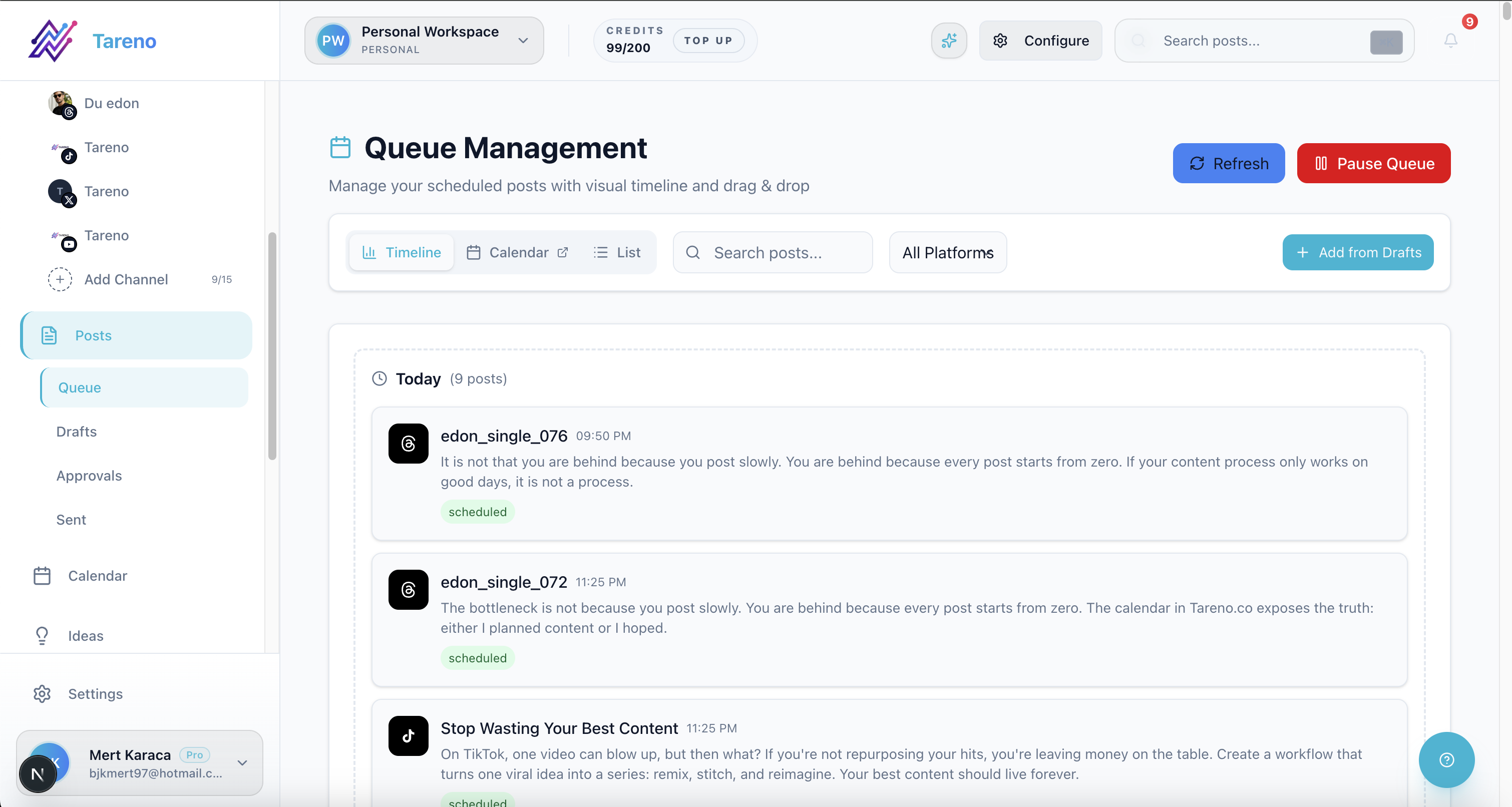
A visible queue keeps repurposed content moving from rewrite to scheduling without getting lost.
A post is not truly repurposed until it is published and measured.
A — Analyze second-wave results
After publishing, review performance with analytics reports.
Ask:
Did the TikTok version work?
Did the Threads version get replies?
Did the Pinterest pin drive clicks?
Did the LinkedIn version create saves or comments?
Did one platform outperform the original Instagram post?
Should the idea become a series?
Should it become a blog?
Should it return to the queue?
Second-wave analytics are important because not every Instagram winner works everywhere.
The goal is to learn platform fit.
M — Move winners back into the queue
If the repurposed version works, keep the idea alive.
Move it back into the queue as:
Reuse Again
Create Follow-Up
Turn Into Blog
Turn Into Carousel
Make Video Series
Add to Evergreen
Build Landing Page Section
This is how content compounds.
A single Instagram post can become a content system.
Example: old Instagram carousel to five assets
Original Instagram carousel:
“Your caption is too vague.”
Performance signal:
high saves
many comments
clear creator pain point
TikTok version
Hook:
Your caption is too vague, and it’s making your content harder to find.
Visual:
screen recording
before/after caption example
CTA:
Rewrite your caption before you post.
Threads version
Post:
“daily vlog” is not a caption strategy.
clear captions give people context.
specific captions give platforms context.vague captions make good content harder to understand.
Pinterest version
Pin title:
Turn Weak Captions Into Search-Friendly Captions
Pin sections:
Weak: daily vlog
Strong: daily vlog ideas for creators trying to stay consistent
LinkedIn version
Post:
Captions are part of content operations.
A vague caption does not only reduce clarity for the viewer. It also makes the asset harder to reuse across channels.
Before publishing, ask: would someone understand the topic from the caption alone?
Blog section
Heading:
Why vague captions reduce repurposing value
This is how one Instagram post becomes five assets.
Workflow for creators
Creators can keep this simple.
Weekly:
Review old Instagram posts.
Pick 3 winners.
Choose target platforms.
Rewrite using AI support.
Edit for voice.
Schedule.
Measure.
Add winners back to queue.
This helps creators stay consistent without creating from zero every day.
Workflow for agencies
Agencies should add approval and client context.
Monthly:
Review client Instagram performance.
Select high-performing posts.
Add to repurposing queue.
Rewrite for TikTok, LinkedIn, Pinterest, or Threads.
Run internal review.
Send to client approval.
Schedule.
Report second-wave performance.
This helps agencies create more value from already-approved ideas.
Workflow for teams
Teams should connect repurposing to analytics.
Weekly:
Analytics owner identifies Instagram winners.
Content owner selects target platforms.
AI drafts platform versions.
Reviewer checks claims and tone.
Publisher schedules.
Performance is measured.
Strong repurposed versions become follow-up content.
This turns Instagram into a source library.
How Tareno fits into Instagram repurposing
Tareno is useful when old Instagram posts need to become a repeatable repurposing workflow.
Relevant Tareno components include:
Instagram channel support
multi-platform scheduling
repurposing queue
content boards
approval workflows
workflow builder
AI captions and hashtags
team workspaces
roles and permissions
activity visibility
analytics
API access
Make integration
n8n integration
This matters because repurposing is not only rewriting.
It is selecting, adapting, approving, scheduling, publishing, measuring, and reusing again.
Tareno helps manage that full loop.
Feature walkthrough: repurposing queue flow from reusable winners to scheduled platform variants.
Common mistakes when repurposing Instagram posts
Mistake 1: Copy-pasting captions
Each platform needs its own version.
Mistake 2: Reusing outdated content
Old posts may include outdated context.
Mistake 3: Ignoring platform format
Instagram carousel logic does not always translate to TikTok.
Mistake 4: Repurposing everything
Only reuse content with a reason.
Mistake 5: Skipping approval
Sponsor, product, pricing, and client content need review.
Mistake 6: Not measuring the repurposed version
You need to learn whether the idea worked on the new platform.
Related Tareno resources
Use Tareno Features and Tareno Pricing to place this recommendation in the broader Tareno stack. For vendor context, compare it with Instagram Channel, TikTok Channel, YouTube Channel, Channels Hub, SocialBee Alternative and Buffer Alternative.
FAQ
Can you repurpose old Instagram posts?
Yes. Old Instagram posts can be repurposed into TikTok videos, Threads posts, Pinterest pins, LinkedIn posts, YouTube Shorts, blog sections, and more.
What Instagram posts should I repurpose?
Start with posts that had high saves, shares, comments, reach, watch time, clicks, or strong audience questions. Evergreen posts are usually best.
Should I copy the same Instagram caption to other platforms?
Usually no. Repurpose the idea, but rewrite the hook, caption, CTA, and format for each platform.
How do I repurpose Instagram posts to TikTok?
Turn the core idea into a short video hook, script, screen recording, or before/after example. Keep it fast, specific, and native to TikTok.
How do I repurpose Instagram posts to Pinterest?
Turn the idea into a search-friendly pin with a clear title, useful visual, and link destination. Pinterest works best with evergreen topics and practical visuals.
Do repurposed Instagram posts need approval?
Yes, if they include sponsor content, product claims, pricing, competitor references, client content, or outdated information.
What tool helps repurpose Instagram posts?
A scheduler can help publish reused content. A workflow-first system like Tareno is stronger when you need a repurposing queue, platform-specific rewrites, approvals, analytics, Make, n8n, API, roles, and activity visibility.
Final thoughts
Your Instagram archive is not just old content.
It can become a source library.
The best posts can become TikToks, Threads posts, Pinterest pins, LinkedIn posts, YouTube Shorts, blog sections, and follow-up series.
But repurposing only works when it is intentional.
Do not copy-paste.
Do not reuse outdated claims.
Do not repurpose everything.
Select the winners, rewrite for each platform, approve where needed, schedule, measure, and reuse again.
That is how old Instagram content becomes a repeatable growth workflow.
Primary CTA: Explore Tareno features to see how Instagram scheduling, repurposing queues, AI captions, approvals, analytics, Make, n8n, API, roles, and activity visibility can work together.
Secondary CTA: Compare Tareno with SocialBee, Buffer, Later, and Metricool on the compare hub.