Content Calendar vs Workflow: What a Small Team Actually Needs
A content calendar answers one question: what goes out when. A team needs a workflow only when several people write, edit or publish the same content, or when a second approval stage exists. One reviewer who checks facts needs a gate, and dates that come from outside the calendar need an extra field, not a workflow. For a very small team, a calendar plus a single approval gate is often enough.
The veterinary example is a constructed teaching case, not a product test. Tareno’s role below is described from its public documentation.
TL;DR
- A calendar plans what is published when. A workflow also settles who writes, who approves, which version counts and where the asset lives.
- Four questions decide the setup: how many people touch a post, whether it contains a claim that can be wrong, where the date comes from, and whether people's rights are involved. Several authors or a second approval stage mean a workflow; a fact check means one gate; an external date or consent means an extra field.
- Approve only what needs it. Everything else goes out without a review step.
- If your answer is "workflow", the build steps are in our six-step small-team workflow guide; this article does not repeat them.
Quick definition
A content calendar is a dated plan of posts per channel. As GeekChamp puts it, it is a planning system for what an organization will publish, when, and who is responsible; a calendar alone does not mean it can publish. A content workflow adds the rules around each post: owners, statuses, approvals and handoffs. ClickUp draws the same line: the calendar says when something goes out, the workflow says who writes it, who approves it, which version is current and where the asset is.
The four questions
Run your own content types through these. Answer per content type, not per team, because different types usually get different answers.
| # | Question | If "no" | If "yes" |
|---|---|---|---|
| 1 | Does more than one person write, edit or publish the post? (A reviewer who only checks facts does not count.) | Calendar | Name one owner per stage, see the workflow guide |
| 2 | Does it contain a factual claim that can be wrong? | No review | Add one gate with one named reviewer |
| 3 | Does its date depend on information outside the calendar? | Free choice of date | Add a "source of the date" field and a weekly check |
| 4 | Does it involve someone's rights, such as a person or a pet owner in a photo? | Nothing to record | Add a consent field and note it per post |
Scoring: if only question 3 or 4 is "yes", you need a calendar with extra fields. If question 2 is "yes", add one gate. If question 1 is "yes" for most of your content, build a workflow. A fact-checking reviewer alone does not make question 1 a "yes"; that is what the gate is for.
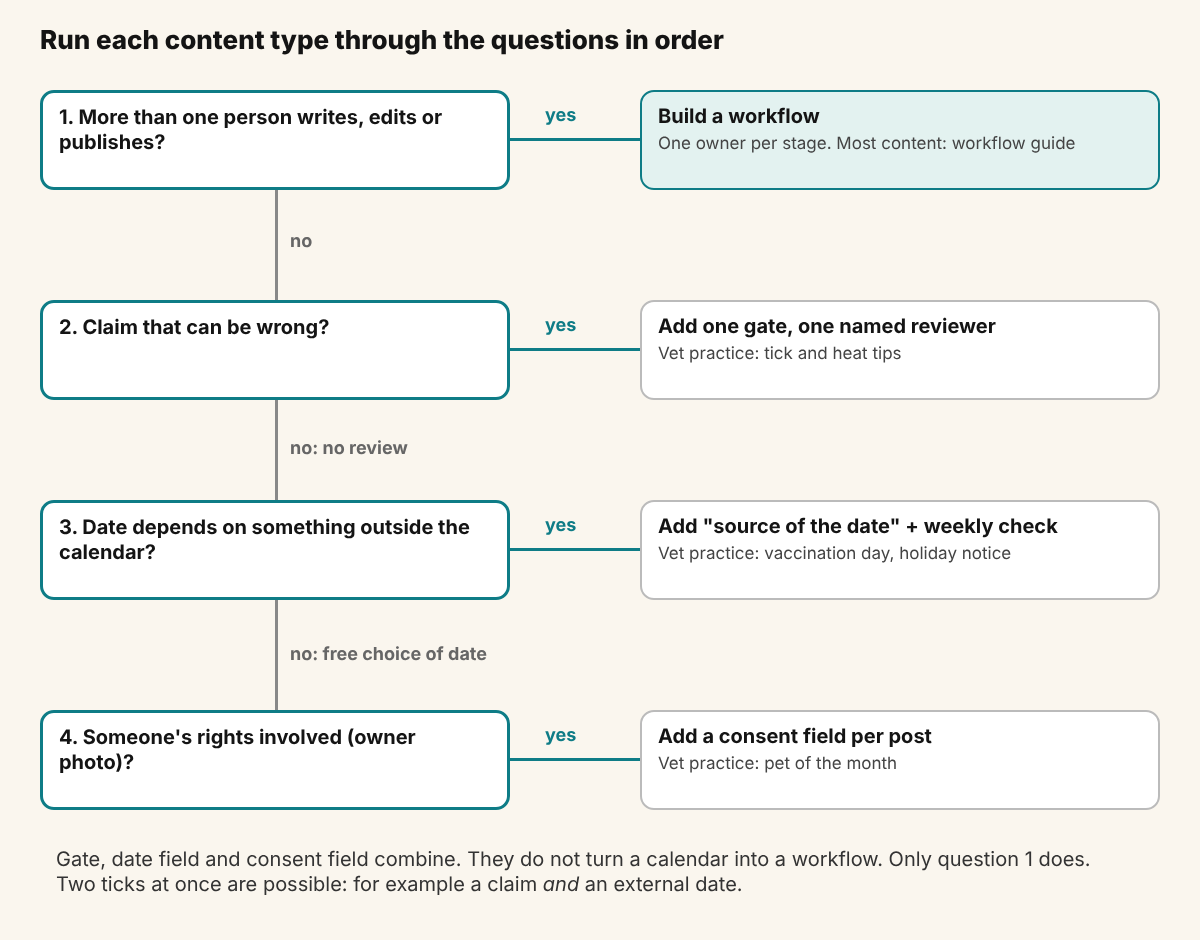
The four questions as a decision path, with the vet practice's content types at each branch.
Worked example: a two-vet practice
This is a constructed teaching example. The practice, the dates and the calendar entries are invented; no real results are claimed.
A small-town veterinary practice has two vets and one receptionist who runs Facebook and Instagram on the side. Material: a shared Google Calendar (vaccination days, holidays, training days) and phone photos. Content types: vaccination-day reminders, seasonal tick and heat tips, and a "pet of the month".
| Content type | Q1: several people? | Q2: claim that can be wrong? | Q3: external date? | Q4: rights? | Result |
|---|---|---|---|---|---|
| Vaccination-day reminder | No, the receptionist writes and posts | No | Yes, Google Calendar | No | Calendar |
| Holiday notice | No | No | Yes, Google Calendar | No | Calendar |
| Tick and heat tips | No, a vet only checks facts | Yes (protection advice, symptoms) | No, seasonal | No | Calendar plus gate |
| Pet of the month | No | No | No, fixed monthly rhythm | Yes, owner photo | Calendar plus consent field |
The decision: one calendar, one gate, one consent field. A vet reads the tick and heat tips before they are scheduled, with a two-day deadline. The receptionist stays author, planner and publisher for everything else. No role model, no multi-step approval, no board. For a team this size, a workflow would cost more upkeep than it saves.
The calendar fields
These fields cover the four questions. Everything beyond them is optional.
| Field | Purpose |
|---|---|
| Date and time | When it goes out |
| Channel | Facebook, Instagram or both |
| Content type | Drives which questions apply |
| Core message | One sentence, so the post can be checked against it |
| Source of the date | Fixed rhythm, season, or the Google Calendar entry it comes from |
| Media status | Photo missing, taken or final |
| Consent | Yes / no, for owner photos |
| Review needed | Yes / no, answered by question 2 |
| Status | Idea, Draft, Checked, Scheduled (Published is optional) |
| Responsible | One name |
Four statuses are our recommendation for a team this size, not a standard. Sources disagree: QualityWordPress uses four calendar statuses, Quire lists more; other sources use between four and eight statuses. Each status should answer one question: whose turn is it now?
- Idea: nobody has to act yet; the entry only reserves the slot.
- Draft: the author's turn, the text or media is not final.
- Checked: the reviewer has signed off, so the receptionist can schedule it. Entries without a claim skip this status.
- Scheduled: nobody's turn; the post waits for its date.
Check the Facebook publishing formats and Instagram formats before treating one calendar row as ready for both networks.
The filled calendar, March 2027
Status as of Fri 26 Feb 2027.
| Date | Channel | Type | Core message | Source of date | Review | Status |
|---|---|---|---|---|---|---|
| Mon 1 Mar | FB + IG | Tick season start | When ticks become active, where to check pets after a walk | Season, no practice dependency | Vet, due Thu 25 Feb | Checked |
| Thu 4 Mar | FB | Vaccination-day reminder | Vaccination day on Sat 13 Mar, book by phone | Google Calendar "Vaccination day" | No | Scheduled |
| Fri 12 Mar | IG | Vaccination-day reminder (Story) | Vaccination day is tomorrow | Google Calendar | No | Draft |
| Mon 15 Mar | FB + IG | Pet of the month | Photo, name, two sentences from the owner | Fixed monthly rhythm | No, consent: yes | Idea |
| Thu 25 Mar | FB | Holiday notice | Practice closed 29 Mar to 2 Apr, cover arrangements | Google Calendar "Holiday" | No | Idea |
One row needs review, four do not. The holiday notice row exists because the Google Calendar has an entry, not because someone had an idea. That is question 3 at work.
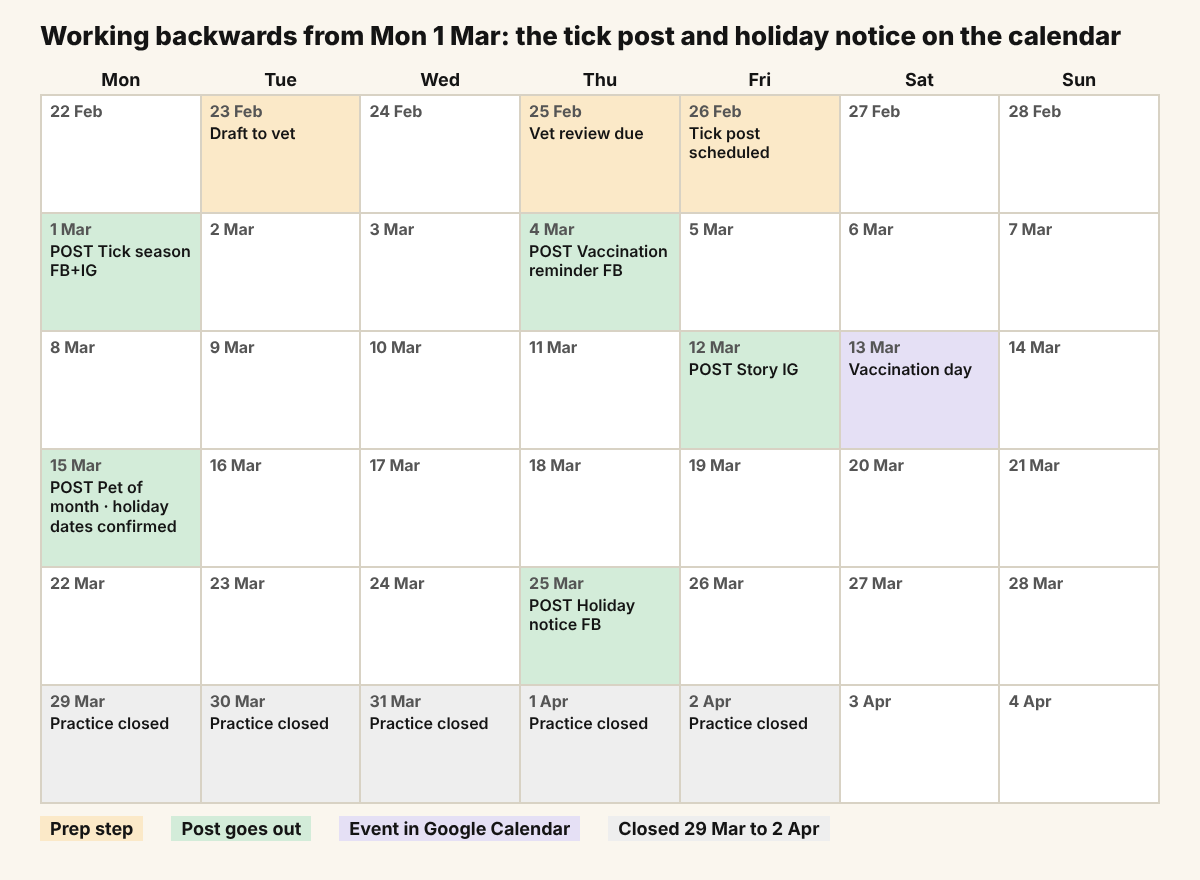
Constructed example: the practice's calendar worked backwards from the post dates.
Working backwards from the post date
The tick post goes out on Monday 1 March. Our assumption: the vet gets the draft with two working days to review.
| Step | Date |
|---|---|
| Post goes live | Mon 1 Mar |
| Scheduled in the calendar tool | Fri 26 Feb |
| Vet's review due (two working days after handover) | Thu 25 Feb |
| Draft handed to the vet | Tue 23 Feb |
The holiday notice works the same way from the other end. It goes out on Thu 25 Mar, so the holiday dates must be confirmed in the Google Calendar by Mon 15 Mar, the Monday check ten days before. A holiday added later shows up in the next weekly check and still leaves time to adjust the notice.
Each Monday the receptionist compares the Google Calendar with the content table. We assume about 15 minutes for that; it is a planning figure, not a measurement. The check catches new holidays and moved vaccination days before posts go out with wrong dates.
When this practice should switch
The setup holds while one person writes and one person reviews one content type. Move to a workflow when any of these happens:
- A third person starts writing posts
- An agency joins
- A second approval stage is required
- The receptionist is absent often enough that posts slip
At that point the rules from the small-team workflow guide apply: owners per stage, a substitute with the same authority, and statuses with handoffs.
If several people start preparing content, Content Boards can hold working briefs before the publishing date is fixed. Keep ownership and handoff rules explicit.
Making the gate work
A gate is a task with a named reviewer before the publish date, as Quire describes approval. Three rules keep it light:
- One reviewer per content type. Sprout Social advises limiting the number of people involved in approvals. That is advice, not a measured result.
- Silence is not approval. ClickUp makes this point explicitly: if the vet does not answer by the deadline, the post is not scheduled, rather than assumed fine. Decide in advance what happens then, for example the post moves or the receptionist phones.
- Review only what needs it. Only claims that can be wrong, such as health advice, prices or dosages, go through the gate. Reminders and notices do not.
On consent: record that you have it. Rules on photos of people and animals' owners differ by country, so check the ones that apply to you. This article is not legal advice.
For a lightweight source-to-draft handoff, the Cowork document workflow is an optional preparation route. It does not replace the vet’s fact check or decide consent.
Where a tool fits
A calendar and a gate can run in a spreadsheet and a shared inbox. A tool adds convenience, not necessity.
- Calendar only: Tareno's post scheduling offers week, month and day views with drag and drop. The page notes it is not ideal for spontaneous real-time posting. The Free plan allows 2 channels and 15 posts scheduled at a time, enough for Facebook plus Instagram, but it has no team features and no ideas board (pricing).
- Gate or workflow: Tareno's approval workflows document statuses (Pending, Approved, Rejected, Changes Requested), comments on the content and a reminder after 24 hours. The page names its own plan availability, so check it before you buy; the page leans toward agency and client sign-off, which is more than a one-reviewer gate needs. Team features (more than one user) start on the Pro plan: US price $49/month billed monthly or $37/month billed yearly, including three team members besides the owner (pricing). For the vet practice that only matters once it moves to a workflow, and a single gate also works by agreement without any tool.
We found no documentation that Tareno connects to Google Calendar, so the weekly check in the example is done by hand.
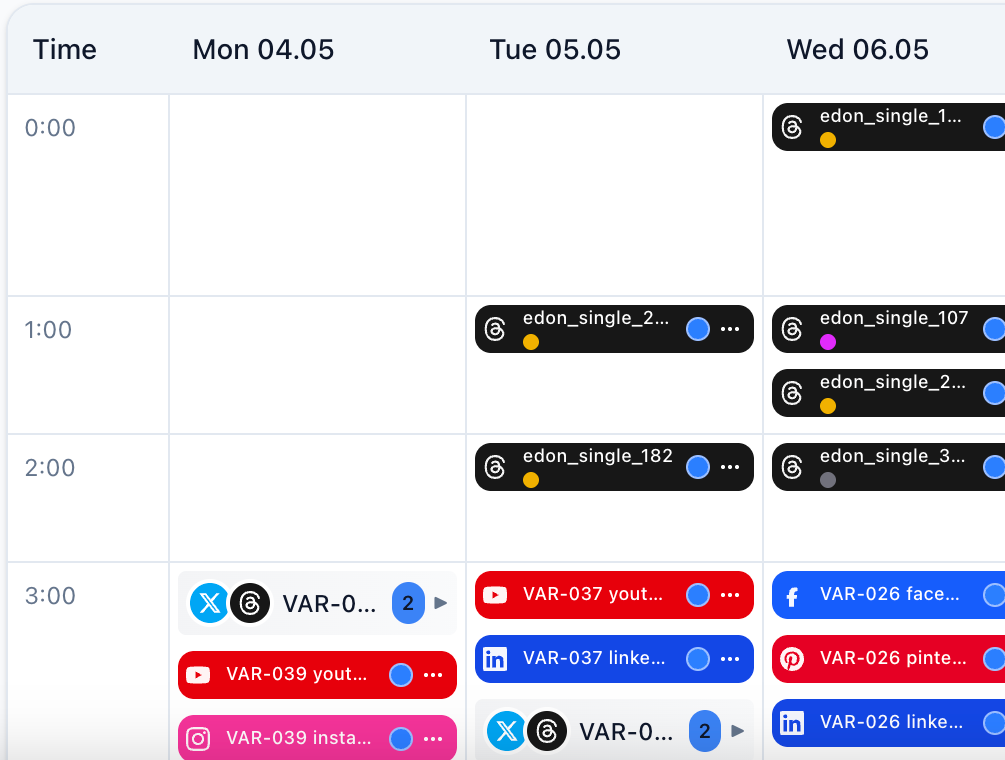
In the calendar view, check the dated column together with each entry’s destination badge. This existing capture illustrates that checkpoint; it is not the veterinary practice’s invented March plan.
When to use a calendar, a gate or a workflow
| Situation | Choose |
|---|---|
| One person writes, plans and publishes; no checkable claims | Calendar |
| Same, plus health, price or legal-style claims, checked by one reviewer who does not write | Calendar plus one gate |
| Dates depend on external schedules (events, holidays, stock) | Calendar with "source of the date" and weekly check |
| Two or more people write, or a second approval stage exists | Workflow |
| Agency or client sign-off involved | Workflow, probably beyond this article |
A workflow is the wrong choice when it adds statuses nobody updates. If your team skips statuses, remove statuses rather than add reminders.
Key takeaways
- Decide per content type, not per team.
- One gate with one named reviewer covers most small-team risk; a workflow starts at several writers or a second approval stage.
- Add "source of the date" whenever dates come from elsewhere, and check it weekly.
- Four statuses are enough to start: Idea, Draft, Checked, Scheduled.
FAQ
Do I need a content calendar or a full social media workflow?
Start with a calendar and add a gate if posts contain claims. A full workflow is for several writers or a second approval stage.
Can one person run a content workflow?
Yes, but most of it is overhead. A solo creator gains more from clear fields and a weekly check than from handoff rules, since there is nobody to hand off to.
How many statuses does a small team need?
Four is a sensible start: Idea, Draft, Checked, Scheduled. This is our recommendation; other sources use between four and eight.
What should every content calendar entry include?
At minimum date, channel, content type, a one-sentence core message, source of the date, media status, status and one responsible name. Add consent and review flags where your content needs them.
Does a content calendar publish posts?
Not by itself. A calendar plans; a scheduler or publishing tool sends. Some tools combine both.
Who should approve social media posts?
One person who can judge the claim, such as a vet for health tips. Keep the circle small and agree what happens if they do not respond.
Where do I find the steps to build a workflow?
In our six-step small-team workflow guide, linked in the conclusion, which covers roles, statuses and handoffs.
Conclusion
Pick the lightest structure that answers your four questions. For the practice in the example that is a calendar, one gate and one consent field. If your answers point to a workflow, the next step is the small-team workflow guide.