To bulk schedule social posts from a spreadsheet, you can use Buffer, Metricool, Hootsuite, SocialPilot, Publer or Tareno. Each describes CSV upload in its own help or feature page; SocialPilot's is described only on its marketing blog. They differ in rows per upload (Buffer 100 per channel on paid plans, Metricool about 50 recommended, Hootsuite 350, SocialPilot and Publer up to 500), in media support, and in whether rows land as drafts. One worked case runs from sheet to approved calendar below.
This documentation-based comparison is published by Tareno, one of the tools compared. The imports were not executed for this article; the programme is a constructed teaching example.
TL;DR
- Row limit decides the shortlist first. For about 65 rows, Metricool needs two files, while Buffer (paid), Hootsuite, SocialPilot and Publer take them in one.
- Buffer's CSV upload does not support video, Reels or carousels, and silently skips rows beyond the limit.
- Import as drafts wherever the tool allows it, and let one named person approve before anything is scheduled.
- Tareno's feature page describes CSV import with column mapping and a calendar preview, but says bulk CSV scheduling unlocks on "Professional and higher". "Professional" is not a plan name on the pricing page; it probably means Pro, but that is unconfirmed. Check your plan first.
Quick definition
Bulk scheduling from a spreadsheet means preparing one row per post (text, media link, publishing time) in a CSV file and importing the file so the scheduler creates all posts in one step. It is a one-off loading tool, not a recurring rule: the file creates posts once, and next week you load a new file.
The worked case: a pool and sports club programme
Illustrative teaching example, not a real customer. A two-person programme team at a municipal swimming pool and sports club keeps one sheet for the coming week plus the next holiday camp: about 65 rows covering early-morning swimming, beginner, aqua-fit and children's courses, and camp days. The sheet has five columns: Date, Title, Location, Description, Image link.
Requirements derived from that sheet:
- 60+ rows in one upload, so the per-upload limit matters.
- Text plus one image per row, for a Facebook Page and Instagram. No video.
- No row goes live unchecked: a cancelled course or a changed pool time posted by mistake costs trust.
We use these three requirements as the sieve in the comparison below.
Comparison: six schedulers on the same criteria
Limits below come from each vendor's help or feature page, read on 2026-11-16. We did not run the imports ourselves, so treat the figures as documented claims.
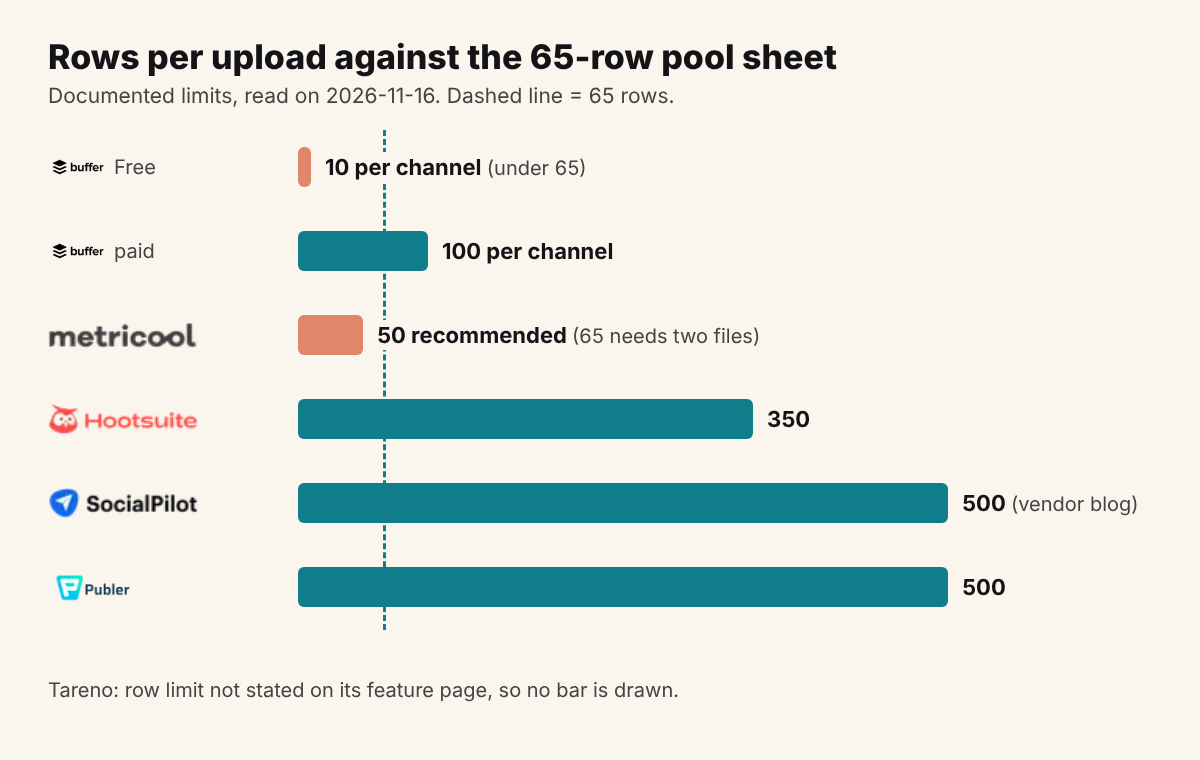
Documented limits from vendor pages, read 2026-11-16; Tareno states no row limit.
| Tool | Rows per upload | Documented networks or media | Review step | What happens at the limit |
|---|---|---|---|---|
| Buffer | 10 per channel on Free, 100 per channel on paid | Text and image URL; no videos, Reels or carousels; not supported for YouTube | Choose "Add to Queue" or "Save as Drafts" | Posts beyond the limit are skipped without an error |
| Metricool | "Up to 50 posts per file" recommended, no hard cap stated | Facebook, X, LinkedIn, Google Business Profile, Instagram, Pinterest, TikTok, YouTube, Threads, Bluesky | Draft column; error preview before import | Split into several files |
| Hootsuite | 350 per upload, across all accounts | X, Facebook Pages, LinkedIn, TikTok, Instagram Business; image per row not documented on the page read | Review screen in Bulk Composer; unscheduled posts are discarded on exit | Already scheduled posts count toward the 350 |
| SocialPilot | Up to 500 at once (vendor blog) | First comment and tags supported; networks not stated on the page | Preview and edit before publishing | Not documented on the page read |
| Publer | Up to 500 per CSV | Not stated on the help page | You pick accounts and scheduling method per post, then submit | Upload notification expires after 24 hours |
| Tareno | Row limit not stated on the page | CSV with captions, media URLs and timestamps; column mapping at import; networks not stated | Feature page: imported rows become drafts; then Draft, Review, Approved, auto-schedule (approval workflows) | Not stated; the scheduled-post limit of your plan applies |
Plan and price context, each dated 2026-11-16 and read from the vendor's pricing page:
- Buffer lists a Free plan with 3 channels and 10 scheduled posts per channel (pricing). Its help article says bulk upload is available on all plans. We could not confirm a paid Buffer price, so none is quoted. Because limits apply per channel, the pool case (Facebook and Instagram) needs two uploads and, on a paid plan, probably two channel fees; check the current price before committing.
- Metricool Free covers 1 brand and 20 scheduled posts per month; Starter is from $20 per month billed annually or $25 monthly, excluding VAT (pricing). Plan gating for CSV import is not stated on the help page.
- Hootsuite Standard is $99 per user per month on annual billing (plans). Bulk scheduling is not available during the free trial, and the help page only says certain plan types include it.
- SocialPilot's pricing page loaded in INR in our fetch, so we do not quote a USD price. It lists "Bulk Scheduling & CSV Uploads" on all plans (pricing).
- Publer's pricing page could not be read, so we state no price.
Fit for the pool case
Applying the three requirements:
| Tool | 65 rows in one upload? | Image per row? | Draft before live? | Verdict for this team |
|---|---|---|---|---|
| Buffer | Yes on paid, per channel (65 is under 100); no on Free (10) | Yes, single image | Yes, "Save as Drafts" | Good fit on a paid plan; upload once per channel |
| Metricool | No: 50 + 15 in two files | Yes, media link column | Yes, Draft column | Fits with a split; location can go into the Google Business Profile column |
| Hootsuite | Yes (65 of 350) | Not documented on the page read | Review screen, but must schedule before leaving | Fits the volume; times must end in 0 or 5 |
| SocialPilot | Yes (65 of 500) | Not documented on the page | Preview and edit | Check networks and template first |
| Publer | Yes (65 of 500) | Not documented on the page | Per-post submit | Check template first; act within 24 hours of upload |
| Tareno | Row limit not stated; plan limits apply | Media URLs per the feature page | Yes: imported rows become drafts, then review | Open until plan and row limit are confirmed; see below |
Prepare the sheet: checklist
Do this once, before choosing a file format. Details come from the Buffer and Metricool help pages linked above.
- Download the tool's own template and copy its headers exactly. Buffer's headers are case-sensitive.
- Save as UTF-8 CSV (Metricool requires UTF-8). Open in a plain text editor to check umlauts and emoji.
- Convert dates to the template's format. Buffer uses
YYYY-MM-DD HH:mm. Date and time mismatch is the common Metricool import error. - Use public, direct image links. Metricool documents separate rules for Google Drive and Dropbox links, so read them before using those.
- Remove blank rows and cancelled courses before exporting.
- Check the schedule rules of the tool: Hootsuite wants dates in column A in 24-hour format, at least 20 minutes ahead, minutes ending in 0 or 5, one post per slot.
- Keep one master sheet for the season, copy the coming week's rows into a separate file for each upload, and after import compare the calendar preview or draft list with that week's rows before anything is scheduled.
Use the Facebook format guide and Instagram format guide to check destination-specific media before exporting the rows.
Step by step: from the 65-row sheet to approved posts
- Choose the tool. The team picks Buffer on a paid plan: one image per row fits its single-image limit, 65 rows are under 100 per channel, and "Save as Drafts" gives the review step.
- Map the columns. Date becomes Posting Time. Title, Location and Description are merged into Text. Image link becomes Image URL.
- Convert the dates from
23.11.2026 06:30to2026-11-23 06:30. - Import five rows as a test. Look at how text, image and time arrive.
- Import the full file as drafts, once per connected channel.
- Second person reviews every draft, deletes cancelled slots, and only then schedules.
Here is the mapped file in the Buffer column layout, six of the 65 rows shown (illustrative content, example.org image links):
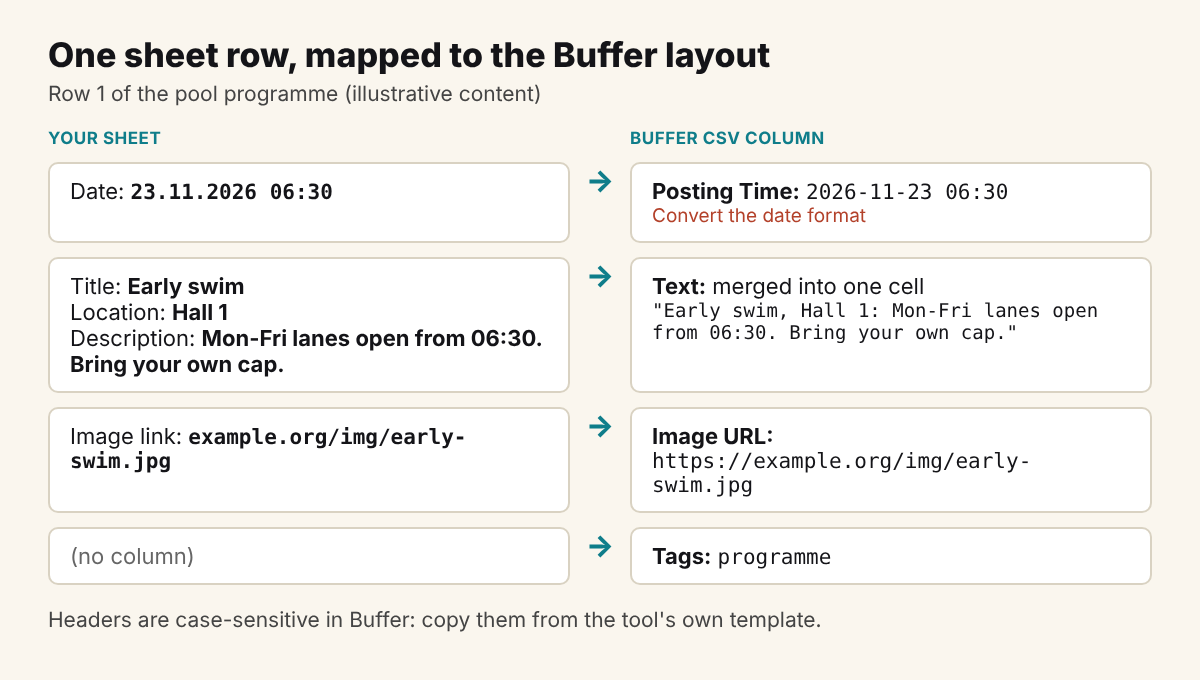
Illustrative example row from the pool programme.
Text,Image URL,Tags,Posting Time
"Early swim, Hall 1: Mon-Fri lanes open from 06:30. Bring your own cap.",https://example.org/img/early-swim.jpg,programme,2026-11-23 06:30
"Beginner course, Pool B: new block starts today, 8 places. Booking at the desk.",https://example.org/img/beginner.jpg,course,2026-11-23 17:00
"Aqua fit, Pool A: 45 minutes, no registration needed.",https://example.org/img/aqua-fit.jpg,course,2026-11-24 18:30
"Children's course, Pool B: Tuesday group, last free place.",https://example.org/img/kids.jpg,course,2026-11-24 15:30
"Holiday camp day 1, Sports hall: meet 09:00, pack swimwear and lunch.",https://example.org/img/camp.jpg,camp,2026-11-25 08:00
"Early swim, Hall 1: Thursday lanes open from 06:30.",https://example.org/img/early-swim.jpg,programme,2026-11-26 06:30
The Buffer help page lists a further Board Name column for Pinterest, which this case leaves out.
Tareno's Free plan allows 15 posts scheduled at a time (pricing), too few for 65 rows if all are scheduled. Starter allows 100 scheduled at a time, but we cannot say whether CSV import is included there (see the Tareno section), so we do not build the case on it.
What the human check looks at
The reviewer checks four things per draft: the date and time against the current pool plan, whether the course still runs, whether the image shows the right venue, and whether the text names the location. Deleting a draft costs nothing; deleting a live post means a correction notice.
Review the saved item itself, not only the spreadsheet row. This existing Tareno draft card shows the destination badges, title and text preview; it does not demonstrate a CSV import or the pool programme.

Where Tareno fits, and where it does not
Tareno's post scheduling page says you can upload a CSV with captions, media URLs and timestamps, map custom columns during import, and preview the full calendar before confirming publication. The approval workflow routes posts through Draft, Review and Approved before they are scheduled. One conflict is open: the feature page says Smart Queue, bulk CSV scheduling and recurring evergreen rules "unlock on Professional and higher", while the pricing page lists Free, Starter, Pro and Business. "Professional" probably means Pro, but that is our reading, not something either page confirms. Which plans include CSV import is therefore not confirmed; check it before relying on Starter. The feature page also says imported rows become drafts.
Team features need Pro or Business according to the pricing page. US prices: Starter $19 per month billed monthly or $15 per month billed yearly, Pro $49 monthly or $37 per month billed yearly, Business $119 monthly or $90 per month billed yearly. The 14-day trial needs a payment method.
For the pool team, the second person can only review inside the tool on a plan with team features, and Starter has none. Free (15 posts scheduled at a time) is too small for 65 rows. Row limit per upload, required columns and supported networks for CSV are not stated on the page.
If your assistant prepares the posts, Tareno's MCP documentation states that scheduling and publishing through MCP create approval actions: the assistant can request the action and read its status, but cannot approve it. Spreadsheet-to-calendar automation through n8n or Make is a separate topic.
For a recurring sheet-driven handoff rather than a one-off CSV upload, inspect the Make integration guide. The API reference covers the programmatic route; neither establishes that every CSV column is accepted.
When to use which tool, and when not
| Tool | Use it when | Do not use it when |
|---|---|---|
| Buffer | Posts are image or text only and you want drafts first | You need video, Reels or carousels from CSV; you are on Free with more than 10 rows per channel |
| Metricool | You post to many networks and want an error preview | Your file regularly exceeds about 50 rows and you dislike splitting |
| Hootsuite | Uploads of up to 350 rows across accounts, in an existing Hootsuite setup | You need flexible posting minutes (they must end in 0 or 5) |
| SocialPilot | Volume up to 500 and first-comment support matter | You need networks and columns confirmed before buying; the pages we read do not list them |
| Publer | You load up to 500 rows and pick accounts per post | You cannot review within 24 hours of the upload notification |
| Tareno | You want draft, review and approval in one place and have Pro or Business for team features | You need column specifications, row limit and per-network rules before a trial, or your team is on Free or Starter and needs a second reviewer |
CSV is also the wrong tool when posts should repeat by rule (a weekly course slot) or when data flows from a live system. Use recurring queues or an API-based automation there.
Key takeaways
- Match the template: headers, date format and UTF-8 decide whether the import succeeds (Metricool names date and time mismatch as its common error).
- Import as drafts and name one approver, because a CSV can carry a cancelled course as easily as a valid one.
- Test with five rows first. Vendor limits are documented claims, not our test results.
FAQ
Which social media scheduler supports bulk scheduling from a spreadsheet?
Buffer, Metricool, Hootsuite, SocialPilot, Publer and Tareno all describe CSV upload. Limits and review steps differ, as the comparison table shows.
Can I bulk schedule videos from a spreadsheet?
Not in Buffer's CSV upload, which lists no videos, Reels or carousels. Metricool lists TikTok and YouTube among its networks and Hootsuite lists TikTok, but check each template for media columns. Tareno's feature page names media URLs but not video in CSV; test it with a small file.
Why did my CSV import fail?
The usual causes are a date format that does not match the template, a file not saved as UTF-8, headers that differ from the template (Buffer's are case-sensitive), and private or non-direct image links.
Can I review posts before they go live?
Yes in most tools: Buffer's Save as Drafts, Metricool's Draft column, Hootsuite's review screen, SocialPilot's preview, Publer's per-post submit, and Tareno's Draft, Review, Approved pipeline.
Do I need Excel or Google Sheets?
Either works for editing. Export as CSV with UTF-8 encoding and check the dates afterwards, because spreadsheets often reformat date cells on export.
Can I automate this from Google Sheets instead?
Yes, with n8n, Make or Zapier on plans with API access, which for Tareno means Pro or Business. That is a separate setup from CSV import.
Conclusion
For a 65-row programme, choose by row limit, media type and review step: only Buffer is confirmed on all three for this case (65 rows under 100 per channel, single image, drafts), at the cost of one upload and one channel fee per network. Hootsuite also fits the volume (Standard is $99 per user per month on annual billing) and has the 0/5 minute rule; we have no confirmed paid Buffer price to compare it with. Metricool needs two files. SocialPilot, Publer and Tareno stay open until you test them. Whichever you pick, import as drafts and let a second person approve. If you want draft, review and approval in one place, confirm that your plan includes CSV import, then run a five-row test in Tareno.