What is the best social media scheduling tool for creators? There is no single winner, because the answer depends on budget, channel mix and queue size. For a creator who posts to Instagram, Pinterest and YouTube Shorts, plans one batch per week and has $0 to spend, Buffer Free is the strongest documented fit, with Publer Free as the alternative. At $15 a month with a bigger Pinterest queue, Buffer Essentials, at its annual-plan price, is the only option in this comparison that passes every gate on its public pricing page. Reuse-heavy plans at around $50 point to a different kind of tool. The rest of this article shows the arithmetic for one constructed creator, so you can run your own numbers.
Disclosure: Tareno publishes this article and sells a scheduling product. Tareno is run through the same gates as every other tool, in the tables below, and does not pass the budget-limited variants V1 and V2. Everything below is based on public documentation read on 7 November 2026. No accounts were connected and no posts were published, so nothing here is a hands-on test result.
TL;DR
- Write your requirement sheet first: budget, channels, posts per month, hours per week, reuse need, analytics need. Tools are only comparable once the sheet is filled in.
- Apply three pass/fail gates before scoring anything (a fourth appears in V4): channel coverage, monthly cost for all your channels, and queue cap versus your cadence.
- For the constructed illustrator below (56 scheduled items a month, $0 budget), two tools pass: Buffer Free scores 85 out of 100 and Publer Free 70 on the published weights.
- Raising the budget or the volume flips the pick: Buffer Essentials at $15, a check of Metricool at $25, and a recycling-capable tool at $50.
- Prices in this market use different units (channel, brand, social set, seat). Convert them to one monthly total for your own channel set.
Quick definition
A social media scheduling tool queues posts in advance and publishes them to connected accounts, or reminds you to publish them by notification. For creators the useful comparison is not a feature list but whether a tool covers your channels at your volume for your budget.
The creator and the requirement sheet
Mara is a fictional solo illustrator who sells prints and stickers in her own online shop. This is a constructed teaching example: not a real customer, and no live test was run. The scoring below is an editorial method with stated weights, not a validated model.
REQUIREMENT SHEET - Mara (constructed)
Channels      Instagram (Creator account), Pinterest (business account),
              YouTube Shorts (own channel, she is the Owner login)
Weekly output 1 vertical process video (30 s, 9:16) + 2 finished stills (4:5)
Instagram     4 posts/week (2 Reels, 2 image or carousel)
Pinterest     7 pins/week (stills + video pin, link to product page)
YouTube       2 Shorts/week
Monthly       17 + 30 + 9 = 56 scheduled items (4.3 weeks)
Time          3 h/week for all social work: ~60 min filming (her own
              assumption), 90 min batch session, 30 min weekly check
Users         1
Reuse         one video -> Reel + Short + video pin, each with its own text
The monthly figures are weekly output times 4.3, rounded: Instagram 4 × 4.3 = 17.2, Pinterest 7 × 4.3 = 30.1, Shorts 2 × 4.3 = 8.6, which gives 17 + 30 + 9 = 56.
Four variants change one requirement at a time:
| Variant | Budget | What changes |
|---|---|---|
| V1 Base | $0 per month | Weekly batch, never more than about 10 pending items per channel, analytics not required |
| V2 Growth | up to $15 | Sticker catalogue: 25 pins a week (25 × 4.3 = 107.5, about 108 a month) and planning two weeks ahead, so up to about 50 pending per channel |
| V3 Measure | up to $25 | Wants to know which pins and posts drive shop visits, needs analytics history beyond 30 days |
| V4 Catalogue | $50 | A backlog of 300 old artwork posts re-queued on 30/60/90-day cycles, with AI-adapted variants |
Step 1: Apply three hard gates (a fourth appears in V4)
Gates are pass or fail and come from the official pages. A tool that fails a gate is not scored.
- G1 Channels: Instagram Creator, Pinterest and YouTube Shorts are all documented as publishable.
- G2 Cost: the monthly cost for three channels is within budget, at the stated billing basis.
- G3 Cap: the post or queue cap covers the stated volume.
V1 results (USD, read 7 Nov 2026; "not verified" means the official page we could read does not say, which is different from "not supported"):
| Tool and plan | G1 Channels | G2 Cost for 3 channels | G3 Cap vs 56/month and 7 pins/week | V1 result |
|---|---|---|---|---|
| Buffer Free | Instagram Creator, Pinterest and YouTube (Shorts) listed for auto-publishing | $0, pass | 10 scheduled posts per channel, and a slot reopens after publishing; a weekly batch of 7 pins fits | Pass |
| Publer Free | Instagram, Pinterest and Shorts documented in help; Pinterest board selection not verified | $0, pass | 10 scheduled posts per account, 25 drafts, 24-hour post history | Pass |
| Metricool Free | Instagram, Pinterest and YouTube listed | $0, pass | Up to 20 scheduled posts per month against 56 needed | Fails G3 |
| Later Starter | Shorts and Pinterest detail not verified (help page blocked) | $18.75 per month billed yearly, fails | 30 posts per profile per month; check the actual month’s Pinterest count against 30 | Fails G2 |
| Tailwind Pin Scheduling | Pinterest only; Instagram and Shorts not mentioned | $17.99 per month annual, fails | 300 credits, 1 credit per scheduled Pin | Fails G1 and G2 |
| Planoly Starter | YouTube listed, Shorts not named | $14 per month, fails | Upload cap not stated | Fails G1 and G2 |
| Hootsuite Standard | Pinterest and Shorts not stated on the plans page | "From $99" per user per month, fails | Not applicable | Fails G2 |
| Tareno Free | 2 channels versus 3 required; fails | US$0; passes budget | 15 simultaneously scheduled posts shared across channels; a one-week batch of 13 fits the queue but not the 2-channel limit | Fails G1 |
Tareno has a Free plan in its current public plan reference: 2 connected channels, 15 simultaneously scheduled posts shared across the user’s channels, 10 AI credits per month and 7 days of analytics history. This is distinct from a paid-plan trial. A publicly selectable Free signup route was not verified; confirm your account’s eligibility before treating it as an available $0 option. The standard paid-plan checkout offers an eligible account a 14-day trial on monthly billing and requires a payment method; it bills after the trial unless canceled. Annual checkout bills immediately. Account-specific trial offers may differ.
Sources for each row are in the tool table below. Two gate details matter in practice. Buffer lists Pinterest and YouTube Shorts as publishing-only networks, and YouTube needs the channel Owner login, not a Manager. Later's lower tiers cap posts per profile per month, which a 30-pins-a-month Pinterest profile hits in some months.
Publer’s Free-plan help also limits a Pinterest connection to accounts with at least 100 followers or a claimed website. The Publer result assumes Mara meets one of those conditions; otherwise it fails the channel gate before scoring.
Later’s plan reference also documents Free, capped at 12 posts per profile monthly and one Short monthly. It fails Mara’s nine-Short requirement; the table’s Later row evaluates paid Starter, not the availability of a free plan.
Step 2: Score what is left
Weights (editorial, stated before scoring): Channel fit 25%, Cost at volume 25%, Queue cap versus cadence 20%, Reuse across channels 15%, Time per week 10%, Analytics 5%. Each criterion scores 0 (fails or undocumented), 1 (partial) or 2 (documented fit). Weighted score = sum of weight × score ÷ 2, so the maximum is 100.
Reuse and Time get a 1 for both survivors, because neither public page documents a difference: Mara adapts each channel's text by hand either way. We did not measure time.
| Criterion | Weight | Buffer Free score | Buffer Free points | Publer Free score | Publer Free points |
|---|---|---|---|---|---|
| Channel fit | 25 | 2 | 25.0 | 1 (board selection not verified) | 12.5 |
| Cost at volume | 25 | 2 ($0) | 25.0 | 2 ($0) | 25.0 |
| Queue cap vs cadence | 20 | 2 (7 ≤ 10 pending) | 20.0 | 2 (7 ≤ 10 pending) | 20.0 |
| Reuse | 15 | 1 | 7.5 | 1 | 7.5 |
| Time per week | 10 | 1 | 5.0 | 1 | 5.0 |
| Analytics | 5 | 1 (30-day insights) | 2.5 | 0 (24-hour post history) | 0.0 |
| Total | 100 | 85.0 | 70.0 |
The worked sum for Buffer Free: 25 + 25 + 20 + 7.5 + 5 + 2.5 = 85. For Publer Free: 12.5 + 25 + 20 + 7.5 + 5 + 0 = 70.
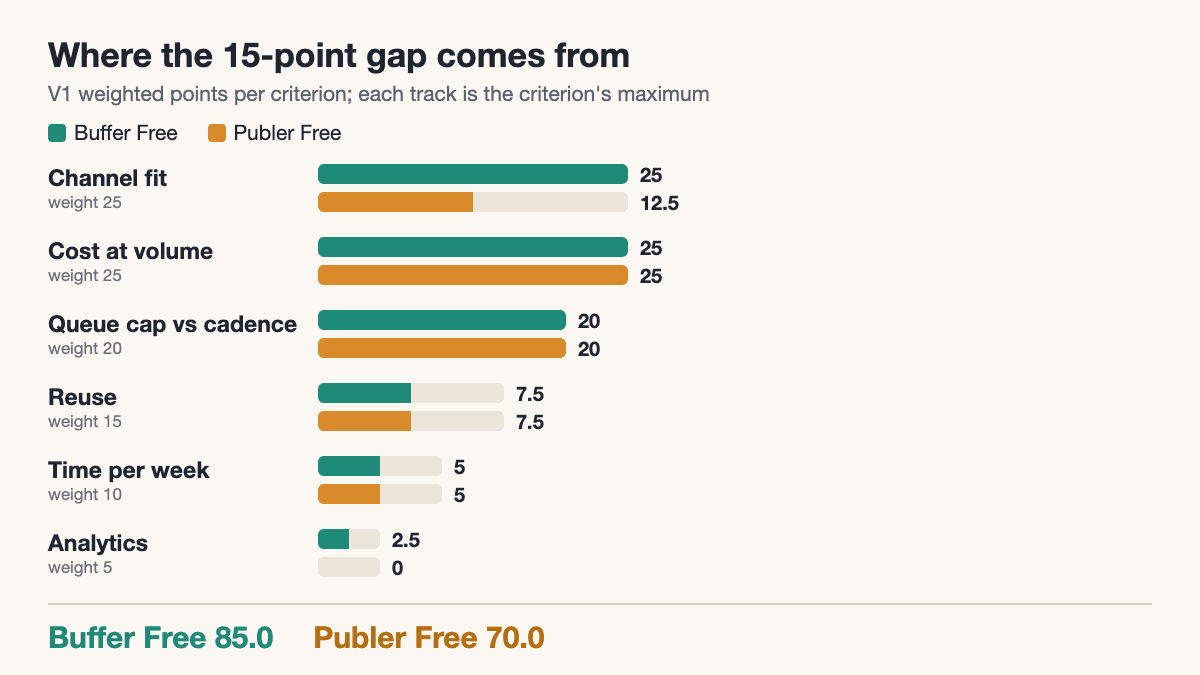
Recommendation for V1: Buffer Free. The 15-point gap comes mostly from one unverified detail (Pinterest board selection in Publer) and from Publer Free keeping only 24 hours of post history, so Mara would have to log her own results. If board selection in Publer is confirmed on a free Publer account, the gap shrinks to 2.5 points and the choice becomes a matter of interface. Buffer Free also states a 30-day insights window and 100 ideas, per its pricing page.
Step 3: Run the weekly 90-minute batch
With a $0 tool the cap is the working constraint, so the batch is built around "never more than 10 pending per channel". The minutes are a time budget Mara sets for herself, not measured results.
WEEKLY BATCH - 90 minutes
1. Pick the video                       5 min   one 30 s process video + 2 stills
2. Export 9:16 and 4:5                 15 min   video as 9:16, stills as 4:5
3. Write 3 channel variants            30 min   caption, Short title, pin text
4. Queue 4 IG / 7 pins / 2 Shorts      30 min   one slot per post
5. Check pending counts                10 min   IG 4, Pinterest 7, Shorts 2
                                       ----
                                       90 min   (+30 min check on another day)
Step 5 is the cap check: each channel must show at most 10 pending after queueing, you cannot add an 11th. Here the counts are 4, 7 and 2.
Step 3 produces three different texts for one artwork. The product and URL are fictional (constructed):
Use a Pinterest description draft and a Shorts title draft as separate writing tasks, then check each promise against the same artwork. Neither tool establishes that the scheduler supports the chosen format.
ARTWORK: Linocut fox sticker sheet (constructed product)

Instagram Reel caption
  Carving the fox took three evenings; printing the sheet took ten
  minutes. Sticker sheet is in the shop, link in bio.
  #linocut #stickers #illustration

YouTube Short title
  Linocut fox to sticker sheet in 30 seconds

Pinterest video pin
  Title:       Linocut fox sticker sheet
  Description: Hand-carved linocut fox, printed as a waterproof-look
               sticker sheet. Illustrated by Mara.
  Board:       Sticker sheets
  Link:        https://shop.example.com/fox-sticker-sheet
If you are choosing among tools that make the three-variant step easier, Tareno's multi-platform publishing page lists per-platform previews and counters and media in 9:16, 1:1, 4:5 and 16:9. It does not document the Pinterest and Shorts publishing behaviour in detail, so treat it as a preview feature until you test it.
A repeatable content repurposing workflow is useful once Mara repeats this batch: keep the source asset, destination text and reviewer together rather than copying one caption everywhere.
Step 4: See what flips the pick
Every variant changes one requirement and breaks one gate or one weight.
| Variant | What breaks | Pick | Why |
|---|---|---|---|
| V1 Base ($0) | Nothing | Buffer Free (Publer Free as alternative) | Both pass the gates; Buffer scores 85 vs 70 |
| V2 Growth ($15) | G3: Buffer Free allows 10 pending per channel, but a two-week horizon at 25 pins a week needs about 50, and 108 pins a month | Buffer Essentials | 3 channels × $5 = $15 a month; no scheduled-post cap listed per channel. Tareno Starter (US$19, US standard monthly) exceeds $15 and fails G2 |
| V3 Measure ($25) | Analytics weight rises to 20% | Buffer Essentials stays on paper; check Metricool Starter before paying | See the calculation below. Tareno Starter (US$19, US standard monthly) fits $25 on cost, but G1 is open and Starter lists 30 days of analytics (Pro 60) |
| V4 Catalogue ($50) | A new gate: recycling | Open: G1 is not documented for Tareno Pro or Publer Business | Tareno Pro (US$49, US standard monthly) is the only tool in this comparison where recycling, AI captions and a price within $50 are all documented on public pages; Pinterest and Shorts auto-publishing is not |
V2: why the cap flips it
Buffer's pricing page lists Essentials at $5 per month per channel and $60 a year per channel, and lists no scheduled-post cap per channel ("Unlimited scheduled posts per channel"), with a fair-use limit of 5,000 per channel in its FAQ. Three channels at $5 come to $15 a month, which equals the budget exactly; the annual total is 3 × $60 = $180. The $5 figure is the page's annual-plan price; we did not verify a month-to-month price, so if you pay monthly, check the page before relying on $15. The 14-day trial falls back to the Free plan.
Publer Professional starts at $5 a month for one account (Business $10), with 20% off for yearly billing, per Publer's plans article. The price for three accounts is not verified (secondary sources suggest a small per-extra-account fee, but that is not an official figure), so it cannot pass G2 on documentation. Metricool Starter ($20 annual) and Later Starter ($18.75 annual) both exceed $15 before any other check.
V3: the matrix with analytics weighted at 20%
V3 weights: Channel fit 25%, Cost 10%, Queue 15%, Reuse 15%, Time 15%, Analytics 20%. Metricool Starter is $20 a month billed annually or $25 monthly, for five brands, and one brand can hold all three of Mara's channels, per its pricing page. Both $20 and $25 fit the $25 budget. Metricool's help page lists the formats for Pinterest and YouTube Shorts, but we could not verify whether Pinterest and Shorts publish automatically or by notification.
One fact cuts against Buffer here: Buffer's channel support article lists Pinterest and YouTube Shorts under publishing only, with no analytics or engagement. So for Mara's question about which pins drive shop visits, Buffer's analytics are partial; the "Instagram only" score below is our assumption from that article, which lists Pinterest and Shorts as publishing-only. We did not find a page documenting shop-visit attribution in either tool.
| Criterion | Weight | Buffer Essentials (score, points) | Metricool Starter (score, points) |
|---|---|---|---|
| Channel fit | 25 | 2, 25.0 | 1 (auto-publish not verified), 12.5 |
| Cost | 10 | 2 ($15), 10.0 | 2 ($20 or $25), 10.0 |
| Queue cap | 15 | 2, 15.0 | 2 (paid plans list no cap, with fair use), 15.0 |
| Reuse | 15 | 1, 7.5 | 1, 7.5 |
| Time | 15 | 1, 7.5 | 1, 7.5 |
| Analytics | 20 | 1 (Instagram only, assumed), 10.0 | 1 (not verified for Pinterest and Shorts), 10.0 |
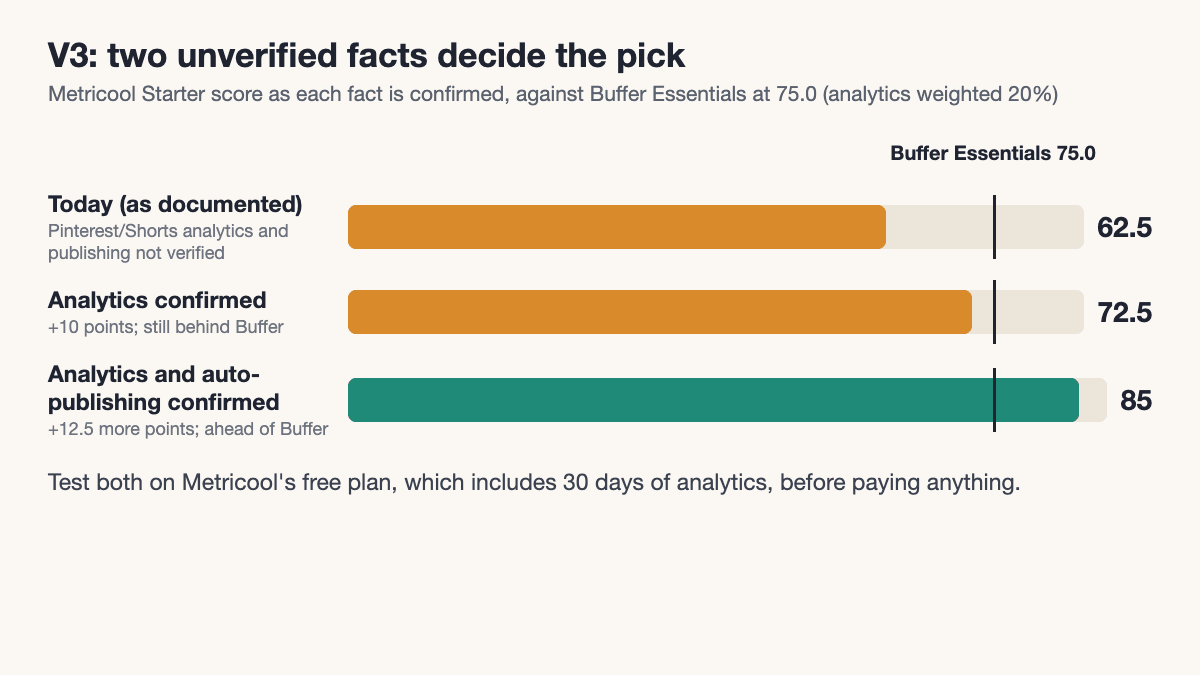
| Total | 100 | 75.0 | 62.5 |
Buffer Essentials leads by 12.5 points because Metricool's publishing is not verified. Two checks flip it, and you can test them on Metricool's free plan, which includes 30 days of analytics, before paying anything:
- If Pinterest and Shorts analytics are confirmed (analytics score 2, +10 points), Metricool reaches 72.5, still behind 75.
- If automatic publishing to Pinterest and Shorts is also confirmed (channel score 2, +12.5 points), Metricool reaches 85, ahead of Buffer at 75.
That is the honest V3 answer: the decision hangs on two facts the public pages do not state, and a free-plan test settles both.
V4: when reuse becomes the requirement
At $50 the question changes from capacity to recycling. If all 300 backlog items returned once every 90 days, that would add roughly 100 publications per month to the baseline 56. This is publication volume, not simultaneous queue occupancy: 156 monthly publications do not imply 156 posts waiting at once. Tareno’s Repurposing Queue page describes 30-, 60- and 90-day intervals, a 48-hour minimum gap and AI captions per variation. Its use of “Professional” should be confirmed against the current Pro plan before buying. Pro has no scheduled-post-count cap in the current plan definitions; Starter permits 100 simultaneously scheduled posts shared across the user’s channels, with a slot released when a post leaves scheduled status. The choice of Pro therefore rests on the required recycling workflow and its entitlement, not on comparing a monthly total with a queue limit. Pro is US$49 per month in the US or EUR 49 in Europe at standard monthly pricing. Publer lists recycling under Business, but the three-account price was not verified; no documented recycling was found for Buffer, Later or Metricool in the pages read, which does not prove it is absent.
The V4 result is therefore open, not a pick: G1 is undocumented for both Tareno Pro and Publer Business, and Buffer has no documented recycling. Open points for Tareno at V4: the feature page says the queue picks top posts by engagement rate, shares and saves, but whether Pinterest and Shorts data feeds that is not stated. How many credits one AI variant uses is not stated either, so 200 credits against a 300-item backlog cannot be calculated. Check both in the 14-day trial.
For agent-assisted preparation of the backlog, the files-to-post-batch guide is a useful next step. It helps structure a reviewable batch; it does not prove automatic recycling support or settle the channel checks above.
The tools side by side
Prices are USD, listed on 7 November 2026, and change often. "Billing basis" is what the page states.
| Tool | Price and billing basis | Key limit | Strength | Weakness | When not to use |
|---|---|---|---|---|---|
| Buffer | Free $0; Essentials $5 per channel per month ($60 a year); Team $10 per channel per month ($120 a year) | Free: 3 channels, 10 scheduled posts per channel, 1 user | Clear per-channel unit; Instagram, Pinterest and Shorts listed for auto-publishing | The reviewed channel-support table lists Pinterest and Shorts as publishing-only; costs scale per channel | When you need recycling, or more than 4 channels, where $5 per channel passes Metricool's $20 for 5 brands (publishing there not verified) |
| Publer | Free $0; Professional from $5 per month for 1 account, Business $10 per month for 1 account; 20% off yearly | Free: 3 accounts, 10 scheduled posts per account, 25 drafts, 24-hour post history | Explicit free plan; analytics, recycling listed on Business | Price for three accounts not verified; 24-hour history on Free | When you need a fixed three-account price you can check today |
| Metricool | Free $0; Starter $20 per month billed annually ($25 monthly), 5 brands | Free: 1 brand, up to 20 posts per month, 30 days of analytics | Brand-based unit fits several channels; analytics breadth | Free cap is too low for 56 items; pricing page read only in part | When you post more than 20 items a month on $0 |
| Later | Starter $18.75 per month billed yearly; Growth $37.50; Scale $82.50 | Starter: 30 posts per profile per month, 8 profiles, 1 user | Visual plan ladder with 14-day trial | Free also exists but fails the required Shorts volume; Starter’s exact format support needs checking | When you need more than 30 pins a month on one profile on the lowest tier |
| Tailwind | $17.99 per month billed annually ($29.99 monthly), 300 credits | 1 credit per scheduled Pin | Pinterest specialist | Instagram and Shorts not mentioned on the page | When you also need Instagram or Shorts in the same tool |
| Planoly | Starter $14, Growth $24, Pro $47 per month (monthly billing) | Starter: 1 social set, 1 user; free plan only in the mobile app, 10 uploads a month | Social-set unit is simple for one brand | Shorts not named | When Shorts is a core channel |
| Hootsuite | "From $99" per user per month (page text was truncated, currency not verified; annual billing per our read) | Standard up to 10 accounts; trial limits daily posting | Plan ladder for teams | No free plan; Pinterest and Shorts not stated on the page | When you are a solo creator on a small budget |
| Tareno | Free US$0 (eligibility/signup route unverified); Starter / Pro / Business: US$19 / 49 / 119 in the US, EUR 19 / 49 / 89 in Europe, standard monthly; eligible monthly trial 14 days with payment method | Free: 2 channels and 15 pending posts shared across channels; Starter: 5 channels and 100 pending posts shared across channels; Pro: no scheduled-post-count cap | Repurposing Queue documents 30/60/90-day cycles; confirm plan entitlement and supported channels | Pinterest and Shorts publishing details and recycling behavior require an account-level test | Free cannot connect all 3 required channels; paid Starter exceeds the $0 and $15 budget variants |
Mistakes and limits of this comparison
- Mixed units. Buffer prices per channel, Metricool per brand, Planoly per social set, Hootsuite per seat. Always convert to the monthly total for your own channel set, as done above.
- Caps hidden outside the price headline. The queue, post history and per-profile limits decided most gates here, not the entry price.
- Documentation is not a test. Rules, API limits and plan terms change. Read each tool's page again before paying, and use the trial.
- Weights are a judgement. Change them to match your life. A creator who sells through Pinterest would put more weight on queue cap than Mara does.
- Other guides. Ranked lists from tool vendors and SEO sites mostly state no weights and, in several cases, say they ran no tests. This article publishes its weights and limits instead.
When to use this method, and when not
Use it when you post to two or more networks, have a fixed budget and can state your monthly volume.
Do not use it when you publish on one network and a native scheduler already meets your requirements, or when the documented workflow cannot establish the required channel behavior. For client approval requirements, see the agencies comparison. For broader automation, use the small-team automation guide and check current regional pricing rather than older plan descriptions.
Key takeaways
- The best scheduling tool for creators is the one that passes your gates: channel coverage, cost for all channels, and queue cap versus cadence.
- For a three-channel creator at $0 with a weekly batch, Buffer Free scored 85 and Publer Free 70 on the stated weights.
- Budget and volume changes flip the pick: a larger Pinterest queue needs Buffer Essentials at $15 for three channels, and a recycling requirement moves the decision to a different type of tool.
- Where an official page is silent, write "not verified" and test it in a free plan or trial.
- Your own numbers matter more than any ranking, including this one.
FAQ
What is the best social media scheduling tool for creators?
It depends on the sheet: for a three-channel creator at $0 posting from a weekly batch, Buffer Free and Publer Free pass the gates. At $15 a month with a larger queue, Buffer Essentials; at about $50 with recycling needs, a tool that documents it.
Is there a good free scheduler for creators?
Buffer Free lists 3 channels and 10 scheduled posts per channel, and Publer Free lists 3 accounts and 10 scheduled posts per account. Both suit a weekly batch. Metricool Free allows up to 20 scheduled posts a month.
How do I compare schedulers that price in different units?
Convert each to a monthly total for your channel set. Buffer: channels × price. Metricool: brands. Planoly: social sets. Hootsuite: seats. Then add the cap that applies to your volume.
Do these tools publish automatically or only remind me?
It varies by account type. Buffer states that Instagram Business and Creator accounts auto-publish while personal Instagram accounts get a reminder. For Metricool and Hootsuite on Pinterest and Shorts, the pages we read do not say. Test one post before committing.
Do I need a separate Pinterest scheduler?
Not necessarily. Buffer and Publer list Pinterest alongside Instagram and Shorts. Tailwind is worth a look if Pinterest is your main channel.
Can one video become a Reel, a Short and a pin?
Yes, with channel-specific text for each, as in the fox sticker example. Publer's help lists Shorts as vertical and up to 3 minutes, and Pinterest video pins from 4 seconds to 15 minutes, per its post types article.
Should I trust ranked "best scheduler" lists?
Check whether they publish criteria, dates and limits. Several lists we read said they ran no multi-network test or were written by tool sellers. Use them for ideas, and the official pricing pages for numbers.
Conclusion
Fill in the requirement sheet, run the three gates, then score the survivors with weights that match your situation. For Mara the answer moved from Buffer Free to Buffer Essentials to a Metricool check to a recycling tool as her requirements grew, which is why a single "best" name is not useful. If recycling and reuse are your actual bottleneck, read the Repurposing Queue page against your own sheet and use the 14-day trial to test your channels.