What is the best Pinterest scheduling tool? It depends on the constraint that binds. Native Pinterest suits a small, near-term queue, and its help page states no scheduling fee. Tailwind earns its price only when Pinterest-specific batching and same-URL spacing matter. Buffer Essentials holds a twelve-Pin campaign for less money than Tailwind; Later Starter costs slightly more than Tailwind's annual price, so it makes sense mainly when you already pay for it, and Tareno fits when cross-channel review and reuse are real requirements. The best Pinterest scheduling tools solve different constraints. These are editorial judgments from public documentation and live pricing pages read on November 6, 2026; no tool was operated in a hands-on test. Tareno publishes this comparison and is one of the tools discussed.
TL;DR
- Native Pinterest allows ten future scheduled Pins up to thirty days ahead. In the worked campaign the thirty-day horizon always binds, because week 6 starts on day 35. Depending on start date and posting days, eight to ten Pins fit at the start (the ten-Pin cap binds only in the upper case) and the rest follow as batches.
- Prices read on November 6, 2026 (see the table in section 1): Tailwind from $17.99 per month, Buffer Essentials $5 per channel, Later Starter US$18.75, Tareno Starter EUR 19. Each tool counts a different unit.
- Twelve Pins fit inside every paid tool's limit (12 of 300 Tailwind credits, 12 of 30 Later posts). Tailwind therefore has to justify itself on spacing and bulk features, not capacity.
- Choose boards, destinations and genuinely different assets before choosing posting slots. No safe posting interval is established by the policy reviewed here.
- The worked campaign is four finished example records plus eight planned slots across six weeks. It does not claim that any Pin was published.
Quick definition
A Pinterest scheduler prepares a Pin for publication at a future date, using an asset, title, description, destination and board. The purchasing question is whether native scheduling covers it.
1. Compare the constraint before comparing the brand
Write down how many Pins must wait at once, how far ahead the last one falls, which media you need, who reviews them and which subscriptions you already hold.
| Tool | Strongest documented reason to consider it | Boards and formats | Capacity or billing unit | Main fit boundary |
|---|---|---|---|---|
| Native Pinterest | A small upcoming batch in Pinterest itself | Image/video assets; one scheduled Pin at a time | Ten future Pins; up to thirty days ahead | Cannot place a Pin more than thirty days out |
| Tailwind | Pinterest-focused batching and same-URL spacing | Bulk creation and Pin Spacing documented; board and format details not read | 300 monthly credits on the scheduling plan; one credit per scheduled Pin; per Pinterest account | Creation and scheduling are bought separately from SEO and engagement |
| Buffer | Pinterest within an existing multi-network calendar | Board selection per selected profile; single media per post | Free: ten scheduled posts per channel, refilling on publication; paid: no stated cap per channel (fair use 5,000) | The ten-post cap is a Free-plan limit only |
| Later | Pinterest within a shared visual calendar | One-image Pins; video with a business account; public boards only | Posts per profile per month: 30, 180 or no cap by plan | Starter's 30 monthly posts per profile are a monthly allowance, not a queue |
| Tareno | Cross-channel calendar, review and reuse | Public Pinterest documentation describes Pins, video Pins and board-based distribution | Free: 15 simultaneously scheduled posts shared across channels; Starter: 100; Pro/Business: no scheduled-post-count cap | Confirm Free eligibility, Pinterest account/format support and six-week horizon |
Pinterest's scheduling help requires a business account and specifies the ten-Pin/thirty-day limits. Metadata and dates can be edited afterward, but the scheduled image or video cannot; finish the asset before committing the slot.
Tailwind's scheduling documentation describes SmartSchedule distribution, bulk creation and Pin Spacing. Its pricing page sells scheduling/creation, SEO and engagement as separate products, per Pinterest account. It says you can schedule "as far in advance as you like"; with a paid subscription the limit that applies is the monthly credit allowance, and extra credits cost $10 per 100. This supports a specialist shortlist, without proving faster work or better traffic.
Buffer's Pinterest help documents board selection for each selected profile, single-media posts and Pinterest Insights. Its pricing page describes up to three channels on Free with ten scheduled posts per channel (a slot frees when a post publishes). On paid plans scheduled posts are listed without a fixed count per channel, subject to a fair-use cap of 5,000, and Team adds approval workflows.
Later's Pinterest instructions document automatic publication, one-image Pins, video Pins with a business account and public-board scheduling. Its pricing table uses social sets—one profile per supported network—and monthly quantities: Starter lists thirty posts per profile, Growth 180 and Scale without a monthly post cap. Those monthly counts are different from a queue that refills after publication.
Prices read on November 6, 2026
Each figure was read from the vendor's own page on that date; confirm at checkout before buying.
| Tool | Price as displayed | Unit | Reading caveat |
|---|---|---|---|
| Native Pinterest | The help page mentions no cost | Business account | Absence of a price statement is not a pricing guarantee |
| Tailwind | $17.99 per month annual, $29.99 monthly for Pin Scheduling and Creation (300 credits) | Per Pinterest account | Page offers a free start without a card; trial terms are not stated |
| Buffer | Free; Essentials $5 per month ($60 billed yearly); Team $10 per month ($120 billed yearly) | Per channel | Page does not separate monthly-billed from yearly-billed totals |
| Later | Starter US$18.75, Growth US$37.50, Scale US$82.50 per month, billed yearly | Social set (one profile per network) | Monthly-billing prices were not shown; 14-day trial on paid tiers |
| Tareno | Free $0, subject to account eligibility. Standard monthly Starter / Pro / Business: US$19 / 49 / 119 in the US; EUR 19 / 49 / 89 in Europe | Free: 2 channels; paid: 5 / 15 / unlimited channels | Regional standard monthly prices; annual and introductory offers differ |
2. Turn a real planning requirement into a shortlist
Synthetic example: an independent seller of downloadable sewing patterns planning an evergreen Pinterest campaign.
The seller owns three destination pages: a wrap-skirt product page, a fabric-selection guide and a sizing guide. Their starting assets are a finished linen-skirt photograph, three fabric swatches, a size-chart crop and a twenty-second tie-fastening demonstration. They have one Pinterest business account and two public boards: “Beginner Garment Sewing” and “Sewing Fit and Fabric.”
They want twelve distinct Pins prepared now across six weeks, with at most three published in any campaign week. Instagram is another channel they use, but Pinterest is the main discovery channel for this campaign.
The capacity calculation is straightforward:
3 destination pages × 4 useful angles per page = 12 Pin records
Cadence: 2 Pins per week × 6 weeks = 12; 2 per week ≤ seller's maximum of 3
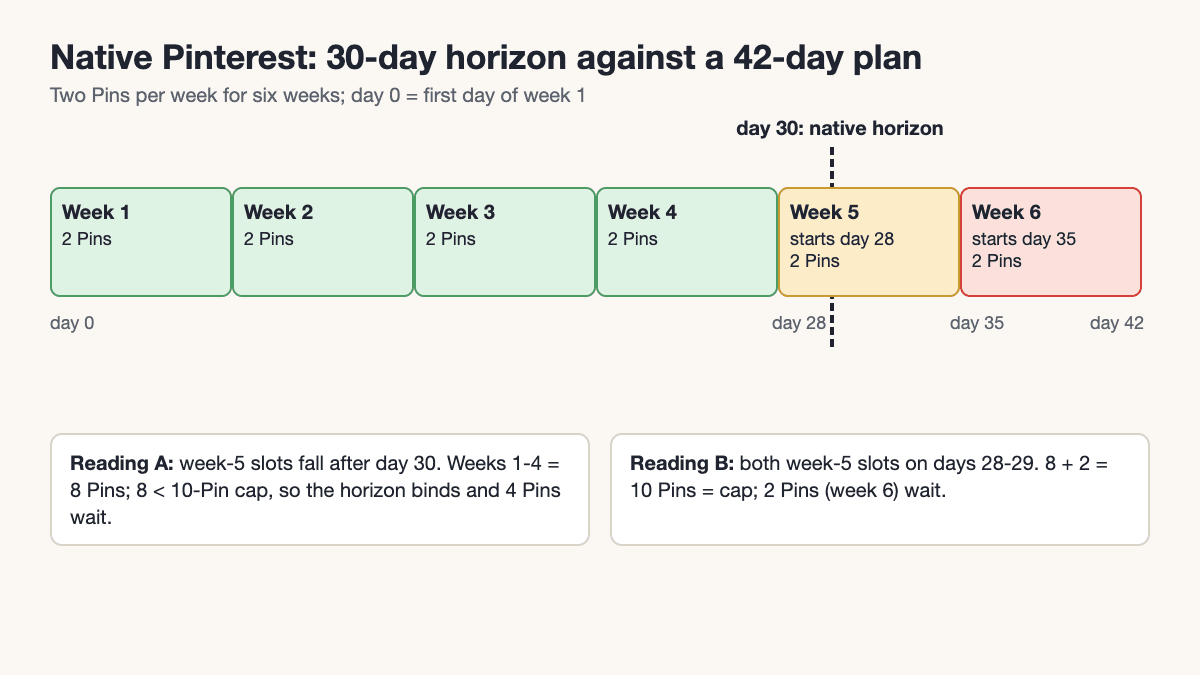
Planning window: 6 weeks × 7 days = 42 days > native horizon of 30 days

Native Pinterest at day 0 (day 0 = first day of week 1; week 5 starts on day 28,
week 6 on day 35, so the count depends on start date and posting days):
  Reading A, week-5 slots fall after day 30: weeks 1-4 = 4 × 2 = 8 Pins.
    8 < 10-Pin cap, so the 30-day horizon binds; 4 Pins wait for top-ups.
  Reading B, both week-5 slots on days 28-29: 8 + 2 = 10 Pins.
    10 = cap, so cap and horizon bind together; 2 Pins (week 6) wait for top-ups.
  Either way 12 > what native holds at once, so loading takes one or two top-ups.
Tailwind:  12 Pins = 12 of 300 monthly credits (4%)        -> fits
Later:     12 posts ≤ 30 per profile per month (Starter)   -> fits
Buffer:    Free 12 > 10 scheduled posts per channel         -> does not fit
           Essentials: no stated cap (fair use 5,000)          -> fits
Tareno:    Free: 1 channel ≤ 2; 12 pending Pins ≤ 15 shared slots -> capacity fits
           Confirm Free eligibility, account/format support and 42-day horizon
           Starter: 12 pending Pins ≤ 100 shared slots -> capacity fits
           These are concurrent scheduled-post limits, not monthly quotas
Read the result by constraint. Native cannot hold all twelve in one session, and Buffer Free’s ten-post channel queue is too small. Tareno Free’s configured 2 channels and 15 simultaneously scheduled posts can hold this one-channel, twelve-Pin campaign, leaving 3 slots if the user has no other scheduled posts. Published posts release slots; the cap is not a monthly or lifetime allowance. Free is a conditional candidate: confirm eligibility, Pinterest account and format support, and the six-week scheduling horizon before relying on it. A public Free enrollment route was not verified.
Paid capacity also fits: Buffer Essentials $5/month for one channel, Tailwind $17.99–29.99, Later Starter US$18.75 on annual billing, and Tareno Starter US$19/month in the US or EUR 19 in Europe. The reviewed pages do not establish the maximum advance-scheduling horizon for Buffer, Later or Tareno; verify 42 days before paying. See the public plan and regional-price reference for configured allowances.
On capacity and price alone, Buffer Essentials or a Later subscription the seller already has would be the lowest-cost way to load all twelve, with Buffer Essentials cheaper per month than the others read. Tailwind is justified here only if the seller values its documented same-URL Pin Spacing and bulk creation, because each of the three destinations receives four Pins, several of them on the same URL. Without that need, native Pinterest in rolling batches adds no fee its help page states, and the paid tools simply save the one or two top-up sessions. Buying a scheduler does not create the missing eight assets.
Tareno becomes more relevant if another person must review sizing descriptions or the seller needs coordinated adaptation across channels. Its public scheduling page describes a calendar and draft/review/schedule workflow; its approval documentation describes assigned reviewers and contextual feedback, and its repurposing queue describes cross-platform adaptation and evergreen reuse. Those are reasons to evaluate that changed requirement. They do not make it the automatic choice for this solo Pinterest campaign, and the pages read do not verify Pinterest-specific plan entitlements or import-field mapping.
3. Build the twelve-slot worksheet before scheduling: four finished records, eight planned
Give each destination four useful angles. A product detail, fabric decision or measuring instruction supplies a different reason to click; changing the title on an otherwise identical Pin does not complete this inventory.
Use these destination keys throughout the worksheet. The seller's patterns.example addresses are deliberately non-live placeholders; replace them with actual checked destinations before scheduling.
P = https://patterns.example/patterns/wrap-skirt
F = https://patterns.example/guides/wrap-skirt-fabrics
S = https://patterns.example/guides/wrap-skirt-sizing
B = Beginner Garment Sewing
F&F = Sewing Fit and Fabric
The first four records have complete metadata below. The remaining eight identify the additional creative work, rather than pretending all twelve finished assets already exist. Dates remain campaign slots until the seller chooses a start date and checks readiness and seasonality.
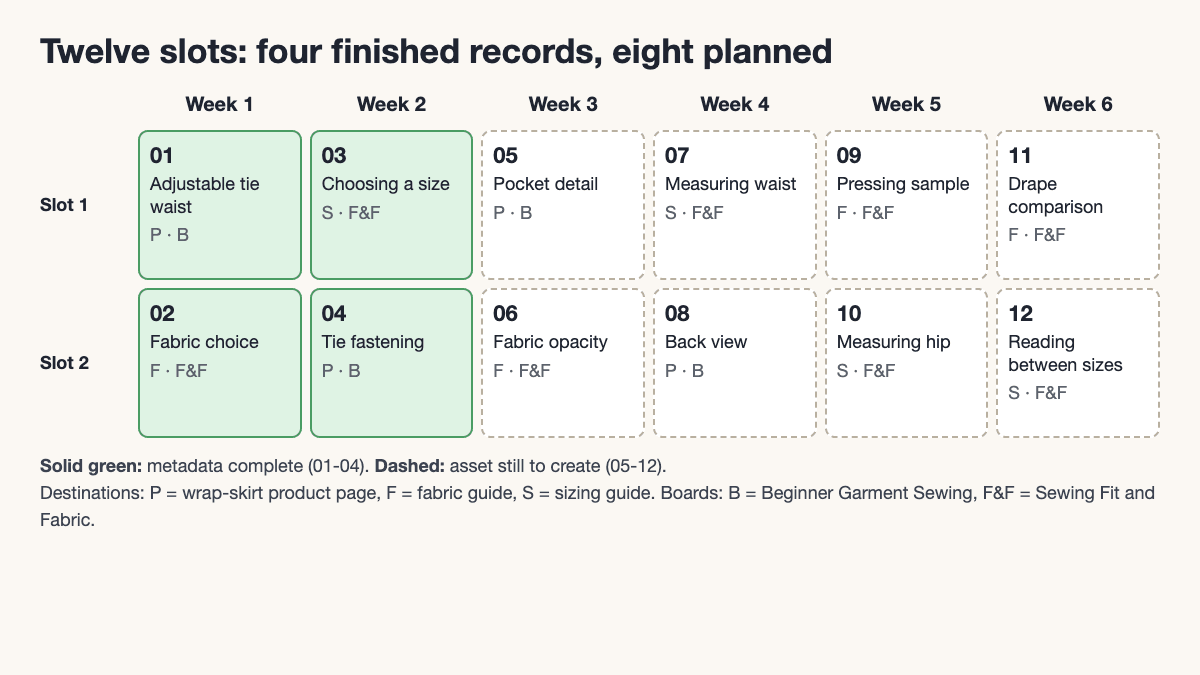
| ID | Useful angle / proposed asset | Destination | Board | Proposed slot | Preparation status |
|---|---|---|---|---|---|
| 01 | Adjustable tie waist / linen-wrap-skirt-front.jpg |
P | B | Week 1, slot 1 | Metadata complete; asset preview pending |
| 02 | Fabric choice / linen-cotton-viscose-swatches.jpg |
F | F&F | Week 1, slot 2 | Metadata complete; asset preview pending |
| 03 | Choosing a size / wrap-skirt-size-chart.jpg |
S | F&F | Week 2, slot 1 | Metadata complete; asset preview pending |
| 04 | Tie fastening / wrap-skirt-tie-demo.mp4 |
P | B | Week 2, slot 2 | Metadata complete; video preview pending |
| 05 | Pocket detail / proposed pocket photograph | P | B | Week 3, slot 1 | Create asset; confirm page covers detail; write metadata |
| 06 | Fabric opacity / proposed light-through-fabric comparison | F | F&F | Week 3, slot 2 | Create asset; check guide; write metadata |
| 07 | Measuring waist / proposed measuring illustration | S | F&F | Week 4, slot 1 | Create asset; check instructions; write metadata |
| 08 | Back view / proposed finished-skirt back photograph | P | B | Week 4, slot 2 | Create asset; confirm page supports angle; write metadata |
| 09 | Pressing sample / proposed pressed-fabric comparison | F | F&F | Week 5, slot 1 | Create asset; check guide; write metadata |
| 10 | Measuring hip / proposed measuring illustration | S | F&F | Week 5, slot 2 | Create asset; check instructions; write metadata |
| 11 | Drape comparison / proposed hanging-fabric photograph | F | F&F | Week 6, slot 1 | Create asset; check guide; write metadata |
| 12 | Reading between sizes / proposed annotated chart | S | F&F | Week 6, slot 2 | Create asset; verify guidance; write metadata |
Four finished example records
01 — Product introduction
- Asset:
linen-wrap-skirt-front.jpg - Title: Beginner Wrap Skirt Sewing Pattern: Adjustable Tie Waist
- Description: Sew a wrap skirt with an adjustable tie waist. See the finished linen version, check the size chart and review the fabric requirements before choosing the downloadable pattern.
- Board: Beginner Garment Sewing
- Destination:
https://patterns.example/patterns/wrap-skirt - Slot: Week 1, first campaign slot
02 — Fabric decision
- Asset:
linen-cotton-viscose-swatches.jpg - Title: Linen, Cotton or Viscose for a Wrap Skirt?
- Description: Compare structure, drape and handling before cutting your skirt. This fabric guide explains what changes with linen, cotton and viscose so you can choose a fabric that suits your project.
- Board: Sewing Fit and Fabric
- Destination:
https://patterns.example/guides/wrap-skirt-fabrics - Slot: Week 1, second campaign slot
03 — Size selection
- Asset:
wrap-skirt-size-chart.jpg - Title: How to Choose a Wrap Skirt Pattern Size
- Description: Use waist and hip measurements to read the pattern size chart. Follow the sizing guide before printing so you can choose the starting size for your wrap skirt project.
- Board: Sewing Fit and Fabric
- Destination:
https://patterns.example/guides/wrap-skirt-sizing - Slot: Week 2, first campaign slot
04 — Fastening demonstration
- Asset:
wrap-skirt-tie-demo.mp4 - Title: How the Wrap Skirt Tie Fastens
- Description: Watch the tie fastening on a finished wrap skirt, then review the pattern details and fabric requirements for your own version.
- Board: Beginner Garment Sewing
- Destination:
https://patterns.example/patterns/wrap-skirt - Slot: Week 2, second campaign slot
Each record pairs a specific promise with a matching destination, and measuring advice sits on the fit board while the finished garment introduces the pattern.
If writing metadata is the bottleneck, use the Pinterest description generator to draft a description from the checked destination and the actual image. Review it against the Pin promise before choosing a slot.
4. Move from planning to publication without losing the details
Use this sequence when implementing the worksheet in your chosen tool:
- Open each real destination and confirm that it answers the Pin's title and description. Revise any unsupported pocket, fabric or sizing promise before preparing the asset.
- Finish and preview the media. Check that chart text is readable and the video actually shows the fastening described.
- Enter the title, description, destination and chosen board in the tool's documented composer. Check the connected account, preview, date and time zone before scheduling.
- Track readiness separately from schedule status. An unfinished Week 5 asset is not ready merely because a slot exists for it.
- After actual publication, record the live Pin URL and verify its destination. Treat publication, visits and sales as separate outcomes.
For measurement, add publication date, outbound clicks, saves and attributable visits or sales to the worksheet, with a review window chosen in advance. A fabric-guide Pin and a product demonstration answer different needs, so their results would not isolate the scheduler's effect.
The analytics and reporting guide can help define the reporting workflow, but confirm which Pinterest metrics are available for the connected account. A click, an attributed visit and a sale remain different measures.
5. When to use / when not to use each workflow
The worksheet uses one relevant board per Pin; it does not assume any tool fans one Pin out across boards, or clone twelve records into twenty-four.
Pinterest's Community Guidelines prohibit unauthorized automation and repetitive, deceptive or irrelevant content, including misleading destinations and manipulation. The policy reviewed does not give a universal safe-hour interval. A vendor's spacing control organizes a campaign; it does not certify repeated content or guarantee distribution.
The policy page announces replacement rules effective November 12, 2026; recheck it if implementing this campaign afterward.
Skip-it conditions differ by tool:
| Tool | Use it when | Skip it if |
|---|---|---|
| Native Pinterest | The next four weeks fit ten Pins and rolling top-ups are acceptable | You must load a campaign longer than thirty days in one session, or need same-URL spacing controls |
| Tailwind | Pinterest is the main channel and bulk creation or Pin Spacing drive the purchase | A native queue or a subscription you already hold covers the volume; you need other networks in the same tool; you would buy only for the "best overall" label |
| Buffer | Pinterest is one of several channels in a calendar you already use | You are on Free and need more than ten scheduled Pins per channel, or you need Pinterest-specific batching |
| Later | Pinterest joins a shared visual calendar already in use | Your plan's monthly posts per profile (30 on Starter) are below the campaign, or you rely on private boards (public only) |
| Tareno | Another person must review descriptions or one idea is adapted across channels | You are a solo, Pinterest-only seller; you need same-URL spacing; or you need board-level Pinterest tooling that tareno.co's Pinterest page does not state |
Later's pricing page names Instagram, Facebook and TikTok for best-time tools, which does not establish a Pinterest best-time feature. No reach comparison was performed, so scheduling natively or through a third party receives no claimed distribution advantage.
Key takeaways
- Choose with queue size, planning horizon, formats, boards and existing subscriptions in view.
- Keep queue capacity, monthly publishing allowance and billing unit separate.
- For this twelve-Pin campaign every paid tool holds all twelve; choose Tailwind only for same-URL spacing and bulk creation, otherwise use native Pinterest in rolling batches or an existing Buffer or Later plan.
- Prepare distinct assets and matching destinations before filling dates.
- Evaluate cross-channel review and reuse only when they are actual requirements.
FAQs
Is Pinterest's own scheduler enough for a small business?
It can be, when a business account's upcoming work fits ten future Pins and thirty days, or the owner accepts rolling batches. Campaign requirements, not business size, decide.
Is Tailwind the best Pinterest scheduling tool for everyone?
Its documented Pinterest batching and URL-spacing features make it a strong specialist shortlist, at $17.99 to $29.99 per month for 300 credits. A seller with a small native queue, or an existing subscription that already covers the work, may have little reason to add it.
Can Buffer publish more than ten Pins a month on Free?
The ten-post cap is a Free-plan limit on scheduled posts per channel, not a monthly allowance: a slot frees when a post publishes. Paid plans list no fixed count of scheduled posts per channel under a 5,000 fair-use cap. Neither removes Pinterest's own restrictions.
Does Later support video Pins and private boards?
Later's reviewed help page documents video Pins with a Pinterest business account and limits scheduling to public boards. Starter lists thirty posts per profile per month; do not build a campaign around an unsupported private-board workaround.
How far apart should Pins to the same page be scheduled?
This article does not establish an exact safe interval. Review relevance, distinct creative value and destination accuracy, and follow Pinterest's current rules. Two per week is the seller's workload, not an anti-spam threshold.
Can the worksheet be imported into every scheduler?
No import compatibility was verified. Use it to prepare content and track readiness, then follow the product's documented entry process.
Choose the smallest workflow that meets the campaign
The sewing seller has a concrete decision: use rolling native batches, evaluate Tareno Free if the account is eligible and the required Pinterest behavior and horizon are confirmed, use a suitable Buffer or Later plan already paid for, or add Tailwind when same-URL spacing justifies it. Coordinated review and reuse change the requirements and may justify a paid Tareno plan; check regional plan pricing and test the actual campaign fields first. The standard paid-plan checkout offers an eligible account a 14-day trial on monthly billing and requires a payment method; it bills after the trial unless canceled. Annual checkout bills immediately. Account-specific trial offers may differ.