TL;DR
If a social account matters to your brand or revenue, password-only access is not enough.
Two-factor authentication helps block many password-based takeover attempts, but it does not eliminate risk.
For most people, an authenticator app is a better default than SMS-based codes.
Backup codes, email security, session review, and app-access cleanup matter almost as much as enabling 2FA.
Tareno’s Settings > Security area can support routine 2FA and session housekeeping, but it should not be treated as a security guarantee.
Quick Definition
Two-factor authentication, or 2FA, is a login method that requires two separate proofs of identity: usually your password plus a one-time code, authenticator prompt, or hardware-based second factor. In social media security, the main benefit is simple: a stolen password is much less useful if the attacker cannot complete the second step.
Key Takeaways
2FA is one of the highest-leverage basic controls for account protection.
Authenticator apps and security keys are generally stronger than SMS-based 2FA.
2FA is weaker if your email account, backup codes, or recovery process are sloppy.
Phishing can still beat a poorly trained user, even when 2FA is enabled.
Good social media security settings are a system, not a single toggle.
Why social accounts are attractive takeover targets
If your social media accounts help you publish, sell, run ads, answer customers, or protect a brand name, they are not casual profiles anymore. They are operating assets.
That is why account takeover hurts more than vanity metrics. A compromised profile can expose direct messages, brand credibility, ad access, connected tools, and internal workflow continuity. For a solo creator, that may mean lost audience trust. For a team, it can disrupt publishing, approvals, reporting, and paid campaigns all at once.
This is the part many people underestimate: attackers do not need your account because they admire your content. They want access, reach, impersonation value, or a path into something else.
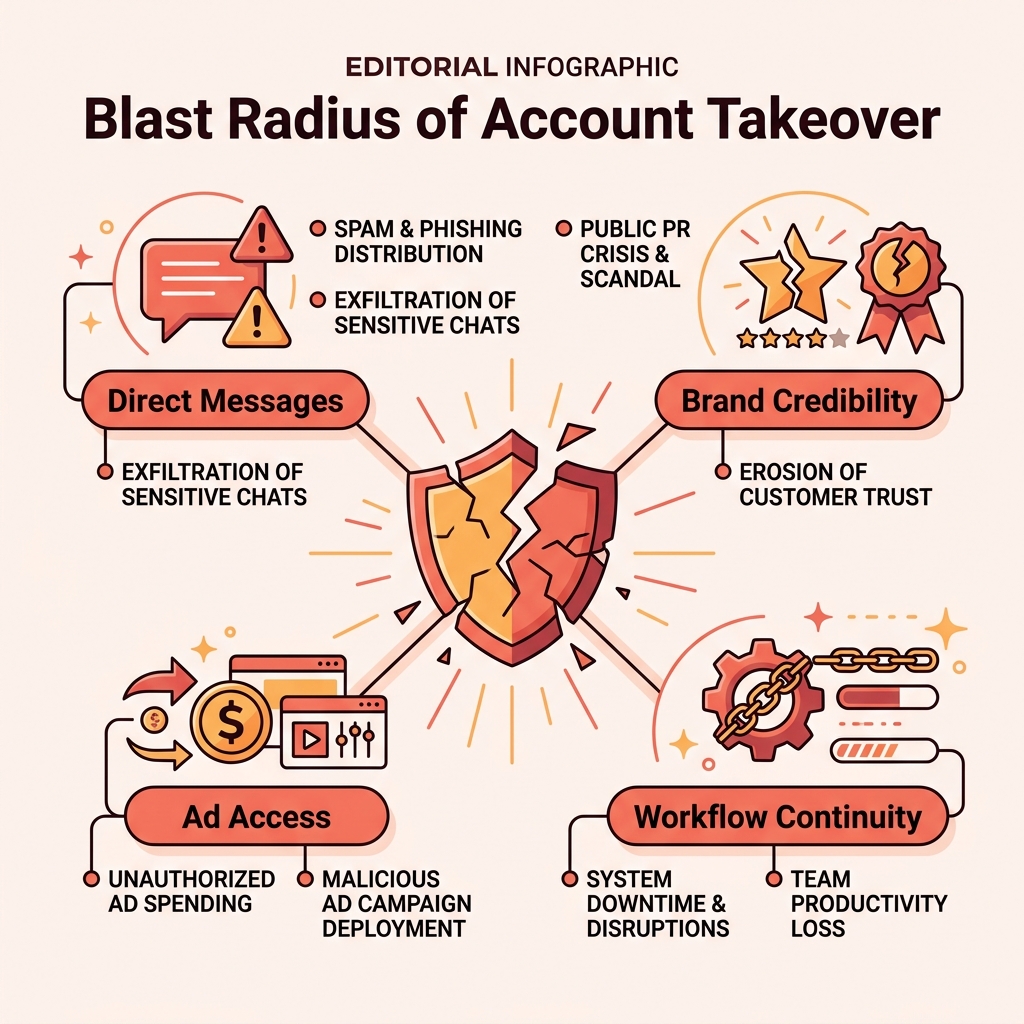
A compromised social account often exposes far more than just your feed. It can give attackers direct access to your audience, workflow systems, and paid advertising tools.
What two-factor authentication actually protects against
Two-factor authentication changes one practical thing: it makes a stolen password less useful on its own.
Without 2FA, an attacker who gets your password may be able to log in immediately. With 2FA enabled, that same attacker usually also needs a separate time-based code, texted code, or hardware-backed second factor. That extra step can interrupt many common account takeover prevention scenarios.
In practical terms, 2FA helps against:
reused passwords from other breaches
weak or guessable passwords
some credential-stuffing attempts
some unauthorized logins from new devices
That does not mean it solves everything. If a victim enters both the password and the one-time code into a fake login page, the attacker may still get in. If the email account behind the social login is weak, recovery may become the easiest attack path instead.
So the honest framing is this: 2FA is one of the best basic controls you can enable, but it works best inside a broader creator account security routine.
Which 2FA method should you choose?
Not all second factors are equal.
MethodTypical strengthConvenienceMain weaknessSMS codeBasicEasyweaker against SIM-swap and related carrier-layer abuseAuthenticator appStrongerGooddevice loss becomes painful without a recovery planSecurity keyStrongest common optionMediumnot supported everywhere and requires hardware discipline
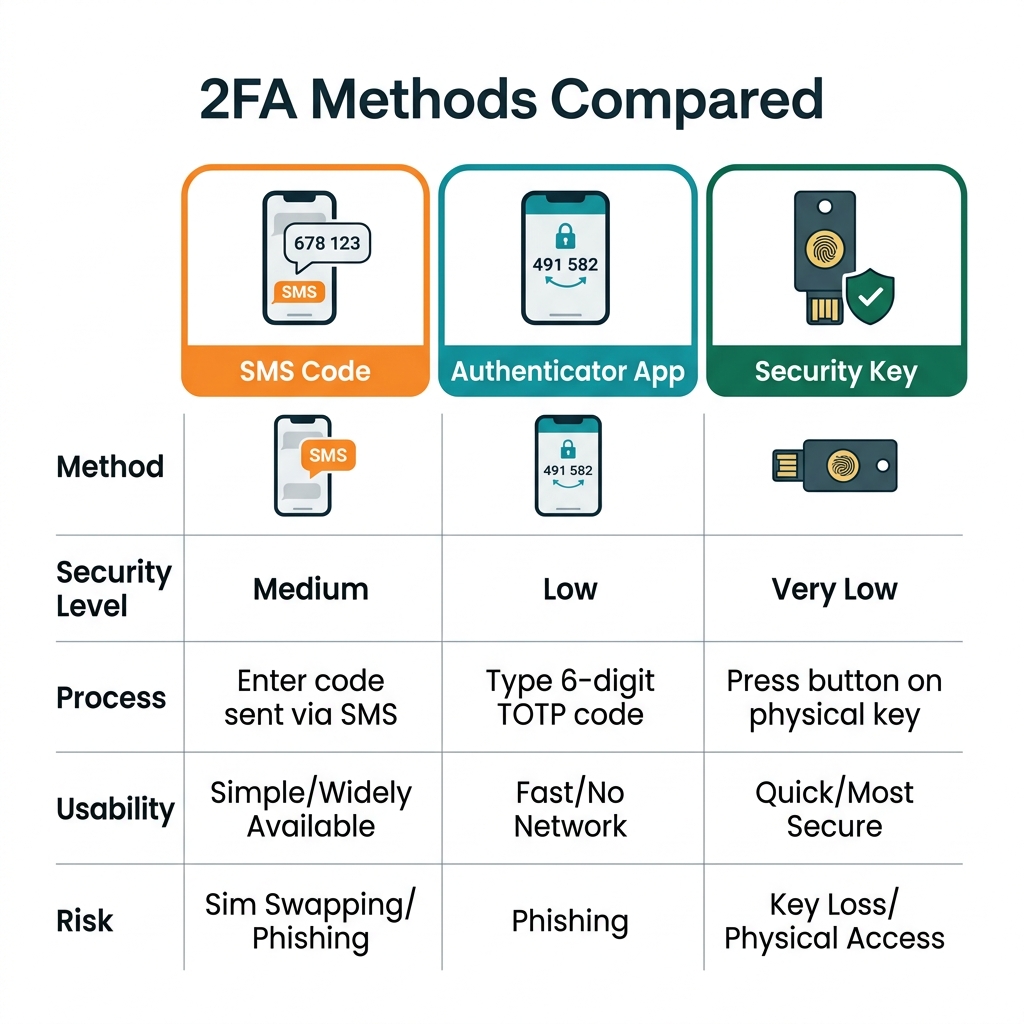
Not all second factors are equal. While SMS is better than nothing, authenticator apps and security keys offer significantly stronger protection against phishing.
For most creators and teams, the practical order is straightforward:
Use an authenticator app if the platform supports it.
Use a security key for especially important accounts when support and team discipline are there.
Use SMS-based 2FA if it is the only realistic option, because it is still usually better than password-only access.
The biggest mistake is not choosing the imperfect method. It is choosing no second factor at all.
The mistakes that make 2FA weaker in real life
Enabling 2FA is useful. Enabling it badly is common.
1. No backup codes
Many platforms provide backup or recovery codes during setup. People skip them, then discover the problem only after a lost phone, broken device, or app migration.
2. The email account stays weak
If password resets and recovery prompts go to an unprotected inbox, the inbox becomes the real weak point. This is why serious social media security starts with the email account too.
3. One person owns everything
A founder’s phone number, a single team lead’s authenticator app, or one shared inbox can become both a security risk and an operations bottleneck.
4. Phishing still works
2FA does not replace judgment. Fake support messages, lookalike login pages, and malicious links can still capture credentials and second-factor codes in real time.
5. Old sessions and apps stay alive
A new 2FA setup does not automatically clean up every trusted browser, stale session, or unnecessary third-party app connection.
6. Security is treated like a one-time task
Teams change, devices change, contractors leave, and permissions drift. Settings that were fine once can quietly become messy.
A practical 2FA rollout checklist for creators and teams
If you want a reasonable minimum standard, do it in this order.
Change weak or reused passwords first. Use strong, unique passwords for the social account and the email account attached to it.
Enable 2FA on the email account behind the social login. If the inbox is weak, your social recovery path is weak too.
Enable 2FA on every priority social account. Start with the accounts tied to publishing, ads, creator identity, or admin control.
Prefer an authenticator app where available. Use SMS only when better options are unavailable.
Save backup codes immediately. Store them in a password manager or another secure location separate from the same phone used for login.
Review active sessions and trusted devices. Sign out of devices you no longer control or recognize.
Audit connected third-party apps. Remove tools and services that no longer need access.
Reduce admin sprawl. Keep high-level permissions limited to the people who truly need them.
Document recovery ownership. Teams should know who can regain access if a phone is lost or an admin becomes unavailable.
Train for phishing. A second factor should never be typed into random links, fake support chats, or suspicious prompts.
If your broader social workflow is also being standardized, it can help to compare native workflows with automation tools before too many permissions and app connections pile up.
Where Tareno’s Settings (Security) fit
Once a team treats protection as an operating habit instead of a one-time toggle, security settings need a predictable home.
According to Tareno’s internal feature documentation, the platform includes a Settings > Security area with 2FA and session functions. That makes it a reasonable place for routine account-security housekeeping, such as enabling an extra login step and reviewing active access patterns in one place.
Here is what this security management looks like in practice with a tool like Tareno:
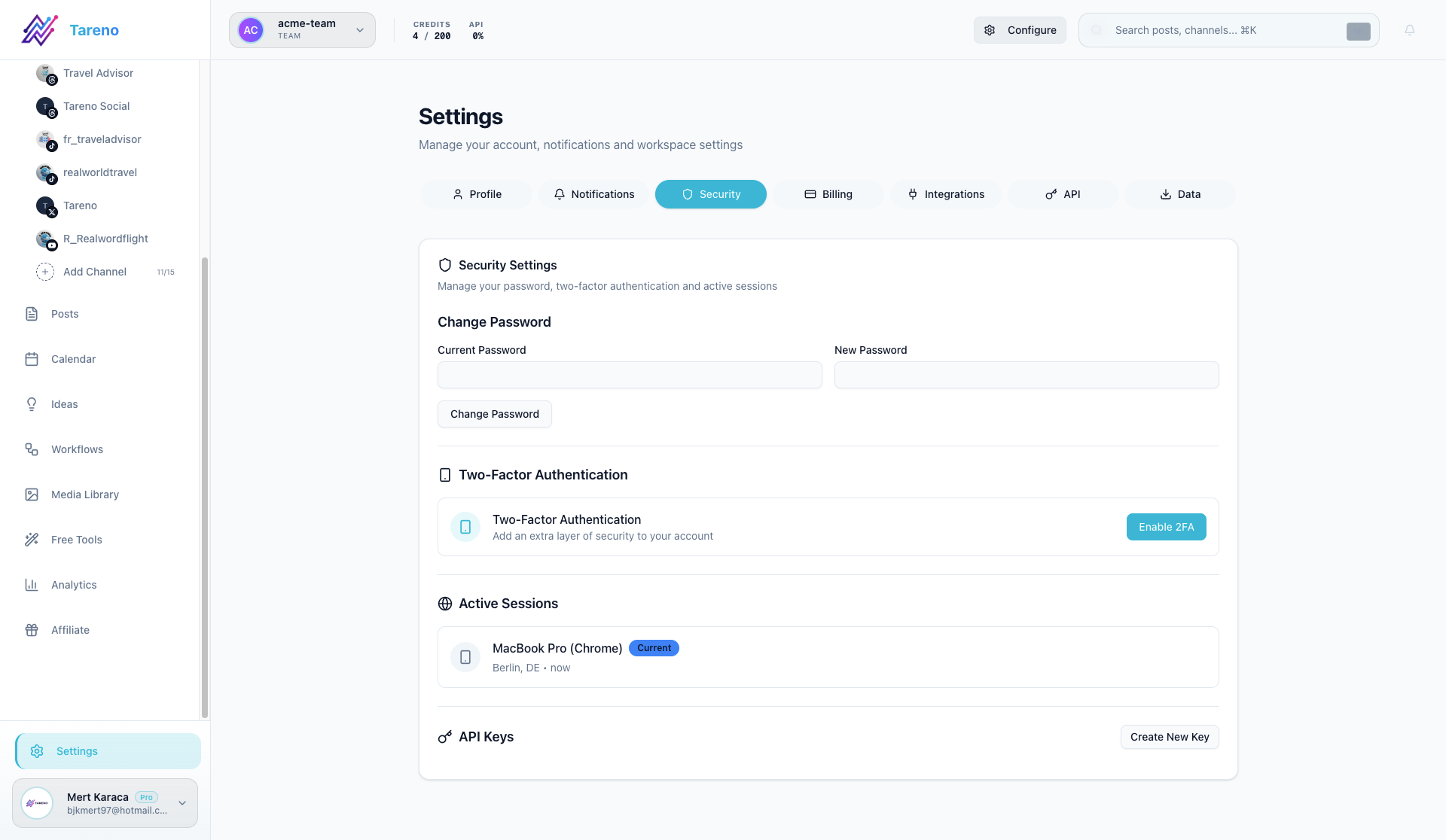
A centralized security area like Tareno's Settings Panel helps you manage active sessions and 2FA status across your entire team.
Tareno's Security settings allow you to enforce multi-factor authentication requirements for your team and easily revoke stale sessions before they become a liability.
What that does not mean is that one dashboard replaces platform-native security decisions or removes phishing risk. The value is simpler: fewer scattered admin habits and a clearer home for basic account-security tasks.
Security is a system, not a checkbox
The most common misunderstanding around two-factor authentication is treating it like a finish line. It is better understood as a baseline.
A serious setup usually includes:
unique passwords
2FA on both the social account and the email account
stored backup codes
regular session review
limited admin access
revoked app access where it is no longer needed
phishing awareness across the team
That kind of discipline is rarely exciting. It is just effective. And for high-value brand accounts, boring effectiveness is exactly what you want.
If your team also relies heavily on content repurposing across channels, it may help to turn YouTube videos into search-ready blog articles without expanding access chaos unnecessarily.
And if platform discovery strategy matters to your workflow too, you may want to see how keyword clarity affects Instagram visibility once the security basics are already in place.
FAQ
Does two-factor authentication stop hackers?
No. It reduces risk, especially in password-theft scenarios, but it does not guarantee safety. Phishing, weak recovery settings, or exposed email access can still create problems.
Is SMS-based 2FA enough?
It is usually better than password-only access, but it is generally weaker than an authenticator app or security key. If you can choose a stronger method, that is usually the better option.
What if I lose the phone that holds my authentication app?
That is why backup codes and recovery planning matter. Save recovery options during setup, not after the emergency.
Should my email account also use 2FA?
Yes. In many account recovery flows, the email account is just as important as the social profile itself.
Does 2FA protect against phishing?
Only partially. If someone tricks you into entering both your password and your code into a fake login flow, the second factor may be captured too.
Do small creator accounts need this too?
Yes. Smaller accounts are still useful for scams, impersonation, spam, or access to linked tools and audiences.
Conclusion
If your account matters, two-factor authentication should not be optional.
It is one of the simplest upgrades available for social media security, and it can block many of the most common password-based compromise scenarios. But the bigger lesson is not just "turn on 2FA." It is "treat security as an operating system."
That means protecting the email behind the account, saving backup codes, cleaning up sessions, trimming app access, and making sure more than one person understands the recovery path. Do that, and 2FA becomes far more than a box you tick in settings. It becomes part of how you keep the business running.
Sources
CISA guidance on multi-factor authentication and phishing-resistant MFA
NIST digital identity guidance on authenticator strength
Instagram / Meta help resources on two-factor authentication and login security
Tareno internal feature documentation: Settings > Security