Yes, both can put an approval step in front of publishing, but neither is built for a client who has no account with the tool. Zapier's Human in the Loop pauses a Zap until a reviewer decides, and its help center says reviewers need a Zapier account and the Zap must be shared with them. Make's native Human in the Loop app is, per its listing, an Enterprise product in closed beta, so most freelancers end up building an approve/reject link themselves. If you want to send social posts to a client for approval and the client will not log into anything, the practical choices are a hand-built link flow or an approval step in the scheduling tool.
TL;DR
- Zapier Human in the Loop requires a reviewer account per its documented limitations; whether an outside reviewer can approve without one is unconfirmed.
- In Make, a common community pattern is an approve/reject link that calls a webhook. It works without a client account but has no login protection unless you add your own.
- Put the approval step after the final text and image exist and directly before the publish action. Timeout must never mean "publish anyway".
- For clients who will not create accounts, an approval step inside the planning tool, with Zapier or Make only delivering drafts, can be simpler to run.
Quick definition
A client approval gate is a step that stops a draft from reaching the publish action until a named person decides approve or reject on a specific version of the post. It is different from a notification: a notification tells someone something happened, a gate blocks the next step until they answer.
The example used throughout
This is a constructed teaching example, not a customer result, and the restaurant is fictional. A freelancer manages Instagram and Facebook for three independent restaurants, which makes six channels. Each week the owners send photos on WhatsApp, and each restaurant has a specials document (a Google Doc or PDF) listing dishes, prices and events. The owners have no Zapier or Make accounts and do not want another app.
What the freelancer needs: a draft per restaurant and channel that the owner can approve from a phone, with price, allergens and date confirmed by the owner, and nothing published until they do.
What Zapier can do, and where the client case breaks
Zapier's "Request Approval" action pauses the Zap and notifies a reviewer by email, Slack, or by triggering another Zap. According to the setup article, you can set Approve and Decline button labels (up to 75 characters), let the reviewer edit content, and choose what happens on decline ("Continue run" or "Stop run") and on timeout ("Skip and continue" or "End run"). The decision lands in a field that reads approved when the reviewer approves.
Three limits matter for client work:
- Plan. Human in the Loop reviewer selection is available on Professional, Team and Enterprise, not Free.
- Reviewer account. The same setup article lists as a limitation that reviewers need a Zapier account and the Zap must be shared with them, and says that on a Pro account you can only send requests to yourself. The reviewer-side article says login is required and that reviewers without an account are prompted to create a free one.
- A contradiction. The reviewer-selection article lists "anyone outside of your account" as an option. That does not obviously fit the account requirement above. I could not test it, so I treat it as unconfirmed. The pages do not say whether "Pro" in the limitation means the Professional plan from the plan article; read it as possibly the same and ask Zapier support. To test, send a request to a second address that has no Zapier account and open the email on a phone, as the owner would.
For the restaurant case, that means three owners would each need a Zapier account at best. It is not a fit for "tap a link in an email".
One more behavior to design around: with "Skip and continue" on timeout, the Zap carries on without an answer. For social posts that is the wrong default. Use "End run" and send a reminder through a separate path. A step stopped on decline or timeout is not retried automatically; a replay re-runs everything and reviewers must review again (run statuses).
Zapier's "Require approval before running" setting for AI tools is oversight for the Zap owner, not a client (AI by Zapier tools).
What Make can do
Make's own Human in the Loop app is listed, according to a search summary (the page itself did not open), as an Enterprise-plan app in closed beta. Treat its availability as unconfirmed; a solo freelancer cannot plan around it.
Make's guide to posting product updates lists lighter options (a Slack "Approve" button, a spreadsheet for manual review), but they assume the reviewer is you or someone in your Slack.
For an external approver, the pattern that shows up in the Make community is an email with links like ?someRecord=1234&action=approve that call a webhook, which answers with a Webhook Response (text or a 302 redirect). This is community experience, not official documentation, and the link carries no authentication of its own. Make's webhook documentation describes the Webhook Response module and its limits (300 requests per 10 seconds, otherwise a 429), which are no concern at this volume. Using the response as a "thank you" screen is my reading, not a documented approval feature.
Where the approval step belongs
No source I found says where to put it, so this is working advice:
- After everything the client is approving exists: final text, photo URL, crop, alt text, scheduled time. Approving a half-built draft means a second approval later.
- Directly before the publish action, with nothing that changes content in between.
- Bound to a version. The approval record stores the record ID and a version marker. If the freelancer edits the draft after sending, the old links stop working and a new request goes out.
- Single use. A link that has been clicked once should not work again.
Main case, step by step in Make
Here is the flow for the three restaurants, using Make because it needs no client account. I describe the logic, not the interface; trigger and module names must be checked in the editor.
Input. Photos land in one Drive folder per restaurant (exported from WhatsApp by hand). The weekly specials document is updated by the freelancer from the owner's message.
Draft. Scenario A starts when a new row or file appears. It writes one record per restaurant and channel: restaurant, channel, text, image URL, requested time, status pending, a random token. Prices and dates are copied from the specials document as written; if an AI step is used at all, it only adjusts tone, never prices or allergens.
A finished draft for the fictional restaurant:
Restaurant: Osteria Alba (fictional)
Channel: Instagram
Requested time: Thu 11:30
Status: pending

Thursday special: slow-braised beef cheek, creamy polenta,
red wine jus, 18 EUR. Contains celery and milk.
Reservations by DM or phone until 4 pm.
Approval request. Scenario A sends the owner a mail on Tuesday 11:30 for a Thursday 11:30 post and ends. It does not wait. The schedule is fixed: reminder Wednesday 11:30, expiry Wednesday 18:00.
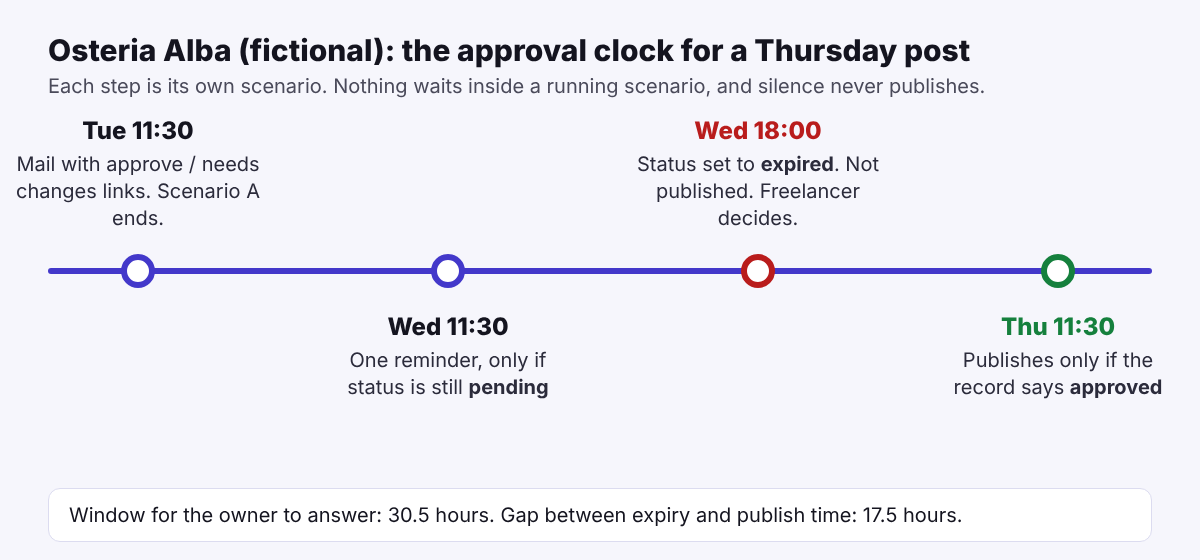
Constructed example schedule; the restaurant is fictional.
Subject: Thursday post for Osteria Alba - please check price and allergens

Hi Marta, this is what will go out on Instagram, Thursday 11:30:

[preview image]
Thursday special: slow-braised beef cheek, creamy polenta,
red wine jus, 18 EUR. Contains celery and milk.

Approve: https://hook.example/approve?id=482&v=3&t=9f3a...
Needs changes: https://hook.example/reject?id=482&v=3&t=9f3a...

I will send one reminder on Wednesday 11:30. Without an answer
by Wednesday 18:00 this post is not published.
Decision. Scenario B starts from the webhook. It checks that the record is still pending, the version matches and the token fits. Then it sets approved or rejected, replies with a short thank-you page, and only on approved triggers the publish step. A reject opens a second page asking for one line of feedback, which goes to the freelancer.
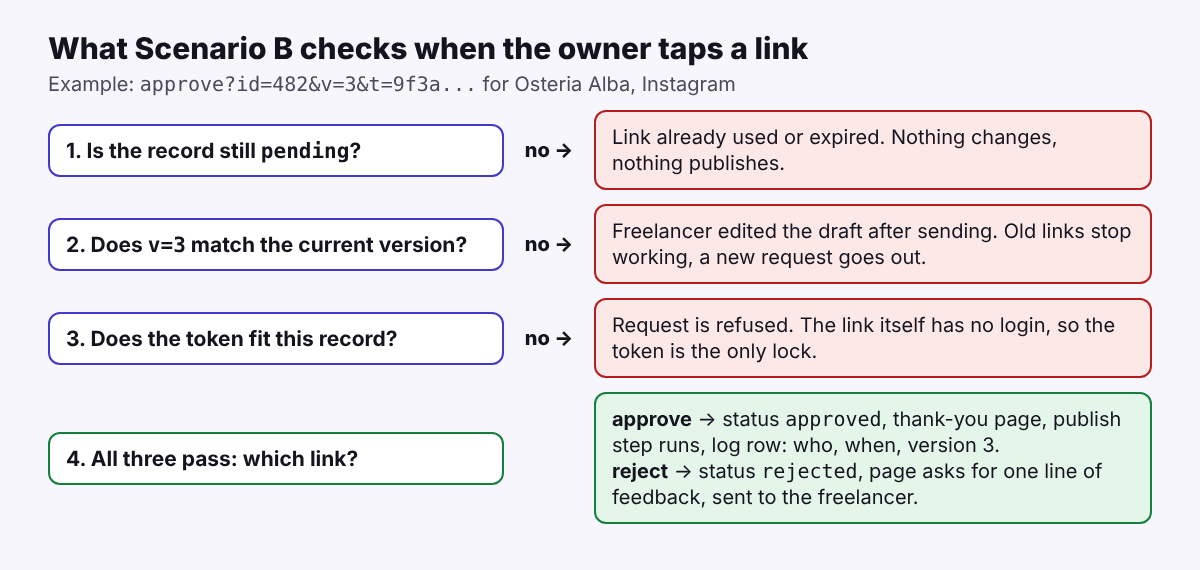
Working design for the Make link pattern, not an official Make feature.
One boundary: I did not verify Make's Instagram and Facebook modules, their connection requirements, or the credits one approval cycle consumes. Check them in Make before relying on this flow. If they do not fit, Scenario B can instead hand the approved record to a scheduling tool that publishes.
Silence. A third, scheduled scenario sends one reminder on Wednesday 11:30 to owners whose record is still pending. On Wednesday 18:00 it sets the status to expired. It never publishes.
Output. For each restaurant and week, two or three approved posts with a log row: who, when, which version. Rejected posts return to the freelancer with the owner's note. I make no claim about time saved.
Decision table: which mechanism fits the owner without an account
| Mechanism | Owner needs an account? | Cost note | Main risk |
|---|---|---|---|
| Zapier Human in the Loop | Documented: yes (reviewer-side article). "Anyone outside your account" is unconfirmed. | Professional plan or higher; see prices below | Reviewer-account rule and Pro self-requests only |
| Make native Human in the Loop app | Not verified | Enterprise, closed beta per listing | Not plannable for a solo freelancer |
| Make webhook approve/reject link (community pattern) | No | Credit use not verified | Link has no login; you build token, expiry, reminder yourself |
| Approval inside a planning tool, Zapier or Make only deliver drafts | Planable: viewing and commenting without account documented, approval by link not. Tareno: portal account question open | Tool subscription; Tareno from Pro, not Starter or Free | Another tool to run; check each tool's client access |
Zapier prices on its pricing page on 2026-11-14 (US, USD): Free includes 100 tasks; Professional starts at $19.99 per month billed yearly (750 tasks) or $29.99 billed monthly; Team at $69 per month billed yearly (2,000 tasks) or $103.50 billed monthly. Check the live page. Zapier counts only successful actions as tasks; the help center does not say how waiting in a Human in the Loop step is counted. Make's pricing page lists 1,000 credits per month on Free; I could not read its dollar prices, so none are quoted.
Approval in the planning tool instead
Another route is to let Zapier or Make create drafts and let a scheduling tool own the decision. Planable says on its client approval page that occasional approvers need no account to view and comment; it does not state that approval by link works without one.
Tareno's approval workflows page describes a pipeline with statuses (Pending, Approved, Rejected, Changes Requested) and a client review portal where clients see only posts assigned to them. The page says approval workflows are available on Team and Business plans and names custom client portals for Enterprise. The pricing page lists team features from Pro and not on Starter or Free. So Starter is out; whether the Pro plan includes the client portal is not stated on either page, and neither page says whether a client needs a Tareno account to use it. Ask before promising an owner a no-login path.
What the pricing page confirms for this case: six channels do not fit Starter (5 channels), while Pro has 15 channels, workflow automation and Automation API access for n8n, Make and Zapier, with 2,000 automation API calls per month. Starter and Free include none. US price for Pro is $49 per month billed monthly or $37 per month billed yearly. Scheduling covers draft, review and schedule, and Instagram and Facebook are supported as Instagram and Facebook channels.
Use the Zapier integration guide or Make integration guide for the actual handoff into Tareno. Those integrations do not by themselves establish a no-login client approval path.
When to use which, and when not
Use the Make link pattern when the owner must not create any account, you are comfortable maintaining three small scenarios, and the content is low-risk enough that a link without login is acceptable. Do not use it where a forwarded email could let the wrong person approve something binding.
Use Zapier Human in the Loop when the reviewer is you or a colleague with a Zapier account on a plan that supports it.
Use approval in a planning tool when you manage several clients over time and want one place for statuses and history. Skip Tareno for this if the owner must not touch a Tareno login or portal, if you run a single channel with a few posts a month where a mail-based Zap is enough, or if you already work in another approval tool.
Key takeaways
- The client-without-account case is the weak spot of both tools.
- Place the gate after final content, before publish, tied to a version, with an expiry that never publishes.
- Avoid letting AI write prices or allergens, and do not treat an unauthenticated link as private.
- Test the owner's path on a phone before you rely on it.
FAQ
Can Zapier send a post to a client for approval, and does the client need an account?
Zapier can pause a Zap and ask a reviewer to approve or decline. The setup article requires a reviewer account and a shared Zap; the reviewer-side article says login is required. A third page lists "anyone outside of your account" as an option, so test before relying on either reading.
Can Make ask a client to approve before posting?
Yes, with a build of your own: an email with approve and reject links that call a webhook, plus a Webhook Response page. It is a community pattern and has no login by default.
What should happen if the client never answers?
Nothing is published. In the example the reminder goes out Wednesday 11:30, the record expires Wednesday 18:00, and the freelancer decides what to do next.
Where in the workflow should the approval step sit?
After the final text, image and time exist, and immediately before the publish action. Tie the decision to a version of the post.
Is a link approval secure?
Only as secure as the mailbox. Use a random token, make it single use, let it expire, and keep high-stakes content out of this pattern.
Can I use Tareno with Zapier or Make for this?
Per Tareno's pricing page, Pro and Business include Automation API access for n8n, Make and Zapier; Starter and Free do not. Whether Pro includes the client portal, and whether clients need an account for it, is not stated, so ask first.
Conclusion
Zapier and Make can both hold a post back until someone approves it, but for owners who will not open another account, a hand-built link flow in Make or an approval step in a planning tool is the more realistic path. Start by writing down who approves, on which device, and what happens on silence; then pick the mechanism. If you want to test the planning-tool route, compare the Tareno plans against your channel count first.