How to Post to Several Platforms from a Google Sheet with Zapier or Make
You can post to several platforms from a Google Sheet by using one row per connected account: a Zap (Zapier) or scenario (Make) reads each row, sends it to a scheduling tool and writes the result back to the sheet. Tareno's Zapier app takes exactly one account per action, so the same caption on Instagram and Facebook means two rows. In Zapier the first step is a draft that a person checks; Make has no draft module, so approval happens in the sheet. Zapier needs a paid plan once the Zap has more than two steps, and Tareno's Automation API needs a Trial, Pro or Business plan.
Tareno's docs page marks the Zapier integration as beta (Tareno Zapier docs), so test it before you rely on it for production posting.
This guide builds that flow for one constructed case, shows the task and credit math, and lists where it breaks.
TL;DR
- One row per account. Rows that share a
Post groupvalue are the same post on different networks. - Use a status column. The Sheets trigger "New or Updated Spreadsheet Row" probably fires on rows you change yourself too (our reading of the trigger description, not a tested result), so a Filter on
Status = Readyand a write-back toDraft createdguard against duplicates. - In Zapier, create drafts with Tareno's Create Draft Post action; a person approves in the sheet, and a second Zap schedules. Make has no draft module, so there
Approvedis the only gate before scheduling. - Zapier Free allows two-step Zaps only; this flow needs a paid Zapier plan. Tareno's Automation API is not available on Free or Starter.
- Photo URLs must be direct public HTTPS links. Sharing pages (a typical Drive link) fail.
- Make charges credits for polling even when nothing changed: 720 a month at an hourly interval.
Quick definition
A sheet-driven social workflow is a spreadsheet where each row is one post, plus an automation that reacts to row status. The sheet is the content queue; the automation tool only moves rows into a scheduler, and a human decides what goes live.
The example used throughout
The case below is a constructed teaching example, not a customer story and not a tested setup: a mobile dog-grooming business with two groomers. The owner wants three kinds of posts (open slots, seasonal promos, before/after photos) on Instagram and Facebook without retyping captions per network.
The sheet has a tab Posts with these columns. One post on two networks is two rows:
| Column | Example value | Purpose |
|---|---|---|
| Status | Ready |
Idea / Ready / Draft created / Approved / Scheduled |
| Post group | slots-1119 | Same value on every row of one post |
| Post type | Open slots | Open slots, Seasonal promo, Before-after |
| Account | grooming-instagram / grooming-facebook | The one connected account this row targets |
| Caption | Two Thursday slots left in the north side, book by Wednesday | Post text |
| Photo URL | https://example.com/photos/maple-after.jpg | Direct public HTTPS image link |
| Publish at | 2026-11-19 09:00 | Intended local time, used when scheduling |
| Timezone | America/Chicago | IANA name, used when scheduling |
| Tareno post ID | (empty until written back) | Optional key; see the note after Zap 1 |
The Format and Internal Post Title fields of the Zapier action are optional and left out here on purpose.
Decide first: four choices
- Drafts only, one approver. Nothing publishes without a person. Buffer's automation guide says never to automate complaint replies, crisis communication or community conversations and to "never give up the human editing" (Buffer). A grooming promo is a low-risk post, but the same rule applies: automate the transfer, not the judgment.
- Filter on status. Zapier lists "New or Updated Spreadsheet Row" (fires on added or changed rows) next to "New Spreadsheet Row" (fires on appended rows) (Zapier Google Sheets integrations). Our reasoning, not a tested result: the updated variant would see your own write-back as a change, so only the intended status may pass.
- Plan for step count. Zapier's pricing page lists Free as 100 tasks per month, two-step Zaps and 15-minute polling; paid plans poll faster and allow multi-step Zaps (Zapier pricing).
- Plan for the scheduler. Tareno's Zapier integration requires the Automation API: Pro, Business or the 14-day Trial. Free and Starter have none (Tareno pricing).
| Need | Zapier route | Make route |
|---|---|---|
| Tareno plan | Trial, Pro or Business | Trial, Pro or Business |
| Tareno Pro price | US $49/month billed monthly, $37/month billed yearly | same |
| Tool plan | Paid Zapier plan (Free: two steps only) | Free lists 1,000 credits a month |
| Draft step | Create Draft Post | None; Approved status is the gate |
| Built-in approval | Human in the Loop on Professional, Team, Enterprise | Not covered here |
Zapier build: the Sheet-to-draft Zap
Field names in the editor may differ from the labels below; this is built from the documentation, not from a run.
Zap 1 turns Ready rows into drafts, one per row and therefore one per account:
Zap 1: Sheet to draft
1. Trigger  Google Sheets: New or Updated Spreadsheet Row (tab Posts)
2. Filter   Only continue if Status = Ready            (no task used)
3. Action   Tareno: Create Draft Post
            account = Account, caption = Caption,
            media URL = Photo URL
4. Action   Google Sheets: Update Spreadsheet Row
            Status = Draft created
            Tareno post ID = post ID from step 3, only if returned
The docs list no output fields for Create Draft Post, so whether the step returns a post ID is open. Check the step's test output in the editor. If there is no ID, leave the Tareno post ID column empty and match rows by Post group and Account; the status column alone carries the duplicate guard.
Between the zaps a person opens the drafts in Tareno, checks them per network, and sets Status = Approved in the sheet for the rows that may go out. Zap 2 then schedules:
Zap 2: Approved to scheduled
1. Trigger  Google Sheets: New or Updated Spreadsheet Row (tab Posts)
2. Filter   Only continue if Status = Approved         (no task used)
3. Action   Tareno: Schedule Post
            account = Account, caption = Caption, media URL = Photo URL,
            date and time = Publish at, timezone = Timezone
4. Action   Google Sheets: Update Spreadsheet Row
            Status = Scheduled
Tareno's documented Zapier app offers three actions, Create Draft Post, Publish Post and Schedule Post, and one trigger, Post Published. Create Draft Post saves a post for review without publishing it. Schedule Post needs a future date and time plus an IANA timezone, which is why the sheet carries Publish at and Timezone. The docs do not say whether Schedule Post turns the earlier draft into the scheduled post or creates a new one, so test one row and delete any leftover draft in Tareno by hand (Zapier has no delete action; only Make does). Tareno publishes no webhook contract for this, so use the app, not hand-built requests (Tareno Zapier docs).
Optional Zap 3: write back Published
An optional third Zap uses the Post Published trigger, which the docs describe as an instant REST Hook sent when a post first reaches the published state. The docs do not describe the payload fields, so check the trigger's test data before planning a write-back that sets Status = Published. Matching the event to a row needs a key: the post ID if you have one, otherwise a Lookup Spreadsheet Row step on Post group and Account. That lookup counts as a task (see the task math below).
What the sheet looks like after the run
Start of the run, two rows for one post:
| Status | Post group | Account | Caption | Photo URL | Tareno post ID |
|---|---|---|---|---|---|
| Ready | slots-1119 | grooming-instagram | Two Thursday slots left in the north side, book by Wednesday | .../maple-after.jpg | |
| Ready | slots-1119 | grooming-facebook | Two Thursday slots left in the north side, book by Wednesday | .../maple-after.jpg |
After Zap 1, each row ran separately:
| Status | Post group | Account | Tareno post ID |
|---|---|---|---|
| Draft created | slots-1119 | grooming-instagram | (see note after Zap 1) |
| Draft created | slots-1119 | grooming-facebook | (see note after Zap 1) |
After the person approves both and Zap 2 has run, both rows read Scheduled, with the time from Publish at in the zone from Timezone. Re-running Zap 1 on those rows does nothing, because its filter blocks every status except Ready.
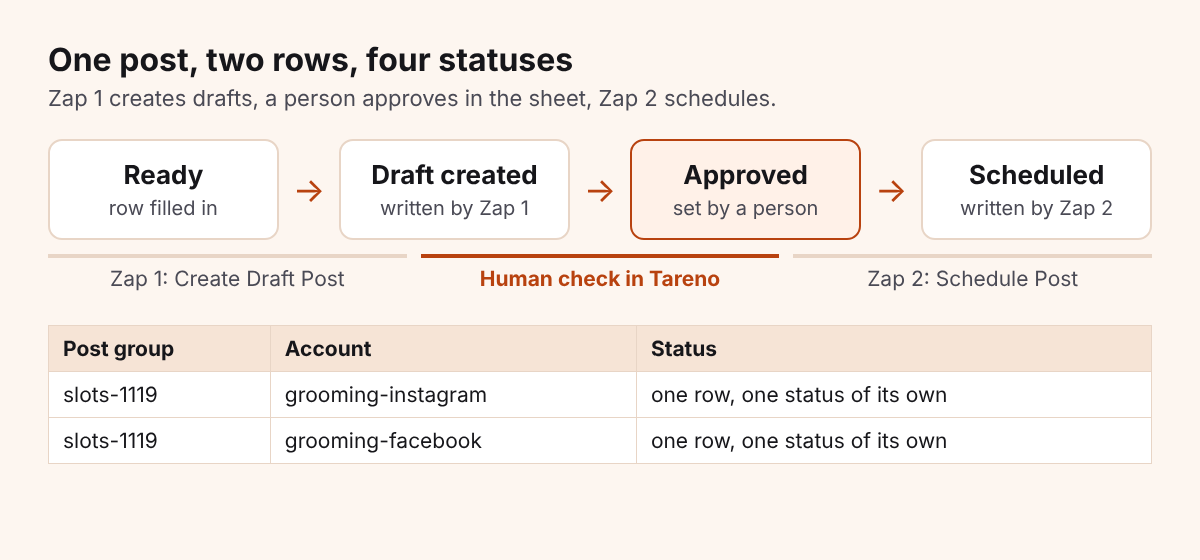
The status column moves each row through two Zaps and one human check.
Platform limits still apply when each draft is checked, so a shared caption may need an edit for one network. Publer's documentation, for example, notes that Instagram, Pinterest and Google My Business do not support link posts, and Pinterest needs a default board (Publer help). See Tareno's channel list for formats per network, such as Instagram. The Zapier app supports Instagram, Facebook, TikTok, YouTube, Threads, Pinterest, X / Twitter, LinkedIn, Mastodon and Bluesky, and only exposes accounts connected to the API-key owner (Tareno Zapier docs).
The review step
Two ways to keep a person in control:
| Option | How it works | Needs |
|---|---|---|
| Review in Tareno plus sheet | A person opens the draft, edits it, then sets Approved in the sheet (the flow above) |
Tareno plan with Automation API |
| Review in Zapier | Zapier's Human in the Loop "Request Approval" sits before a Schedule Post action | Zapier Professional, Team or Enterprise |
Zapier's help article lists Human in the Loop as available on Professional, Team and Enterprise, not Free (Zapier help). What happens on a decline or a timeout is not stated there, so test it before relying on it. Teams that want a multi-person chain inside Tareno can look at approval workflows.
Keep the Facebook publishing requirements beside the Instagram checks, and verify the final account and time in the scheduling calendar before approving the batch.
Task and credit math
Zapier counts actions as tasks; triggers, Filter, Formatter and Paths do not count (Zapier pricing).
12 posts/month x 2 accounts                       = 24 rows
Zap 1: 24 rows x 2 counted steps (Draft, Update)  = 48 tasks
Zap 2: 24 rows x 2 counted steps (Schedule, Update) = 48 tasks
Total                                             = 96 tasks
Zap 3 (optional): 24 rows x 2 (Lookup, Update)    = 48 tasks
Total with Zap 3: 48 + 48 + 48                    = 144 tasks
The fan-out is the cost driver: every extra network doubles or triples the rows. 96 tasks sit under Free's 100, but the optional third Zap takes the total to 144. If a returned post ID makes the lookup unnecessary, Zap 3 is 24 tasks and the total 120, still above 100. Free fails on step count, not on tasks: Zap 1 has four steps. Zapier's 750-task Professional tier is listed at $19.99/month billed annually or $29.99 billed monthly when read for this guide; check the live page. On Tareno's side, 24 drafts plus 24 schedule calls sit far below Tareno Pro's 2,000 Automation API calls per month; the Trial's limit is 100, so the case fits but leaves little room for test runs. Whether a draft counts as an API call is not documented in the sources read.
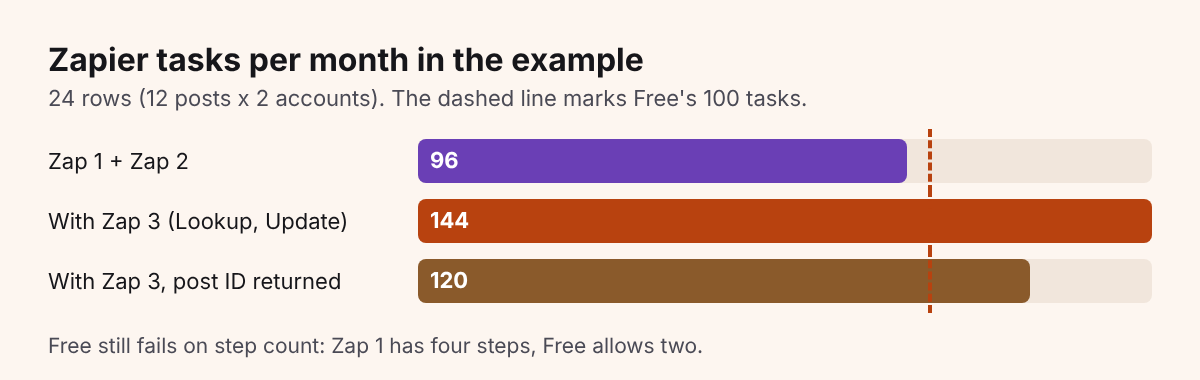
Numbers from the task math above; the 100-task line is Zapier Free.
Make variant
Tareno's Make modules are List accounts, Publish post, Schedule post, Delete post and Make an API Call. There is no draft module, so the "drafts only" step from the Zapier build does not exist here. The gate is the sheet: a person reviews the row and sets Status = Approved, and the scenario schedules only those rows. Schedule post uses POST /publish with mode=schedule, scheduledAt and timezone (Tareno API docs).
The scenario, with the mapping from Tareno's Make docs applied to our columns:
1. Google Sheets > Watch Rows (tab Posts)
2. Filter          Status = Approved
3. Tareno: Schedule post
   accountId   <- Account (the account ID from List accounts)
   text        <- Caption
   mediaUrls   <- Photo URL, kind image
   scheduledAt <- Publish at, as ISO date-time
   timezone    <- Timezone
4. Google Sheets > Update a Row
   Status = Scheduled
Tareno's own template uses the column placeholders account_id, caption, media_url, scheduled_at_iso and a timezone setting, so run List accounts once to look up the IDs and keep them in the Account column, and convert Publish at to ISO format. The duplicate guard is the same as in Zapier: the filter plus the Scheduled write-back. The documented template watches rows as they appear; whether Watch Rows also catches a status edited in place on an existing row is not covered there, so test it, or add rows to the tab only once approved. Two rows per post work as before.
Make charges credits for polling even when nothing changed. Its help page gives 15 minutes as the default interval, and 288 credits per day (8,640 a month) at a 5-minute interval, 720 a month hourly and 30 a month daily (Make help). Make's Free tier is listed at 1,000 credits a month (Make pricing), so 5-minute polling alone exceeds it, while hourly polling uses 720 before any module runs. Paid Make prices were not confirmed, so this guide does not rank the two tools on cost; compare the polling interval and your row count on the live pages.
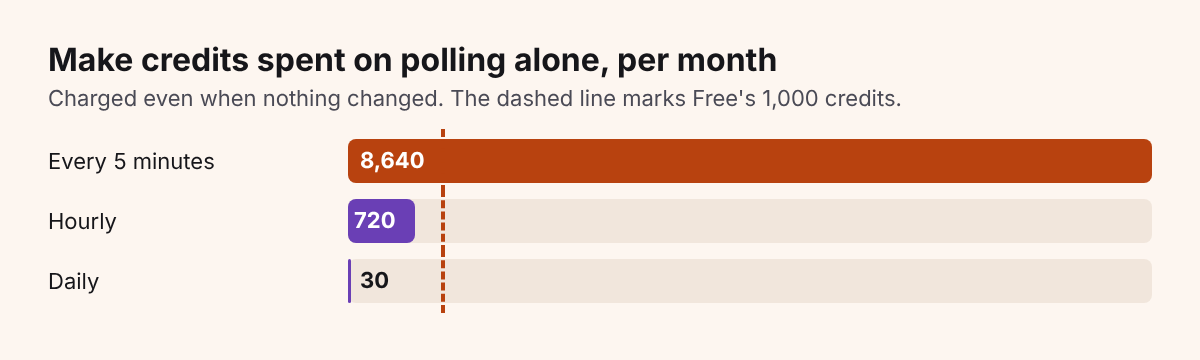
Polling credits per month as given on Make's help page.
Errors and limits
- Unreadable photos. Tareno's troubleshooting asks for direct public HTTPS media URLs. A Drive sharing page is not an image file.
- Duplicates. Retries can double-post, and a 200 response does not prove a post is live (Postgate). Drafts plus the status guard limit the damage.
- Test rows. Use a filter so empty or test rows never reach the scheduler, and watch the first runs before leaving it unattended (SkedCast).
- Evidence. No time saving or error reduction is measured here.
When to use it, and when not
| Use a sheet plus Zapier or Make when | Skip it when |
|---|---|
| Content already lives in a sheet and has fixed fields | You write each post fresh, so a scheduler's calendar is faster |
| Volume is regular and a person reviews drafts | Replies, complaints or crisis posts are involved |
| You need the same caption on several accounts (one row per account) | Per-network wording differs heavily |
| You can pay for a multi-step Zap and Tareno Pro | You are on Zapier Free, or Tareno Free or Starter |
This guide does not cover self-hosted n8n setups.
Key takeaways
- One row per account; a shared
Post groupvalue ties them together. - Status column plus Filter plus write-back is the duplicate guard in both tools.
- Zapier can create drafts; Make cannot, so approval there is the
Approvedstatus. - Zapier needs a paid plan for this flow; Tareno needs Pro, Business or Trial.
- Photo links must be direct public HTTPS files.
- Make polling costs credits before the first post.
FAQs
Can Zapier Free post to several platforms from a Google Sheet?
Not with this flow. Free allows two-step Zaps, and a trigger, a draft action and a sheet write-back need more. Free fails on step count, not on tasks. A single trigger-to-action Zap works but cannot write the status back.
Should I use Zapier or Make?
Pick Zapier if you want a draft step and, on a higher plan, Human in the Loop approval. Pick Make if you accept sheet-only approval. This guide found no cost winner: Make's polling is billed in credits, Zapier's actions in tasks, so run your own numbers.
How do I stop a row from posting twice?
Filter on the status the Zap or scenario should act on, write the next status back (and, in Zapier, the post ID if the draft step returns one), and never leave a trigger watching rows that the automation edits itself without that filter.
Does Tareno have a free plan for this?
Tareno Free has no Automation API access, and neither does Starter. Pro, Business and the 14-day Trial do.
Which channels can the Tareno Zapier app post to?
Instagram, Facebook, TikTok, YouTube, Threads, Pinterest, X / Twitter, LinkedIn, Mastodon and Bluesky, limited to accounts connected to the API-key owner (Tareno Zapier docs). X / Twitter requires Tareno Pro or above, and each action targets one account.
Where do I find the post in Tareno after the run?
If the draft step returns a post ID, the sheet holds it; the docs list no output fields, so otherwise match by Post group and Account. Zapier's draft is saved in your Tareno workspace for review; the docs read for this guide do not name the exact screen, so look there first.
Can one row post to Instagram and Facebook at once?
Not through the documented actions, which take one account each. Use two rows with the same Post group.
Why does Make not create drafts?
Tareno's Make app lists List accounts, Publish post, Schedule post, Delete post and Make an API Call only. Use the Approved status as the human gate, or build the draft step in Zapier.
Conclusion
Keep the sheet as the queue: one row per account, a person decides, and the automation moves rows through the statuses. To try the flow, start from Tareno's Zapier integration docs. Tareno's Trial lasts 14 days and needs a payment method; billing starts after the trial unless you cancel first.