Yes, Claude Code can generate social media posts from a GitHub repository, as drafts. It reads files such as CHANGELOG.md, can read git history through the shell when you allow it, and writes the text. Publishing is a separate step: it needs a connection to a posting target, and a person should approve the post there. This guide walks one release, from repository material to a LinkedIn draft and an X draft, and shows where to restrict Claude Code and where a human decides.
TL;DR
- Claude Code can draft release posts from
CHANGELOG.md, merged pull requests and release notes. Treat the output as a draft that a maintainer edits. - Pre-approve only
Readandgit log/git diffwith--allowedTools. That list only auto-approves; to keep everything else blocked, add a deny rule and a mode that rejects unapproved calls. A scheduling or publishing tool does not belong in an automated run. - Do not post security fixes from a repository run. Flag them and decide the disclosure separately.
- Check every concrete claim (version, command, flag name) against the repository before approval.
- Drafts go to a posting target over MCP or an API. Tareno is one such target, and its approval step is described below.
Quick definition
A repository-to-post workflow takes release material from a repo (changelog, merged PRs, release notes), has a coding agent draft channel-specific posts, and sends them through a human approval before anything goes live. Claude Code is Anthropic's command-line coding agent; here it is used for reading and writing text, not for changing code.
The worked example: v1.4.0 of a small CLI
This is an illustrative teaching example. The tool tidyfmt, its repository, its links and its numbers are invented; nothing here was run against a real repository, and no result is measured.
Two maintainers share one repository and are about to tag v1.4.0. The material since v1.3.0:
CHANGELOG.md, section 1.4.0 (Keep a Changelog format)
### Added
- `tidyfmt --watch` reformats files when they are saved
- `--report json` writes results as machine-readable JSON
### Changed
- `--strict` is renamed to `--fail-on-warn` (old flag works until 2.0)
### Fixed
- Crash when the config file is empty
- Windows paths with spaces were skipped
### Security
- Path traversal fixed in the include-glob handling

Merged PRs since v1.3.0: 9
- 2 by Dependabot (label: dependencies)
- 1 docs typo fix
- 1 security fix
- 5 feature/fix/rename PRs that match the Added/Changed/Fixed lines
The arithmetic is simple: 9 merged PRs minus 2 Dependabot PRs, 1 docs fix and 1 security fix leaves 5 candidates for a public announcement. The GitHub release notes exist as a draft, grouped by labels through .github/release.yml.
What a repository offers as post material
Not every file in a repo is announcement material. Keep a Changelog defines the categories Added, Changed, Deprecated, Removed, Fixed and Security, with an Unreleased section on top, and describes the file as written for humans. That makes the changelog the best primary source. GitHub's generated release notes list merged pull requests and contributors, and .github/release.yml can group entries by label and exclude labels or authors. That is a cheap way to keep bot PRs out before Claude Code sees them.
| Source | Good for | Risk | What Claude Code does | Who decides |
|---|---|---|---|---|
CHANGELOG.md Added / Fixed |
User-facing statements | Wording too technical | Rewrites into plain claims | Which 1 to 2 changes are the headline |
| Merged PRs | Context, contributor names | Dependabot and internal refactors drown the signal | Skips excluded labels | Whether contributors are named |
| GitHub release notes | A ready link target | Auto-generated lists read like a ledger | Quotes the link, not the list | Which link goes in the post |
| Changed entries | Migration notes | A rename in the post may confuse readers | Quotes old and new flag | Whether it is a warning in the post |
| Security entries | Nothing automatic | Premature disclosure | Flags only, drafts no post | Whether and when to mention it, advisory first |
| Issues and comments | Almost nothing | Complaints, private details | Leave out | A person replies |
Step-by-step: from tag range to approved drafts
- Fix the scope. Name the tag range in the prompt:
git log v1.3.0..v1.4.0and the 1.4.0 changelog section. A named range keeps Claude Code from summarising the whole history. - Pre-approve reading only. The headless documentation shows
claude -pwith--allowedToolsand prefix-matched Bash rules. A run for this case could look like this (no backticks inside the double quotes, because a shell would execute them):
claude -p "Read CHANGELOG.md section 1.4.0 and the output of git log v1.3.0..v1.4.0.
Write one LinkedIn draft and one X draft (max 280 characters).
Skip Dependabot and docs-only changes. Do not draft anything for the
Security entry; list it under 'Not mentioned, because'. After the drafts,
list every command, flag and version number you used." \
  --allowedTools "Read,Bash(git log *),Bash(git diff *)" \
  --permission-mode dontAsk
--allowedTools only auto-approves; it does not forbid other tools. Without --bare, a -p run also loads the hooks and .mcp.json servers of the repository it reads, so for a repository you do not control, add --bare and pass any MCP servers explicitly with --mcp-config.
- Collect three outputs: the two drafts, a "not mentioned, because" list, and a list of claims to check.
- Check the claims. Run the upgrade command in a clean directory and put the output next to the claim. Compare flag names with the changelog. This check is our recommendation, not a requirement from any documentation.
- Save as drafts, not as published posts. With the allowlist above, the run cannot call a posting tool, so it prints the drafts and a person copies them into the posting target, or you save the output as a file in a pull request. The alternative is to allow one draft-creating tool on purpose, as described in the Tareno section below.
- The second maintainer approves. One person writes, the other releases.
For step 2, the headless documentation states that since v2.1.302 claude -p runs start in Manual mode unless you set something else, and that a call needing consent is rejected rather than asked. Check the version you run; for unattended runs the docs also describe --permission-mode dontAsk.
What the run produces
These are the outputs for the invented v1.4.0 release.
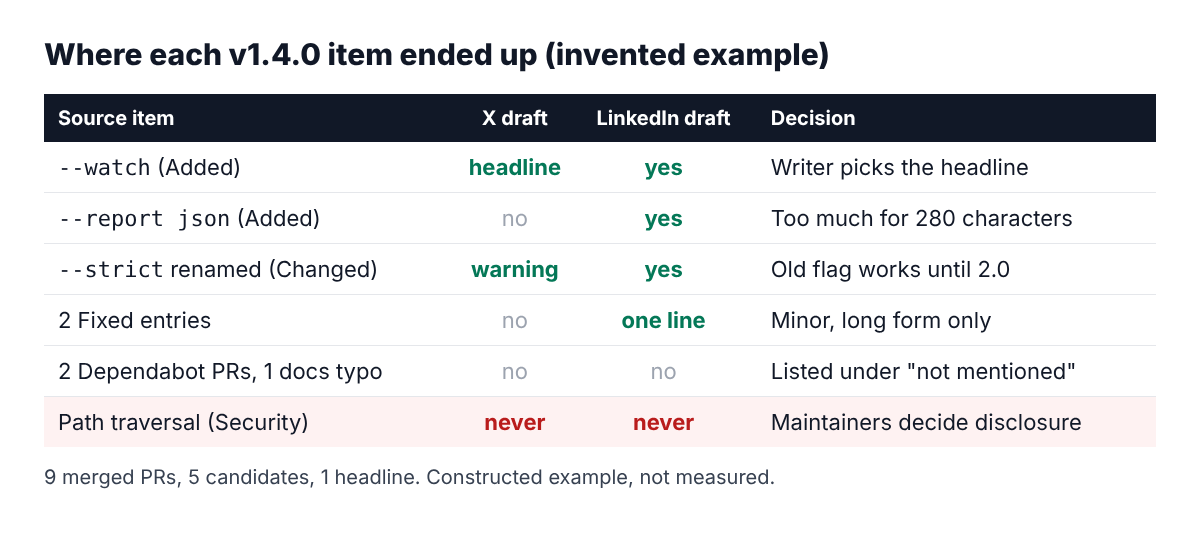
Where each item of the invented v1.4.0 release ends up.
X draft (229 characters):
tidyfmt 1.4.0 is out. New: `tidyfmt --watch` reformats files as you save them.

Heads-up: `--strict` is now `--fail-on-warn`. The old flag still works until 2.0.

npm i -g tidyfmt@1.4.0
https://example.com/tidyfmt/releases/v1.4.0
One headline, one command, one link. The X API documentation gives a 280-character limit for text without X Premium and requires the tweet.write scope; the draft stays under it even with the link counted in full.
LinkedIn draft:
Running a formatter after every save is a habit we wanted to remove.

tidyfmt 1.4.0 adds a watch mode: run `tidyfmt --watch` and files are
reformatted when you save them. It also adds `--report json` for
scripts and CI.

One change to plan for: `--strict` is now `--fail-on-warn`. The old
name keeps working until 2.0, so existing pipelines will not break
today, but update them when you can.

We also fixed a crash on empty config files and Windows paths that
contain spaces.

Release notes and upgrade steps: https://example.com/tidyfmt/releases/v1.4.0
The two texts differ on purpose. X carries one point and the migration warning; LinkedIn gets the problem, the change, the migration and the fixes in short paragraphs. No contributor is thanked by name, because that needs the person's agreement.
Not mentioned, because:
- Path traversal fix (Security): disclosure is a maintainer decision
- 2 Dependabot PRs: dependency bumps, no user-visible change
- Docs typo fix: no user-visible change
Checklist for the second maintainer:
[ ] Version number matches the tag (v1.4.0)
[ ] `tidyfmt --watch` ran in a clean directory; output matches the claim
[ ] `--fail-on-warn` exists in --help; old flag still accepted
[ ] Release link opens the published release, not the draft
[ ] No internal paths, hostnames or keys in either text
[ ] Security item stays out until the advisory is decided
[ ] Names of contributors only with their consent
Where the drafts go: a posting target and an approval
Claude Code reaches outside systems over MCP. The MCP documentation gives claude mcp add --transport http <name> <url> for remote servers and warns to use only servers you trust, since servers that bring in external content can carry prompt-injection risk. Repository text such as PR titles is outside content too; that is a reason to read drafts before approving them, not a documented attack on this workflow.
Tareno is one posting target for this. Its MCP documentation lists a remote server at https://tareno.co/api/mcp with a create_drafts tool, and Claude Code is listed there as connected through a plugin or MCP, with the connection marked "tested" by Tareno (setup for Claude Code). Per the same agent documentation, creating drafts is direct, while scheduling, publishing, edits to scheduled posts and deletions become pending actions that a person approves in the dashboard (approval workflows). To let the run itself save drafts, add mcp__tareno__create_drafts to --allowedTools (the server name depends on what you chose in claude mcp add) and keep schedule_posts and publish_posts denied. Without that entry, the drafts stay in the run output as above. We have not run this sequence from a real repository to Tareno drafts.
Two plan details matter for this case. X / Twitter access starts on Pro, and so do team members (Pro: 3 invited members besides the owner), which is how a second maintainer would approve. The US price for Pro is $49 per month billed monthly or $37 per month billed yearly; see pricing. Free covers 2 channels and 15 scheduled posts, so it fits LinkedIn alone but not X.
Keep automated runs unable to publish
Three layers stack, and the order matters.
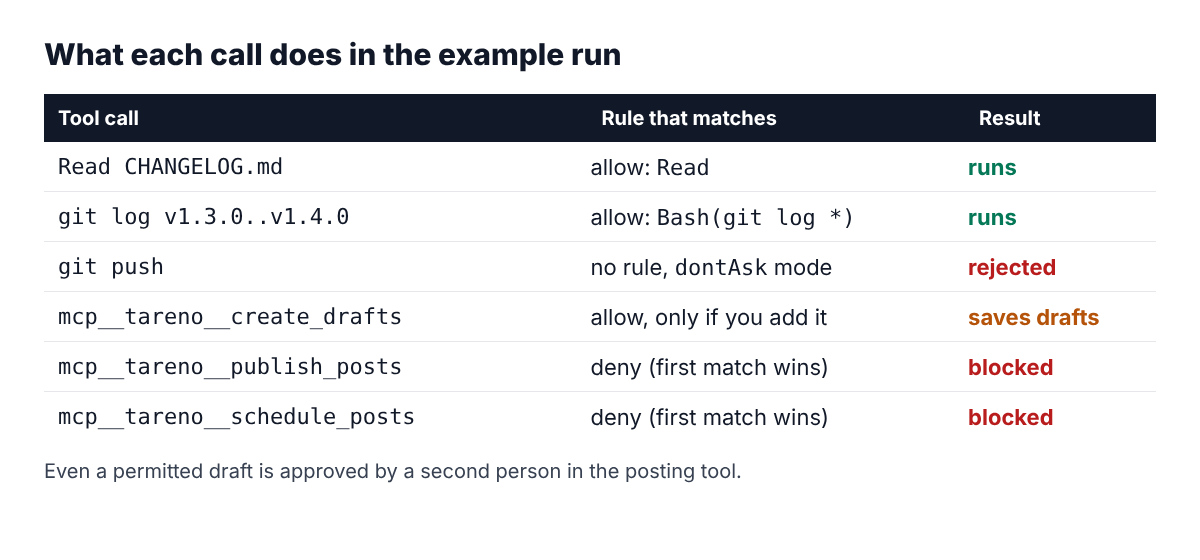
How the example run treats each tool call.
- Allowlist and mode. The allowlist pre-approves reading. It does not block other tools: per the headless documentation, calls to tools you did not list still run if they need no approval. What stops the rest is a mode that rejects unapproved calls (Manual, or
dontAskas in the example) together with the deny rules below. Add--bareso repository-supplied hooks and MCP servers are not loaded. - Deny rules. The permissions documentation evaluates rules in the order deny, ask, allow, and the first match wins. MCP tools are addressed as
mcp__<server>__<tool>, ormcp__<server>__*for a whole server. Denying the scheduling and publishing tools of your posting server (for Tareno,schedule_postsandpublish_posts) is a belt-and-braces choice. Tareno already routes those actions to approval, so we suggest the deny rule as extra safety rather than as a requirement. - Hooks. The hooks documentation describes
PreToolUsehooks that can block a call; to match all tools of one MCP server, use a regex matcher such asmcp__<server>__.*. Per the permissions documentation, a hook decision does not override deny or ask rules, so hooks add checks but do not replace rules.
The approval itself sits in the target system. A Claude Code rule protects your run; the approval protects your audience. Tareno's own repository-posts page makes the same split: nothing is published until you approve it, and automated jobs should not hold scheduling or publishing tools.
Three ways to run it
| Way | Needs | Best for | Watch out for |
|---|---|---|---|
| Interactive session | Claude Code installed | First attempts, tuning the prompt | Easy to approve a tool prompt without thinking |
claude -p locally or in CI |
Allowlist, tag range in the prompt | Repeatable release drafts | Version-dependent permission defaults; set them explicitly |
anthropics/claude-code-action in a workflow |
The GitHub app, an API key or OAuth token as a secret | Drafts created when a release is cut | GitHub Actions minutes and API tokens cost money; the triggering user needs write access, per the GitHub Actions documentation |
Start interactive, move to claude -p once the prompt is stable, and only then consider the Action. This guide does not cover Action setup beyond that pointer.
Platform rules that affect who can post
Drafting is easy; posting rights are the constraint. For X, the API endpoint is POST https://api.x.com/2/tweets with the tweet.write scope. For LinkedIn, the Posts API uses POST https://api.linkedin.com/rest/posts, a Linkedin-Version header, and w_member_social for a person or w_organization_social for an organization, which is tied to page roles. If you post to a company page, the person connecting must hold a suitable role. We did not review LinkedIn's access program requirements, so check them before building your own integration. A tool that already holds the connections removes that work.
The LinkedIn channel guide and X channel guide help check the destination before a release draft is handed to a scheduler.
When to use it and when not to
Use it when:
- Releases have a maintained changelog and tags.
- Two people can split writing and approval.
- The announcement is a plain fact: a feature, a fix, a migration step.
Do not use it when:
- The change is a security fix or a breaking change without a migration note. Decide disclosure first.
- The material comes from a private repository and contains internal names, paths or customer details.
- The post would answer a complaint or a community discussion. Buffer says community conversations and complaints should be handled by a real person, and Hootsuite advises human review of automated posts.
We have no measured data on time saved or reach, so this guide makes no such claim.
Key takeaways
- Claude Code writes the draft; a maintainer owns the facts and the decision to post.
- Use the changelog as the main source and exclude bot and docs-only PRs before drafting.
- Pre-approve only reading tools, reject unapproved calls with a mode or deny rule, and keep scheduling and publishing out of automated runs.
- Verify commands and flag names in a clean directory before approving.
- Keep security entries out of automated drafts.
FAQ
Can Claude Code read my GitHub repository directly?
It reads files in the working directory, and it can run git commands such as git log when you permit them. For data that lives only on GitHub, like pull request details, you would need to allow gh commands or paste the content in. Allow them deliberately, one command prefix at a time.
Can Claude Code publish the posts for me?
Only if you connect a tool that can publish and permit its use. We recommend against it for unattended runs. Let Claude Code save drafts and have a person approve in the posting tool.
Do I need the GitHub Action, or is claude -p enough?
claude -p is enough for a first working setup, run by hand or from your own CI. The Action adds triggers such as a schedule, with Actions minutes and API tokens as costs.
What should never be in an automated post?
Unreviewed security details, internal paths, hostnames, keys, customer names, and claims nobody has run. The checklist above covers these.
How do I write different posts for LinkedIn and X?
Give each channel its own instruction. In the example X gets one headline, one command and one link under 280 characters, and LinkedIn gets short paragraphs with the migration note. Through the agent connection, Tareno's X configuration page lists single posts at 280 characters with no thread tool; see Claude Code for X.
Does this work for a week of tips from a test suite?
That is a different source and a different job, covered on the same Claude Code for X page.
Conclusion
Claude Code can turn a tagged release into a LinkedIn and an X draft in one read-only run, and the useful part is the structure around it: a named tag range, excluded noise, a "not mentioned" list, claims to verify and a second person who approves. To save drafts from Claude Code and approve them with a teammate, start from the Tareno MCP setup.