Short answer: Out of the box, only partly, and only for Hermes. Hermes Agent's official bundled-skills catalog lists one social skill, xurl for X, and no skill for Instagram or LinkedIn. NanoClaw's official README and spec describe messaging channels such as WhatsApp, Telegram and Slack, and mention none of the three networks. For Instagram and LinkedIn with Hermes, and for all three with NanoClaw, the documented route is an MCP-connected publisher that holds the network accounts while the agent prepares drafts.
TL;DR
- Hermes Agent + X: the only native combination found, through the bundled
xurlskill, which needs your own X developer app and likely pay-per-use API credits per its troubleshooting. Documented, not tested by us. - Hermes Agent + Instagram or LinkedIn: no bundled skill. Use a publisher connected through MCP.
- NanoClaw + any of the three: not mentioned in the official README, spec or agent-runner doc. That is an absence in the pages we read, not proof it is impossible.
- Safe default: the agents' own approval settings guard shell commands and MCP servers, not posts. Let scheduled runs write drafts only, and let a human approve publishing.
Quick definition
An agent here means a self-hosted assistant that runs tools on your behalf (Hermes Agent, NanoClaw). A publisher is a service that holds your Instagram, LinkedIn and X connections and exposes drafting and scheduling to the agent, in this article through MCP, a protocol that gives compatible AI clients typed tools.
What Hermes Agent documents
Three official Hermes pages matter for this question.
Skills. The bundled skills catalog lists xurl in its social-media category: "X/Twitter via xurl CLI: raw post search, posting, DM, media." The xurl skill page adds the catch: you register your own app in the X developer dashboard and authenticate outside the agent session, and the page's troubleshooting section refers to X's pay-per-use package and credits (minimum purchase $5). So "native" means a documented skill plus your own X developer setup and likely API costs. The catalog has no bundled skill for Instagram, LinkedIn or a scheduling tool; community skills for those networks may exist (the vendor article below says they need your own Meta app and token), but we did not read them. A vendor article makes the same point, but that vendor sells a publisher, so treat it as a secondary view. We did not read the optional-skills catalog.
MCP. Hermes can connect to remote MCP servers through an mcp_servers: block in ~/.hermes/config.yaml, with a url and either headers or auth: oauth (followed by hermes mcp login <name>). A tools: filter can include or exclude individual tools, and "include wins" per the Hermes MCP documentation. That filter is useful here: you can hide any tool that publishes.
Scheduling. Hermes has built-in cron. Jobs can be created with /cron add, hermes cron create or plain language, run in a fresh session, and deliver results to a deliver: target such as Telegram, Discord or a local file. These targets are messaging platforms, not social networks. Cron schedules the agent, not a post on Instagram's calendar.
What NanoClaw documents
The NanoClaw README describes a self-hosted, open-source assistant. Channels are added with /add-<channel> skills and include WhatsApp, Telegram, Discord, Slack, Teams, Signal, iMessage, Matrix and email. Instagram, LinkedIn and X do not appear. Scheduled tasks can be one-off or recurring.
The agent-runner doc lists the agent's tools: send_message, send_file, send_card, ask_user_question, edit_message, add_reaction, create_agent, install_packages and add_mcp_server. Two of them, install_packages and add_mcp_server, need host-side admin approval (as does create_agent in confined groups). So a publisher can be attached through add_mcp_server, with an admin approving that step. The older SPEC describes an earlier design and says "The core ships with no channels built in"; cite it as history only.
Two caveats. We did not search NanoClaw's skill directories, so a community skill may exist. And a fork's README, such as expandtalk/nanoclaw, is not evidence of what the official project can do. The README also says that API keys stay outside the container, but values passed as --env for an MCP server end up in container.json, which the agent can read. Treat a publisher key in that file as visible to the agent.
The decision table
Each cell reflects what the official pages above say, plus the MCP route.
| Setup | X | ||
|---|---|---|---|
| Hermes Agent alone | No bundled skill | No bundled skill | Yes, via xurl (documented; own X developer app, likely pay-per-use API credits) |
| NanoClaw alone | Not in official docs read | Not in official docs read | Not in official docs read |
| Either agent + MCP publisher | Only if the publisher supports Instagram | Only if the publisher supports LinkedIn | Only if the publisher supports X |
The last row is where publishers differ. One vendor guide for Hermes, Postgale, covers Instagram, limits LinkedIn to personal profiles and lists X as coming soon. Check the network coverage of any publisher before you wire it up.
Main case: a community tool library with two volunteers
This example is illustrative: the sheet rows, deposit amounts and post texts are invented for teaching, and we did not run Hermes or NanoClaw to produce them.
A tool library has two volunteers and three recurring post types: new-tool arrivals, repair workshop nights and borrowing hours. They want these on Instagram, LinkedIn and X. The inventory is a Google Sheet with the columns Tool, Condition and Deposit, and new arrivals are photographed on a phone.
Input (one sheet row):
Tool: Tile saw | Condition: Good, new blade fitted | Deposit: $25
Step 1: get the facts to the agent. Hermes' catalog lists a google-workspace skill: "Gmail, Calendar, Drive, Docs, Sheets via gws CLI or Python." Whether its setup suits two volunteers is untested, and NanoClaw documents no sheet access. The safe fallback is to paste the row into the chat channel; the phone photo arrives the same way, through a messaging channel both agents document.
Step 2: make the photo reachable. A publisher needs the media at a URL. In Tareno's MCP, upload_media_from_url takes a URL, so the photo must be hosted somewhere reachable first. A vendor guide (Superdirector) says Instagram publishing needs a public media URL, a JPEG and a business or creator account; verify this against Meta's current documentation before relying on it.
Step 3: draft three versions, publish nothing. The agent writes one text per network:
Instagram: New in the library: a tile saw with a fresh blade. Deposit $25.
Borrow it Saturday, return it clean.

LinkedIn: Our neighbourhood tool library added a tile saw this week. Members
can borrow it for a $25 deposit, which is returned when the tool comes back.
If you have a renovation project, we would be glad to see you.

X: New at the tool library: tile saw, fresh blade. $25 deposit.
Step 4: three human checkpoints.
- A volunteer compares deposit and condition in the drafts with the sheet row. This is the editorial check, and only a person can do it.
- A volunteer confirms the publishing time in the publisher's dashboard. With Tareno, scheduling and publishing through MCP create approval actions; the assistant can request them and read their status but cannot approve them, and the MCP reference defines a 15-minute approval window.
- An admin approves the agent setup. For NanoClaw this is the
add_mcp_serverapproval; for Hermes,approvals.mode(smart by default, or manual or off) governs shell commands. Neither is a post review.
Step 5: recurring posts. Borrowing hours repeat weekly. Hermes cron or NanoClaw tasks can start the weekly drafting run. This is our recommendation, derived from the vendor guidance we read: a scheduled run should write drafts and never publish. Hermes' cron_mode defaults to deny; setting it to approve confirms everything automatically, which is the wrong choice here (per the Hermes security docs). Hermes' MCP tools: filter is set per MCP server in the global config, not per cron job. It can hide publishing tools from the agent entirely, so the agent then cannot request scheduling either. The sketch below is that draft-only setup (not run by us; check the tool names against the Tareno MCP reference). Remove the exclusion when you want the agent to request schedules for the Step 4.2 confirmation.
mcp_servers:
  tareno:
    url: https://tareno.co/api/mcp
    auth: oauth
    tools:
      exclude: [publish_posts, schedule_posts]
Step 6: check the result per network. A scheduled post is not a published post. Tareno's documentation describes get_action_status and a partial_failure result for mixed outcomes, and advises against resubmitting items that already succeeded.
Output for one week: 3 post types x 3 networks = 9 drafts, 9 pieces of text to check against the sheet, and one confirmation of the schedule.
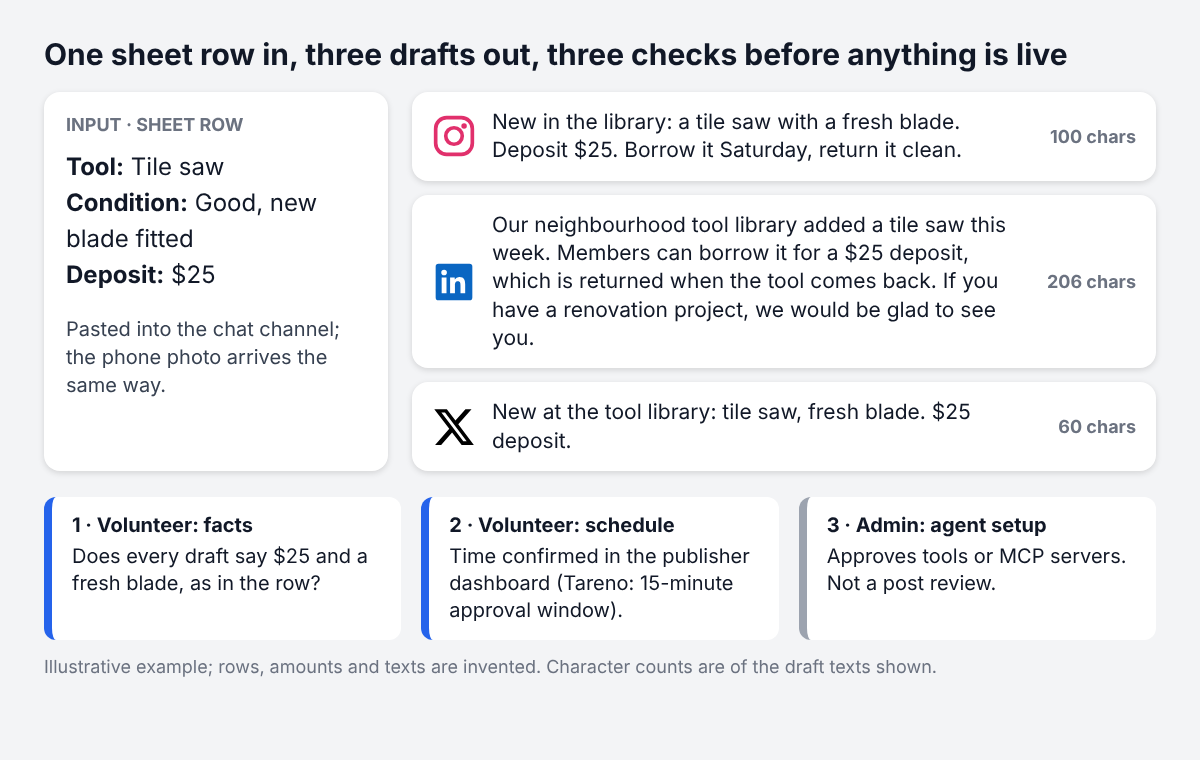
One invented sheet row, three drafts, and the checks a person still has to do.
Example publisher: Tareno
Tareno documents a Hermes Agent connection (a ClawHub skill plus the remote MCP endpoint https://tareno.co/api/mcp, with OAuth) and lists NanoClaw as a documented MCP connection with client-dependent auth. "Documented" means the setup is described, not tested; the Hermes page itself says a client test is still required. Supported networks include Instagram, LinkedIn and X / Twitter.
Plan matters for the volunteers. On the pricing page: Free has 2 channels and no API access, Starter has 5 channels but no X access and no API access, and Pro is the first plan with X / Twitter access and Automation API access (2,000 calls a month). Pro costs $49 a month billed monthly or $37 a month billed yearly (US price). A 14-day trial also includes API access, with 100 calls. For three networks plus MCP, that means Pro or the trial.
Use the dedicated Hermes Agent setup guide or NanoClaw connection guide for the agent-side configuration. Check the LinkedIn publishing formats separately before preparing that channel’s draft.
Mistakes and limits
- Letting cron publish. An unattended run that can publish will publish whatever the model wrote.
- Timestamps without an offset. One vendor guide (SocialByIDM) warns that a time without an offset uses the workspace timezone and a past time publishes immediately. State date, time and timezone explicitly.
- Quoting one Instagram limit. Vendor pages disagree on Meta's daily publishing limit. Read it from Meta's
content_publishing_limitfor your account instead.
When to use this setup, and when not
| Use it when | Skip it when |
|---|---|
| You already run Hermes or NanoClaw for other chores and want drafts in your own chat | You only need a calendar; a scheduler on its own is simpler |
| A person can review every text before it goes out | Nobody has time to approve, and you want fully unattended posting |
| You need Instagram or LinkedIn, which neither agent covers natively | You only post to X and can register your own X developer app and pay for API credits for xurl |
| You can keep the publisher key out of files the agent can read | You cannot control who can message the agent |
Key takeaways
- NanoClaw's official pages name none of the three networks; Hermes covers X only.
- Agent approval is not editorial approval; scheduled runs write drafts, not posts.
- Check each publisher's network coverage and plan before connecting.
FAQ
Can Hermes Agent post to X by itself?
Its official catalog lists xurl ("X/Twitter via xurl CLI: raw post search, posting, DM, media."). The skill page requires your own app in the X developer dashboard, and its troubleshooting mentions pay-per-use credits (minimum $5). We have not run it.
Can Hermes Agent post to Instagram?
Not with a bundled skill. The catalog has none. The documented route is a remote MCP publisher added in ~/.hermes/config.yaml, with an Instagram account the publisher supports.
Can NanoClaw post to LinkedIn?
Nothing in the official README, spec or agent-runner doc mentions LinkedIn. An MCP publisher added through add_mcp_server, with admin approval, is the route those docs make available.
Does the agent's approval setting stop a bad post?
No. Hermes approvals.mode concerns commands, and NanoClaw's admin approval concerns installing packages and MCP servers. Post approval has to come from the publisher or from your own process.
Can the agent approve its own scheduled posts?
With Tareno, no. The assistant can request scheduling and read the status, but approval happens in the dashboard.
Do I need a paid Tareno plan to connect an agent?
Yes: Free and Starter include no API access. Pro, Business or the 14-day trial do.
Conclusion
Use a connected publisher, keep the agent on drafts and let a person approve the post. To try the draft-first flow, connect your agent through the Tareno MCP guide.