Short answer: Manus can plan a campaign and draft the posts without any extra setup. Whether it can also publish depends on the route you connect: an Instagram connector, a Chrome or Edge browser session, an MCP connector to a scheduler, or a custom MCP server. There is no single built-in "publish to every channel" switch. For LinkedIn and Facebook, Manus's own connector directory does not list a dedicated connector (LinkedIn appears only through Taplio), so a team posting to several channels needs one of the other routes.
TL;DR
- Planning and drafting need no connection. Give Manus a document and ask for a calendar and per-channel copy.
- Publishing works through four routes, each with different prerequisites and risks (table below).
- Manus's Connectors directory lists an Instagram connector, but no Facebook or X entry, and LinkedIn only via Taplio.
- Manus Scheduled Tasks have a "Skip confirmations" setting that lets workflows proceed without asking before posting. Keep it off for anything public.
- If you want a hard approval step before anything goes live, route publishing through a scheduler that enforces approval, such as Tareno, which Tareno has tested with Manus.
Quick definition
Manus is a general-purpose autonomous agent that works in its own sandbox with internet access and connectors, which its documentation describes as a "virtual colleague with its own computer". A social media scheduler is a separate tool that stores posts, holds them until a set time and publishes them through each network's API.
What Manus does alone, and what it does not
Manus is strong at the thinking part of social media work: reading a source document, building a calendar, writing variants for different audiences. None of that touches a social account, so none of it needs a connection or carries publishing risk.
The doing part is different. Publishing means acting on an account with real followers. Manus's documentation covers several ways to reach those accounts, but its pages I read do not describe a per-post confirmation step for any of them. That gap is why this article separates "draft" from "go live" explicitly.
The four routes to publishing
| Route | What it needs | Fits | Main risk |
|---|---|---|---|
| 1. Instagram app connector | Connect Instagram in Manus. The directory describes it as "Plan and publish Instagram posts, stories, and reels." | Instagram only | The directory line does not say whether it schedules for later or posts at once, nor whether it asks before posting. Test with a private account first. |
| 2. Browser Operator | Chrome or Edge extension using your existing logins; the desktop browser must stay online (docs) | One-off posts on any site you are logged into | Manus notes that "complex interactions ... may not work perfectly" and that sites with anti-bot protection may need you to step in. In my assessment (the docs do not say so), it is a poor fit for posts planned weeks ahead. |
| 3. Scheduler through an MCP connector | Buffer, Metricool, Postiz and Ayrshare are listed as MCP connectors, Publer API as an API-key connector (connectors directory) | Several channels, posts planned ahead | Approval behavior depends on the scheduler, not on Manus |
| 4. Custom MCP server | Settings, Integrations, Custom MCP Servers, Add Server (docs) | Schedulers without a ready-made connector | Manus's page does not describe confirmation behavior; plan availability for this feature is not stated there |
Two details change the decision. First, Manus asks for your approval before it enables a recommended connector, but that is a one-time permission, not an approval of each post. Second, a separate Cloud Browser uses data-center IP addresses, and tasks can wait until you take over, for example at a CAPTCHA or multi-factor prompt.
Outside Manus, Meta's Instagram content publishing documentation requires a professional account, JPEG for images and a publicly reachable media URL. Those rules apply to any tool that posts through that API.
Scheduled Tasks: automation with one dangerous switch
Manus Scheduled Tasks run a prompt on a timer, and the automations documentation lists daily on workdays, weekly, monthly or one-time repetition. It advises setting the time and time zone explicitly and offers a test run.
The same feature has a setting called "Skip confirmations", which Manus describes as: "Skip confirmations lets trusted workflows proceed without asking for approval before sending, publishing, or posting." The page I read names no default value, so check the setting yourself. For a recurring task that reads a document and writes posts, that is the setting that removes your last check. Use Scheduled Tasks to create drafts. Do not let one publish.
The SkedCast guide, a scheduler vendor's article and therefore an interested source, gives a rule that fits: "Start with drafts, monitor first runs, then allow unattended publishing." For a volunteer-run account, I would stop at the first half of that sentence.
Worked example: a community theater with one volunteer publicist
This is a constructed teaching example, not a customer report and not a product test. "Riverside Players", the plays, dates and venue are invented. Open items I could not confirm from documentation are marked as such.
Riverside Players is a community theater. One volunteer publicist spends about two evenings a month on social media. The group posts on Instagram, a Facebook Page and LinkedIn (for sponsors and city partners).
Input: a Google Doc called "Season 2027" with the schedule for three plays (dates, titles, audition dates, presale start) and about 40 phone photos from rehearsals, some showing identifiable faces of cast members.
Step 1. Hand the document to Manus and ask for a plan
Manus reads the document (upload it or paste the text; whether a dedicated Google Docs connector exists is not documented in the pages I read, though Google Drive is a listed connector). The brief asks for a campaign calendar and per-channel copy. Nothing here is published.
The rule for the calendar: announce the season, post the audition call four weeks before each audition, remind 48 hours before, announce the ticket presale on its first day, and remind 48 hours before opening night. Manus returns this table (dates calculated from the invented schedule):
| Play | Audition call (4 weeks before) | Audition reminder (48 h) | Presale post | Opening reminder (48 h) |
|---|---|---|---|---|
| The Lighthouse Keeper's Daughter | Sat 12 Dec 2026 | Thu 7 Jan 2027 (audition Sat 9 Jan) | Mon 1 Mar 2027 | Wed 7 Apr 2027 (opens Fri 9 Apr) |
| Midsummer Ledger | Sat 20 Feb 2027 | Thu 18 Mar 2027 (audition Sat 20 Mar) | Mon 3 May 2027 | Wed 9 Jun 2027 (opens Fri 11 Jun) |
| Winter Fair | Sat 14 Aug 2027 | Thu 9 Sep 2027 (audition Sat 11 Sep) | Mon 1 Nov 2027 | Wed 1 Dec 2027 (opens Fri 3 Dec) |
A season announcement on Mon 7 Dec 2026 comes first. Each audition call is exactly 28 days before its audition (for example, 12 Dec plus 28 days is 9 Jan).
Step 2. Draft one audition call in three versions
Manus writes the audition call for The Lighthouse Keeper's Daughter once per channel. Text in brackets is where the document must supply the real fact.
Instagram (short, one call to action):
Auditions open for The Lighthouse Keeper's Daughter.
Sat 9 Jan, [time], [venue]. No experience needed, bring a short
reading of anything you like. Details in bio.
#CommunityTheater #Auditions
Facebook Page (event details):
Riverside Players are casting The Lighthouse Keeper's Daughter.
Auditions: Saturday 9 January 2027, [time], at [venue].
Roles for [number] actors, ages [range]. Rehearsals begin [date].
Questions? Message the Page or reply here.
LinkedIn (for sponsors and city partners):
Riverside Players opens its 2027 season with The Lighthouse Keeper's
Daughter, opening 9 April. Auditions take place on 9 January at
[venue]. If your organisation would like to support the season,
[contact route].
Step 3. A human checks before anything is stored for publishing
This is the step Manus should not own:
- Check every date, venue and ticket link against the Google Doc, not against Manus's summary.
- Choose the photos and confirm that people with visible faces agreed to be shown.
- Read all three texts as the group's voice.
Step 4. Choose the publishing route
For this group, routes 1 and 2 fall short. The Instagram connector covers one of three channels, and the directory lists no Facebook connector. The Browser Operator posts one item at a time in a session you authorize, with the desktop running, so it does not suit audition calls queued for December and January.
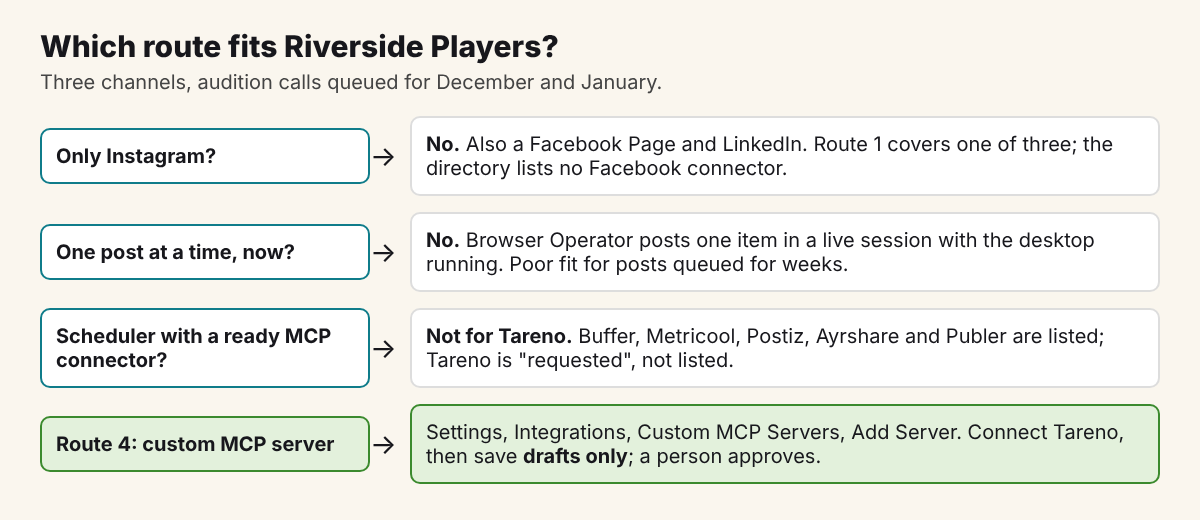
Route choice for the invented Riverside Players example.
That leaves a scheduler. In this example the publicist connects Manus to Tareno through a custom MCP connection. The Tareno Manus guide documents this setup and lists it as tested by Tareno; Manus is not yet a published listing in Manus's directory (status "requested"). Manus's custom MCP page mentions an API-key or bearer field while Tareno documents OAuth, so follow the Tareno guide for the current steps. Tareno's MCP docs show what Manus can then do: list connected accounts, load each channel's requirements with get_platform_schema, save drafts with create_drafts, and request a publishing time with schedule_posts.
For destination-specific drafting, compare the Manus Instagram workflow and Manus LinkedIn workflow. Verify the connected account and format for each before requesting a publishing time.
Step 5. Give Manus a prompt that stops at drafts
Read the attached "Season 2027" document.
1. List my connected accounts in Tareno and check the platform
   requirements for Instagram, [Facebook Page name] and LinkedIn
   ([organisation page name]).
2. Save the audition call for The Lighthouse Keeper's Daughter as three
   drafts, one per channel, using the three texts below.
3. Save as drafts only. Do not schedule and do not publish.
4. List which facts (date, venue, time) came from the document and
   which you could not find.

INSTAGRAM TEXT:
[paste the Instagram text from step 2]

FACEBOOK TEXT:
[paste the Facebook text from step 2]

LINKEDIN TEXT:
[paste the LinkedIn text from step 2]
Step 6. The approval
The season announcement of 7 December runs separately before this. Once the drafts look right, the publicist asks for a schedule: "Request Saturday 12 December 2026 at 10:00 in America/New_York for these three drafts." Tareno states that scheduling and publishing through MCP create approval actions: "The assistant can request the action and read its status, but cannot approve it." The publicist approves in the Tareno dashboard; the MCP reference defines a 15-minute approval window, and an approval does not by itself prove publication, so the status per target account is checked afterwards. More on that flow is on the approval workflows page.
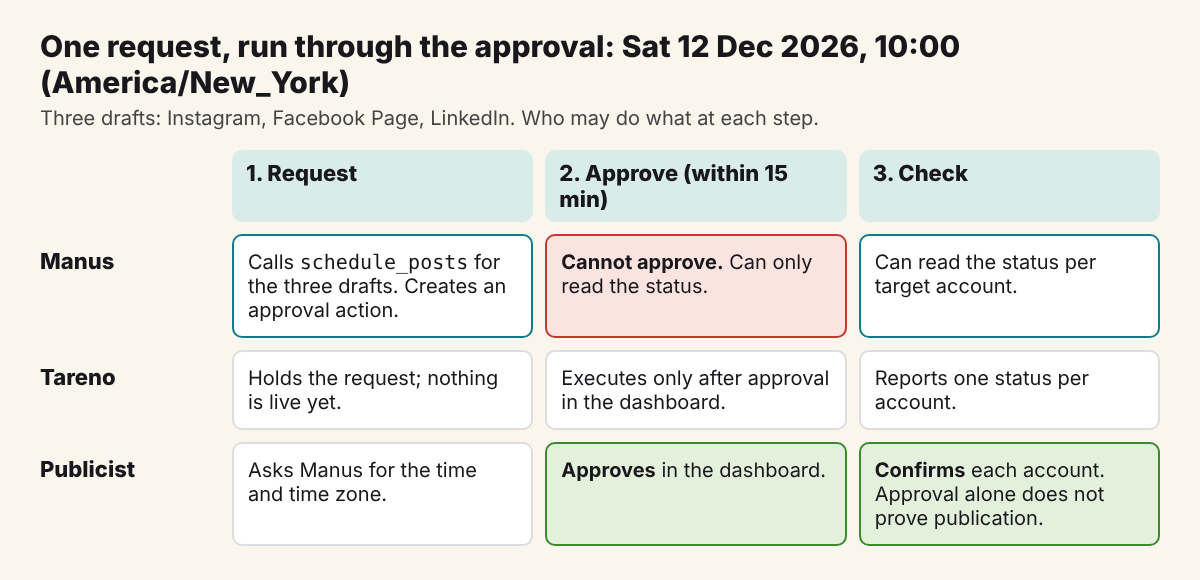
Approval flow for the example request, based on Tareno's MCP documentation.
Use the MCP tool reference to distinguish a pending request from its per-account execution result.
Step 7. Optional: a monthly Scheduled Task
Once the first run behaves, a Manus Scheduled Task can run monthly with the prompt from step 5 and a new audition or presale in scope. "Skip confirmations" stays off, and the task only ever saves drafts.
What this costs the group
Tareno's MCP and API access is included in the 14-day trial (100 calls), Pro (2,000 calls per month) and Business, but not in Free or Starter. Free supports only 2 channels, so three channels plus MCP means Pro at minimum. The US price for Pro is $49 per month billed monthly, or $37 per month billed yearly. Calculation: $49 × 12 = $588 monthly billing against $37 × 12 = $444 yearly billing, a difference of $144. The trial requires a payment method and billing starts after 14 days unless cancelled. Manus has its own pricing, which I could not read from its pricing page; check manus.im/pricing directly. Whether Pro's 2,000 calls are enough depends on how many drafts and requests the group makes; the example does not measure that.
Task split worksheet
| Task | Manus | Scheduler (Tareno or similar) | Human |
|---|---|---|---|
| Read the source document, build the calendar | Yes | Checks dates | |
| Draft per-channel copy | Yes | Edits and approves tone | |
| Pick photos, confirm consent | Yes | ||
| Store drafts | Yes, via connection | Holds them | Reviews in the dashboard |
| Set the publishing time | Requests it | Executes after approval | Approves |
| Check that posts went live | Can read status | Reports per account | Confirms |
Extra checks before you approve (beyond step 3)
- Time zone stated explicitly (for example America/New_York).
- Channel rules loaded with
get_platform_schema(media format, length). - Instagram account is a professional account (Meta's requirement for API publishing).
- After approval, the status for each target account is checked, not just the approval itself.
When to use this setup, and when not to
Use it when you post to several channels from one source document, publish days or weeks after drafting, and want one person to sign off on everything that goes live.
Do not use it when the post is a complaint, a crisis or a sensitive reply. Buffer's automation guide (June 2026) says not to automate those, and its author edits AI drafts before publishing. Skip it also for a single spontaneous post, where posting by hand takes less time than setting up a connection.
Key takeaways
- Publishing always needs one of four routes; the Instagram connector is the only social-network entry I found in the directory.
- A scheduler with enforced approval turns "the agent can publish" into "the agent can ask to publish".
- Always recheck dates and consent yourself; an agent summary is not a source.
FAQ
Can Manus schedule posts for next month?
Manus can run Scheduled Tasks on a timer, but that schedules the Manus task, not necessarily a post on the network. For posts that should go live later, use a scheduler such as the ones listed under MCP connectors and let it hold the post.
Does Manus ask before it posts?
The pages I read describe no per-post confirmation for any route (see the risk column in the table above). Treat any route as unconfirmed until you test it on a private account.
Can Manus post to LinkedIn or Facebook?
Manus's connector directory has no Facebook entry and lists LinkedIn only through Taplio. A scheduler connected over MCP is the more reliable route; Tareno's MCP supports Facebook, LinkedIn and Instagram (see the Facebook channel page), among others, with plan and account requirements.
Can Manus approve its own posts in Tareno?
No. Tareno's documentation says the assistant can request an action and read its status but cannot approve it. You approve in the dashboard within the 15-minute window.
Do I need a paid Tareno plan to connect Manus?
MCP and API access is not in Free or Starter. It is in the 14-day trial, Pro and Business. X / Twitter publishing also starts at Pro.
Is Manus a replacement for a scheduler?
No. Manus is an agent that can do research, planning and writing; a scheduler stores posts and publishes them at set times. They work best together, with the agent preparing and the scheduler publishing after approval.
Conclusion
Manus can do the planning and drafting for your social media. Publishing is a separate decision: choose a route, and decide where a person approves. For a team with several channels and posts planned ahead, connecting Manus to a scheduler that enforces approval keeps the agent useful without giving it the last word. To try that setup, follow the Tareno Manus guide and start with one draft.