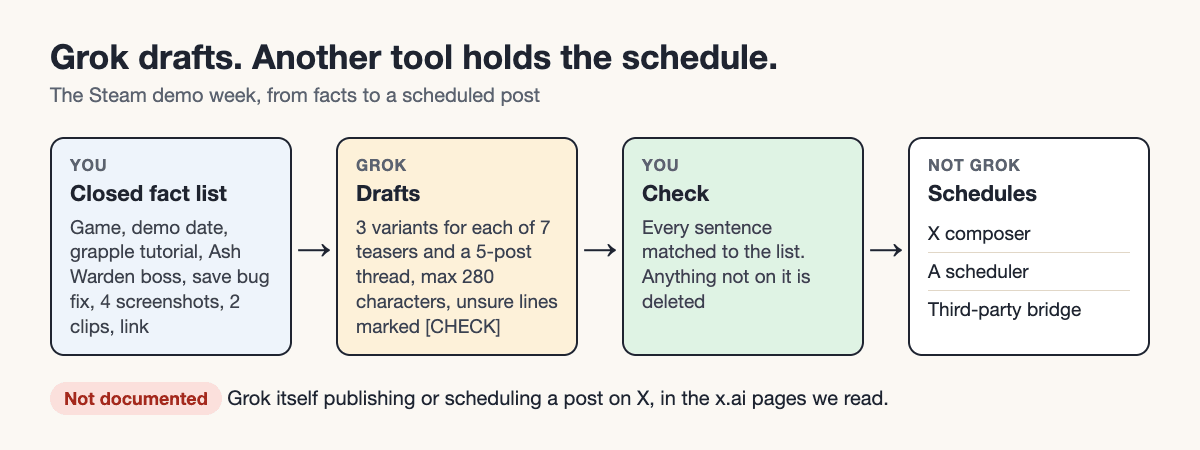
To use Grok to write and schedule posts for X, let Grok produce the drafts and let a different tool hold the schedule: X's own composer, a scheduler, or a third-party bridge that connects Grok to the X API. None of the official x.ai pages we read says that Grok itself can publish to X or schedule a post there. This guide shows the full workflow on one worked example, a solo developer announcing a Steam demo, from patch notes to a scheduled week.
Tareno publishes this guide and offers a product discussed here. The worked examples are illustrative; this article does not report a connected-account test or measured customer results.
TL;DR
- Grok is the drafting step. You give it facts and rules, you check every claim it returns, and you publish or schedule somewhere else.
- Grok Automations run Grok tasks on a schedule, but the announcement does not mention posting to X.
- The basic routes are: (a) Grok drafts and you schedule in X's composer, (b) Grok Automations (no posting step documented), (c) a third-party Grok-to-X-API bridge (vendor claims only), (d) a classic scheduler.
- Native scheduling differs by device, so test one post on your own (Step 5).
- Replies stay manual. Grok can draft reply snippets; a person sends them.
Quick definition
Using Grok for X posts means treating Grok as a drafting assistant: it turns your source material into post text, and a person approves it. Scheduling is a separate step performed by X or by a tool that holds a publish time.
What each route can do
This table reflects the pages read on 7 November 2026. "Not documented" means the pages we read do not say it; it does not prove the feature is absent.
| Route | Drafts text | Schedules a time | Publishes to X | Status of the evidence |
|---|---|---|---|---|
| Grok chat without a publishing connector | Yes. Grok's overview lists "brainstorm, write" | No | No | Overview page does not mention X or posting |
| Grok Automations | Runs Grok jobs | Yes: once, daily, weekdays, weekly, monthly, yearly | Not documented | Vendor post, 16 July 2026 |
| Grok Bot with X plugin | Reads and searches X | Not documented | Not documented | X access is "read-only and doesn't sign in as you" per the Grok Bot docs |
| Third-party bridge (xpost.to) | Grok drafts | Time is given to Grok in the instruction | Via an X API key | Vendor's own description; not tested by us |
| X composer | No | Yes, on some devices | Yes | Third-party reports; X's own help pages returned HTTP 403 when we tried to read them |
| Classic scheduler | Varies | Yes | Yes | Depends on the tool |
The practical reading: the only paths that both schedule and publish are the X composer, a scheduler and the bridge. Unconnected Grok chat is a drafting surface; Grok Bot with a connected Tareno MCP tool can also request approval-gated scheduling.
The worked example: a Steam demo week
This is a constructed teaching example. The game, the dates and the links are placeholders, and the Grok output below is not a recorded Grok run. It shows the shape of the workflow, not measured results.
Maya (a placeholder) is a solo developer. Her Steam demo goes live on a date she calls D-day. She has patch notes, four screenshots and two short capture clips, and she wants seven teaser posts in the week before, plus a launch thread on the day.
Step 1. Collect facts Grok may use
Grok drafts best from a closed list of facts. Maya writes the whole list:
FACTS (the only things you may state)
- Game: Lanternfall (placeholder), 2D platformer
- Demo release: [D-DAY], on Steam, free
- Added: grapple tutorial
- Added: new boss, the Ash Warden
- Fixed: save bug
- Media: 4 screenshots, 2 capture clips
- Link: [STEAM LINK]
Note the list is short on purpose. Anything not on it is something Grok might invent.
Step 2. Prompt Grok with rules, not just a request
You are drafting posts for X for a solo indie developer.
Use ONLY the facts below. Do not add features, numbers,
dates or platforms that are not listed.
Rules:
- Each post at most 280 characters including the link.
- Plain, friendly tone, no hashtags except one at most.
- Write 3 variants for each of the 7 teaser posts
  and a 5-post launch thread.
- Mark any sentence you are unsure about with [CHECK].

FACTS:
[paste the FACTS block]
The 280-character rule is the safe default. Sources disagree about the limit for Premium accounts (the Sked guide lists 25,000 in one place and 4,000 in another), so the prompt does not assume a longer one.
Step 3. Read the draft output
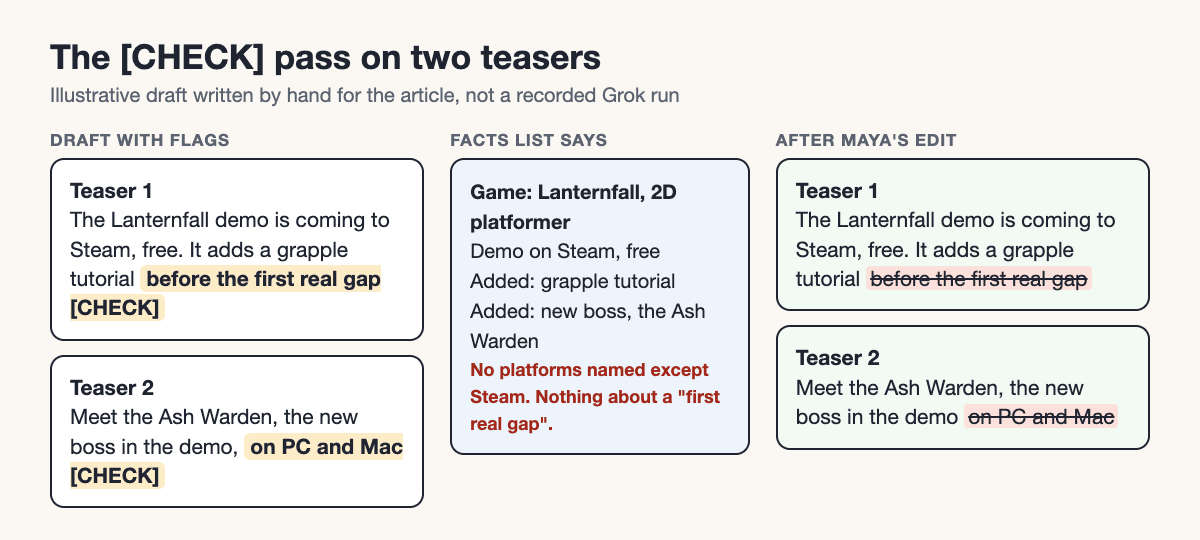
What follows is an illustrative draft in the style Grok might return, written by hand for this article:
Teaser 1, variant A:
The Lanternfall demo is coming to Steam, free. It adds a grapple tutorial before the first real gap. [CHECK: "before the first real gap"]

Teaser 2, variant A:
Meet the Ash Warden, the new boss in the demo, on PC and Mac. [CHECK: "on PC and Mac"]
The [CHECK] flags do their job here. "Before the first real gap" and "on PC and Mac" are not on the facts list (the list names Steam, not platforms), so Maya deletes both. This is the editorial pass in miniature: every sentence is matched against the list, and anything not in it goes.
For a more systematic evidence check, use the fact-check-before-posting workflow to associate each retained statement with its approved source. Unresolved facts stay out of the scheduled copy.
Step 4. Finalize the launch thread
After editing, the thread for D-day reads as follows (each post is under 280 characters):
Post 1: The Lanternfall demo is live on Steam and free to play. New: a grapple
tutorial and a boss, the Ash Warden. Fixed: a save bug. [STEAM LINK]
Post 2: The grapple tutorial is new in this demo. Here is how
it looks in the 2D platformer. (Screenshot 1)
Post 3: Meet the Ash Warden, the new boss in the demo. Capture clip 2 shows the
fight. (Capture clip 2)
Post 4: We also fixed a save bug in this demo.
(Screenshot 3)
Post 5: The demo is free on Steam. Try it and tell us what you find: [STEAM LINK]
Each post has one job: announce, tutorial, boss, fix, call to action. Maya adds alt text to each of the four screenshots and attaches one clip to post 1.
Step 5. Pick the scheduling route
Use this decision table:
| Situation | Route |
|---|---|
| One account, desktop available, no thread to schedule | X composer: open the composer, use the calendar icon, set date and time, confirm |
| You are on iOS | X app: a calendar icon sits at the bottom of the composer, per Roboin, which lists iOS as supported but reports no iOS test |
| You are on Android | Roboin tested a Pixel 8 and found no scheduling in the Android app; it lists mobile web as having the calendar icon. The report is dated 7 September 2026 and mentions an update, so app behaviour may have changed |
| You need queues or a calendar view | A scheduler such as Tareno (its page does not describe thread scheduling; check the current plan for Smart Queue access) or another tool |
| You want Grok to run the schedule through the API | Third-party bridge, with the security checks below |
| You want Grok to prepare drafts that a person approves before anything is scheduled | Grok Bot connected to Tareno through a custom MCP connection; Tareno holds the pending action until you approve it in its dashboard (see the human-in-the-loop section below) |
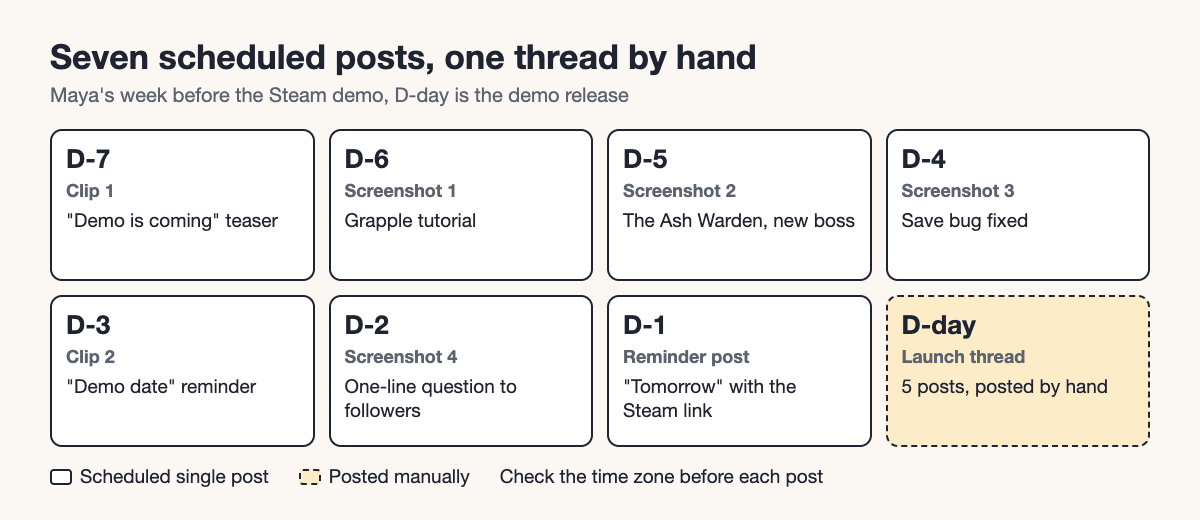
Reports on native scheduling conflict by device and by date, so run one test post on your own device before committing a week. Thread scheduling is not covered by the sources we read for the native route, and SociaHive states that its own tool cannot schedule threads. Maya therefore posts the launch thread by hand at D-day and schedules only the seven single posts.
Step 6. Schedule the week
D-7  Clip 1 + "demo is coming" teaser
D-6  Screenshot 1 + grapple tutorial
D-5  Screenshot 2 + the Ash Warden (new boss)
D-4  Screenshot 3 + save bug fixed
D-3  Clip 2 + "demo date" reminder
D-2  Screenshot 4 + one-line question to followers
D-1  "Tomorrow" post with the Steam link
D-day  Launch thread, posted by hand
Before each post goes to the queue, she checks the time zone shown in the composer or tool. A post set in the wrong zone goes out at the wrong hour and nothing flags it.
In Tareno, check the visible calendar zone before submitting a scheduling request. The screenshot below shows the control only; it does not show Maya’s campaign or prove that any post was scheduled.

The campaign overview below has a different job: reconcile seven queued single posts with the manually published launch thread on D-day.
Step 7. Prepare reply snippets, and send them yourself
Grok drafts answers to four expected questions. Maya reviews each and sends them from her own account.
Controller support? -> [Fill from your game: yes/no/partial]
Price?              -> "The demo is free. The full game price is not announced."
Mac version?        -> [Fill from your game]
Found a bug?        -> "Thank you! Please send a short description and your platform to [CONTACT]."
The price line is only valid if it is true for Maya's game; the bracketed lines she must fill in from facts, not from Grok.
What it costs if you go through the API
X's API pricing page, read on 7 November 2026, lists pay-per-usage prices: $0.015 to create a post and $0.200 for a post containing a URL, and says the prices are subject to change. If Maya's seven teasers went through the API with only the last containing the Steam link, the calculation is:
6 posts x $0.015  = $0.090
1 post with URL   = $0.200
Total             = $0.290
This applies only if you post through the API yourself. xpost.to states "no extra fee and no usage meter" and a free first post; we have not verified that. A wrinkle: Sked's guide states the X API's create-post endpoint has no publish-time field. We did not check that in X's documentation, so treat it as a reason to confirm where the schedule lives in your setup, not as an established fact.
Security and approval
If you use a bridge that hands Grok an X API key, then:
- Create the key with the narrowest permission you can, and keep a note of where it was issued.
- Remember that the key can create posts; that is the point of the bridge, so a wrong draft can go live.
- Do not give Grok your password: per the vendor, Grok cannot sign in through a browser.
- Keep the bridge separate from Grok Bot's X plugin, which per the Grok Bot docs is read-only and needs X API credits in a developer account.
If you need a human-in-the-loop by design, a tool that stages drafts for review is a better fit. Tareno's agent page says that scheduling, publishing, edits to scheduled posts and deletions create a pending action in Tareno, and that nothing goes out until a person approves it in the Tareno dashboard, whichever agent requested it. The same page lists Grok Bot and Grok Build, each as a custom MCP connection. For Grok Bot you add Tareno's remote MCP endpoint as your own connector and sign in with OAuth; Tareno reports that its connection test on this route succeeded, and says that custom connectors depend on your Grok plan and workspace. For Grok Build, the terminal agent, Tareno describes the setup but says it has not completed its own client test yet. We did not run either connection ourselves. For this X workflow, use Pro or Business, or a trial whose effective plan includes X and automation access; a Free or Starter connection is not an entitled paid X workflow.
Start with the Grok Bot X workflow guide and compare the saved draft IDs with the reviewed posts. The MCP tool reference defines the available actions; do not infer X feed-reading access from the ability to save drafts.
Pre-publish checklist
- Every fact matches the patch notes or facts list.
- No post is over 280 characters.
- Media is attached, with alt text.
- The link is in the right post, and the post cost is understood if posted by API.
- The time zone matches what you intend.
- One test post has been scheduled and seen in the queue.
- Replies are drafted but not auto-sent.
Mistakes and limits
- Letting Grok state facts you did not give it. It will fill gaps.
- Treating Automations as a posting tool. The documentation does not describe one.
- Relying on reports of 18-month scheduling windows or similar limits. They come from secondary sources and are unconfirmed.
- Scheduling a thread without testing it (see Step 5).
- Auto-replying. One source claims X rules require approval for AI reply bots and cites account removals; we could not verify either claim, because X's help pages returned HTTP 403. Until you can check X's rules, keep a human on every reply.
When to use / when not
| Use Grok for drafting when | Skip or change the approach when |
|---|---|
| You can give it a closed fact list | You have no source facts and want it to "come up with news" |
| You expect Grok to draft only | You expect Grok to hold the schedule |
Key takeaways
- Grok drafts; X's composer, a scheduler or a bridge schedules.
- A closed fact list and a
[CHECK]rule are the quality control. - Test native scheduling on your own device first; reports differ.
- Replies are drafted by Grok and sent by you.
FAQ
Can Grok schedule posts on X by itself?
The official x.ai pages we read do not describe it. Grok Automations schedule Grok tasks; the announcement does not establish native X publishing. Grok Bot can separately request scheduling through a connected Tareno MCP tool, with approval in Tareno.
Do I need a paid plan for Grok Automations?
The vendor post says scheduled automations are available to everyone and that email triggers are included with SuperGrok.
Can I schedule posts in the X app?
Reports differ by device. Roboin (7 September 2026) tested a Pixel 8 and found no scheduling in the Android app; it lists iOS and mobile web as supported but reports no iOS test, and mentions an update since. Test your own device.
Can I schedule a whole thread?
We could not confirm it for X's native route, and at least one scheduler says it cannot do it. Post threads by hand or check your tool.
Is a third-party Grok bridge safe?
We did not test one. The vendor says the key can create posts, so a faulty draft could go live. Treat any API key as sensitive and read the vendor's terms.
Does X allow AI-written posts?
AI-written wording does not by itself establish policy compliance. Check X’s current automation and authenticity rules for the actual posting or reply workflow; this article does not certify a bridge or automated reply bot.
Conclusion
Draft with Grok from a closed list of facts, check every line, and schedule through a route you have tested. Tareno’s X channel describes tweets, threads and media-post workflows. The public plan reference includes X access on Pro and Business, and on an applicable trial with that entitlement; Free and Starter do not include it. For a paid X workflow, budget for at least Pro: US$49 per month in the US or EUR 49 in Europe at standard monthly pricing; check regional pricing and billing terms.
The standard paid-plan checkout offers an eligible account a 14-day trial on monthly billing and requires a payment method; it bills after the trial unless canceled. Annual checkout bills immediately. Account-specific trial offers may differ. Plan entitlement does not establish current connector availability or prove a successful publishing test. Check the account’s X connection and any service notice, then run one test post before loading the seven-post week.