Not on its own. According to several vendor guides, ChatGPT has no connection to your Instagram or LinkedIn accounts, so it cannot schedule or publish anything by itself (post2all, Spreadcast). It can write the posts. If you connect a scheduler (through an app or plugin, or a custom MCP server), ChatGPT can pass those posts to the scheduler as drafts or schedule them. The part that matters most is where a human looks at the result before it goes live.
TL;DR
- ChatGPT drafts captions, LinkedIn text, alt text and hooks. It cannot post to Instagram or LinkedIn without a connected tool.
- Three routes exist: copy and paste into the native tools, a scheduler connected to ChatGPT, or an automation platform such as Zapier.
- Scheduled ChatGPT tasks are timers for prompts. A vendor test found that a task drafted a post but did not schedule it (Kadenzo).
- Keep three approval layers apart: what ChatGPT may do in your connector, the draft status in the scheduler, and a person checking price, size and photo order.
- Platform rules still apply: Instagram publishing through the API needs JPEG images, and LinkedIn has no organic carousel through its Posts API.
Quick definition
A connected scheduler is a social media tool with its own login to your accounts, a calendar and a draft status. ChatGPT only instructs it. Scheduling here means storing a post with a future publish time in that tool, as opposed to drafting, which is only writing the text.
What ChatGPT does alone, and what it needs help with
The vendor guides agree on a split. Distinctful separates drafting, planning and scheduling (Distinctful). Post2all lists what it cannot do alone: it has no account connection, no path for media files and no queue, and its built-in timer reminders do not touch your accounts (post2all).
| Job | ChatGPT alone | With a connected scheduler |
|---|---|---|
| Write captions, LinkedIn text, hooks, alt-text drafts | Yes | Yes |
| Read your connected accounts | No | Through the connector |
| Store a draft in a calendar | No | Yes, as a draft |
| Set a publish time | No | Yes, if the connector allows writes |
| Publish | No | Only if you allow it |
| Check facts against your notes | Only what you paste into the chat | Same, plus whatever the tool exposes |
OpenAI's own help pages on apps, scheduled tasks and developer mode returned an access error (HTTP 403) when we tried to read them on 11 November 2026. Statements below about ChatGPT plans and connectors therefore rest on vendor guides, not on OpenAI documentation.
The three routes
Route A: copy and paste. ChatGPT writes, you paste the text into Meta Business Suite, the Instagram app or LinkedIn. Presly describes this free route with Meta Business Suite (Presly). Nothing is connected, so nothing can be published by mistake.
Route B: a scheduler connected to ChatGPT. You add the scheduler as an app or plugin, or as a custom MCP server. ChatGPT then calls the scheduler's tools. Spreadcast reports that Pro workspaces get read-only access to custom connectors, while writing needs Business, Enterprise or Edu (Spreadcast). We could not confirm that against OpenAI's help center, so check your own workspace before you plan around it.
Route C: an automation platform. Zapier's MCP page lists ChatGPT as a client, says MCP is included in every Zapier plan, and counts each tool call as two tasks. It does not mention Instagram or LinkedIn, and we did not verify which Zapier actions exist for either channel (Zapier). A classic Zap, which runs on a trigger without a chat, is a different thing from a tool call made inside a ChatGPT conversation.
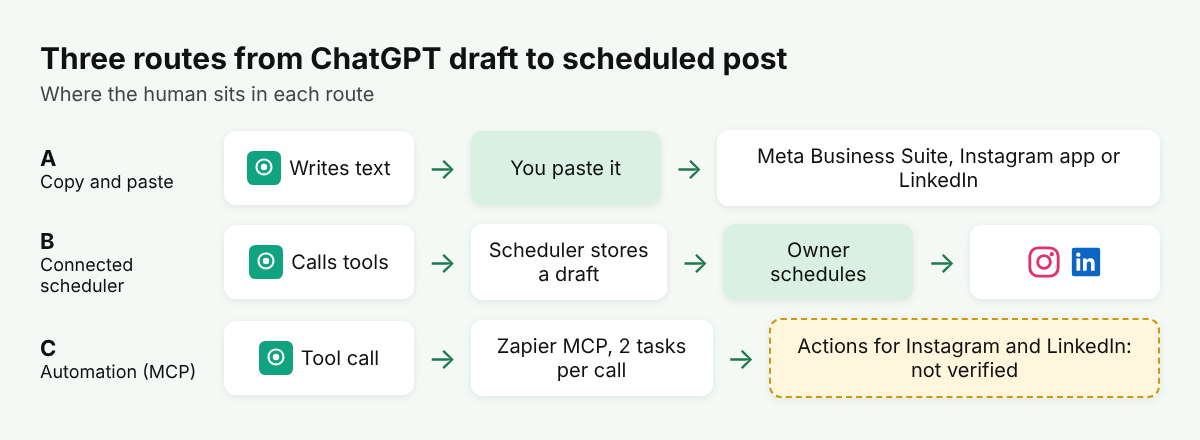
The three routes and where the human step sits in each.
A note on scheduled ChatGPT tasks: Distinctful says they run as a timer for prompts and do not post (Distinctful). Kadenzo ran one test in which the task wrote and checked a post but did not schedule it; that is a single vendor observation, not an OpenAI statement (Kadenzo). Whether a task can run a connector's write action while you are away is not confirmed.
Worked example: a restoration shop's week
This is a constructed teaching example, not a customer and not a test with connected accounts. A small shop restores vintage furniture. The owner decides; a part-time assistant prepares content. The shop has an Instagram Business account and a LinkedIn company page, and wants one week of posts from a notes list and phone photos.
Step 1: the input
The assistant keeps one note per piece. All values are invented.
1. Teak sideboard | 160 x 45 x 78 cm | price 890 | veneer lifted at one corner, original handles | photos: before, mid-repair, after
2. Bentwood cafe chairs (pair) | seat height 46 cm | price 240 for the pair | one rung re-glued | photos: before, after
3. Oak school desk | 75 x 55 x 78 cm | price 310 | ink stains kept on purpose | photos: after
Step 2: the prompt
The assistant gives ChatGPT the list and one rule: use only the facts in it.
Use only the facts in the list. If a fact is missing, write TBD.
For piece 1 write an Instagram carousel caption (photo order: before, mid-repair, after),
a LinkedIn post about the repair, an alt-text draft per photo, and three hook options.
For piece 2 write an Instagram carousel caption. For piece 3 write a LinkedIn image post.
Do not invent prices, dates, measurements or materials.
The Presly guide warns that AI drafts can invent prices, opening hours and claims, which is why the prompt forbids guessing and the next step checks everything (Presly).
Step 3: the draft
We wrote this draft by hand, including one deliberate slip, to show what the check catches. It is not a recorded ChatGPT output, though real drafts can contain the same kind of error. The Instagram caption for the sideboard:
Teak sideboard, 160 x 45 x 78 cm. One corner of the veneer had lifted; we re-glued it
and kept the original handles. Swipe: before, mid-repair, after. Price: 890. DM to reserve.
And the LinkedIn post for the same piece:
A 1960s-style sideboard came in with veneer lifting at one corner. We re-glued it
rather than replacing the panel, and kept the original handles. Photos show the piece
before, mid-repair and finished. Interested in pieces like this for interiors or
hospitality projects? Message us.
Note the slip a reviewer should catch: "1960s-style" appears nowhere in the notes, and a model could plausibly add it. That is exactly what the check in step 4 is for.
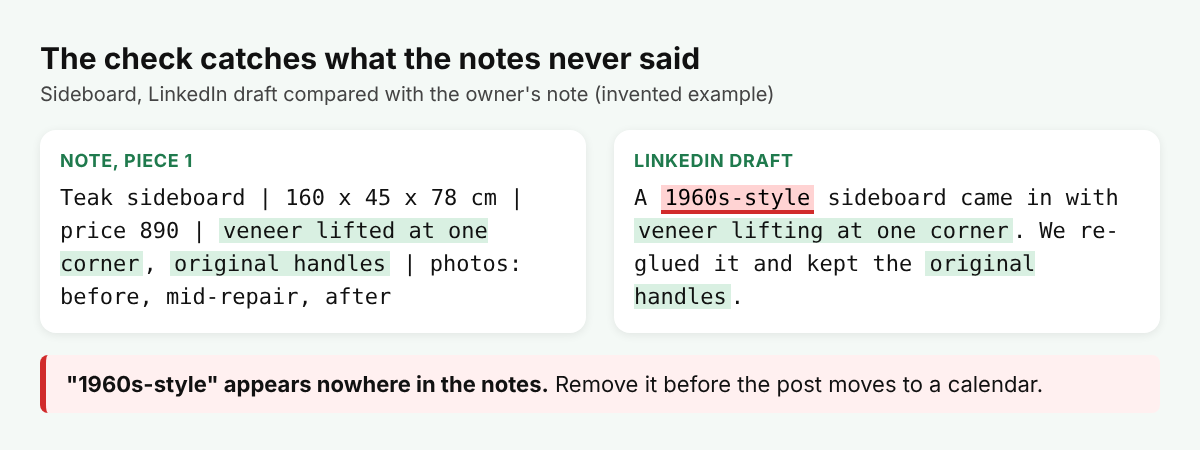
The invented example: the check flags a detail the notes never contained.
Step 4: the human check
Before anything moves to a calendar, the assistant compares each draft with the notes. The owner then reviews what is left.
| Check | Sideboard IG | Sideboard LinkedIn | Chairs IG | Desk LinkedIn |
|---|---|---|---|---|
| Price matches notes | 890, ok | none stated, ok | 240 for the pair, ok | 310, ok |
| Dimensions match | ok | none stated, ok | seat height 46 cm, ok | ok |
| Condition stated as in notes | ok | "1960s-style" not in notes, remove | ok | ok |
| Photo count and order | 3, before / mid / after | 3 | 2 | 1 |
| Status | checked | checked after edit | checked | checked |
Step 5: the platform rules
Before connecting anything, check what each platform's API accepts. This table is from the platform documentation, read on 11 November 2026.
| Rule | Instagram (Meta) | |
|---|---|---|
| Account | Professional Instagram account; a linked Facebook Page is needed with Facebook Login (Page token); with Instagram Login (Instagram user token) it appears not to be, which is our reading of the token table, not an explicit statement; Page Publishing Authorization only if the linked Page requires it | w_member_social for member posts, w_organization_social for pages; the poster needs a page role such as administrator |
| Images | JPEG only | Image, MultiImage, document, video, text and others |
| Feed (single image) | Supported, JPEG | Image post |
| Multi-image | Carousel up to 20 items | MultiImage is allowed; organic carousel is not |
| Reels and Stories | Supported for publishing (media_type REELS and STORIES). The page's "not supported" note applies only to the alt_text field |
Not applicable |
| Not supported | Shopping tags and filters | A carousel of cards |
Sources: Meta content publishing documentation and Microsoft's LinkedIn Posts API documentation (page dated 7 May 2026).
Meta's page also gives a daily limit for API publishing: up to 100 posts per 24 hours, with a carousel counted as one. The carousel section of the same page mentions 50, so the page is inconsistent. Four posts a week is far below either number. The practical consequences for the shop: phone photos saved as HEIC should be exported as JPEG first, because whether a given scheduler converts them is unverified; and the media must be reachable by the connector, since Kadenzo found that chat attachments do not reach plugins and media needs a public URL (Kadenzo). On LinkedIn, the section we read lists a draft lifecycle state, but creation accepts only PUBLISHED, and it does not describe time-scheduled publishing. Where a draft step happens is therefore a feature of your scheduler. Check it there.
Step 6: the route and the approval gate
The shop picks route B, with ChatGPT limited to creating drafts. The assistant sends the checked texts and photos to the scheduler, and the owner moves them from draft to scheduled in the scheduler's calendar. OpenAI's Apps SDK security guidance for developers asks for human confirmation of irreversible actions and recommends treating prompt injection as a real risk (OpenAI). Spreadcast recommends allowing read actions only, so that ChatGPT has to ask before it changes anything (Spreadcast). For the shop, that gives three gates:
Gate 1  ChatGPT connector: read actions allowed, changes ask first
Gate 2  Scheduler: assistant creates drafts, only the owner schedules
Gate 3  Human check: price, size, condition, photo order against the notes
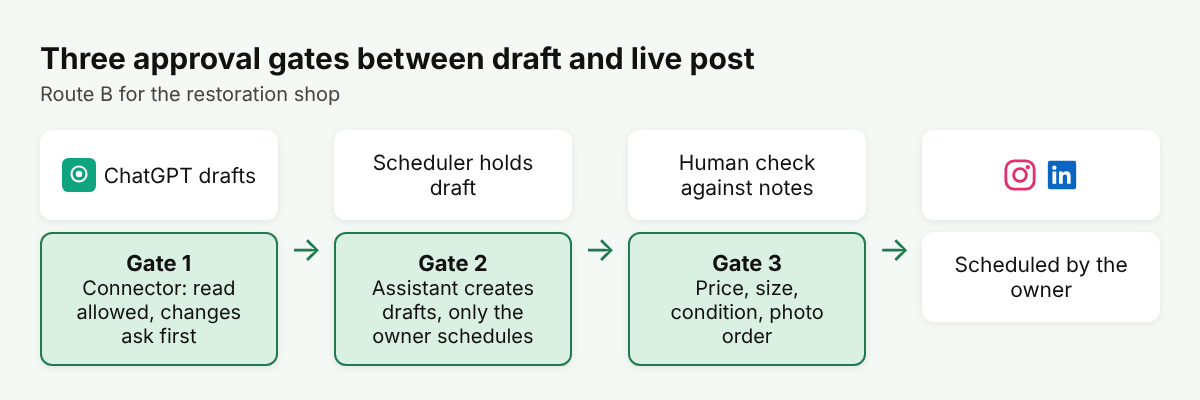
Three gates for route B: connector permissions, scheduler status, human check.
Step 7: the result
The finished week, all entries still marked as drafts until the owner approves:
| Day | Channel | Piece | Format | Media order | Status |
|---|---|---|---|---|---|
| Mon | Sideboard | Carousel | before, mid, after | checked, ready to schedule | |
| Tue | Sideboard | MultiImage post | before, mid, after | checked after edit | |
| Thu | Chairs | Carousel | before, after | checked, ready to schedule | |
| Thu | Chairs | Story reminder, set manually | after | manual task, not scheduled | |
| Fri | Desk | Image post | after | checked, ready to schedule |
The Story entry stays a manual task on purpose. Meta lists Stories as supported, but how third-party tools handle them (direct publishing or a reminder) was not verified.
Where Tareno fits
Tareno's ChatGPT plugin is published, and Tareno documents the connection as tested. Agents can create drafts directly and have to request approval for scheduling or publishing (setup, MCP overview, agent comparison). That maps to gates 1 and 2 above. Tareno supports Instagram Feed posts, Reels, Stories and Carousels, and LinkedIn text, image and video posts and company updates (Instagram, LinkedIn).
On plans, with US prices: Free has 2 channels and up to 15 posts scheduled at a time. The shop's 4 scheduled posts per week, queued 3 weeks ahead, make 12, which is within that limit (4 x 3 = 12 of 15). These are channel and queue limits only. Tareno's pricing page lists no automation API access on Free and Starter, and MCP access is documented for Trial, Pro and Business, not Free or Starter. Starter is US $19 per month billed monthly or $15 per month billed yearly, with 5 channels and up to 100 posts scheduled at a time, but no team members. The assistant as a separate team member needs Pro (US $49 per month billed monthly, $37 per month billed yearly, 3 team members) (pricing).
For channel-specific preparation, use the ChatGPT Instagram caption workflow. The ChatGPT setup guide explains the connection and review handoff.
When to use which route, and when not
| Situation | Better route |
|---|---|
| A few posts a week, one person, no tool budget | A: copy and paste |
| Weekly batches, an assistant preparing and an owner approving | B: connected scheduler, drafts only |
| Content already moves through other apps on triggers | C: automation, once the actions for your channels are confirmed |
| Regulated claims, prices that change daily | Keep a person in the loop for every post |
| Stories that must publish at an exact minute | Do not rely on a chat tool to do this |
ChatGPT adds little when your notes are thin. It cannot supply a price or a repair history you never wrote down.
Key takeaways
- ChatGPT drafts; a connected tool schedules.
- Never let ChatGPT be the only reviewer. Check price, dimensions, condition and photo order against your own notes.
- Separate three gates: connector permissions, draft status in the scheduler, and a human check.
- Convert phone photos to JPEG before Instagram publishing, and keep LinkedIn to MultiImage or document posts instead of carousels.
- Check plan and permission details in your own ChatGPT workspace, since the OpenAI help pages could not be read for this article.
FAQ
Can ChatGPT post to Instagram directly?
No, not by itself. It has no login to your account. A scheduler or automation tool with its own connection to Instagram has to do the posting, and Meta's API requires a professional Instagram account. With Facebook Login a linked Facebook Page is needed; with Instagram Login it appears not to be, though that is our reading of Meta's token table rather than an explicit statement, so check which one your tool uses (Meta).
Can ChatGPT post to a LinkedIn company page?
Only through a connected tool with the right permission. LinkedIn's API uses w_organization_social for pages, and the person connecting needs a page role such as administrator (Microsoft).
Do scheduled tasks in ChatGPT publish posts?
According to Distinctful, they act as timers for prompts and do not post. Kadenzo's single test found a task drafted but did not schedule. Neither is an OpenAI statement.
Which ChatGPT plan do I need?
Spreadcast reports that connectors with write access need Business, Enterprise or Edu workspaces and that Pro is read-only. We could not read OpenAI's help pages on 11 November 2026 to confirm it, so verify in your workspace.
Can Zapier do this instead?
Zapier's MCP page lists ChatGPT as a client but does not name Instagram or LinkedIn, so confirm the available actions first. Each tool call counts as two Zapier tasks (Zapier).
Can ChatGPT make an Instagram carousel?
It can write the caption and suggest the slide order. The carousel is built from your images in a scheduler or in Instagram, with up to 20 items per Meta's documentation. LinkedIn does not offer an organic carousel through its Posts API; use MultiImage or a document.
Conclusion
ChatGPT is a drafting assistant, and scheduling begins when a tool with account access takes over. Decide the approval gates before you decide the tool. If you want to see the draft-first flow with a ChatGPT connection, start from Tareno's ChatGPT setup page.